
Įvadas
The EVOLVEO EASYPHONE FM is a user-friendly mobile phone designed for straightforward communication. It features large, separated keys, a clear display, and essential functions to ensure ease of use. This manual provides instructions for setting up, operating, and maintaining your device.
1. Pakuotės turinys
Patikrinkite pakuotę, ar joje yra šie daiktai:
- EVOLVEO EASYPHONE FM Mobile Phone
- Įkrovimo dokas
- Kintamosios srovės adapteris
- Li-ion 1000 mAh Battery
- Vartotojo vadovas
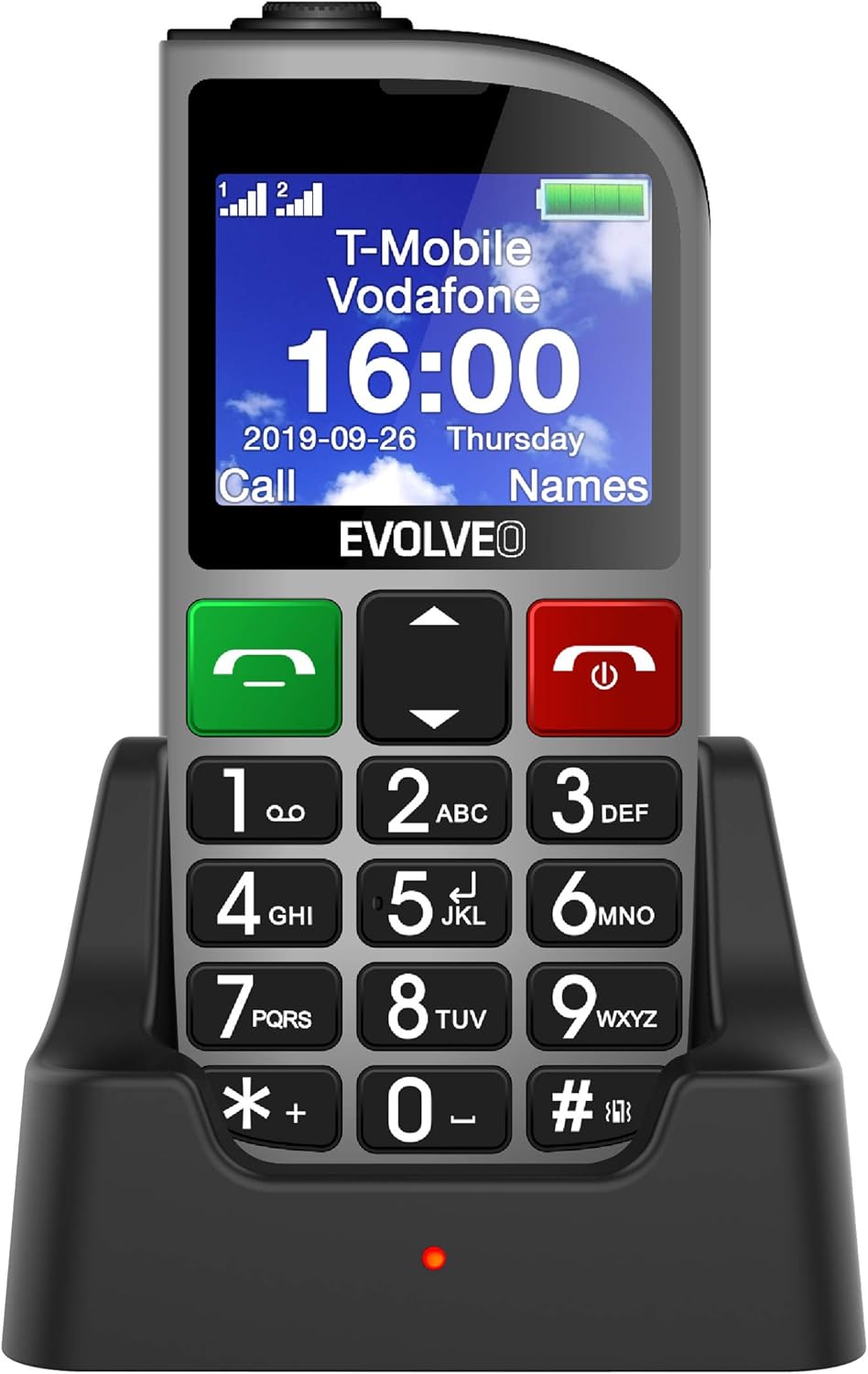
1.1 paveikslas: EVOLVEO EASYPHONE FM placed in its charging dock. The phone features a large display showing time and network information, with prominent green call and red end call buttons, and a numeric keypad below.
2. Sąranka
2.1. Baterijos įdėjimas ir įkrovimas
- Nuimkite galinį telefono dangtelį.
- Insert the Li-ion 1000 mAh battery, ensuring the contacts align correctly.
- Uždėkite galinį dangtelį.
- Connect the AC adapter to the charging dock.
- Place the phone into the charging dock. The charging indicator light will illuminate.
- Prieš pirmą kartą naudodami, leiskite telefonui visiškai įsikrauti.
2.2. SIM kortelės (-ių) įdėjimas
The phone supports two SIM cards (Dual SIM) for GSM/GPRS 850/900/1800/1900 MHz networks.
- Įsitikinkite, kad telefonas yra išjungtas.
- Nuimkite galinį dangtelį ir bateriją.
- Locate the SIM card slots.
- Insert your SIM card(s) into the designated slots, ensuring correct orientation.
- Vėl įdėkite bateriją ir galinį dangtelį.
2.3. Inserting a MicroSDHC Card
You can expand the phone's storage for music, photos, and other files by inserting a MicroSDHC card.
- Įsitikinkite, kad telefonas yra išjungtas.
- Nuimkite galinį dangtelį ir bateriją.
- Locate the MicroSDHC card slot.
- Gently insert the MicroSDHC card until it clicks into place.
- Vėl įdėkite bateriją ir galinį dangtelį.
3. Naudojimo instrukcijos
3.1. Maitinimo įjungimas/išjungimas
- Norėdami įjungti: paspauskite ir palaikykite Raudona Baigti skambutį / Maitinimas mygtuką, kol ekranas užsidegs.
- Norėdami išjungti: paspauskite ir palaikykite Raudona Baigti skambutį / Maitinimas mygtuką, kol pasirodys išjungimo parinktys, tada patvirtinkite.

3.1 paveikslas: Priekyje view of the EVOLVEO EASYPHONE FM, highlighting the large display, call buttons, and numeric keypad for easy dialing.
3.2. Skambinimas ir skambučių priėmimas
- Skambinimas: Dial the number using the numeric keypad and press the Žaliasis skambutis mygtuką.
- Greitasis rinkimas: The phone supports quick access to 8 popular contacts. Assign numbers to keys 2-9 for speed dialing. Press and hold the assigned key to dial.
- Skambučio priėmimas: Paspauskite Žaliasis skambutis mygtuką atsiliepti į skambutį.
- Skambučio pabaiga: Paspauskite Raudona Baigti skambutį / Maitinimas button to end an active call.
3.3. SMS žinučių siuntimas ir gavimas
The separated keyboard keys facilitate easy writing of SMS messages.
- Navigate to the Messaging menu.
- Norėdami parašyti naują SMS žinutę, pasirinkite „Rašyti žinutę“.
- Įveskite gavėjo numerį arba pasirinkite iš kontaktų.
- Įveskite pranešimą naudodami klaviatūrą.
- Norėdami išsiųsti pranešimą, paspauskite „Siųsti“.
3.4. Garsumo valdymas
Adjust the call and ringtone volume using the dedicated volume control button located on the left side of the phone.

3.2 paveikslas: Left side of the phone, showing the volume control buttons and the FM radio activation button.
3.5. SOS avarinis mygtukas
The SOS button, located on the back of the device, allows for quick emergency calls and messages.
- Before use, configure up to five emergency contact numbers in the phone settings.
- Avarijos atveju paspauskite ir palaikykite SOS mygtuką.
- The phone will automatically dial the predefined emergency numbers sequentially and send an emergency message to these contacts.

3.3 paveikslas: Galinis view of the EVOLVEO EASYPHONE FM, showing the prominent red SOS emergency button and the camera lens.
3.6. FM radijas
The phone includes an FM radio with a dedicated activation button.
- To turn on the FM radio, press the independent FM button on the side of the device.
- The radio can play in the background, allowing you to use other phone functions.
- During an incoming or outgoing call, the radio will automatically mute and resume playback after the call ends.
3.7. Žibintuvėlis
A powerful flashlight is integrated into the phone, activated by a dedicated button.
- Press the dedicated flashlight button on the side of the phone to turn the flashlight on or off.

3.4 paveikslas: Right side of the phone, showing the dedicated flashlight button.
3.8. Kitos funkcijos
- Kamera: Telefone yra VGA kamera, skirta pagrindiniam nuotraukų darymui.
- Muzikos grotuvas: Leisti muziką files stored on your MicroSDHC card.
- Digital Recorder (Dictaphone): Įrašyti balso pastabas.
- Kalendorius: Sekite svarbias datas ir įvykius.
- Žadintuvas: Nustatykite žadintuvus priminimams.
- Skaičiuotuvas: Atlikite pagrindinius skaičiavimus.
- Didinamasis stiklas: Utilize the screen as a magnifying glass.
4. Priežiūra
4.1. Prietaiso valymas
- Use a soft, dry cloth to clean the phone's surface and screen.
- Avoid using liquid cleaners or abrasive materials, as they may damage the device.
- Ensure no moisture enters the charging port or other openings.
4.2. Akumuliatoriaus priežiūra
- Norėdami pailginti baterijos veikimo laiką, venkite telefono laikyti ekstremaliose temperatūrose.
- Charge the battery regularly, but avoid overcharging or letting it completely drain for extended periods.
- If the phone will not be used for a long time, charge the battery to about 50% before storing it.
5. Problemų sprendimas
If you encounter issues with your EVOLVEO EASYPHONE FM, refer to the following common problems and solutions:
5.1. Phone Does Not Turn On
- Įsitikinkite, kad baterija tinkamai įdėta ir įkrauta.
- Connect the phone to the charger and wait a few minutes before attempting to power it on again.
- Patikrinkite, ar akumuliatoriaus kontaktai švarūs.
5.2. Negaliu skambinti arba priimti skambučių
- Check if the SIM card(s) are correctly inserted and activated.
- Įsitikinkite, kad turite tinklo aprėptį.
- Patikrinkite, ar telefonas nėra lėktuvo režime (jei taikoma).
- Check your account balance or subscription status with your service provider.
5.3. FM Radio Not Working
- Ensure you are in an area with good FM signal reception.
- Check if the FM radio is properly activated using its dedicated button.
5.4. Ekrano problemos
- If the display is dim, check the brightness settings.
- If the screen is unresponsive, try restarting the phone.
6. Specifikacijos
| Prekės ženklas | „Evolveo“ |
| Modelis | EASYPHONE FM |
| Ekrano dydis | 1.8 colių |
| Ekrano raiška | 320 x 240 px |
| Korinio ryšio technologija | 2G (GSM/GPRS 850/900/1800/1900 MHz) |
| SIM palaikymas | Dvi SIM kortelės |
| Ryšys | „Bluetooth“, 3.5 mm lizdas |
| Baterija | Li-ion 1000 mAh |
| Matmenys | 130 × 61 × 16.5 mm |
| Svoris | 105 g (su baterija) |
| Fotoaparatas | VGA |
| Saugyklos išplėtimas | MicroSDHC kortelės lizdas |
Pastaba: specifikacijos gali būti keičiamos be išankstinio įspėjimo.
7. Garantija ir palaikymas
For warranty information and technical support, please refer to the warranty card included in your package or visit the official Evolveo websvetainėje. Išsaugokite pirkimo įrodymą garantiniams reikalavimams.