
Įvadas
This manual provides essential information for the safe and efficient operation of your Domo DO157A Tower Fan. Please read these instructions carefully before use and retain them for future reference.
The Domo DO157A is a versatile appliance combining the functions of an air cooler, fan, and humidifier, designed to enhance your indoor comfort.

Vaizdas: priekis view of the Domo DO157A Tower Fan.
Saugos informacija
Naudodami elektros prietaisus, visada laikykitės pagrindinių saugos priemonių, kad sumažintumėte gaisro, elektros smūgio ir sužalojimo riziką.
- Įsitikinkite, kad ttagant prietaiso nurodyta e atitinka jūsų vietinio elektros tinklo įtampątage prieš prisijungiant.
- Nemerkite prietaiso, kištuko ar laido į vandenį ar kitus skysčius.
- Unplug from the outlet when not in use, before cleaning, or before moving the appliance.
- Prietaisą laikykite vaikams nepasiekiamoje vietoje.
- Nenaudokite prietaiso, kurio laidas ar kištukas pažeistas, arba po to, kai prietaisas neveikia arba buvo kaip nors sugadintas.
- Refer to the official safety document for detailed safety guidelines: Saugos informacija (PDF).
Produkto komponentai
Familiarize yourself with the main parts of your Domo DO157A Tower Fan:
- Main Unit (Tower Fan)
- 7 litro vandens bakas
- Washable Filter System (Honeycomb Cooling Membrane)
- Nuotolinio valdymo pultas
- Coolpack (for enhanced cooling)
- Valdymo skydelis su LED ekranu
Vaizdas: View of the tower fan with the filter system removed, showing the honeycomb cooling membrane.
Sąranka
- Išpakavimas: Carefully remove the appliance from its packaging. Retain packaging for storage or disposal.
- Vieta: Place the tower fan on a firm, level surface. Ensure there is adequate space around the unit for proper airflow.
- Vandens bako užpildymas:
- Ištraukite vandens baką iš apatinės įrenginio galinės dalies.
- Fill the 7-liter water tank with clean, cold water. For enhanced cooling, place the included Coolpack (after freezing) into the water tank.
- Ensure the water level does not exceed the maximum fill line.
- Įstumkite vandens bakelį atgal į įrenginį, kol jis spragtelėdamas užsifiksuos.
- Maitinimo jungtis: Prijunkite maitinimo laidą į tinkamą elektros lizdą (230 V).
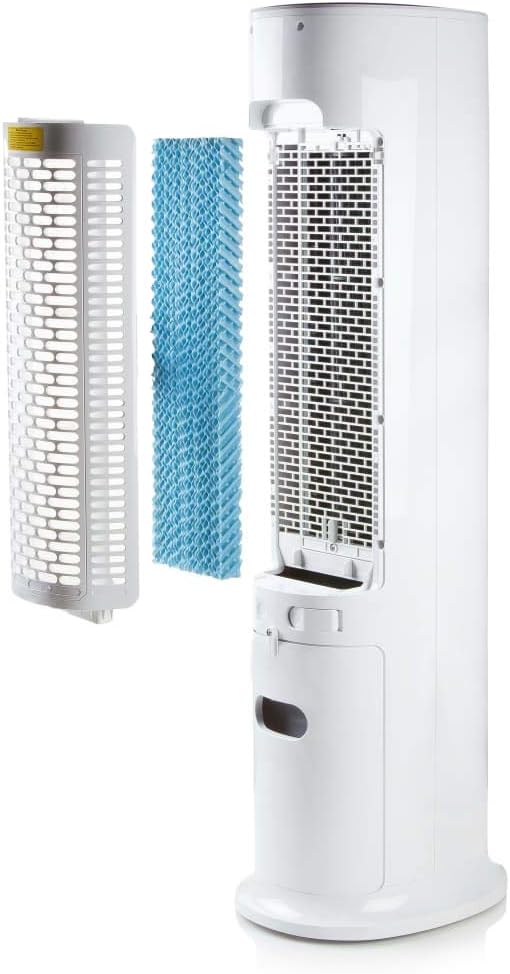
Image: Demonstrating the process of filling the water tank of the tower fan.
Naudojimo instrukcijos
The Domo DO157A can be operated using the control panel on top of the unit or the included remote control.
Valdymo pulto ir nuotolinio valdymo pulto funkcijos

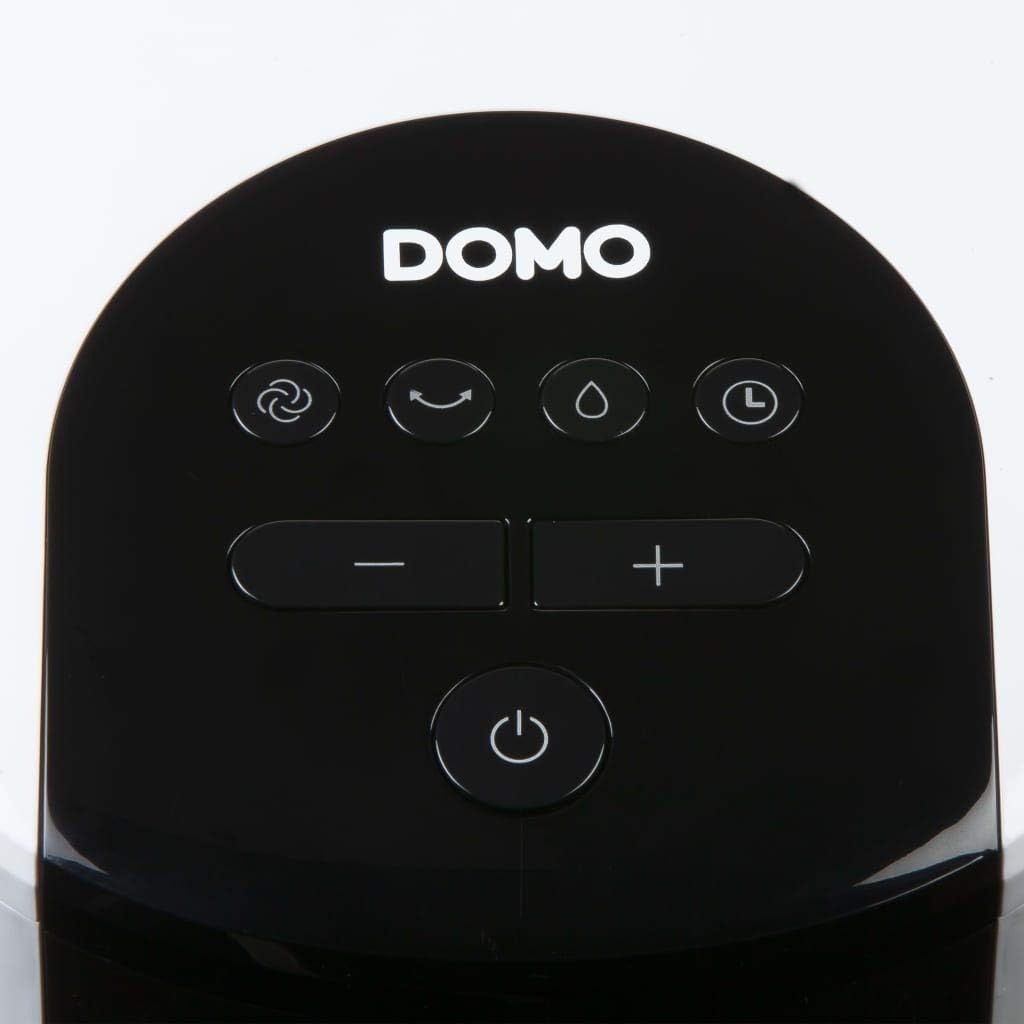
Vaizdas: Stambus planas view of the control panel on the top of the tower fan.
- Įjungimo mygtukas (⏻): Įjungia arba išjungia įrenginį.
- Režimo mygtukas (☺): Cycles through 3 ventilation modes:
- Normalus: Pastovus oro srautas pasirinktu greičiu.
- Natūralus: Imituoja natūralų vėją su kintamu ventiliatoriaus greičiu.
- Miegas: Reduces fan speed and noise for quiet operation during sleep.
- Speed Buttons (− / +): Reguliuoja ventiliatoriaus greitį (4 lygių).
- Aušinimo / drėkintuvo mygtukas (💧): Activates or deactivates the air cooling and humidifying function. This function requires water in the tank.
- Laikmačio mygtukas (⏱): Sets the operating timer for up to 10 hours. Each press adds 1 hour.
- Osciliacijos mygtukas (↻): Activates or deactivates the oscillation function, allowing the fan to rotate and distribute air over a wider area.
Pradinė operacija
- Press the Power button to turn on the unit. The default mode is usually Normal.
- Use the Speed buttons to select your desired fan speed (1-4).
- To activate cooling/humidifying, press the Cooling/Humidifier button. Ensure the water tank is filled.
- Select a ventilation mode (Normal, Natural, Sleep) using the Mode button.
- Press the Oscillation button for wider air distribution.
- Set the timer if desired using the Timer button.

Image: The tower fan operating in a living room, illustrating the airflow direction.
Priežiūra
Reguliarus techninis aptarnavimas užtikrina optimalų veikimą ir prailgina prietaiso tarnavimo laiką.
Išorės valymas
- Prieš valydami, visada išjunkite įrenginį.
- Išorinius paviršius nuvalykite minkšta, damp audinys. Nenaudokite abrazyvinių valiklių ar tirpiklių.
- Įsitikinkite, kad į vidinius komponentus nepatenka vanduo.
Vandens bako valymas
- Išimkite vandens baką iš įrenginio.
- Išpilkite likusį vandenį.
- Bakelį išplaukite švelniu muilu ir vandeniu. Kruopščiai išskalaukite.
- Prieš vėl įdėdami bakelį, leiskite jam visiškai išdžiūti ore.
- Reguliariai valykite vandens baką, ypač jei dažnai naudojate drėkinimo funkciją, kad nesusidarytų pelėsis.
Filtrų sistemos valymas
- The high-quality filter system is washable.
- Carefully remove the filter (honeycomb cooling membrane) from the unit as shown in the "Product Components" section.
- Nuplaukite filtrą po tekančiu vandeniu, kad pašalintumėte dulkes ir šiukšles.
- Prieš vėl įdėdami filtrą į įrenginį, leiskite jam visiškai išdžiūti.
- Regular cleaning of the filter is recommended, especially for allergy sufferers, to maintain hygiene and efficiency.
Trikčių šalinimas
If you encounter issues with your Domo DO157A, refer to the following common problems and solutions:
| Problema | Galima priežastis | Sprendimas |
|---|---|---|
| Įrenginys neįsijungia. | Nėra maitinimo. | Patikrinkite, ar maitinimo laidas tvirtai įjungtas į veikiantį lizdą. |
| Nėra aušinimo efekto. | Vandens bakas tuščias arba neaktyvuota aušinimo funkcija. | Fill the water tank. Press the Cooling/Humidifier button to activate the function. Ensure Coolpack is frozen and placed in the tank if desired. |
| Silpnas oro srautas. | Fan speed is too low; air filter is dirty. | Increase the fan speed. Clean the air filter as per maintenance instructions. |
| Nemalonus kvapas. | Stagnant water in the tank or dirty filter. | Empty and clean the water tank. Clean the filter. Use fresh water. |
Specifikacijos
| Funkcija | Detalė |
|---|---|
| Prekės ženklas | Domo |
| Modelio pavadinimas / numeris | DO157A |
| Tipas | Tower Fan, Air Cooler, Humidifier |
| Medžiaga | Plastikiniai |
| Montavimo tipas | Pastatomas |
| Spalva | Baltas |
| Oro srauto talpa | 294.29 Cubic Feet per Minute (500 m³/h) |
| Valdymo tipas | Remote Control, On-unit Control Panel |
| Vandens rezervuaro talpa | 7 litrai |
| Rekomenduojamas grindų plotas | 25 kvadratinių metrų |
| Produkto svoris | 11.2 kilogramo |
| Vattage | 65 W |
| Triukšmo lygis | 40 decibelų |
| Greičių skaičius | 4 |
| ttage | 230 voltų |
| Matmenys (G x P x A) | 34 cm x 26 cm x 106.5 cm |
| Laikmatis | Iki 10 valandų |
| Vėdinimo režimai | Normalus, natūralus, miegas |
| Ypatingos savybės | Sleep mode, Washable filter system, Oscillation, Coolpack included |
Garantija ir palaikymas
For warranty information, please refer to the documentation provided with your purchase or contact Domo customer support. Keep your proof of purchase for warranty claims.
If you require further assistance or have questions not covered in this manual, please contact Domo customer service through their official websvetainėje arba kontaktinėje informacijoje, pateiktoje kartu su jūsų produktu.


