
1. Įvadas ir pabaigaview
The ESX INFOTAINMENT VN1015-MA-DAB-4G is an advanced Android-based naviceiver designed for vehicle integration, offering a comprehensive multimedia and navigation experience. This unit features a 10.1-inch anti-glare multi-angle touchscreen, Android operating system, 4G/LTE connectivity, DAB+ digital radio, and Google Maps navigation. It supports Bluetooth hands-free calling and audio streaming, USB and MicroSD media playback, and includes inputs for rearview cameras and auxiliary devices.
Pagrindinės funkcijos:
- 10.1-inch high-resolution, anti-glare multi-angle touchscreen.
- Android Operating System for versatile app usage.
- Integrated 4G/LTE dongle for mobile internet (requires optional SIM card).
- DAB+ digital radio reception with station logos and AM/FM radio with RDS.
- Google Maps navigation (online and offline capabilities).
- Bluetooth hands-free system with audio streaming.
- Multiple connectivity options: 2x USB ports, 1x MicroSD slot, 1x camera input, 2x video outputs, 1x AUX/video input, 1x AUX/audio input.
- Support for steering wheel controls (optional adapter may be required).
2. Sąranka ir diegimas
Proper installation is crucial for the optimal performance of your ESX VN1015-MA-DAB-4G naviceiver. It is highly recommended that installation be performed by a qualified professional to ensure correct wiring and vehicle compatibility.
2.1. Komponento identifikavimas
Familiarize yourself with the various ports and connections on the rear of the unit before installation.
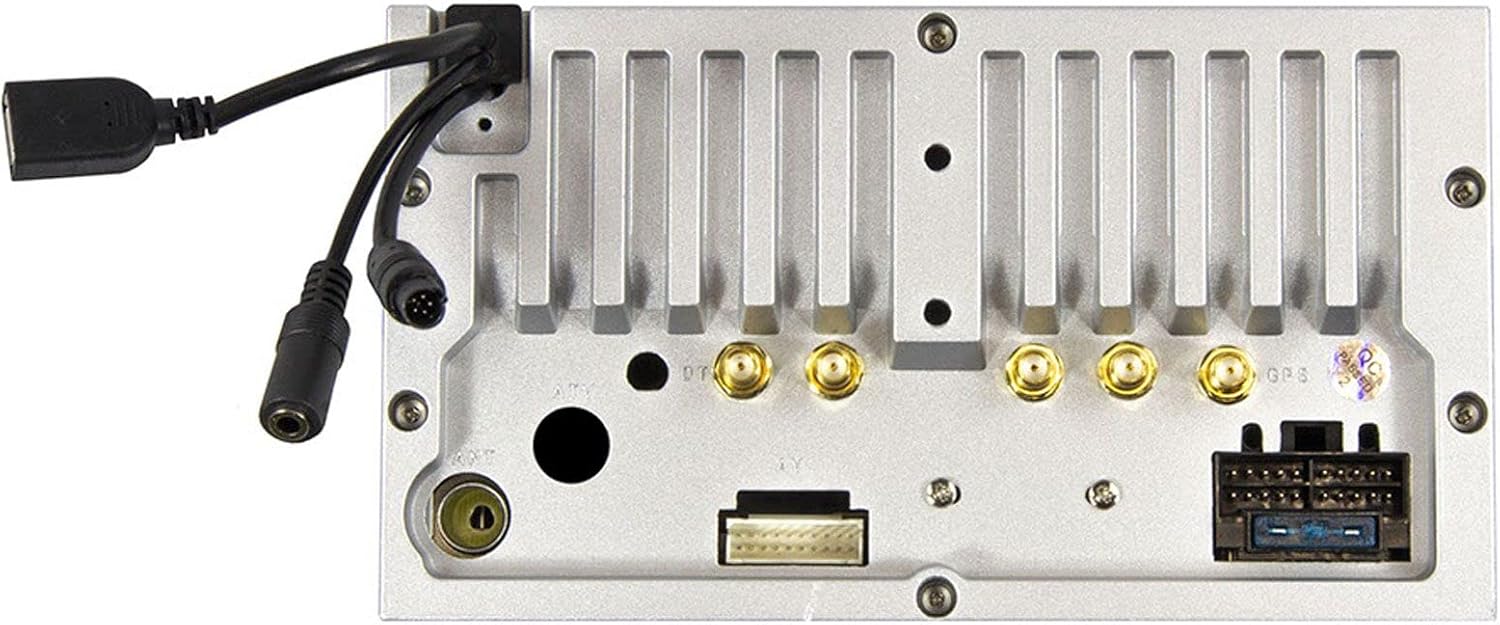
2.1 paveikslas: Galinis view of the ESX VN1015-MA-DAB-4G unit, illustrating the power harness, antenna inputs, USB ports, and auxiliary connections.
2.2. Laidų jungtys
- Maitinimas: Connect the main power harness to your vehicle's electrical system, ensuring correct positive, negative, and accessory (ACC) connections.
- Garsiakalbių išvestys: Connect your vehicle's speakers to the corresponding outputs on the naviceiver.
- Antenos jungtys: Connect the FM/AM antenna. For DAB+ digital radio, connect the included DAB+ antenna to the designated port.
- GPS antena: Prijunkite GPS anteną ir pritvirtinkite ją vietoje, kur nėra šviesos. view dangaus optimaliam signalo priėmimui.
- USB prievadai: Connect external USB devices for media playback or smartphone connectivity.
- Mikrofonas: Connect the external microphone (VNA-MIC-AND, optional) for improved hands-free call quality.
- Galinisview Kamera: Prijunkite galinę dalįview camera to the dedicated camera input. Ensure the reverse trigger wire is correctly connected for automatic display switching.
- Vaizdo išėjimai: Utilize the two video outputs for connecting external monitors.
- AUX įėjimai: Connect external audio/video sources to the AUX/video and AUX/audio inputs.
- 4G/LTE Dongle: If using mobile internet via 4G/LTE, insert a compatible SIM card into the optional 4G/LTE dongle and connect it to a USB port.
- Vairo valdymas: If your vehicle supports steering wheel controls, an optional adapter may be required to integrate this functionality.
2.3. Pradinis įjungimas
After all connections are secure, turn on your vehicle's ignition. The naviceiver should power on. Follow any on-screen prompts for initial setup, such as language selection and time zone.
3. Naudojimo instrukcijos
This section details the primary functions and operations of your ESX VN1015-MA-DAB-4G naviceiver.
3.1. Pagrindiniai valdikliai ir sąsaja
The unit features a responsive touchscreen and physical buttons for common functions.

3.1 paveikslas: The main screen showing the radio interface with frequency display and control buttons.
- Maitinimo mygtukas: Press and hold to turn the unit on/off. A short press may mute audio or put the unit into standby.
- Garsumo valdymas: Sureguliuokite garso išvesties lygį.
- Namų mygtukas: Grąžina į pagrindinį „Android“ ekraną.
- Atgal mygtukas: Navigates back one step in menus or applications.
- Kameros mygtukas: Direct access to the camera input display (e.g., rearview fotoaparatas).
3.2. Android Operating System
The naviceiver runs on an Android operating system, allowing access to various applications and customization options.
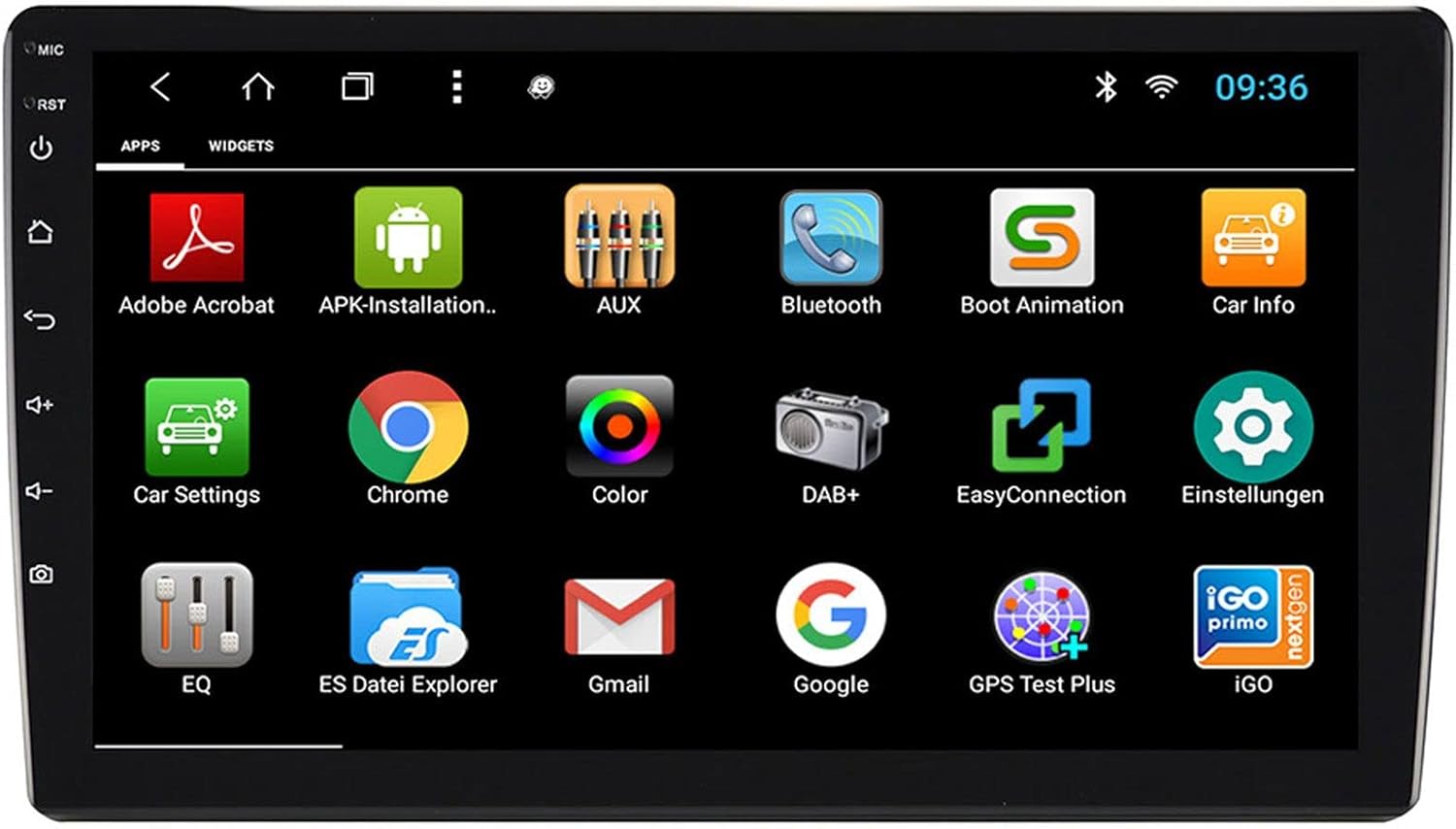
3.2 paveikslas: The applications screen, displaying various pre-installed and user-installed Android apps.
- Programėlių paleidimo priemonė: Access all installed applications from the app drawer.
- Valdikliai: Customize your home screen with widgets for quick access to information or functions.
- Nustatymai: Adjust system settings, network connections, display, audio, and more.
- Interneto ryšys: Connect to the internet via a WiFi hotspot (from a compatible smartphone) or by inserting a SIM card into the 4G/LTE dongle.
3.3. Radio Functions (AM/FM/DAB+)
The unit supports both analog and digital radio broadcasts.
- Juostos pasirinkimas: Switch between AM, FM, and DAB+ bands.
- Tiuningas: Manually tune or use the auto-scan function to find available stations.
- Išankstiniai nustatymai: Išsaugokite mėgstamiausias stotis, kad galėtumėte jas greitai pasiekti.
- RDS (FM): Radio Data System displays station information (e.g., station name, song title).
- DAB+ Features: Enjoy higher quality digital audio and view station logos where available.
3.4. Bluetooth ryšys
Pair your smartphone for hands-free communication and audio streaming.
- Poravimas: Enable Bluetooth on your smartphone and search for the naviceiver. Select the unit and confirm the pairing code.
- Skambinimas laisvų rankų įranga: Make and receive calls directly from the naviceiver screen.
- Garso transliacija: Play music from your smartphone wirelessly through the naviceiver.
3.5. Navigation (Google Maps)
Utilize Google Maps for turn-by-turn navigation.

3.3 paveikslas: The navigation interface showing a map with a selected destination.
- Naršymas internete: Requires an active internet connection (WiFi hotspot or 4G/LTE).
- Neprisijungus pasiekiami žemėlapiai: Download maps for specific regions to use navigation without an internet connection.
- Įėjimas į kelionės tikslą: Enter addresses or points of interest using the touchscreen keyboard.
3.6. Medijos atkūrimas
Leisti garso ir vaizdo įrašus files iš įvairių šaltinių.
- USB: Connect USB drives containing media files.
- „MicroSD“: Insert a MicroSD card into the dedicated slot for media or navigation data.
- Palaikomi formatai: The unit supports a wide range of audio and video formats. Refer to the system settings for a complete list.
3.7. Kameros įvestis
The naviceiver automatically displays the rearview camera feed when the vehicle is in reverse, or manually via the camera button.

3.4 paveikslas: Galinisview camera display with dynamic parking guidelines.
- Automatinis aktyvinimas: When connected correctly, the rearview camera image appears automatically when shifting into reverse.
- Parkavimo taisyklės: Adjustable parking lines assist with maneuvering.
4. Priežiūra
Regular maintenance ensures the longevity and optimal performance of your naviceiver.
- Ekrano valymas: Jutiklinį ekraną švelniai nuvalykite minkšta, nepūkuota šluoste. Įsisenėjusias dėmes šiek tiek nuvalykiteampNuvalykite šluostę vandeniu arba ekranui saugiu valikliu. Venkite stiprių cheminių medžiagų ar abrazyvinių medžiagų.
- Programinės įrangos atnaujinimai: Periodically check for available software updates through the system settings or the manufacturer's websvetainė. Atnaujinimai gali pagerinti našumą, pridėti funkcijų ir ištaisyti klaidas.
- Bendra priežiūra: Avoid exposing the unit to extreme temperatures, direct sunlight for prolonged periods, or excessive moisture. Ensure all connections remain secure.
5. Problemų sprendimas
This section addresses common issues you might encounter with your ESX VN1015-MA-DAB-4G naviceiver.
| Problema | Galima priežastis | Sprendimas |
|---|---|---|
| Įrenginys neįsijungia. | Nėra maitinimo; Perdegęs saugiklis; Neteisingas laidų pajungimas. | Check vehicle's fuse box and the unit's power connections. Ensure ACC wire is receiving power. |
| Nėra garso. | Volume too low; Mute activated; Incorrect speaker wiring; Audio source issue. | Increase volume. Check if mute is active. Verify speaker connections. Try a different audio source. |
| GPS signal loss or inaccurate navigation. | GPS antenna obstructed or disconnected; Outdated maps. | Įsitikinkite, kad GPS antena turi laisvą view dangaus ir yra saugiai prijungtas. Jei reikia, atnaujinkite žemėlapius. |
| Bluetooth ryšio problemos. | Įrenginys nėra susiejimo režime; Trikdžiai; Įrenginys neaptinkamas. | Ensure both devices are in pairing mode. Restart both devices. Check Bluetooth settings on the naviceiver. |
| Jutiklinis ekranas nereaguoja. | System freeze; Software error. | Perform a soft reset (refer to the unit's specific reset procedure, often a small reset button). If persistent, a factory reset might be needed (data loss may occur). |
| DAB+ radio not receiving stations. | DAB+ antenna not connected or faulty; Poor signal area. | Check DAB+ antenna connection. Ensure the antenna is correctly installed. Try rescanning for stations in a different location. |
If you encounter issues not listed here or if the suggested solutions do not resolve the problem, please contact ESX customer support or your authorized dealer.
6. Specifikacijos
Below are the technical specifications for the ESX VN1015-MA-DAB-4G Naviceiver:
| Funkcija | Detalė |
|---|---|
| Prekės ženklas | ESX plėtinys |
| Modelis | VN1015-MA-DAB-4G |
| Ekrano dydis | 10.1 colio (25.6 cm) |
| Ekrano tipas | High-resolution, anti-glare multi-angle touchscreen |
| Operacinė sistema | Android |
| RAM | 4 GB |
| Flash atmintis | 64 GB |
| Ryšys | Bluetooth, USB, 4G/LTE (via dongle), WiFi (via hotspot) |
| Radijo imtuvas | AM/FM with RDS, DAB+ Digital Radio |
| Navigacija | Google Maps (online/offline) |
| Įėjimai | 1x Camera Input, 1x AUX/Video Input, 1x AUX/Audio Input, 2x USB Ports, 1x MicroSD Slot |
| Išėjimai | 2x Video Outputs, Pre-amplified outputs (Front/Rear/Subwoofer) |
| Kontrolės metodas | Jutiklinis ekranas |
| Suderinami įrenginiai | Išmanusis telefonas |
7. Garantija ir palaikymas
Your ESX VN1015-MA-DAB-4G naviceiver comes with a Certificate of Authenticity. For specific warranty terms and conditions, please refer to the documentation provided with your purchase or contact your authorized ESX dealer.
For technical support, troubleshooting assistance beyond this manual, or inquiries regarding parts and service, please contact your point of purchase or visit the official ESX websvetainė, kurioje pateikiama klientų aptarnavimo kontaktinė informacija.