
Įvadas
Thank you for choosing the Perixx PERIBOARD-317 Backlit USB Keyboard. This full-size wired keyboard is designed for comfortable daily typing, featuring large print keys and white LED backlighting for enhanced visibility in various lighting conditions. Its low-profile keys offer a quiet and responsive typing experience. This manual provides essential information for setting up, operating, maintaining, and troubleshooting your keyboard.
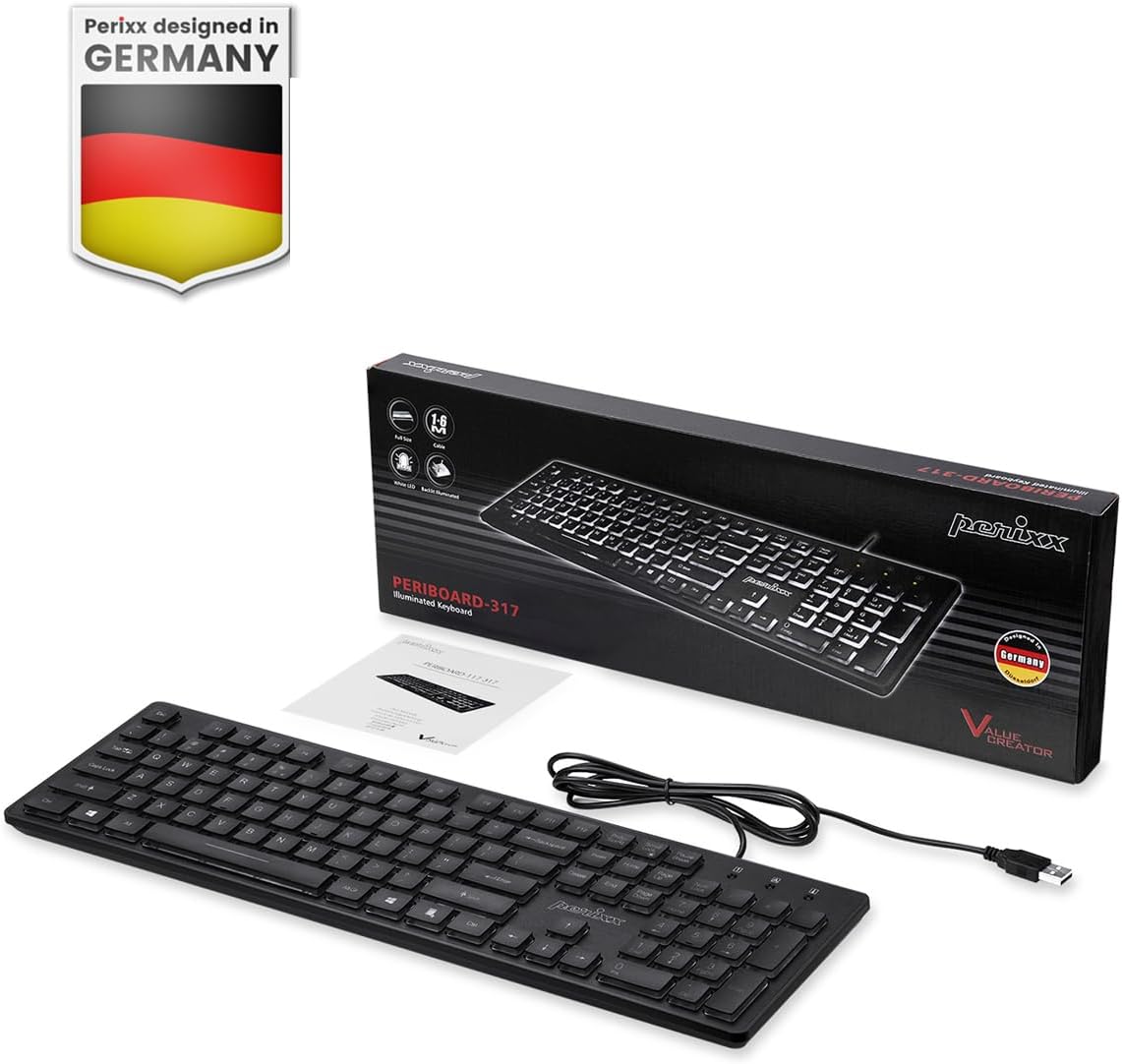
Image: Perixx PERIBOARD-317 keyboard and its contents.
1. Sąranka
1.1 Pakuotės turinys
- Perixx PERIBOARD-317 Keyboard
- Vartotojo vadovas
1.2 Sistemos reikalavimai
- Compatible with Windows 7, 8, 10, and 11.
- Galimas USB-A prievadas.
1.3 Klaviatūros prijungimas
- Unpack the Perixx PERIBOARD-317 keyboard from its packaging.
- Kompiuteryje raskite laisvą USB-A prievadą.
- Plug the USB-A cable of the keyboard into the USB-A port on your computer.
- The keyboard is plug-and-play; no additional drivers or software installation is required. Your computer will automatically detect and configure the device.

Image: Connecting the Perixx PERIBOARD-317 keyboard via USB.
2. Naudojimo instrukcijos
2.1 Pagrindinis spausdinimas
The Perixx PERIBOARD-317 features a standard full-size Italian QWERTY layout with 105 keys. The large print characters on the keys are designed for improved visibility, making typing easier for users with visual impairments or in low-light environments.

Image: Large print keys for enhanced visibility.
2.2 Foninio apšvietimo valdymas
The keyboard is equipped with a bright, uniformly distributed white LED backlight. This feature allows for comfortable typing in dimly lit conditions.
- Turning On/Off the Backlight: Locate the backlight control key (often indicated by a sun or light bulb icon, or a dedicated function key combination). Press this key to toggle the backlight on or off.
- Ryškumo reguliavimas: If available, use the designated brightness control keys (often function keys combined with Fn) to increase or decrease the backlight intensity.

Image: White LED backlighting for clear visibility.

Image: Easy typing in low-light conditions with the illuminated keys.
2.3 Scroll Lock and Backlight Interaction
Please note the interaction between the backlight and the Scroll Lock function:
- When the backlight is active, the Scroll Lock function is disabled.
- When the backlight is turned off, the Scroll Lock function is enabled.
2.4 Rašymo patirtis
Mažai profesionalusfile keys with wider surfaces provide a responsive, quiet, and precise typing experience. The high-quality ABS key printing is designed to resist wear, and the membrane switches are rated for 5 million keystrokes.

Image: Quiet and responsive typing experience.

Image: Low-profile chiclet keys for comfortable typing.
3. Priežiūra
3.1 Klaviatūros valymas
Norėdami išlaikyti klaviatūros veikimą ir išvaizdą:
- Prieš valydami atjunkite klaviatūrą nuo kompiuterio.
- Šiek tiek naudokite minkštą, be pūkelių šluostę dampKlaviatūros dangtelius ir paviršių nuvalykite vandeniu arba švelniu valymo tirpalu.
- Venkite purkšti skysčius tiesiai ant klaviatūros.
- Dulkėms ir šiukšlėms tarp klavišų pašalinti naudokite suslėgtą orą.
3.2 Saugykla
Ilgą laiką nenaudojant klaviatūros, ją laikykite sausoje vietoje, atokiau nuo ekstremalių temperatūrų ir tiesioginių saulės spindulių.
4. Problemų sprendimas
4.1 Klaviatūra nereaguoja
- Įsitikinkite, kad USB laidas yra tvirtai prijungtas tiek prie klaviatūros, tiek prie kompiuterio USB prievado.
- Pabandykite prijungti klaviatūrą prie kito kompiuterio USB prievado.
- Iš naujo paleiskite kompiuterį.
- Išbandykite klaviatūrą kitame kompiuteryje, kad nustatytumėte, ar problema susijusi su klaviatūra, ar su kompiuteriu.
4.2 Neveikia foninis apšvietimas
- Ensure the backlight is turned on using the dedicated backlight control key.
- Check if the brightness level is set too low. Adjust it using the brightness control keys.
- Verify that the Scroll Lock function is not interfering (refer to section 2.3).
4.3 Keys Not Registering or Repeating
- Clean the affected keys as described in the Maintenance section.
- Ensure no debris is lodged under the keycap.
- If the issue persists, it may indicate a hardware problem. Refer to the Warranty and Support section.
5. Specifikacijos
| Funkcija | Detalė |
|---|---|
| Prekės ženklas | Perixx |
| Modelio pavadinimas | PERIBOARD-317 IT B |
| Modelio numeris | 11629 |
| Ryšio technologija | USB (laidinis) |
| Klaviatūros aprašymas | Full-size, Backlit |
| Rekomenduojami naudojimo būdai | Daily use, study |
| Ypatinga funkcija | Backlit (White LED), Large Print Keys |
| Klaviatūros foninio apšvietimo spalvų palaikymas | Vienspalvis |
| Gaminio matmenys (I x P x A) | 44 L x 12.9 W x 2.7 A cm |
| Maitinimo šaltinis | Su laidu elektra |
| Jungiklio tipas | Linear (Membrane) |
| Klaviatūros išdėstymas | QWERTY (Italian) |
| Raktų skaičius | 105 |
| Suderinamos operacinės sistemos | Windows 7, 8, 10, 11 |
| Būsto medžiaga | ABS plastikas |
| Prekės svoris | 530 gramų |
| Gamintojas | Perixx |
| Gamintojo dalies numeris | PB-317IT-11629 |
| Kilmės šalis | Kinija |
6. Garantija ir palaikymas
6.1 Informacija apie garantiją
The Perixx PERIBOARD-317 keyboard is covered by a limited 24-month warranty from the date of purchase. This warranty covers manufacturing defects and workmanship under normal use.
6.2 How to Obtain Support
For warranty claims, technical assistance, or product inquiries, please visit the official Perixx website. Warranty replacement requests (RMA) are generally processed within 48-72 hours.
Norėdami gauti daugiau informacijos, apsilankykite: www.perixx.com

Image: Perixx - Designed in Germany.