
1. Produktas baigtasview
The Cecotec Conga 1090 Connected Force is a versatile 4-in-1 robot vacuum cleaner designed to sweep, vacuum, mop, and scrub your floors. It features intelligent navigation, app control, and compatibility with voice assistants for a comprehensive cleaning experience.

Image 1.1: The Conga 1090 Connected Force robot vacuum cleaner, showcasing its sleek design, accompanying smartphone application interface, and compatibility with Alexa and Google Assistant.
Pagrindinės funkcijos:
- 4 viename funkcionalumas: Šluoja, siurbia, plauna ir šveičia vienu metu.
- „iTech Smart 2.0“ navigacija: Išmanioji navigacijos sistema efektyviems valymo maršrutams.
- Programos valdymas: Manage cleaning modes, scheduling, suction, and scrubbing levels from your smartphone.
- Balso asistento suderinamumas: Works with Amazon Alexa and Google Assistant for hands-free control.
- Turbo režimas kilimams: Automatiškai padidina siurbimo galią ant kilimų, kad būtų galima giliau išvalyti.
- Geriausių draugų priežiūros sistema: Includes a special silicone brush designed for pet hair.
- Keli valymo režimai: Auto, Edges, Manual, Room, Spiral, and Return to Home.
- Programuojamas: Schedule cleaning sessions 24/7.
- Ilgas baterijos veikimo laikas: Iki 160 minučių nepertraukiamo valymo.
- Didelio efektyvumo filtras: Sulaiko alergenus ir smulkias dulkių daleles.
2. Sąrankos vadovas
2.1 Išpakavimas ir komponentų patikrinimas
Atsargiai išimkite visus komponentus iš pakuotės. Įsitikinkite, kad yra visi toliau išvardyti daiktai:
- Cecotec Conga 1090 Connected Force Robot Vacuum Cleaner
- Įkrovimo bazė ir maitinimo adapteris
- Multifunction Brush (bristles and silicone)
- BestFriend Care Silicone Brush
- 4 šoniniai šepečiai
- Mixed Tank (solids and liquids)
- Mop and Mop Pad
- Didelio efektyvumo filtras
- Instrukcijų vadovas
2.2 Įkrovimo stotelės išdėstymas
Place the charging base against a wall in an open area, ensuring there are no obstacles within 1 meter (3 feet) to the sides and 2 meters (6 feet) in front of the base. Connect the power adapter to the charging base and plug it into a power outlet.
2.3 Pradinis įkrovimas
Place the robot vacuum cleaner onto the charging base. Ensure the charging contacts on the robot align with those on the base. The robot will begin charging automatically. For optimal battery life, fully charge the robot before its first use (approximately 3-4 hours).
2.4 Programėlių atsisiuntimas ir Wi-Fi ryšys
- Download the official Cecotec Conga app from your smartphone's app store (Google Play Store or Apple App Store).
- Open the app and follow the on-screen instructions to create an account and add your Conga 1090 Connected Force robot.
- During the connection process, ensure your smartphone is connected to a 2.4 GHz „Wi-Fi“ tinklas. The robot is not compatible with 5GHz networks. If you experience connection issues, verify that your router's 2.4GHz Wi-Fi channel is enabled at 20Hz (in addition to 40Hz if applicable).
- Once connected, you can control the robot and access all its features via the app.

Image 2.1: Controlling the robot vacuum cleaner using the dedicated smartphone application.
2.5 Balso asistento sąranka (pasirenkama)
Norėdami integruoti su „Amazon Alexa“ arba „Google Assistant“:
- Išmaniajame telefone atidarykite programėlę „Alexa“ arba „Google Home“.
- Eikite į skyrių „Įgūdžiai“ arba „Darbas su „Google“.
- Ieškokite 'Cecotec Conga' and enable the skill/service.
- Link your Cecotec account when prompted.
- You can now use voice commands to start, stop, or send the robot back to its charging base.
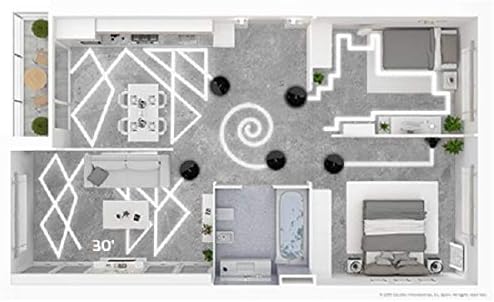
Image 2.2: The robot vacuum cleaner integrated with smart home voice assistants.
3. Naudojimo instrukcijos
3.1 Valymo pradžia ir pabaiga
- Per roboto mygtuką: Press the main power button on the robot once to start cleaning in Auto mode. Press again to pause. Hold to send it back to the charging base.
- Per programą: Open the Conga app, select your robot, and tap 'Clean' or choose a specific cleaning mode.
- Balso komandomis: Use your configured voice assistant (e.g., "Alexa, tell Conga to start cleaning").
3.2 Valymo režimai
The Conga 1090 Connected Force offers 6 cleaning modes:
- Auto: The robot intelligently cleans the entire floor area.
- Kraštai: Valo palei sienas ir baldų kraštus.
- Rankinis: Valdykite roboto judėjimą rankiniu būdu per programėlę.
- Kambarys: Cleans a specific room or area.
- Spiralė: Valo koncentruotą plotą spirale.
- Grįžti į namus: Robotas grįžta į savo įkrovimo bazę.

Image 3.1: Visualization of different cleaning patterns the robot can perform.
3.3 Adjusting Suction and Scrubbing Levels
Through the Conga app, you can select from three power levels (Eco, Normal, Turbo) for vacuuming and three scrubbing levels for mopping, adapting to different floor types and cleaning needs.
3.4 Valymo planavimas
Use the app to set up daily or weekly cleaning schedules. The robot will automatically start cleaning at the programmed times.
4. Priežiūra
Reguliarus techninis aptarnavimas užtikrina optimalų roboto dulkių siurblio veikimą ir pailgina jo tarnavimo laiką.
4.1 Dulkių surinktuvo ištuštinimas
After each cleaning cycle, or when indicated by the app, remove the dust tank and empty its contents into a waste bin. Clean any debris from the tank and filter compartment.
4.2 valymo šepetėliai
- Multifunction Brush / BestFriend Care Brush: Remove the main brush from the robot. Use the included cleaning tool to cut and remove any tangled hair or fibers.
- Šoniniai šepečiai: Periodically check side brushes for wear or entanglement. Remove any debris and replace worn brushes as needed.

Image 4.1: The robot vacuum cleaner's main brush engaging with a carpeted surface.
4.3 Filtrų valymas
Tap the high-efficiency filter gently to remove dust. Do not wash the HEPA filter with water, as this can damage it. Replace the filter every 3-6 months, depending on usage.
4.4 Cleaning the Mop and Water Tank
After mopping, remove the mop pad and wash it thoroughly. Empty any remaining water from the mixed tank and allow it to air dry before reinserting. Clean the water outlet ports on the tank to prevent blockages.
4.5 Jutiklių valymas
Wipe the robot's sensors (anti-drop sensors, obstacle detection sensors) with a clean, dry cloth to ensure accurate navigation.
5. Problemų sprendimas
If you encounter issues with your Conga 1090 Connected Force, refer to the following common solutions:
- Robotas neįkraunamas: Įsitikinkite, kad įkrovimo bazė yra prijungta, o roboto įkrovimo kontaktai yra švarūs ir tinkamai sulygiuoti su baze.
- Robotas neprisijungia prie „Wi-Fi“: Verify your Wi-Fi network is 2.4GHz. Check router settings to ensure the 2.4GHz channel is enabled at 20Hz. Restart both the robot and your router.
- Prastas valymo efektyvumas: Empty the dust tank, clean all brushes, and check the filter for blockages. Ensure sensors are clean.
- Robotas dažnai užstringa: Clear obstacles from the cleaning area. Ensure cables, loose rugs, or small items are removed.
- Neįprasti garsai: Check main and side brushes for tangled hair or debris. Inspect wheels for obstructions.
For persistent issues, consult the full instruction manual or contact Cecotec customer support.
6. Specifikacijos
| Funkcija | Specifikacija |
|---|---|
| Prekės ženklas | Cecotec |
| Modelio numeris | Conga 1090 Connected Force |
| Spalva | Juoda |
| Gaminio matmenys (I x P x A) | 32.5 x 32.5 x 7.5 cm |
| Dulkių bako talpa | 500 mililitrų |
| ttage | 14.4 voltų |
| Medžiaga | Plastikiniai |
| Triukšmo lygis | 64 dB |
| Suderinamumas | „Amazon Echo“, „Google Home“, išmanieji telefonai |
| Prekės svoris | 4.1 kilogramo |
| Filtro tipas | HEPA |
| Baterijos veikimo laikas | Iki 160 minučių |
| Valdymo tipas | Programų valdymas |
7. Garantija ir palaikymas
For warranty information, please refer to the documentation included with your product or visit the official Cecotec website. For technical support or service inquiries, please contact Cecotec customer service through their official channels.