
SENTRY KX200
Sentry Industries Inc. HPXKX200 Gaming Keyboard + Mouse 2 Pack
Model: KX200 User Manual
Įvadas
Ačiū, kad pirkoteasing the Sentry Industries Inc. HPXKX200 Gaming Keyboard and Mouse 2 Pack. This combo kit is designed to enhance your gaming and computing experience with its responsive keyboard and precise mouse. The keyboard features 104 keys with RGB backlighting, while the mouse offers 7200 DPI sensitivity and RGB lighting. Both devices connect via USB for reliable performance.
This manual provides detailed instructions for setup, operation, maintenance, and troubleshooting to ensure optimal use of your new gaming peripherals.
Pakuotės turinys
- 1 x Sentry HPXKX200 104-Key RGB USB Gaming Keyboard
- 1 x Sentry HPXKX200 7200 DPI RGB Gaming Mouse
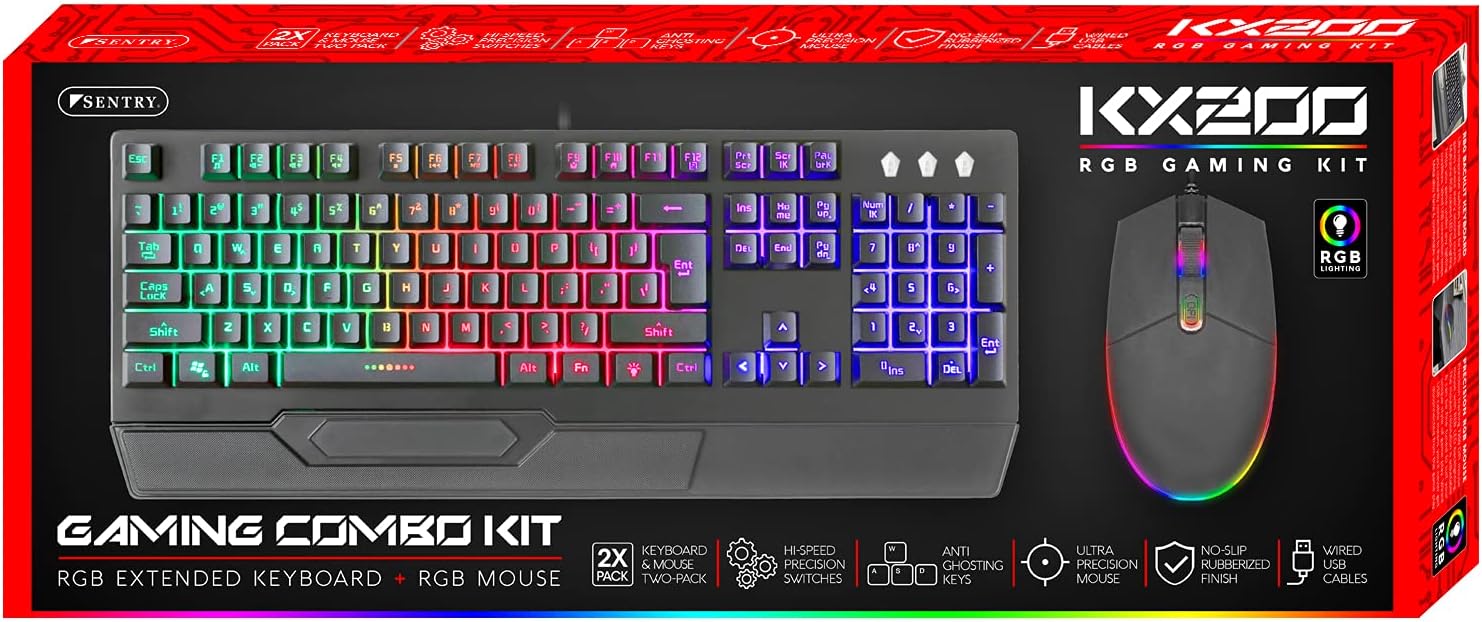
Image: The retail packaging for the Sentry HPXKX200 Gaming Keyboard and Mouse combo kit, showing both devices and key features.
Sąrankos instrukcijos
Follow these steps to connect your Sentry HPXKX200 Gaming Keyboard and Mouse to your computer:
- Išpakuokite įrenginius: Atsargiai išimkite klaviatūrą ir pelę iš pakuotės.
- Prijunkite klaviatūrą: Raskite laisvą USB prievadą kompiuteryje. Tvirtai įkiškite klaviatūros USB jungtį į USB prievadą.
- Prijunkite pelę: Locate another available USB port on your computer. Insert the USB connector of the mouse firmly into the USB port.
- Tvarkyklės diegimas: Your operating system (e.g., Windows) should automatically detect and install the necessary drivers. This process may take a few moments.
- Patikrinkite ryšį: Once drivers are installed, the keyboard and mouse RGB lighting should illuminate, indicating they are ready for use.

Image: The Sentry HPXKX200 Gaming Keyboard, showcasing its full layout and attached USB cable for connection.

Image: The Sentry HPXKX200 Gaming Mouse, highlighting its ergonomic design and attached USB cable.

Vaizdas: Stambus planas view of a standard USB-A connector, which is used to connect both the keyboard and mouse to a computer.
Naudojimo instrukcijos
Klaviatūros naudojimas
The 104-key layout provides a full range of standard typing and function keys. The RGB backlighting enhances visibility and aesthetics.
- Rašant: Use the alphanumeric keys for standard text input.
- Funkciniai klavišai (F1–F12): These keys perform various functions, often in combination with the 'Fn' key, depending on your operating system and applications.
- RGB apšvietimo valdymas: Specific key combinations (e.g., Fn + Scroll Lock, Fn + Home/End) may cycle through different RGB lighting modes or adjust brightness. Refer to the keyboard's specific key legends for lighting controls.
Pelės naudojimas
The 7200 DPI RGB mouse offers precise tracking and comfortable use.
- Kairysis spustelėjimas: Pirminis veiksmas, atranka.
- Dešiniuoju pelės mygtuku spustelėkite: Kontekstinis meniu.
- Slinkties ratukas: Slinkite per dokumentus ir web puslapius. Slinkties ratukas taip pat veikia kaip vidurinis spustelėjimo mygtukas.
- DPI reguliavimas: The DPI button (often located near the scroll wheel) allows you to cycle through different sensitivity settings (DPI levels) to match your preference for various tasks or games. The mouse supports up to 7200 DPI.
- RGB apšvietimas: The mouse features integrated RGB lighting that typically changes based on DPI settings or cycles through colors automatically.

Image: The Sentry HPXKX200 Gaming Keyboard and Mouse side-by-side, illustrating their design and illuminated RGB features.
Priežiūra
Proper care will extend the life of your gaming peripherals:
- Valymas: Klaviatūros ir pelės paviršius nuvalykite minkštu, sausu skudurėliu. Jei nešvarumai sunkiai įveikiami, šiek tiek nuvalykite.ampNuvalykite šluostę vandeniu arba švelniu, neabrazyviniu valikliu. Venkite per didelės drėgmės.
- Dulkių šalinimas: Use compressed air to remove dust and debris from between the keyboard keys and from the mouse's optical sensor.
- Venkite skysčių: Do not immerse the devices in water or expose them to excessive liquids.
- Saugykla: Store the keyboard and mouse in a cool, dry place when not in use.
Trikčių šalinimas
If you encounter issues with your Sentry HPXKX200 Gaming Keyboard and Mouse, try the following solutions:
| Problema | Galimas sprendimas |
|---|---|
| Klaviatūra / pelė nereaguoja |
|
| RGB apšvietimas neveikia |
|
| Pelės žymeklis juda nereguliariai arba nejuda |
|
| Keys not registering on keyboard |
|
Specifikacijos
| Funkcija | Detalė |
|---|---|
| Prekės ženklas | SENTRY |
| Modelio numeris | KX200 |
| Ryšio technologija | USB (laidinis) |
| Klaviatūros tipas | 104-Key RGB USB Keyboard |
| Pelės DPI | 7200 DPI RGB Mouse |
| Spalva | Juoda |
| Operacinės sistemos suderinamumas | Windows (and generally compatible with other OS supporting USB peripherals) |
| Gaminio matmenys (klaviatūra) | Maždaug 21.65 x 9.84 x 3.15 colio |
| Prekės svoris | Maždaug 2.2 svaro (kartu) |
Garantija ir palaikymas
Sentry Industries Inc. products are manufactured to high-quality standards. For information regarding warranty coverage, technical support, or service inquiries, please refer to the warranty card included with your product or visit the official Sentry Industries Inc. websvetainėje. Prašome išsaugoti pirkimo įrodymą garantiniams reikalavimams.
Ask a question about this manual
Ask about setup, troubleshooting, compatibility, parts, safety, or missing instructions. Manuals+ will review the question and use this page’s manual context to help answer it.