Įvadas
This manual provides detailed instructions for the safe and efficient operation of your Altec Lansing AL-1005 A BT Portable Speaker. Please read this manual thoroughly before using the product and retain it for future reference.
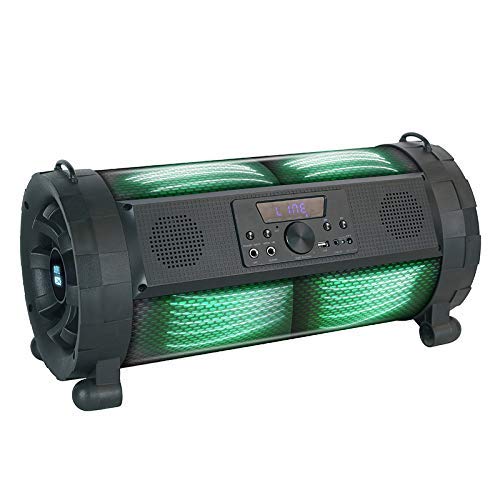
Image: The Altec Lansing AL-1005 A BT Portable Speaker, featuring a black barrel design with illuminated green DJ lights, a central control panel, and integrated handles.
Pakuotės turinys
Patikrinkite, ar pakuotėje yra visi reikalingi daiktai:
- Altec Lansing AL-1005 A BT Portable Speaker
- Vartotojo vadovas
- Įkroviklio adapteris
- Nuotolinio valdymo pultas
- Dirželio laikiklis
- Belaidis mikrofonas
Produktas baigtasview
The AL-1005 A is a portable barrel-design speaker equipped with various features for an enhanced audio experience.
Pagrindinės funkcijos:
- 80W garsiakalbio išvestis
- Belaidis Bluetooth ryšys
- AUX įvestis
- USB atkūrimas
- Gitaros įvestis
- Integrated DJ Lights
- 2000 mAh Battery (Up to 6 hours playtime)
- Pridedamas belaidis mikrofonas
- Pridedamas nuotolinio valdymo pultas
Sąranka
Garsiakalbio įkrovimas:
- Connect the charger adapter to the speaker's charging port.
- Įkiškite adapterį į standartinį maitinimo lizdą.
- Allow the speaker to charge fully before first use. The charging indicator light will change when charging is complete.
Attaching the Strap Holder:
The strap holder can be attached to the designated loops on the speaker for easier portability.
Mikrofono sąranka:
- Ensure the wireless microphone has fresh batteries (1 AA battery required, included).
- Įjunkite mikrofoną. Jis turėtų automatiškai susiporuoti su garsiakalbiu.
Naudojimo instrukcijos
Maitinimo įjungimas/išjungimas:
Press and hold the Power button on the control panel or remote control to turn the speaker on or off.
„Bluetooth“ susiejimas:
- Įjunkite garsiakalbį. Jis automatiškai įsijungs „Bluetooth“ susiejimo režimu.
- Savo įrenginyje (išmaniajame telefone, planšetiniame kompiuteryje ir kt.) įjunkite „Bluetooth“ ir ieškokite galimų įrenginių.
- Select "AL-1005 A" from the list of devices.
- Kai garsiakalbis bus suporuotas, jis rodys sėkmingą ryšį.
AUX įvestis:
Connect an audio device using a 3.5mm AUX cable to the AUX input port on the speaker. The speaker will automatically switch to AUX mode.
USB atkūrimas:
Įdėkite USB atmintinę su garso įrašu files into the USB port. The speaker will automatically detect and begin playing music from the drive.
Gitaros įvestis:
Connect a guitar or other instrument to the dedicated guitar input port for ampliūdnas garsas.
Controlling Playback and Volume:
- Use the volume knob on the speaker or the volume buttons on the remote control to adjust the master volume.
- Use the Play/Pause, Next, and Previous buttons on the speaker's control panel or remote for media playback control.
DJ Lights:
The speaker features integrated DJ lights. These lights typically activate automatically with music playback or can be controlled via a dedicated button on the control panel or remote, if available.
Priežiūra ir priežiūra
- Valymas: Garsiakalbio išorę valykite minkšta, sausa šluoste. Nenaudokite abrazyvinių valiklių ar tirpiklių.
- Saugykla: Garsiakalbį laikykite vėsioje, sausoje vietoje, toliau nuo tiesioginių saulės spindulių ir ekstremalių temperatūrų.
- Akumuliatoriaus priežiūra: Norėdami pailginti baterijos veikimo laiką, venkite dažnai visiškai ją iškrauti. Reguliariai įkraukite garsiakalbį, net jei ilgą laiką jo nenaudojate.
- Atsparumas vandeniui: Šis produktas yra ne Saugokite, kad nepatektų į vandenį arba būtų per didelė drėgmė.
Trikčių šalinimas
| Problema | Galima priežastis | Sprendimas |
|---|---|---|
| Garsiakalbis neįsijungia. | Išsikrovusi baterija; netinkamai paspaustas maitinimo mygtukas. | Įkraukite garsiakalbį; paspauskite ir kelias sekundes palaikykite nuspaudę maitinimo mygtuką. |
| Iš garsiakalbio nėra garso. | Volume too low; Incorrect input mode; Device not paired (Bluetooth). | Increase volume; Select correct input (Bluetooth, AUX, USB); Re-pair Bluetooth device. |
| „Bluetooth“ ryšys nestabilus. | Įrenginys per toli nuo garsiakalbio; trukdžiai. | Move device closer to speaker (within 1 foot for optimal range); Avoid obstacles between devices. |
| Mikrofonas neveikia. | Microphone off; Low microphone battery. | Ensure microphone is turned on; Replace microphone batteries. |
Specifikacijos
| Funkcija | Detalė |
|---|---|
| Modelio pavadinimas | AL-1005 A |
| Garsiakalbio tipas | Bookshelf (Portable Barrel Design) |
| Garsiakalbio išėjimo galia | 80 vatų |
| Ryšys | Bluetooth, pagalbinis, USB |
| Baterijos talpa | 2000 mAh |
| Baterijos veikimo laikas | Iki 6 valandų |
| Įtraukti komponentai | User manual, charger adapter, remote, strap holder, wireless mic |
| Matmenys (IxPxH) | 28.5 x 25 x 60 cm |
| Prekės svoris | 4.2 kg |
| Ypatingos savybės | DJ lights, Guitar Input |
| Belaidžio ryšio technologija | Bluetooth |
| Maksimalus veikimo atstumas („Bluetooth“) | 1 pėdų |
Informacija apie garantiją
For warranty details and terms, please refer to the warranty card included with your product or contact Altec Lansing customer support. Extended warranty options may be available from your retailer.
Pagalba klientams
For technical assistance, service, or inquiries, please contact Altec Lansing customer support. Contact information can typically be found on the manufacturer's official websvetainėje arba ant produkto pakuotės.
Gamintojas: Altec Lansing
Importer/Distributor (India): Compuage Infocom Limited
Adresas: Lotus Corporate Park Goregoan (E), Mumbai – 400 063
Telefonas: +91-22-67114444