1. Įvadas
Thank you for choosing the Losei D65 Wireless Earbuds. These earbuds are designed to provide a high-quality audio experience with advanced features such as environmental noise canceling (ENC), individual power display, wireless charging, and IPX7 waterproofing. This manual will guide you through the setup, operation, and maintenance of your new earbuds.
2. Kas yra dėžutėje
- Wireless Sport Earbuds (1 Pair)
- Charging Case (1 PC)
- Type-C Charging Cable (1 PC)
- Original Ear Caps (1 Pair)
- Spare Ear Caps (6 Pairs)
- Vartotojo vadovas (šis dokumentas)
3. Produktas baigtasview
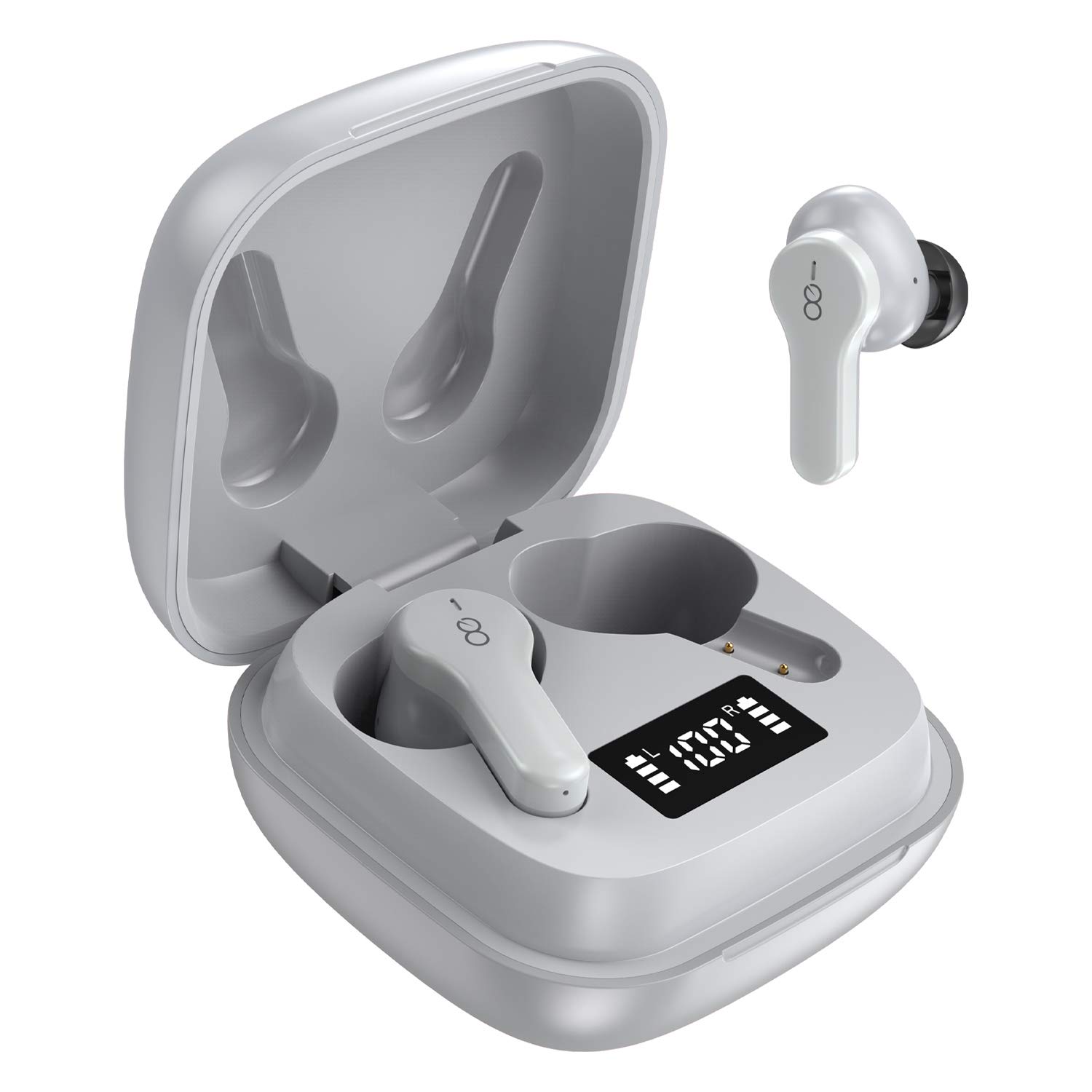
The Losei D65 earbuds feature a compact, in-ear design with touch controls. The accompanying charging case provides portable power and includes a digital display to show battery levels for both the case and individual earbuds.
Pagrindinės funkcijos:
- Clear Call with 4-Mics Noise Reduction: Built-in 4 microphones with Environmental Noise Canceling (ENC) technology for clear calls.
- Individual Power Display: Skaitmeninis ekranas ant įkrovimo dėklo rodo akumuliatoriaus įkrovos procentątage for the case and charging status for each earbud.
- Wireless Charging & Extended Playtime: Supports wireless charging and provides up to 30 hours of total playtime with the charging case.
- Comfortable Fit & IPX7 Waterproof: Ergonomic design with multiple ear tip sizes and IPX7 water resistance for sports and daily use.
- Auto Pairing & Smart Touch Control: Automatic connection to the last paired device and intuitive touch controls for various functions.
4. Sąranka
4.1 Ausinių ir dėklo įkrovimas
Prieš pirmą kartą naudodami, visiškai įkraukite ausines ir įkrovimo dėklą.
- Ausinių įkrovimas: Place the earbuds into the charging case. The marquee lights on the case will indicate charging. They will stop when fully charged.
- Charging the Case (Wired): Connect the provided Type-C charging cable to the charging port on the case and to a USB power source. The digital display will show the battery percentage padidėjimasasing. A full charge takes approximately 1.5-2 hours.
- Dėklo įkrovimas (belaidis): Place the charging case on a compatible wireless charging pad (not included). The digital display will indicate charging status.
The charging case's digital display shows the battery percentage (1-100%). The individual earbud power consumption indicators show 4 grids, each representing 25% battery.
4.2 Susiejimas su jūsų įrenginiu
The Losei D65 earbuds feature automatic pairing.
- Įsitikinkite, kad jūsų įrenginyje įjungtas „Bluetooth“ ryšys.
- Atidarykite įkrovimo dėklą. Ausinės automatiškai įsijungs ir pradės veikti susiejimo režimu.
- On your device, search for Bluetooth devices and select "Losei-D65" from the list.
- Prijungus išgirsite patvirtinimo pranešimą ir ausinės bus paruoštos naudoti.
The earbuds will automatically reconnect to the last paired device when taken out of the charging case.
5. Naudojimo instrukcijos
5.1 Išmanieji jutikliniai valdikliai
The Losei D65 earbuds utilize touch controls for various functions. The sensor area is typically located on the outer surface of each earbud.
- Leisti / pristabdyti: Vieną kartą bakstelėkite bet kurią ausinę.
- Kitas takelis: Dukart palieskite dešinįjį ausinės antgalį.
- Ankstesnis takelis: Dukart palieskite kairįjį ausinės antgalį.
- Pagarsink: Tris kartus palieskite dešinįjį ausinės antgalį.
- Patildyti: Tris kartus palieskite kairįjį ausinės antgalį.
- Atsiliepti / Baigti skambutį: Vieną kartą bakstelėkite bet kurią ausinę įeinančio skambučio metu.
- Atmesti skambutį: Įeinančio skambučio metu paspauskite ir 2 sekundes palaikykite nuspaudę bet kurią ausinę.
- Suaktyvinti „Voice Assistant“: Paspauskite ir 3 sekundes palaikykite nuspaudę bet kurią ausinę (kai neskambinate).
5.2 Multi-Using Modes
The earbuds support different usage scenarios:
- Vienspalvis režimas: Each earbud can be used independently. This is ideal for driving or when you need to be aware of your surroundings. Simply take one earbud out of the case and connect it.
- Bendrinimo režimas: You can share one earbud with another person to listen to the same audio content.
- Stereo režimas: Use both earbuds together for a full, immersive stereo sound experience.
6. Priežiūra
6.1 Valymas
Reguliarus valymas padeda palaikyti garso kokybę ir higieną.
- Ausinėms ir įkrovimo dėklui nuvalyti naudokite minkštą, sausą, nepūkuotą šluostę.
- Ausų antgalius nuimkite nuo ausinių ir, jei reikia, nuvalykite švelniu muilo tirpalu, tada kruopščiai nuskalaukite ir visiškai nusausinkite prieš vėl uždėdami.
- Nenaudokite abrazyvinių valiklių, alkoholio ar cheminių tirpiklių.
6.2 Saugykla
Kai nenaudojate, laikykite ausines įkrovimo dėkle, kad jos būtų apsaugotos ir įkrautos.
- Laikyti vėsioje, sausoje vietoje, toliau nuo ekstremalių temperatūrų.
- Venkite ilgalaikio tiesioginių saulės spindulių poveikio.
6.3 Atsparumas vandeniui (IPX7)
The Losei D65 earbuds are IPX7 waterproof, meaning they can withstand immersion in water up to 1 meter for 30 minutes. This makes them suitable for sports and protection against sweat and rain. However, they are not designed for swimming or prolonged submersion. Ensure the earbuds are dry before placing them back in the charging case to prevent damage.
7. Problemų sprendimas
If you encounter issues with your Losei D65 earbuds, refer to the following common solutions:
- Ausinės nesusijungia arba neprisijungia:
- Įsitikinkite, kad abi ausinės yra įkrautos.
- Išjunkite „Bluetooth“ savo įrenginyje, tada vėl jį įjunkite.
- Forget/delete "Losei-D65" from your device's Bluetooth list and attempt to pair again.
- Place both earbuds back into the charging case, close the lid, wait a few seconds, then open the lid to reset.
- Veikia tik viena ausinė:
- Įsitikinkite, kad abi ausinės yra įkrautos.
- Place both earbuds back into the charging case, close the lid, wait a few seconds, then open the lid. They should reconnect to each other automatically.
- If the issue persists, try resetting the earbuds as described in the pairing section.
- Prasta garso kokybė arba mažas garsumas:
- Sureguliuokite garsumą tiek savo įrenginyje, tiek ausinėse.
- Ensure the ear tips are properly sealed in your ear canal. Try different sized ear tips for a better fit.
- Nuvalykite visas šiukšles nuo ausinių garsiakalbių ir ausinių antgalių.
- Įsitikinkite, kad tarp jūsų įrenginio ir ausinių nėra jokių kliūčių.
- Įkrovimo dėklas neįkraunamas:
- Patikrinkite, ar įkrovimo laidas ir maitinimo adapteris nepažeisti.
- Įsitikinkite, kad C tipo laidas yra tvirtai prijungtas prie korpuso ir maitinimo šaltinio.
- Jei naudojate belaidį įkrovimą, įsitikinkite, kad dėklas tinkamai padėtas ant suderinamo belaidžio įkrovimo padėklo.
8. Specifikacijos
| Modelio pavadinimas | Losei-D65 |
| Ryšio technologija | Belaidis ryšys („Bluetooth 5.0“) |
| Ausų išdėstymas | Ausyje |
| Triukšmo valdymas | Sound Isolation, Environmental Noise Canceling (ENC) |
| Atsparumo vandeniui lygis | IPX7 (atsparus vandeniui) |
| Valdymo tipas | Palieskite valdymą |
| Baterijos veikimo laikas (ausinės) | Vienu įkrovimu veikia iki 5 valandų |
| Bendras grojimo laikas (su dėklu) | Iki 30 valandų |
| Įkrovimo laikas (dėklas) | apytiksliai 1.5-2 valandos |
| Įkrovimo sąsaja | Type-C, Wireless Charging |
| Suderinami įrenginiai | Most Bluetooth-enabled devices (Android, iOS, PC, etc.) |
| Prekės svoris | 0.176 uncijos (vienai ausinei) |
| Gaminio matmenys | 1.18 x 1.54 x 1.85 colio (įkrovimo dėklas) |
9. Garantija ir palaikymas
9.1 Informacija apie garantiją
The Losei D65 Wireless Earbuds come with a 12 mėnesių pakeitimo garantija. Additionally, returns are accepted within 30 days for a full refund. This warranty covers manufacturing defects and ensures customer satisfaction.
9.2 Pagalba klientams
For any questions, issues, or support needs, please contact Losei customer service. Quick-response professional customer service is available to assist you.
Please refer to the product packaging or the official Losei websvetainę, kurioje pateikiami konkretūs kontaktiniai duomenys.


