
360 S9
360 S9 roboto dulkių siurblio ir šluotos naudotojo vadovas
Modelis: S9
Svarbios saugos instrukcijos
Please read this manual carefully before using the 360 S9 Robot Vacuum and Mop and retain it for future reference. Follow all safety precautions to prevent injury or damage.
- Šį prietaisą gali naudoti vaikai nuo 8 metų ir asmenys, turintys ribotų fizinių, jutiminių ar protinių gebėjimų arba neturintys patirties ir žinių, jei jie yra prižiūrimi arba yra instruktuojami, kaip saugiai naudoti prietaisą ir supranta su tuo susijusius pavojus. .
- Vaikus reikia prižiūrėti, kad jie nežaistų su prietaisu.
- Vaikai negali valyti ir atlikti naudotojo priežiūros darbų be priežiūros.
- Naudokite tik originalų gamintojo pateiktą maitinimo adapterį.
- Nenaudokite roboto aplinkoje, kurioje yra atviros liepsnos ar trapūs objektai.
- Ensure the robot operates on a stable surface and avoid dropping it.
- Plaukus, laisvus drabužius, pirštus ir visas kūno dalis laikykite toliau nuo angų ir judančių dalių.
Produktas baigtasview
The 360 S9 Robot Vacuum and Mop is an intelligent cleaning device designed to efficiently vacuum and mop your floors. It features advanced LiDAR navigation, powerful suction, and smart app control for a customized cleaning experience.

Image: The 360 S9 Robot Vacuum and Mop, a white circular device, is shown alongside a smartphone displaying its control application. The robot features a central LiDAR sensor and two control buttons on its top surface.
Pakuotės turinys
Patikrinkite, ar pakuotėje yra visi komponentai:
- 360 S9 Robot Vacuum and Mop
- Įkrovimo dokas
- Maitinimo adapteris
- Pagrindinis teptukas
- Šoniniai šepečiai (2 poros)
- Didelio efektyvumo filtras
- Vandens bakas
- Šluostės (2)
- Valymo įrankis
- Vartotojo vadovas
Paveikslėlis: Viršutinė dalis view displaying the 360 S9 Robot Vacuum and its various accessories, including the main unit, a rectangular filter, two pairs of side brushes, a main roller brush, and the charging dock.
Sąranka
1. Išpakavimas ir įdėjimas
- Nuimkite visas pakavimo medžiagas ir apsaugines plėveles nuo roboto ir įkrovimo stotelės.
- Pastatykite įkrovimo stotelę prie sienos ant kieto, lygaus paviršiaus. Įsitikinkite, kad iš abiejų pusių yra bent 0.5 metro (1.6 pėdos) laisvos vietos, o priešais stotelę – 1.5 metro (4.9 pėdos).
- Prijunkite maitinimo adapterį prie įkrovimo doko ir įjunkite jį į maitinimo lizdą.
2. Roboto įkrovimas
- Place the robot onto the charging dock, ensuring the charging contacts align. The robot will announce that it is charging.
- Prieš pirmą kartą naudojant, pilnai įkraukite robotą (maždaug 4–5 valandas).
3. Programėlės diegimas ir prijungimas
- Download the '360Robot' app from your mobile device's app store (Google Play Store or Apple App Store).
- Open the app and follow the on-screen instructions to create an account and add your 360 S9 robot.
- Ensure your mobile device is connected to a 2.4 GHz Wi-Fi network during the initial setup process, as the robot only supports 2.4 GHz Wi-Fi.
- Once connected, the robot will perform an initial mapping run to create a layout of your home. This map is crucial for advanced features like no-go zones and selective room cleaning.

Image: A hand holds a smartphone displaying the 360 Robot app interface, which shows a floor plan map, cleaning status, and control options for the robot vacuum. The image also highlights compatibility with Amazon Alexa and Google Assistant.
Operacija
1. Valymo režimai
- Automatinis valymas: The robot intelligently navigates and cleans your entire home based on the generated map.
- Kraštų valymas: Robotas valo palei sienas ir baldų kraštus.
- Vietų valymas: Nukreipkite robotą valyti nedidelį plotą sutelktomis pastangomis.
2. Vacuuming and Mopping
The 360 S9 can vacuum, mop, or perform both functions simultaneously. Attach the water tank and mopping pad for mopping operations.
- 3-Stage Water Adjustment: Control the water flow level (low, medium, high) via the app to suit different floor types and cleaning needs.
- Ensure the water tank is filled with clean water before mopping. Do not use detergents or cleaning solutions not approved by the manufacturer.

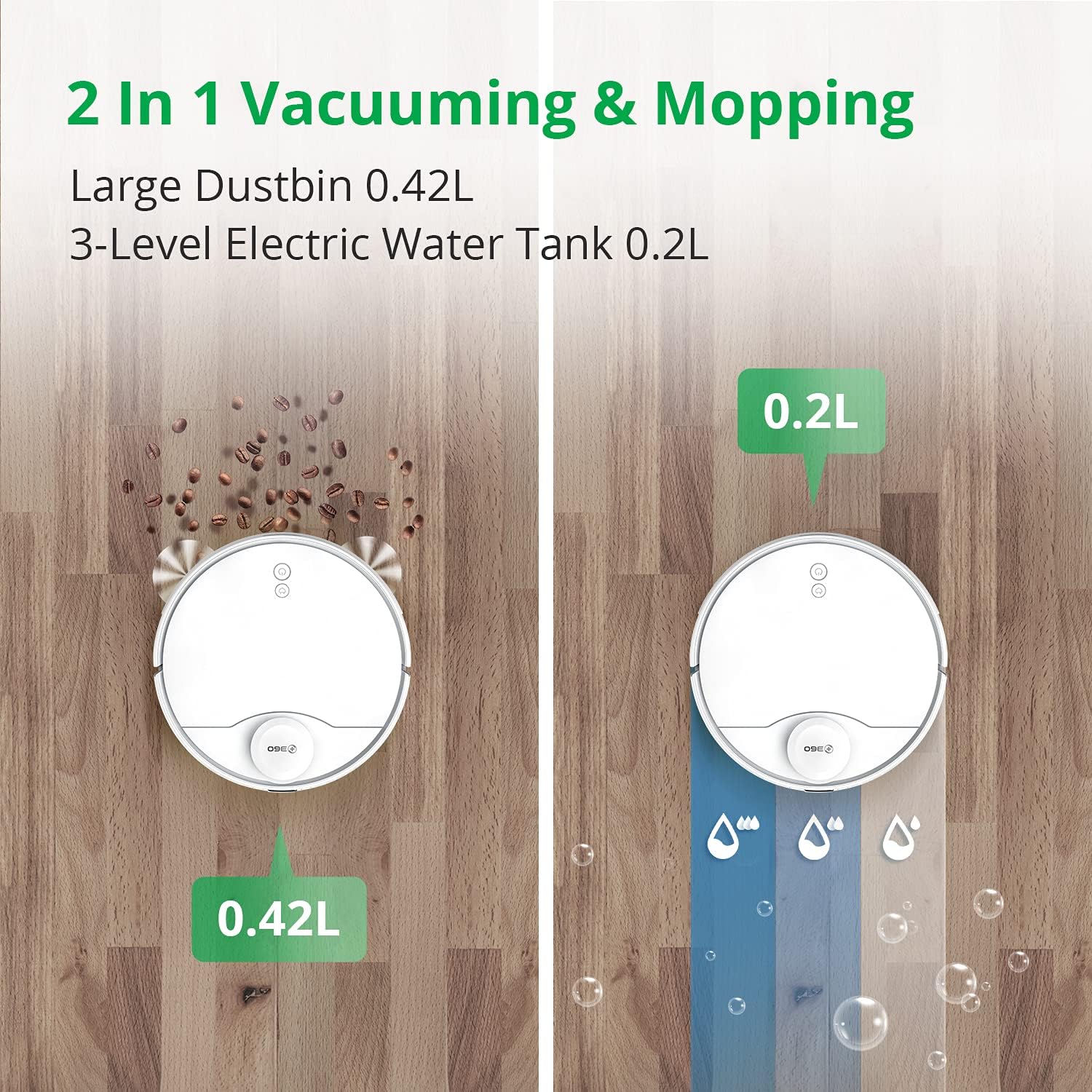
Image: A split image illustrating the 360 S9 Robot Vacuum's dual functionality. On the left, the robot vacuums debris into its 0.42L dustbin. On the right, it mops with water from its 0.2L 3-level electric water tank.
3. Išmanioji navigacija ir žemėlapių sudarymas
The 360 S9 utilizes advanced LiDAR navigation to create precise maps of your home, enabling efficient and systematic cleaning.
- Realaus laiko žemėlapių sudarymas: View the robot's cleaning path and map in real-time on the app.
- Draudžiamos zonos ir virtualios sienos: Set virtual boundaries in the app to prevent the robot from entering specific areas or crossing certain lines.
- Atrankinis kambarių valymas: Divide your home into rooms on the app and select specific rooms for cleaning, or schedule different rooms for different times.

Image: The 360 S9 Robot Vacuum is depicted in a modern living space, emitting green laser lines to illustrate its advanced LiDAR navigation and high-precision mapping capabilities.

Image: The 360 S9 Robot Vacuum is shown cleaning a living room floor, with a child playing nearby. The image highlights customized cleaning features such as No-go Zones, Scheduled Cleaning, and Selected Room Cleaning, indicated by icons above the scene.
4. Baterijos valdymas
- The robot has a long battery life, providing up to 180 minutes of runtime on a single charge.
- When the battery is low, the robot will automatically return to its charging dock to recharge. Once fully charged, it will resume cleaning from where it left off.

Image: The 360 S9 Robot Vacuum is shown approaching its charging dock, with icons indicating its long battery time (160-180 min runtime, 5200mAh) and self-charging capability.
5. Siurbimo galia
The 360 S9 features 2650Pa powerful suction, capable of effectively cleaning various floor types. It also includes a carpet boost function.

Image: The 360 S9 Robot Vacuum is shown on a carpet, illustrating its 2650Pa powerful suction with a carpet boost feature, designed to effectively clean rugs and carpets.
6. Balso valdymo integravimas
The 360 S9 is compatible with smart home assistants, allowing for convenient voice control:
- Amazon Alexa: Connect your 360Robot account to Alexa for voice commands.
- „Google“ padėjėjas: Integrate with Google Home for hands-free control.
Priežiūra
Reguliarus valymas užtikrina optimalų roboto dulkių siurblio veikimą ir pailgina jo tarnavimo laiką.
1. Šiukšlių dėžė ir filtras
- Tuščia šiukšliadėžė: Po kiekvieno valymo ciklo ištuštinkite šiukšliadėžę.
- Išvalyti filtrą: Tap the filter to remove loose dirt. Rinse the filter with water if necessary, ensuring it is completely dry before reinstallation. Replace the filter every 3-6 months depending on usage.
2. Šepečiai
- Pagrindinis šepetys: Remove the main brush cover and lift out the brush. Use the provided cleaning tool to remove hair and debris tangled around the brush. Clean weekly.
- Šoniniai šepečiai: Check side brushes for damage or entanglement. Remove any hair or debris. Replace if worn or damaged. Clean monthly.
3. Water Tank and Mopping Pad
- Tuščias vandens bakas: Po plovimo išpilkite iš bako likusį vandenį.
- Švarus šluostės padas: Remove and wash the mopping pad after each use. Allow it to air dry completely.
4. Jutikliai ir įkrovimo kontaktai
- Wipe all sensors (LiDAR, cliff, wall sensors) and charging contacts on both the robot and the charging dock with a clean, dry cloth. Clean monthly.
Trikčių šalinimas
If you encounter issues with your 360 S9, refer to the following common problems and solutions:
- Robotas neįkraunamas: Ensure the charging dock is powered on and the robot's charging contacts are aligned with the dock's contacts. Clean contacts if dirty.
- Robotas dažnai užstringa: Clear obstacles from the cleaning path. Check for tangled wires or small objects. Ensure no-go zones are correctly set in the app for problematic areas.
- Programėlės ryšio problemos: Verify your Wi-Fi network is 2.4 GHz. Restart your router, robot, and smartphone. Re-pair the robot with the app if necessary.
- Prastas valymo efektyvumas: Empty the dustbin and clean the filter. Check and clean the main brush and side brushes for tangled hair or debris. Ensure the water tank is filled for mopping.
- Neįprasti garsai: Check brushes for foreign objects. Ensure all components are correctly installed.
For further assistance, please contact customer support through the 360Robot App.
Specifikacijos
| Prekės ženklas | 360 |
| Modelis | S9 |
| Ypatinga funkcija | LiDAR Navigation, No-Go Zone, Selective Room |
| Spalva | Baltas |
| Gaminio matmenys | 13.78 colio ilgio x 13.78 colių pločio x 3.94 colio aukščio |
| Prekės svoris | 14.33 svaro |
| Filtro tipas | Kasetė |
| Baterijos veikimo laikas | 180 minučių |
| ttage | 127 voltų |
| Šiukšlių dėžės talpa | 0.42 Liters (from image) |
| Vandens rezervuaro talpa | 0.2 litrai |
| Maitinimo šaltinis | Maitinamas baterijomis |
| Kontrolės metodas | Remote, Voice (App, Amazon Echo, Google Home) |
Garantija ir palaikymas
The 360 S9 Robot Vacuum and Mop comes with a 12 mėnesių garantija nuo pirkimo datos.
For technical support, warranty claims, or any product-related inquiries, please contact 360 Smart Life customer support:
- Via 360Robot App: Access the support section within the application for direct assistance.
- Palaikymas internetu: Visit the official 360 Smart Life webDUK ir kontaktinės informacijos svetainė.
- Atsakymo laikas: Customer support aims to respond within 24 hours.
- A local after-service center is available in California, US.
Susiję dokumentaiS9


Ask a question about this manual
Ask about setup, troubleshooting, compatibility, parts, safety, or missing instructions. Manuals+ will review the question and use this page’s manual context to help answer it.