
1. Produktas baigtasview
The LIDER LTS-2H Countdown Timer Switch is designed to automate the control of lighting fixtures, ceiling fans, bathroom fans, or space heaters. It features six preset countdown options and a manual ON/OFF button, ensuring connected appliances automatically turn off after a set duration. This helps conserve energy and enhances safety by preventing appliances from being left on unintentionally. This product includes two timer switches and two matching wall plates (LWP-31M-W).

Image 1.1: The LIDER LTS-2H Countdown Timer Switch seamlessly integrates into various home environments, providing convenient control for lighting and fans.
2. Pakuotės turinys
- 2 x LIDER LTS-2H Countdown Timer Switches
- 2 x LIDER Wall Plates (Model: LWP-31M-W)
- Montavimo varžtai
3. Saugos informacija
ĮSPĖJIMAS: To avoid fire, shock, or death, turn off power at the circuit breaker or fuse box and test that the power is off before wiring. Installation should be performed by a qualified electrician or in accordance with local electrical codes. This device requires a neutral wire for proper operation. Ensure all wire connections are secure.
4. Įdiegimas (sąranka)
- Išjungti maitinimą: Locate the circuit breaker or fuse that supplies power to the switch location and turn it OFF. Verify power is off using a voltage testeris.
- Seno jungiklio pašalinimas: Atsargiai nuimkite esamą sieninę plokštę ir jungiklį nuo sieninės dėžutės. Atjunkite laidus nuo seno jungiklio.
- Identifikuokite laidus: Identify the LINE (Hot), LOAD, NEUTRAL, and GROUND wires in the wall box. A neutral wire is required for this timer switch.
- Prijunkite laikmačio jungiklį: Connect the wires to the LIDER LTS-2H switch terminals as follows:
- Connect the LINE (Hot) wire to the terminal labeled 'HOT'.
- Connect the LOAD wire to the terminal labeled 'LOAD'.
- Connect the NEUTRAL wire to the terminal labeled 'NEUTRAL'.
- Connect the GROUND wire to the terminal labeled 'GROUND'.
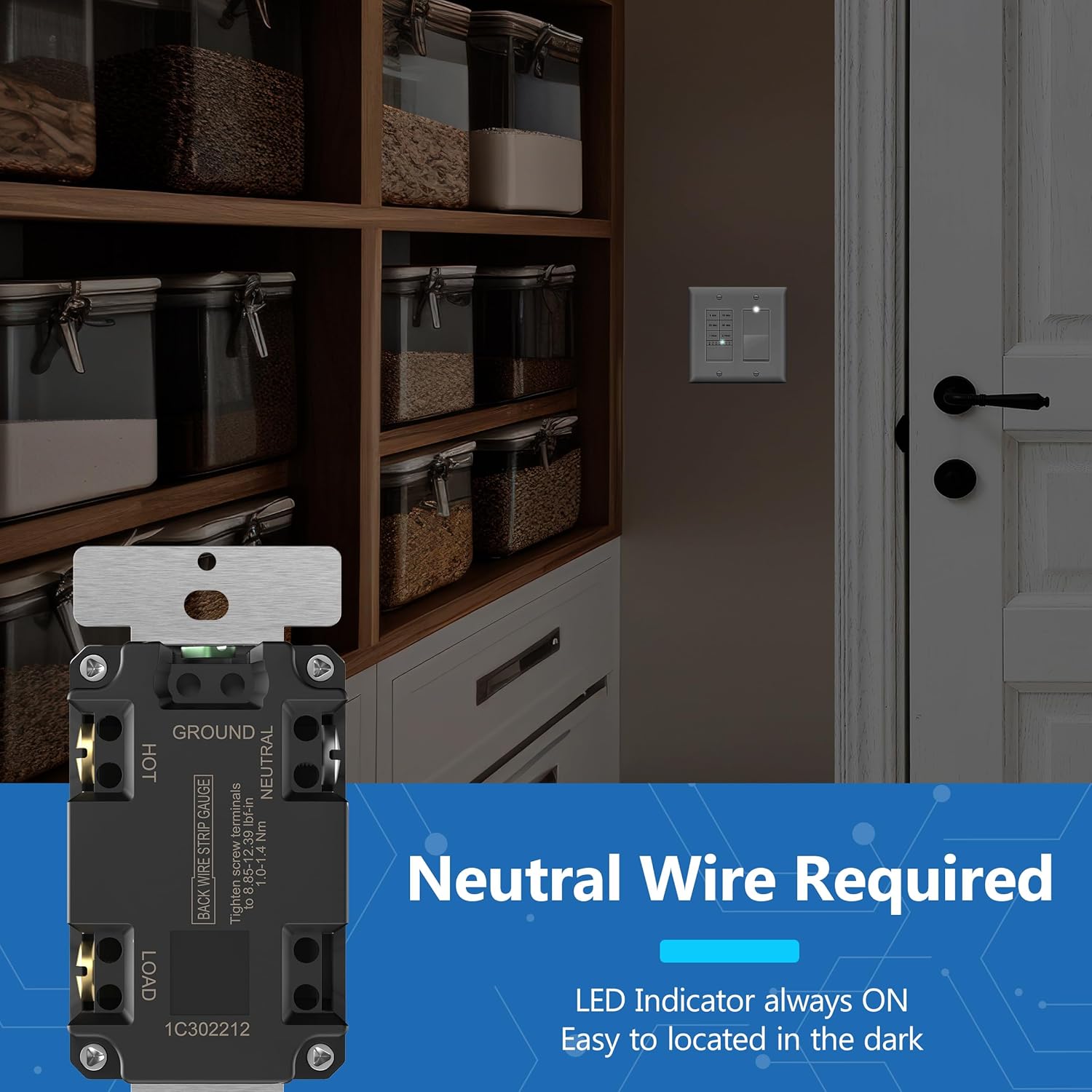
Image 4.1: Wiring diagram on the back of the LIDER LTS-2H switch, indicating connections for Hot, Ground, Load, and Neutral wires. A neutral wire is essential for installation.
- Sumontuokite jungiklį: Carefully push the wired switch into the wall box and secure it with the provided screws.
- Įdiekite sieninę plokštę: Attach the LIDER wall plate over the switch.
- Atkurti maitinimą: Įjunkite maitinimą grandinės pertraukikliu.
5. Operacija
5.1 Laikmačio nustatymas
The LIDER LTS-2H switch features six preset buttons for countdown timing:
- 5 minučių
- 10 minučių
- 20 minučių
- 30 minučių
- 1 valanda
- 2 valandų
To activate a timer, simply press the desired time button. The connected load will turn ON and automatically turn OFF once the selected time expires.
5.2 Manual ON/OFF
The switch includes a manual ON/OFF button located at the bottom. Press this button once to turn the load ON or OFF, overriding any active timer setting.
5.3 LED Indicator Modes
The blue LED indicators on the switch have two operating modes:
- Mode 1 (Default): After a timer is set, the LED flashes twice to confirm the setting, then turns OFF.
- 2 režimas: The LED remains ON during the entire selected time delay and turns OFF when the timer expires.
To switch between LED modes, ensure the switch is ON, then press and hold the top two timer buttons simultaneously for 7 seconds. The LED indicator will flash three times to confirm the mode change.
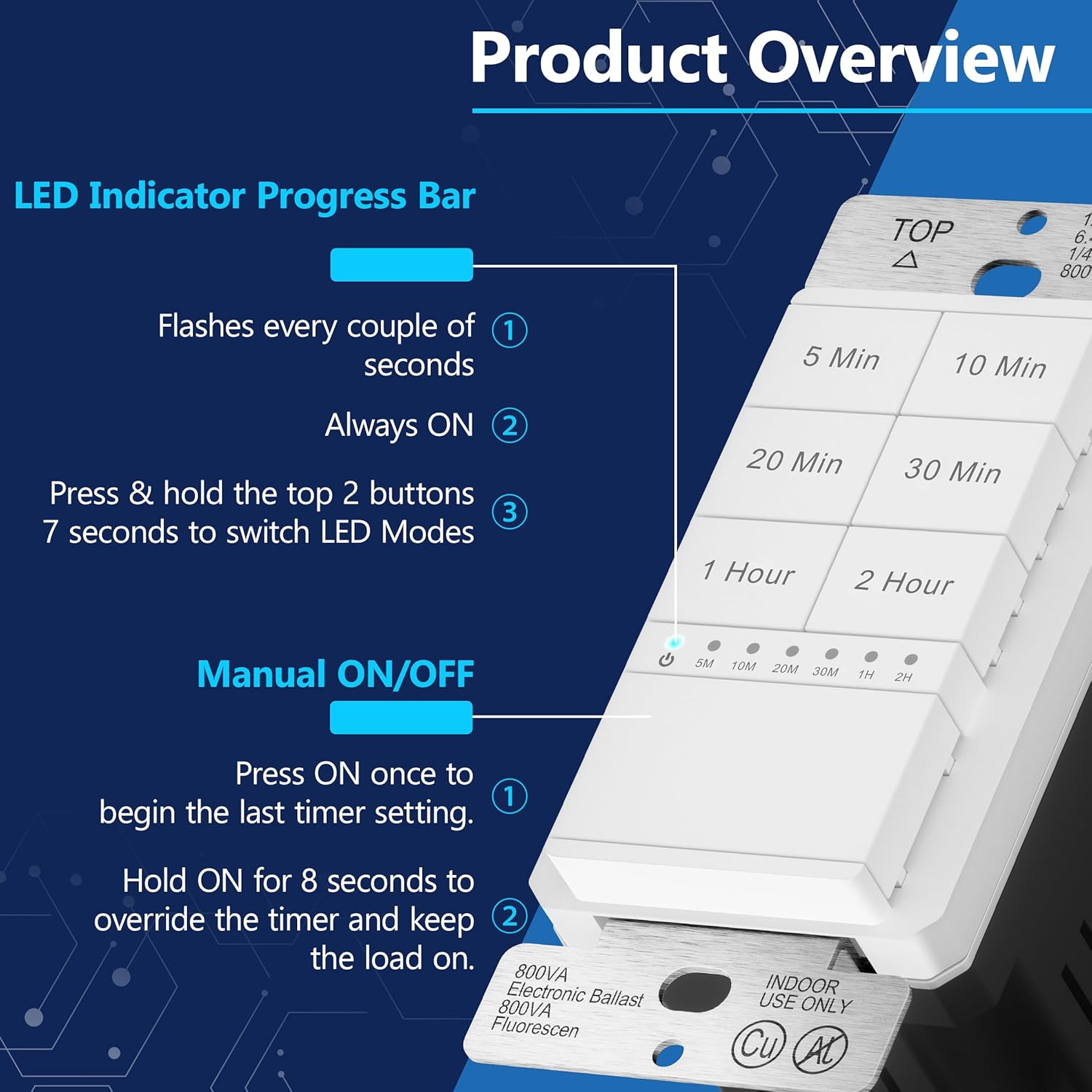
5.1 pav.: Išsamus view of the LIDER LTS-2H switch, highlighting the timer buttons, manual control, and LED indicator functionality.

Image 5.2: Illustration of the LED indicator progress bar, demonstrating how the blue LEDs illuminate to show the active timer duration or setting confirmation.
6. Priežiūra
To clean the timer switch, ensure power is turned off at the circuit breaker. Use a soft, damp cloth to wipe the surface. Avoid using abrasive cleaners or solvents, as these may damage the finish or internal components.
7. Problemų sprendimas
- Jungiklis nereaguoja:
- Patikrinkite, ar įjungtas grandinės pertraukiklis.
- Verify all wiring connections are secure, especially the neutral wire.
- Ensure the load (light/fan) is functioning correctly.
- LED Indicator Not Behaving as Expected:
- Review Section 5.3 on LED Indicator Modes.
- Attempt to switch LED modes by holding the top two buttons for 7 seconds to reset the display behavior.
- Load Does Not Turn Off After Timer:
- Ensure the correct timer button was pressed and the LED indicator confirmed the setting.
- If the manual ON/OFF button was used to override the timer, the load will remain on until manually turned off.
8. Specifikacijos
| Funkcija | Specifikacija |
|---|---|
| Modelio numeris | LTS-2H-WWP2P |
| Veikimo režimas | ĮJUNGTI IŠJUNGTI |
| Dabartinis reitingas | 15 Amps |
| ttage | 120VAC, 60Hz |
| Vattage | 1200 vatų |
| Variklio arklio galia | 1 / 2 HP |
| Grandinės tipas | 1 krypčių |
| Montavimo tipas | Sieninis laikiklis |
| Pavaros tipas | Mygtukas |
| Medžiaga | Plastikiniai |
| Spalva | White (with blue LED indicators) |
| Darbinė temperatūra | nuo 32 °F iki 131 °F (nuo 0 °C iki 55 °C) |
| Sertifikatai | Įtrauktas į UL sąrašą |
| UPC | 883951850326 |
9. Garantija ir palaikymas
9.1 Informacija apie garantiją
The LIDER LTS-2H Countdown Timer Switch comes with a 1-year limited warranty from the date of purchase. This warranty covers defects in materials and workmanship under normal use. It does not cover damage resulting from improper installation, misuse, abuse, or unauthorized modifications.
9.2 Pagalba klientams
For technical assistance, troubleshooting, or warranty claims, please contact LIDER customer support. Refer to the product packaging or the LIDER official websvetainę, kurioje rasite naujausią kontaktinę informaciją.