
Įvadas
Ačiū, kad pirkoteasing the Toyomi TF 1624 Desk Fan with Timer. This manual provides important information regarding the safe operation, assembly, maintenance, and troubleshooting of your new desk fan. Please read this manual thoroughly before use and retain it for future reference.
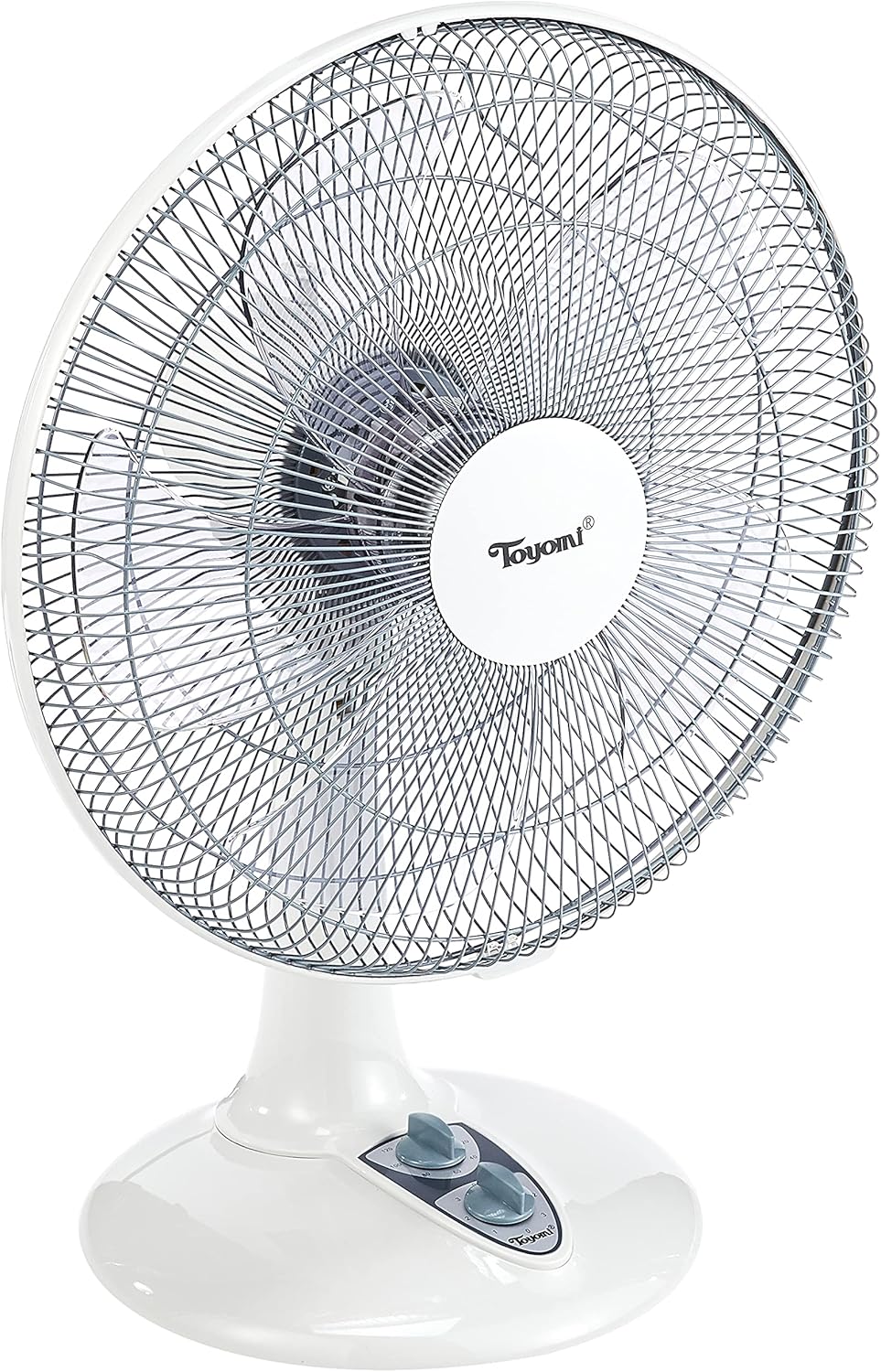
The Toyomi TF 1624 is a 16-inch desk fan designed to provide powerful cooling with 3 speed settings and 90° oscillation. It features a 2-hour timer for energy saving and operates quietly, making it suitable for various environments like offices or bedrooms.
Saugos instrukcijos
Kad sumažintumėte gaisro, elektros smūgio ar sužalojimo riziką, visada laikykitės šių pagrindinių saugos priemonių:
- Prieš naudodami šį prietaisą perskaitykite visas instrukcijas.
- Užtikrinkite maitinimo šaltinio ttage atitinka ventiliatoriaus vardinę etiketę.
- Nenaudokite ventiliatoriaus su pažeistu laidu ar kištuku. Jei laidas pažeistas, jį turi pakeisti gamintojas, jo techninės priežiūros atstovas arba panašios kvalifikacijos asmenys, kad būtų išvengta pavojaus.
- Atjunkite ventiliatorių nuo elektros lizdo, kai jo nenaudojate, prieš valydami arba prieš jį perkeldami.
- Do not insert fingers or any other objects through the fan guard when the fan is operating.
- Nenaudokite ventiliatoriaus šalia vandens aramp tokiose vietose kaip vonios kambariai.
- Pastatykite ventiliatorių ant lygaus, stabilaus paviršiaus, kad jis neapvirstų.
- Šis prietaisas nėra skirtas naudoti asmenims (įskaitant vaikus), kurių fizinės, jutimo ar psichikos negalios arba neturintys patirties ir žinių, nebent už jų saugumą atsakingas asmuo juos prižiūrėtų arba instruktuotų, kaip naudoti prietaisą.
- Vaikus reikia prižiūrėti, kad jie nežaistų su prietaisu.
Produkto komponentai
Familiarize yourself with the parts of your Toyomi TF 1624 Desk Fan:
- Priekinė gvardija
- Ventiliatorius
- Galinė apsauga
- Variklio korpusas
- Control Panel (Speed and Timer Knobs)
- Virpesių rankenėlė
- Bazė
- Maitinimo laidas ir kištukas

Sąranka ir surinkimas
The Toyomi TF 1624 Desk Fan features an easy assembly base. Follow these steps to set up your fan:
- Išpakuoti: Atsargiai išimkite visus komponentus iš pakuotės. Įsitikinkite, kad yra visos dalys, išvardytos skyriuje „Gaminio komponentai“.
- Surinkite pagrindą: Attach the fan body to the base. Ensure it is securely fastened.
- Attach Rear Guard: Place the rear guard onto the motor housing, aligning the notches. Secure it with the provided nut or clips.
- Ventiliatoriaus mentės montavimas: Slide the fan blade onto the motor shaft. Ensure it is pushed all the way back and secured with the blade cap.
- Pritvirtinkite priekinę apsaugą: Place the front guard over the fan blade and align it with the rear guard. Secure the front guard using the clips or screws provided, ensuring it is firmly closed.
- Padėties ventiliatorius: Place the assembled fan on a stable, flat, and dry surface. Ensure there is adequate space around the fan for proper air circulation.
Naudojimo instrukcijos
Once assembled, your Toyomi TF 1624 Desk Fan is ready for operation.

Įjungimas / išjungimas ir greičio valdymas:
- Prijunkite: Įkiškite maitinimo kištuką į tinkamą elektros lizdą.
- Įjungti: Rotate the lower knob (Speed Control) clockwise from '0' to select your desired fan speed:
- '1' for Low speed
- '2' for Medium speed
- '3' for High speed
- Išjungti: Rotate the Speed Control knob counter-clockwise back to '0' to turn off the fan.
Virpesių funkcija:
- To activate oscillation (fan head moves side-to-side), push down the oscillation knob located on top of the motor housing.
- To stop oscillation and direct airflow in a fixed direction, pull up the oscillation knob.
Laikmačio funkcija:
Ventiliatorius turi 2 valandų laikmatį.
- To set the timer, rotate the upper knob (Timer Control) clockwise to the desired duration (e.g., 60 minutes, 120 minutes).
- The fan will operate for the set duration and then automatically turn off.
- To operate the fan continuously without the timer, set the timer knob to the 'OFF' position.
Priežiūra ir valymas
Reguliarus valymas ir priežiūra užtikrins optimalų ventiliatoriaus veikimą ir prailgins jo tarnavimo laiką.
- Visada atjunkite ventiliatorių nuo elektros tinklo prieš valydami atjunkite nuo elektros lizdo.
- Išorinis valymas: Nuvalykite ventiliatoriaus išorinius paviršius minkšta,amp šluoste. Nenaudokite abrazyvinių valiklių ar tirpiklių, nes jie gali pažeisti apdailą.
- Guard and Blade Cleaning: To clean the fan blades and inside the guards, you may need to carefully remove the front guard. Refer to the assembly instructions for guidance on removing and reattaching the guard. Use a soft cloth or a vacuum cleaner with a brush attachment to remove dust from the blades and guards.
- Nenardinkite the fan in water or allow water to drip into the motor housing.
- Saugykla: When not in use for extended periods, store the fan in a cool, dry place, preferably in its original packaging, to protect it from dust.
Trikčių šalinimas
If you encounter any issues with your Toyomi TF 1624 Desk Fan, refer to the following common problems and solutions:
| Problema | Galima priežastis | Sprendimas |
|---|---|---|
| Ventiliatorius neįsijungia. |
|
|
| Ventiliatorius triukšmingas arba vibruoja. |
|
|
| Osciliacija neveikia. |
|
|
| Laikmatis neveikia tinkamai. |
|
|
Specifikacijos
| Funkcija | Detalė |
|---|---|
| Prekės ženklas | Toyomi |
| Modelio pavadinimas | TF 1624 |
| Elektrinio ventiliatoriaus dizainas | Stalo ventiliatorius |
| Dydis | 16 colių |
| Spalva | Baltas |
| Maitinimo šaltinis | Su laidu elektra |
| Greičių skaičius | 3 |
| Laikmatis | 2 valandų |
| Ypatingos savybės | Svyruoja |
| Valdiklio tipas | Button Control (Knobs) |
| Medžiaga | Plastikiniai |
| Vattage | 55 vatų |
| Ašmenų skaičius | 3 |
| Naudojimas viduje / lauke | Vidinis |
| Montavimo tipas | Stalviršio laikiklis |

Garantija ir palaikymas
For warranty information or technical support, please refer to the warranty card included with your product or contact Toyomi customer service. Keep your purchase receipt as proof of purchase for any warranty claims.
For further assistance, you may visit the official Toyomi websvetainėje arba kreipkitės į jų įgaliotuosius techninės priežiūros centrus.