
Mesko MS-3160
Mesko Precision Kitchen Scale MS-3160 User Manual
Modelis: MS3160
1. Įvadas
Thank you for choosing the Mesko Precision Kitchen Scale MS-3160. This digital scale is designed for accurate weighing of various items, offering high precision for both kitchen use and other applications requiring fine measurements. Please read this manual carefully before use to ensure proper operation and to maximize the lifespan of your device.
2. Saugos instrukcijos
- Do not overload the scale beyond its maximum capacity of 500 grams. Overloading can damage the sensor.
- Keep the scale away from water and moisture. It is not waterproof.
- Avoid extreme temperatures and sudden temperature changes.
- Do not drop or subject the scale to strong impacts.
- Nuvalykite svarstykles minkšta, damp audinys. Nenaudokite abrazyvinių valiklių ir nemerkite į vandenį.
- Store the scale in a clean, dry place when not in use.
- Laikyti vaikams nepasiekiamoje vietoje.
3. Pakuotės turinys
- Mesko Precision Kitchen Scale MS-3160
- Vartotojo vadovas
Pastaba: Baterijos paprastai neįeina į komplektą ir turi būti įsigytos atskirai.
4. Produktas baigtasview
Familiarize yourself with the components of your Mesko Precision Kitchen Scale.
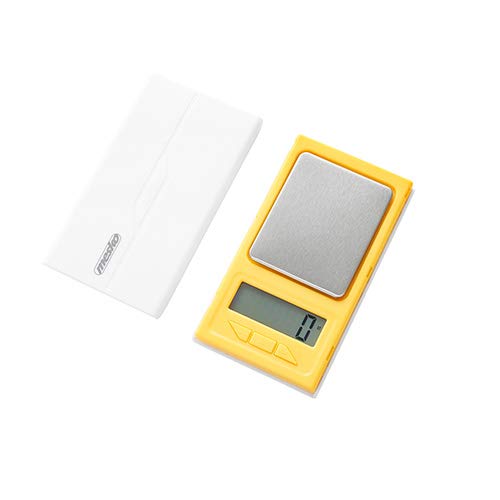
Figure 1: Mesko Precision Kitchen Scale MS-3160 with a gold ring on the weighing platform, displaying '1.2'.

Figure 2: Close-up of the LCD display showing '1.2 ct', indicating 1.2 carats.
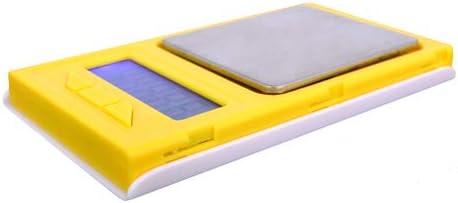
3 pav.: šonas view of the Mesko MS-3160 scale, illustrating its compact and lightweight design.
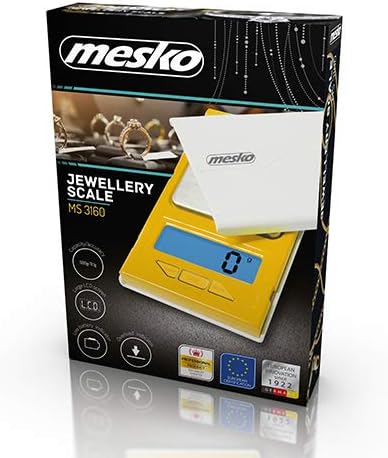
Figure 4: Product packaging for the Mesko MS-3160, highlighting its features as a jewelry scale.
5. Sąranka
5.1 Akumuliatoriaus įdėjimas
- Apatinėje svarstyklių pusėje raskite baterijos skyrių.
- Atidarykite akumuliatoriaus skyriaus dangtelį.
- Insert the required batteries (e.g., AAA, specific type not provided in data, assume common type) according to the polarity indicators (+/-).
- Saugiai uždarykite akumuliatoriaus skyriaus dangtelį.
5.2 Pradinis išdėstymas
- Place the scale on a hard, flat, and stable surface to ensure accurate readings.
- Avoid placing the scale near sources of vibration, drafts, or extreme temperature fluctuations.
6. Naudojimo instrukcijos
6.1 Įjungimas / išjungimas
- Norėdami įjungti svarstykles, paspauskite [ON/OFF] button. The display will show '0.0' or '0.00' when ready.
- Norėdami išjungti svarstykles, paspauskite ir palaikykite [ON/OFF] button for a few seconds, or it will automatically shut off after a period of inactivity (auto-off function).
6.2 Svorio vienetų keitimas
- With the scale on and displaying '0.0', press the [VIENETAS] button to cycle through the available weight units: grams (g), carats (ct), pennyweights (dwt), troy ounces (ozt), ounces (oz), and grains (gn).
- Select the desired unit before placing items on the platform.
6.3 Taros funkcija
The tare function allows you to subtract the weight of a container, so you only measure the contents.
- Padėkite tuščią indą ant svėrimo platformos. Ekrane bus rodomas jo svoris.
- Paspauskite [TARA] mygtuką. Ekrane bus nustatytas naujas skaičius „0.0“.
- Įdėkite norimus pasverti daiktus į konteinerį. Ekrane bus rodomas grynasis daiktų svoris.
- Norėdami išvalyti tarą, nuimkite visus daiktus nuo platformos ir paspauskite [TARA] again, or turn the scale off and on.
6.4 Svėrimo elementai
- Turn on the scale and ensure it displays '0.0' in your desired unit.
- Atsargiai padėkite sveriamą(-us) daiktą(-us) svėrimo platformos centre.
- Palaukite, kol ekranas stabilizuosis. Bus parodytas stabilus svoris.
6.5 Hold Function (Delay Function)
This function allows the display to hold the weight reading even after the item is removed, useful for unstable items or when the display is hard to read during weighing.
- While weighing an item, if the scale has a hold function, it may activate automatically or require a button press (refer to specific button labels on your device if available).
- The display will typically show a 'HOLD' indicator or similar icon.
7. Priežiūra
7.1 Valymas
- Svarstyklių paviršių nuvalykite minkšta, šiek tiek drėgna šluosteamp audinys.
- Do not use chemical cleaning agents, abrasive materials, or immerse the scale in water.
- Prieš padėdami svarstykles saugoti arba naudodami kitą kartą, įsitikinkite, kad jos yra visiškai sausos.
7.2 Saugykla
- Svarstykles laikykite vėsioje, sausoje vietoje, toliau nuo tiesioginių saulės spindulių ir ekstremalių temperatūrų.
- Jei svarstyklės ilgesnį laiką nebus naudojamos, išimkite baterijas, kad išvengtumėte ištekėjimo ir galimos žalos.
8. Problemų sprendimas
Jei kyla problemų dėl svarstyklių, žr. šias dažniausiai pasitaikančias problemas ir sprendimus:
| Problema | Galima priežastis | Sprendimas |
|---|---|---|
| Ekrane rodoma „Lo“ | Maža akumuliatoriaus energija. | Pakeiskite baterijas naujomis. |
| Display shows 'O-Ld' or 'EEEE' | Overload. The item on the platform exceeds the maximum capacity. | Remove the item immediately. Do not exceed 500 grams. |
| Netikslūs rodmenys | Unstable surface, drafts, or scale not tared correctly. | Place the scale on a flat, stable surface. Avoid drafts. Perform tare function before weighing. |
| Svarstyklės neįsijungia | Neteisingai įdėtos arba išsikrovusios baterijos. | Patikrinkite baterijų poliškumą. Jei reikia, pakeiskite baterijas. |
9. Specifikacijos
| Funkcija | Detalė |
|---|---|
| Prekės ženklas | Mesko |
| Modelio numeris | MS-3160 (Internal: 49132374) |
| Didžiausia talpa | 500 gramų |
| Tikslumas | 0.1 gramų |
| Svorio vienetai | g / ct / dwt / ozt / oz / gn |
| Ekrano tipas | LCD |
| Ypatingos savybės | Tare Function, Hold Function, Overload Indicator, Lightweight |
| Medžiaga | Plastikiniai |
| Spalva | Geltona |
| Gaminio matmenys | 16 x 11 x 3 cm |
| Produkto svoris | 110 g |
10. Garantija ir palaikymas
Mesko products are designed for reliability and performance. For information regarding warranty coverage, technical support, or service, please refer to the warranty card included with your purchase or visit the official Mesko websvetainėje. Prašome išsaugoti pirkimo įrodymą, jei prireiktų pateikti pretenziją dėl garantijos.
Ask a question about this manual
Ask about setup, troubleshooting, compatibility, parts, safety, or missing instructions. Manuals+ will review the question and use this page’s manual context to help answer it.