
Įvadas
This manual provides detailed instructions for the installation, operation, and maintenance of your XVIM 8CH 1080P Home Security Camera System. Please read this manual thoroughly before using the product to ensure proper setup and functionality. Keep this manual for future reference.
Produktas baigtasview
The XVIM 8CH 1080P Home Security Camera System includes an 8-channel Digital Video Recorder (DVR) with a 1TB hard drive and four 2MP HD outdoor IP66 waterproof cameras. The system is designed for reliable surveillance with features such as night vision and remote access capabilities.

Vaizdas: Viršview of the XVIM 1080P HD Security Camera System, showing a camera and a smartphone displaying live view.
Kameros ypatybės
- IP66 Metal Housing: Durable and weatherproof construction.
- 3.6mm HD Lens: Suteikia 75° vaizdą viewing kampas.
- IR-Cut filtras: Ensures clear day and night vision.
- 24 šviesos diodai: Offers up to 65ft night vision range.

Image: Diagram highlighting key camera features: IP66 metal housing, 3.6mm HD lens, IR-cut filter, and 24 LEDs.
Day and Night Monitoring
The cameras are equipped with an IR-Cut filter and infrared LEDs to provide clear surveillance both during the day and at night. During the day, images are colorful and high definition. At night, the cameras automatically switch to infrared mode for clear black and white vision in low-light conditions.
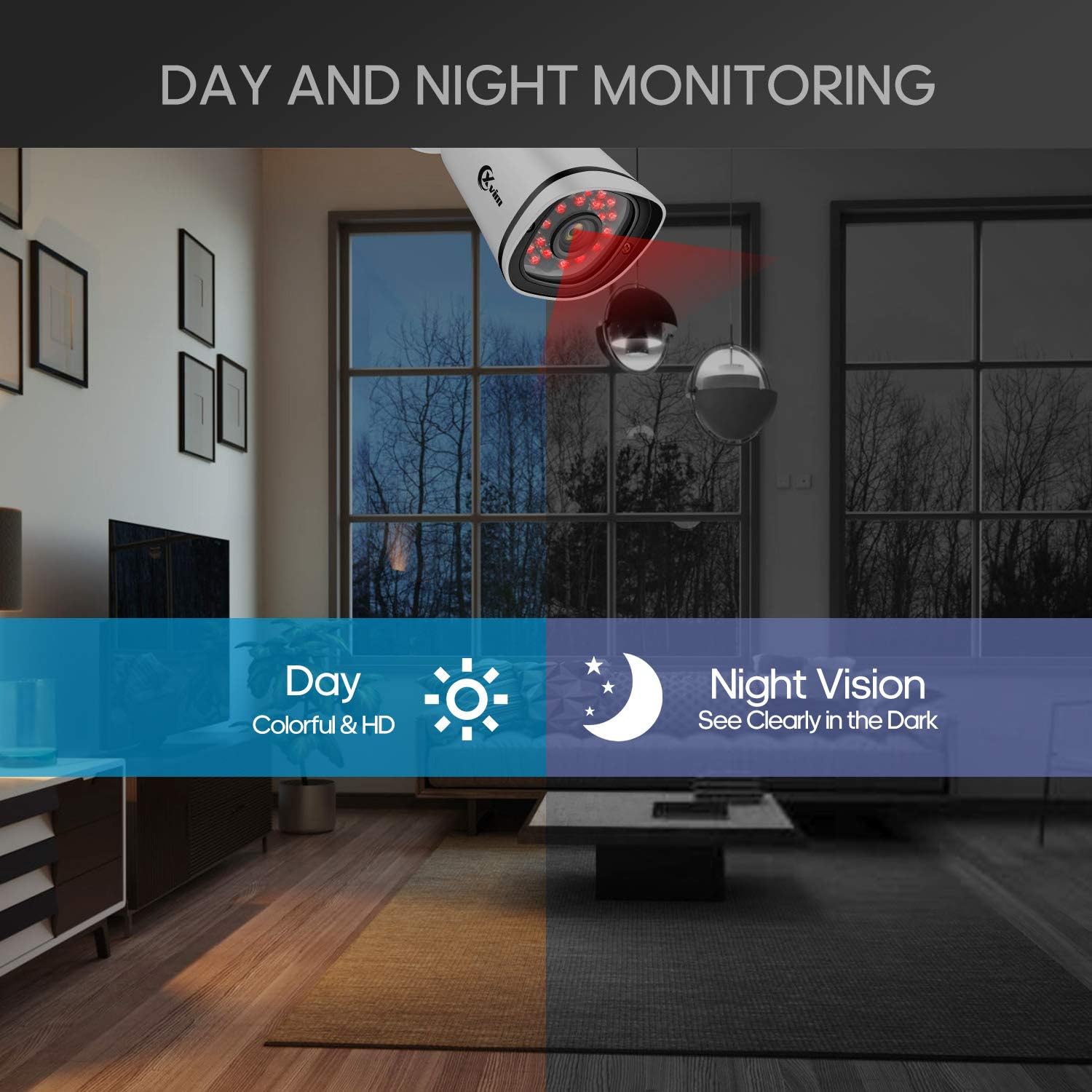
Image: Illustration showing the camera's ability to monitor both during the day (colorful HD) and at night (clear vision in the dark).
Vandeniui atsparus dizainas
The cameras feature an IP66-rated metal housing, ensuring they are protected against dust and powerful water jets, making them suitable for outdoor installation in various weather conditions.
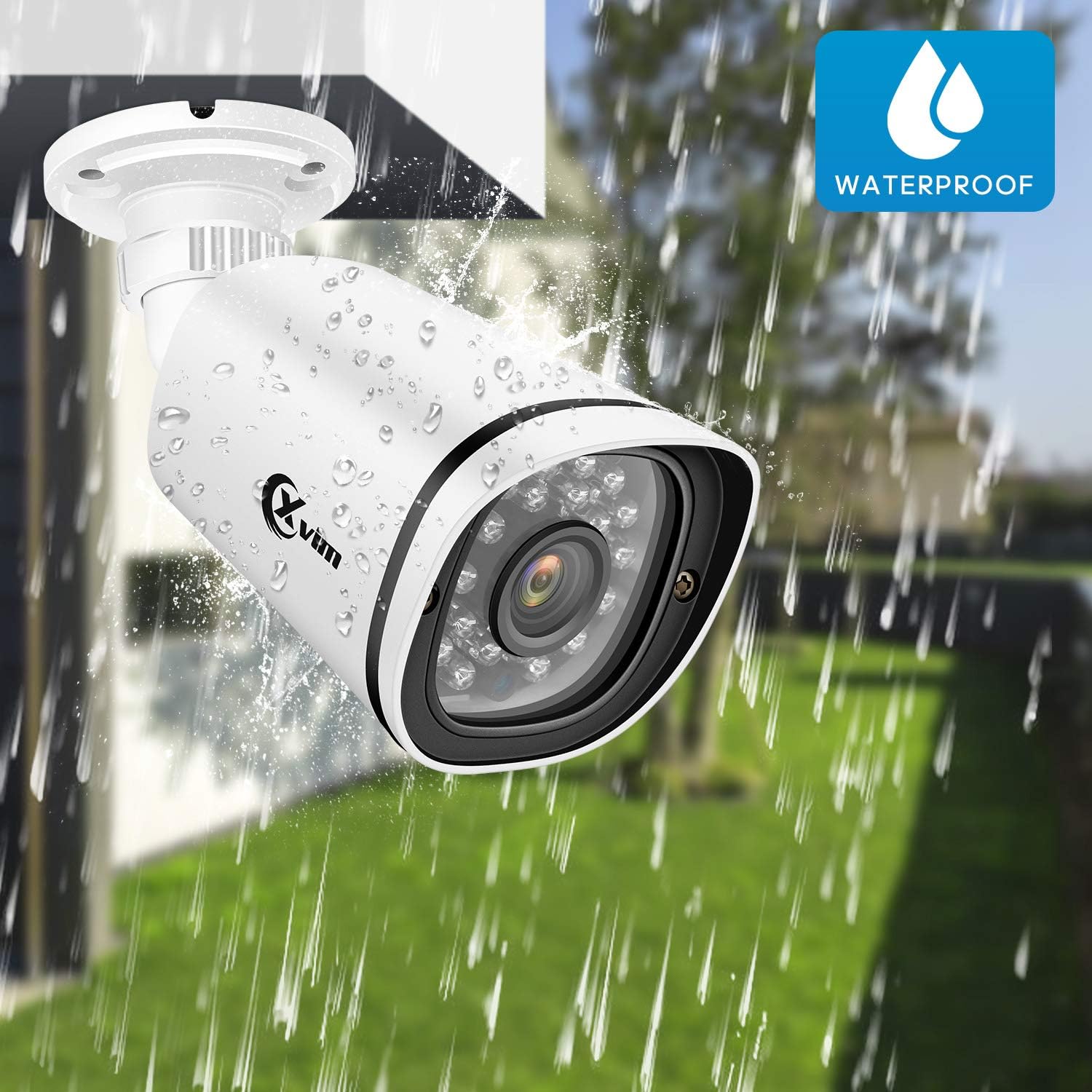
Image: An XVIM camera being sprayed with water, illustrating its waterproof design.
DVR Back Panel Overview
The DVR unit provides multiple ports for connecting cameras, a monitor, audio input/output, and network connectivity. Familiarize yourself with the ports before installation.
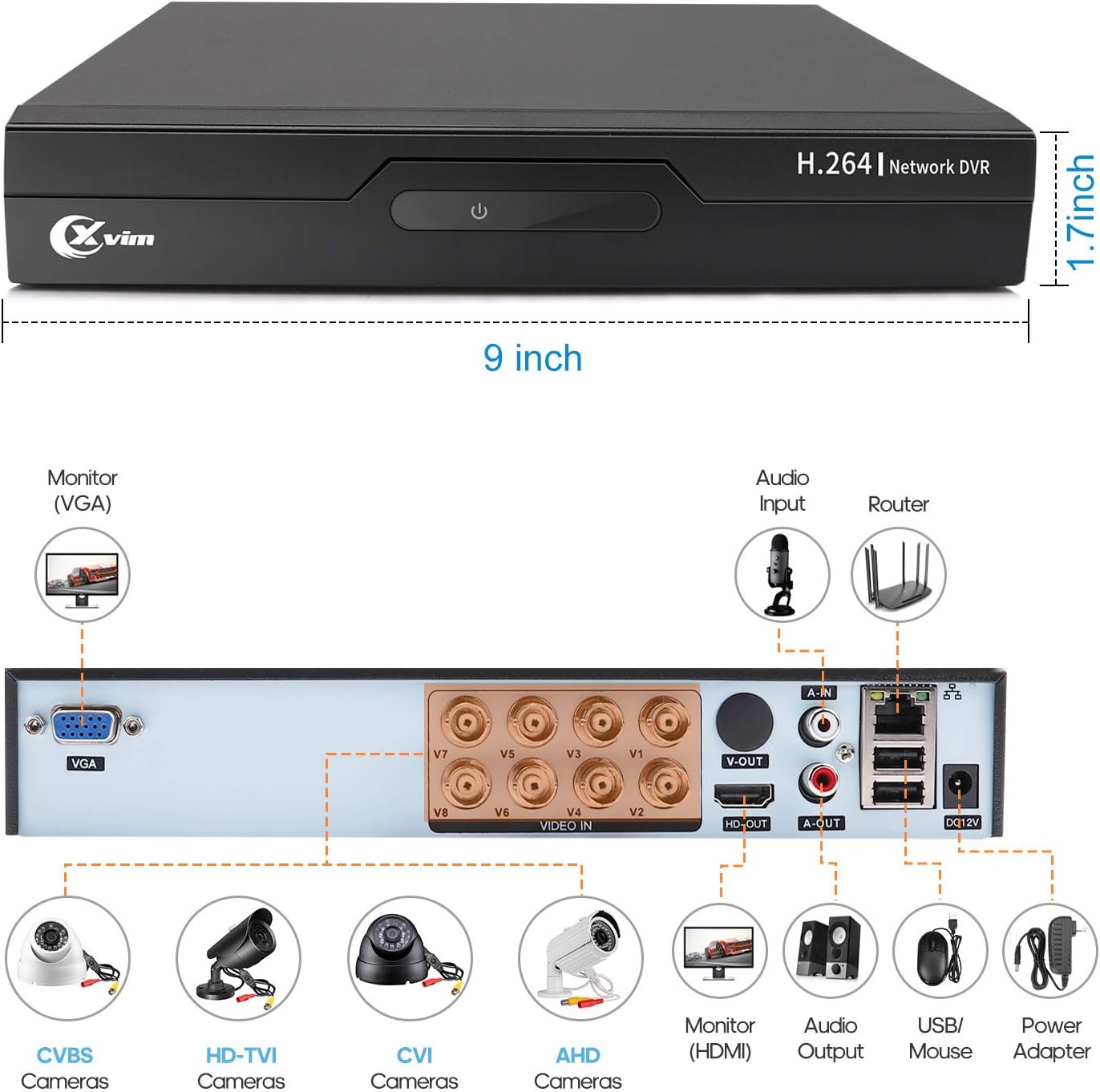
Image: Diagram of the DVR's back panel, showing ports for VGA, HDMI, video input (BNC), audio input/output, USB, and power.
Sąrankos instrukcijos
- Prijunkite kameras prie vaizdo registratoriaus: Connect each camera to the corresponding video input (BNC) port on the DVR using the provided cables. Ensure secure connections.
- Prijunkite vaizdo registratorių prie monitoriaus: Connect the DVR to a monitor using either the VGA or HDMI port.
- Prijunkite vaizdo registratorių prie tinklo: Norėdami nuotolinės prieigos, prijunkite vaizdo registratorių prie maršrutizatoriaus naudodami eterneto kabelį.
- Prijunkite maitinimą: Connect the power adapters to the cameras and the DVR, then plug them into a power outlet. The system will power on automatically.
- Pradiniai nustatymai: Follow the on-screen prompts on your monitor to complete the initial DVR setup, including setting up a password and configuring basic settings.
- Programėlės mobiliesiems sąranka:
- Download the "XVR Pro" app from your smartphone's app store.
Atsisiųskite „Android“.
Atsisiųskite iOS - Register for an account within the app.
- Add your DVR device by scanning the QR code displayed on the DVR's monitor or by manually entering the device ID.
- Pridėjus, galite view your cameras remotely from anywhere.
- Download the "XVR Pro" app from your smartphone's app store.

Image: Step-by-step guide for connecting the system components and setting up the XVR Pro mobile application.
Naudojimo instrukcijos
Tiesiogiai View
Po sėkmingo nustatymo galite view gyvas kvailystage from your cameras on the connected monitor or through the XVR Pro mobile app. The DVR interface allows you to switch between single-camera view ir kelių kamerų tinklelis view.
Įrašymo režimai
The system supports various recording modes:
- Rankinis įrašymas: Start and stop recording manually via the DVR interface.
- Judesio aptikimo įrašymas: Configure the system to record automatically when motion is detected in specified areas. This helps conserve hard drive space.
- Suplanuotas įrašymas: Set specific times for continuous recording.
Refer to the DVR's on-screen menu for detailed configuration of recording schedules and motion detection zones.
Nuotolinė prieiga
The XVR Pro app enables you to:
- View live camera feeds from anywhere with an internet connection.
- Atkūrimas įrašytas footage stored on the DVR.
- Gaukite judesio aptikimo įspėjimus.
- Control certain DVR settings remotely.
Camera Mode Switching (OSD Menu)
Each camera features an OSD (On-Screen Display) button on its cable, allowing you to switch between different video modes (Analog, AHD, TVI, CVI) to ensure compatibility with various DVRs. To access the OSD menu and switch modes:
- Analog (CVBS) Mode: Paspauskite OSD mygtuką Aukštyn 5 sekundes.
- AHD Mode: Paspauskite OSD mygtuką Kairėn 5 sekundes.
- TVI Mode: Paspauskite OSD mygtuką Teisingai 5 sekundes.
- CVI Mode: Paspauskite OSD mygtuką Žemyn 5 sekundes.
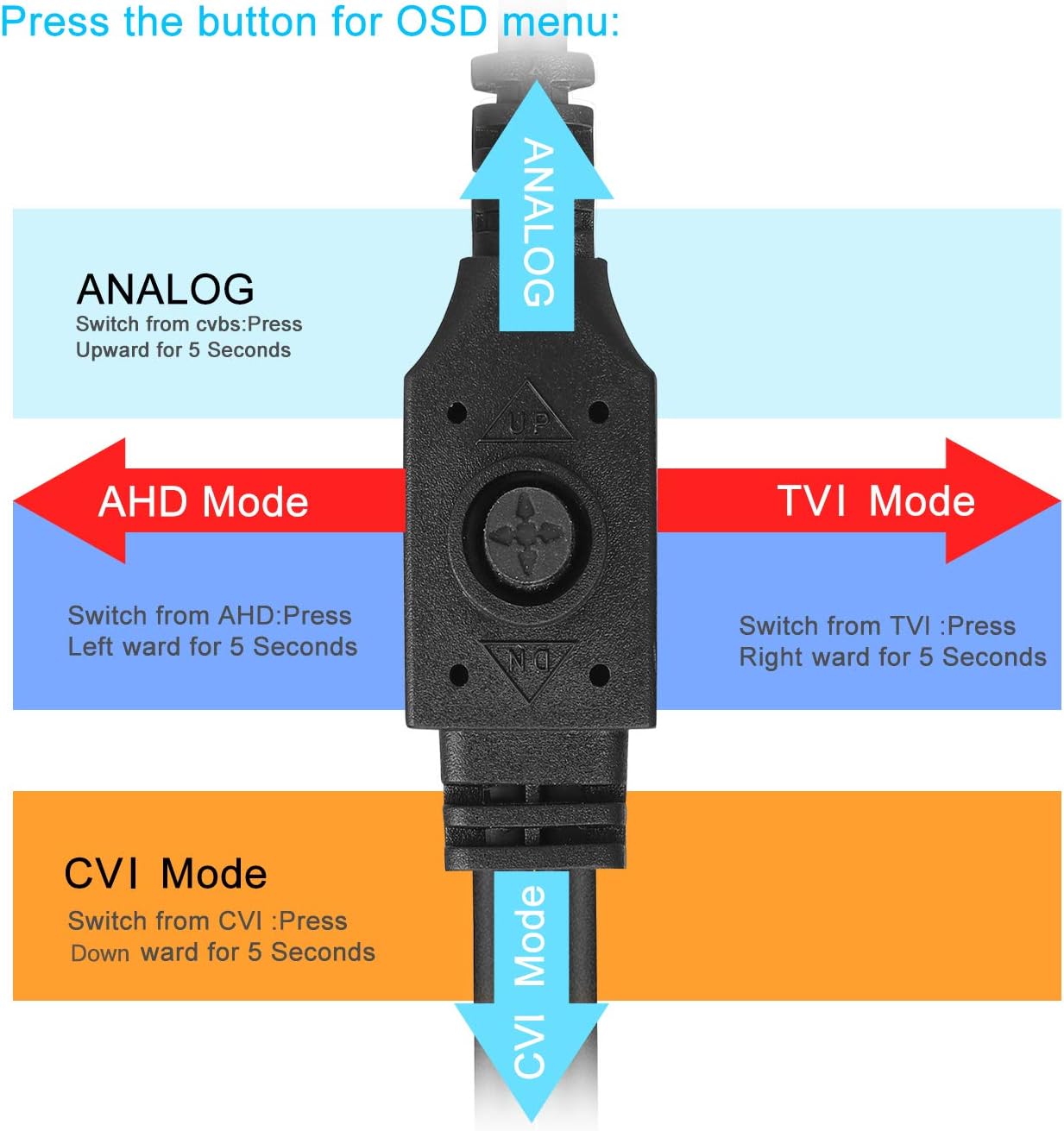
Image: Diagram illustrating how to use the OSD button on the camera cable to switch between Analog, AHD, TVI, and CVI video modes.
Priežiūra
- Kameros valymas: Reguliariai valykite fotoaparato objektyvus minkšta,amp šluoste, kad užtikrintumėte aiškią vaizdo kokybę. Venkite abrazyvinių valiklių.
- Kabelio apžiūra: Periodically check all cables and connections for wear, damage, or loose connections.
- DVR ventiliacija: Užtikrinkite tinkamą DVR įrenginio ventiliaciją, kad jis neperkaistų. Pasirūpinkite, kad ventiliacijos angos būtų neuždengtos.
- Kietojo disko valdymas: 1 TB kietasis diskas automatiškai perrašys seniausius failus.tage, kai pilna. Jei reikia, reguliariai kurkite svarbių įrašų atsargines kopijas.
- Firmware atnaujinimai: Check the XVIM official website for any available firmware updates for your DVR to ensure optimal performance and security.
Trikčių šalinimas
Nėra vaizdo rodymo
- Check all power connections for the DVR and cameras.
- Verify that the monitor is correctly connected to the DVR via VGA or HDMI and is set to the correct input source.
- Ensure camera cables are securely connected to the DVR's video input ports.
- If a specific camera has no video, try switching its video mode using the OSD button (refer to "Camera Mode Switching" section).
Nuotolinės prieigos problemos
- Confirm the DVR is connected to your router and has internet access.
- Patikrinkite maršrutizatoriaus interneto ryšį.
- Ensure the XVR Pro app is updated to the latest version.
- Verify that the device ID is correctly added in the app and your login credentials are correct.
Prastas naktinis matymas
- Įsitikinkite, kad kameros objektyvas yra švarus ir be jokių kliūčių.
- Check for strong light sources near the camera that might interfere with the infrared LEDs.
DVR Not Recording
- Check the hard drive status in the DVR's system settings. Ensure it is detected and functioning.
- Verify that recording schedules or motion detection settings are correctly configured.
- Ensure there is sufficient hard drive space (though the system typically overwrites old footagir).
If you encounter persistent issues not covered here, please contact XVIM customer support for assistance.
Specifikacijos
| Prekės ženklas | XVIM |
| Modelio numeris | US-D8-4AHD7-1T-203 |
| Ryšio technologija | Laidinis |
| Vaizdo įrašymo raiška | 1080p |
| Ypatingos savybės | Image, Motion Sensor, Night Vision, Waterproof |
| Kanalų skaičius | 4 (cameras included, DVR supports 8 channels) |
| Atminties talpa | 1 TB (kietasis diskas) |
| Maitinimo šaltinis | Su laidu elektra |
| Prekės matmenys (I x P x A) | 13.94 x 11.85 x 6.93 colio |
| Naktinio matymo diapazonas | 85 pėdų |
| Įrašymo režimas | Manual, Motion Detection |
| Techninės įrangos sąsaja | B tipo USB 3.0 |
| Objektyvo tipas | Pataisyta |
| Vaizdo įvestis | BNC, RCA (CVBS) |
| Viewing kampas | 81 laipsnių |
Garantija ir palaikymas
XVIM products are designed for reliability and performance. For specific warranty details, please refer to the warranty card included with your product or visit the official XVIM website. For technical support, troubleshooting assistance, or any inquiries, please contact XVIM customer service through their official channels.
Internetiniai ištekliai: For additional support, FAQs, and software downloads, please visit the XVIM Store on Amazon or the official XVIM websvetainę.