
Įvadas
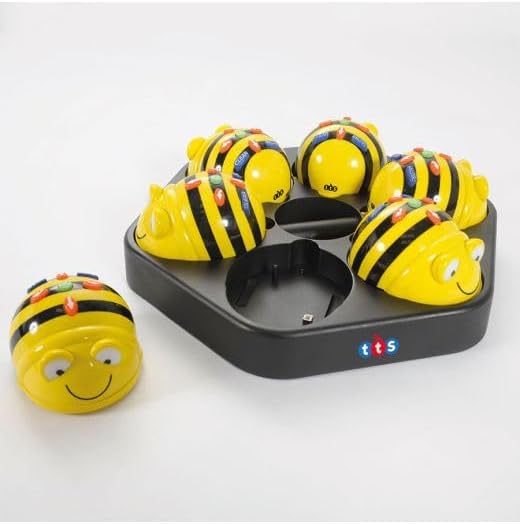
The TTS Bee-Bot & Blue-Bot Rechargeable Docking Station is designed to keep your coding robots powered and organized. This solution is ideal for classrooms, coding clubs, and STEM enthusiasts, allowing you to charge and store up to six Bee-Bots or Blue-Bots simultaneously. Its lightweight and wall-mountable design offers flexibility in placement, while the upgraded USB charging system provides convenient power-ups without requiring a mains cable.
Kas yra dėžutėje
- 1 x Docking Station
- 1x USB laidas
Note: Bee-Bots and Blue-Bots are NOT included.
Sąrankos instrukcijos
- Prijunkite USB kabelį: Insert the included USB cable into the designated USB port on the docking station.
- Prijunkite prie maitinimo šaltinio: Kitą USB laido galą prijunkite prie suderinamo USB maitinimo adapterio (nepridedamas) arba kompiuterio USB prievado.
- Place Robots for Charging: Gently place your rechargeable Bee-Bots or Blue-Bots into the individual charging slots on the docking station. Ensure each robot is correctly seated for proper contact and charging.


Naudojimo instrukcijos
- Automatinis įkrovimas: Once placed correctly in the slots, your rechargeable Bee-Bots or Blue-Bots will begin charging automatically.
- Įkrovimo laikas: A full charge typically takes approximately half a day (around 4 hours).
- Baterijos veikimo laikas: A fully charged robot provides up to 4 hours of continuous use.
- Saugykla: The docking station serves as an organized storage solution for up to six robots, keeping them tidy and ready for use.
- Montavimas ant sienos: The lightweight design allows for easy wall-mounting, helping to save desk space and improve convenience.

Priežiūra
To ensure optimal performance and longevity of your docking station, keep it clean and free from dust. Use a soft, dry cloth to wipe down the surface. Avoid using abrasive cleaners or solvents, as these may damage the finish. Ensure the charging contacts are free from debris for efficient charging.
Troubleshooting (FAQs)
- Can I charge non-rechargeable Bee-Bots with this docking station?
No, this docking station is designed only for rechargeable Bee-Bots and Blue-Bots. Non-rechargeable versions will not be compatible. - How long does it take to charge the bots fully?
The docking station can fully charge your bots in half a day (approximately 4 hours of charging time). - Does the docking station come with a mains cable?
No, the latest version has been upgraded to USB charging, making it more convenient and versatile. A USB cable is included in the package, but the robots themselves are sold separately.
Specifikacijos
| Funkcija | Detalė |
|---|---|
| Prekės ženklas | TTS |
| Modelis | EL00358 |
| Suderinami įrenginiai | Rechargeable Bee-Bot and Blue-Bot robots |
| Įkrovimo talpa | Up to 6 robots simultaneously |
| Įkrovimo sąsaja | USB |
| Pilnas įkrovimo laikas | Approximately 4 hours (half a day) |
| Usage Time (per charge) | Iki 4 valandų nepertraukiamo naudojimo |
| Dizainas | Portable, lightweight, wall-mountable |
| Spalva | Juoda |
Garantija ir palaikymas
For warranty information, technical support, or any product-related inquiries, please refer to the documentation provided with your purchase or contact TTS directly through their official websvetainėje arba klientų aptarnavimo kanaluose. Išsaugokite pirkimo įrodymą, jei prireiktų pateikti garantinį prašymą.