
Wireless Gear G0687
Wireless Gear True Wireless Case Earbuds User Manual
Modelis: G0687
Įvadas
Thank you for choosing the Wireless Gear True Wireless Case Earbuds. These in-ear headphones are designed for comfort and convenience, offering a seamless audio experience with advanced features. This manual provides detailed instructions on how to set up, operate, maintain, and troubleshoot your new earbuds to ensure optimal performance.
Pagrindinės funkcijos:
- Laisvų rankų mikrofonas: Integrated microphone for seamless transition between music and calls.
- Patogus prigludimas: Flexible Fit-Gel ear gels ensure a secure and comfortable fit for extended wear.
- Prailgintas grojimo laikas: Up to 8 hours of continuous play and talk time.
- Nešiojamas įkrovimo dėklas: The included charging case provides 4-5 full recharges, extending total playtime significantly.
- Extreme Bass Sound: High-performance wireless earbuds delivering rich, superior sound with ultra-deep bass.
Pakuotės turinys
Pažymėkite langelį prie šių elementų:
- Wireless Gear True Wireless Case Earbuds (Left and Right)
- Nešiojamas įkrovimo dėklas
- USB įkrovimo laidas
- Vartotojo vadovas
- Multiple sizes of Fit-Gel ear tips
Produktas baigtasview
Familiarize yourself with the components of your Wireless Gear True Wireless Case Earbuds.

1 vaizdas: The Wireless Gear True Wireless Earbuds resting inside their open charging case. The earbuds are black with a sleek design, and the case is also black with a translucent lid, showing the charging indicators.

2 vaizdas: Priekyje view of the retail packaging for the Wireless Gear True Wireless Case Earbuds. The box prominently displays the product name, brand logo, and key features such as "8 HRS" playtime, "4-5 RECHARGES PER FULL CASE", and "EXTREME BASS".
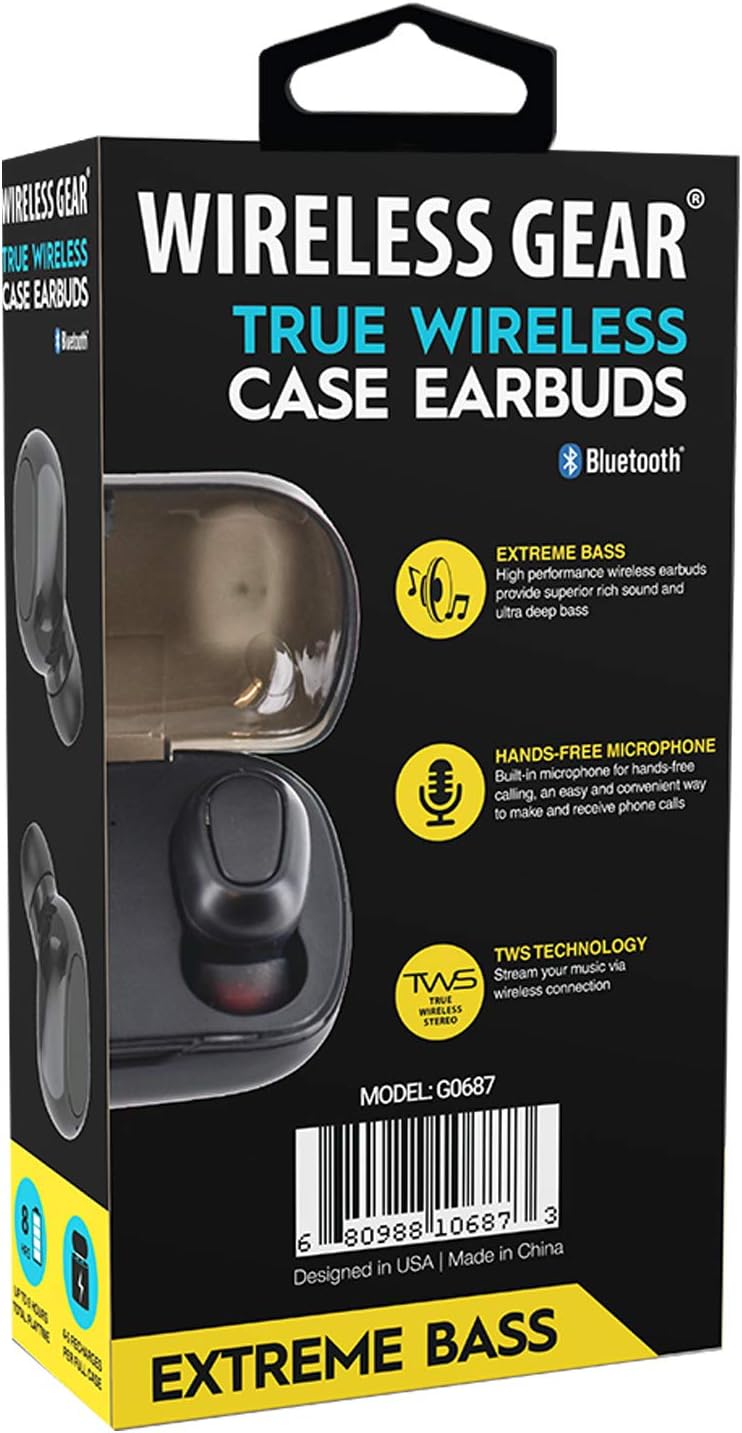
3 vaizdas: Atgal view of the retail packaging, highlighting additional features like "Hands-Free Microphone" and "TWS Technology". The model number G0687 and UPC 0680988106873 are visible at the bottom.
Ausinių komponentai:
- Multi-function Touch/Button Area: Skirta valdyti atkūrimą, skambučius ir balso asistentą.
- Mikrofonas: Skambinimas laisvų rankų įrangai.
- LED indikatorius: Rodo susiejimo būseną, įkrovimo būseną ir galią.
- Įkrovimo kontaktai: Located at the bottom of each earbud.
Įkrovimo dėklo komponentai:
- Ausinių įkrovimo lizdai: Tvirtai laikykite ir įkraukite ausines.
- Įkrovimo dėklo LED indikatoriai: Rodo dėklo ir ausinių įkrovimo būseną.
- USB įkrovimo prievadas: Dėl paties dėklo įkrovimo.
Sąranka
1. Pradinis įkrovimas
- Place both earbuds into the charging case. Ensure they are properly seated so the charging contacts align.
- Prijunkite USB įkrovimo laidą prie dėklo įkrovimo prievado, o kitą galą – prie USB maitinimo šaltinio (pvz., sieninio adapterio, kompiuterio USB prievado).
- The LED indicators on the earbuds and/or case will illuminate to show charging status. A full charge for the case and earbuds typically takes 1-2 hours.
- Once fully charged, disconnect the charging cable. The case holds enough power for 4-5 full earbud recharges.
2. Susiejimas su jūsų įrenginiu
- Maitinimas: Open the charging case, or remove the earbuds from the case. They should automatically power on and enter pairing mode. The LED indicator on one earbud will flash, indicating it's ready to pair.
- Suaktyvinkite „Bluetooth“: Išmaniajame telefone, planšetiniame kompiuteryje ar kitame įrenginyje su „Bluetooth“ ryšiu eikite į „Bluetooth“ nustatymus ir įjunkite „Bluetooth“.
- Ieškokite Įrenginiai: Your device will scan for available Bluetooth devices. Look for "Wireless Gear Earbuds" or a similar name in the list.
- Prisijunkite: Select the earbuds from the list. Once connected, the LED indicator on the earbud will stop flashing or change color. You will hear an audible confirmation.
- Automatinis pakartotinis prisijungimas: After the initial pairing, the earbuds will automatically connect to the last paired device when removed from the case and Bluetooth is active on your device.
Note: If pairing fails, turn off Bluetooth on your device, place earbuds back in the case, close and reopen, then try again.
Naudojimo instrukcijos
Basic Controls (Touch/Button Functions):
| Funkcija | Veiksmas |
|---|---|
| Maitinimas | Išimkite iš įkrovimo dėklo. |
| Išjungti | Įdėkite atgal į įkrovimo dėklą. |
| Leisti / pristabdyti muziką | Vieną kartą bakstelėkite bet kurią ausinę. |
| Kitas takelis | Dukart palieskite dešinįjį ausinės antgalį. |
| Ankstesnis takelis | Dukart palieskite kairįjį ausinės antgalį. |
| Atsiliepti / Baigti skambutį | Vieną kartą bakstelėkite bet kurią ausinę įeinančio skambučio metu. |
| Atmesti skambutį | Įeinančio skambučio metu paspauskite ir 2 sekundes palaikykite nuspaudę bet kurią ausinę. |
| Suaktyvinkite balso padėjėją | Tris kartus palieskite bet kurią ausinę. |
| Padidinti garsumą | Press and hold Right earbud. |
| Sumažinti garsumą | Press and hold Left earbud. |
Note: Specific touch/button functions may vary slightly. Refer to the quick start guide included in your package for precise controls if different.
Priežiūra
Cleaning Your Earbuds and Case:
- Ausinėms ir įkrovimo dėklui nuvalyti naudokite minkštą, sausą, nepūkuotą šluostę.
- Įsisenėjusiam purvui šiek tiek pamirkykiteamplt šluostę nuvalykite vandeniu arba švelniu, neabrazyviniu valikliu.
- Nenaudokite stiprių cheminių medžiagų, aerozolių ar abrazyvinių valiklių.
- Įsitikinkite, kad ausinių ir dėklo įkrovimo kontaktai yra švarūs ir be nešvarumų, kad įkrovimas būtų tinkamas.
- Remove ear tips and clean them separately with water and mild soap if necessary, then dry completely before reattaching.
Saugykla:
- Kai nenaudojate, visada laikykite ausines įkrovimo dėkle, kad jos būtų apsaugotos ir įkrautos.
- Store the device in a cool, dry place, away from extreme temperatures, humidity, and direct sunlight.
Akumuliatoriaus priežiūra:
- Norėdami pailginti baterijos veikimo laiką, venkite dažnai visiškai iškrauti ausines ir dėklą.
- Reguliariai kraukite įrenginį, net jei juo nesinaudojate dažnai, kad išvengtumėte visiško išsikrovimo.
Trikčių šalinimas
If you encounter issues with your Wireless Gear True Wireless Case Earbuds, try the following solutions:
- Ausinės nesusijungia su įrenginiu:
- Įsitikinkite, kad jūsų įrenginyje įjungtas „Bluetooth“.
- Įsitikinkite, kad ausinės yra įkrautos.
- Place earbuds back in the case, close the lid, wait a few seconds, then open the lid and try pairing again.
- Pamirškite / ištrinkite ausines iš savo įrenginio „Bluetooth“ sąrašo ir iš naujo suporuokite.
- Įsitikinkite, kad ausinės yra „Bluetooth“ diapazone (paprastai 10 metrų / 33 pėdų).
- Veikia tik viena ausinė:
- Įsitikinkite, kad abi ausinės yra įkrautos.
- Place both earbuds back into the charging case, close the lid, and then remove them simultaneously. This often re-syncs them.
- Try resetting the earbuds (refer to specific reset instructions if available in the quick start guide, usually involves holding a button for a long time).
- Ausinės neįkraunamos:
- Įsitikinkite, kad įkrovimo laidas yra tvirtai prijungtas tiek prie dėklo, tiek prie maitinimo šaltinio.
- Patikrinkite, ar ausinių ir dėklo viduje esantys įkrovimo kontaktai yra švarūs ir be šiukšlių.
- Išbandykite kitą USB kabelį arba maitinimo adapterį.
- Įsitikinkite, kad įkrovimo dėklas yra įkrautas.
- Prasta garso kokybė arba nutrūkstantis ryšys:
- Priartėkite prie suporuoto įrenginio, kad sumažintumėte trukdžius.
- Venkite kliūčių tarp ausinių ir įrenginio.
- Įsitikinkite, kad netoliese nėra kitų stiprių belaidžių signalų, kurie galėtų sukelti trukdžius.
- Clean the ear tips and earbud speakers.
Specifikacijos
| Funkcija | Detalė |
|---|---|
| Modelio numeris | G0687 |
| Belaidžio ryšio technologija | Bluetooth |
| Ryšio technologija | Bluetooth |
| Formos faktorius | Į ausį įdedami (Intraurales) |
| Spalva | Juoda |
| Grojimo / pokalbių laikas | Iki 8 valandų |
| Įkrovimo dėklo įkrovimas | 4-5 full recharges |
| Baterijos tipas | Ličio jonų (įkraunamas) |
| Ypatingos savybės | Bluetooth, Wireless, Microphone Included |
| Gamintojas | ESI Wireless Accessories |
| Gaminio matmenys | 13.97 x 7.62 x 3.81 cm; 226.8 g (Package) |
| ASIN | B08DCTH7DW |
| UPC | 0680988106873 |
Garantija ir palaikymas
Informacija apie garantiją:
Wireless Gear products are manufactured to the highest quality standards. For specific warranty details, please refer to the warranty card included with your purchase or visit the official Wireless Gear website. Typically, products come with a limited warranty covering manufacturing defects from the date of purchase.
Klientų aptarnavimas:
If you have any questions, require technical assistance, or need to report an issue, please contact Wireless Gear customer support. You can usually find contact information (phone number, email, or support portal) on the product packaging or the official brand websvetainę.
Jei reikia daugiau pagalbos, apsilankykite: Wireless Gear Support Page (Note: This is a placeholder link. Please refer to your product's official documentation for the correct support URL.)
Ask a question about this manual
Ask about setup, troubleshooting, compatibility, parts, safety, or missing instructions. Manuals+ will review the question and use this page’s manual context to help answer it.