
1. Įvadas
This manual provides essential information for setting up, operating, maintaining, and troubleshooting your AVITA Essential NE14A2INC433-MB laptop. Please read this manual thoroughly before using your device to ensure proper functionality and longevity.
2. Produktas baigtasview
The AVITA Essential NE14A2INC433-MB is a thin and light 14-inch laptop designed for everyday use. It features an aluminum body and a unique cloth design on the palm rest.

Figure 2.1: AVITA Essential Laptop (Matt Black) with screen and keyboard visible.
2.1 Ekrano funkcijos
The laptop is equipped with a 14-inch Full HD (1920x1080) anti-glare IPS display. The ultra-narrow bezels provide an immersive viewpatirtį.

Figure 2.2: Close-up of the AVITA Essential display, showcasing the FHD IPS Anti-Glare Panel and 4mm Narrow Bezels.
2.2 Prievadai ir jungiamumas
The AVITA Essential laptop offers various ports for connectivity, including two USB 3.0 Type A ports, one full-size HDMI port, and a Micro SD card reader.
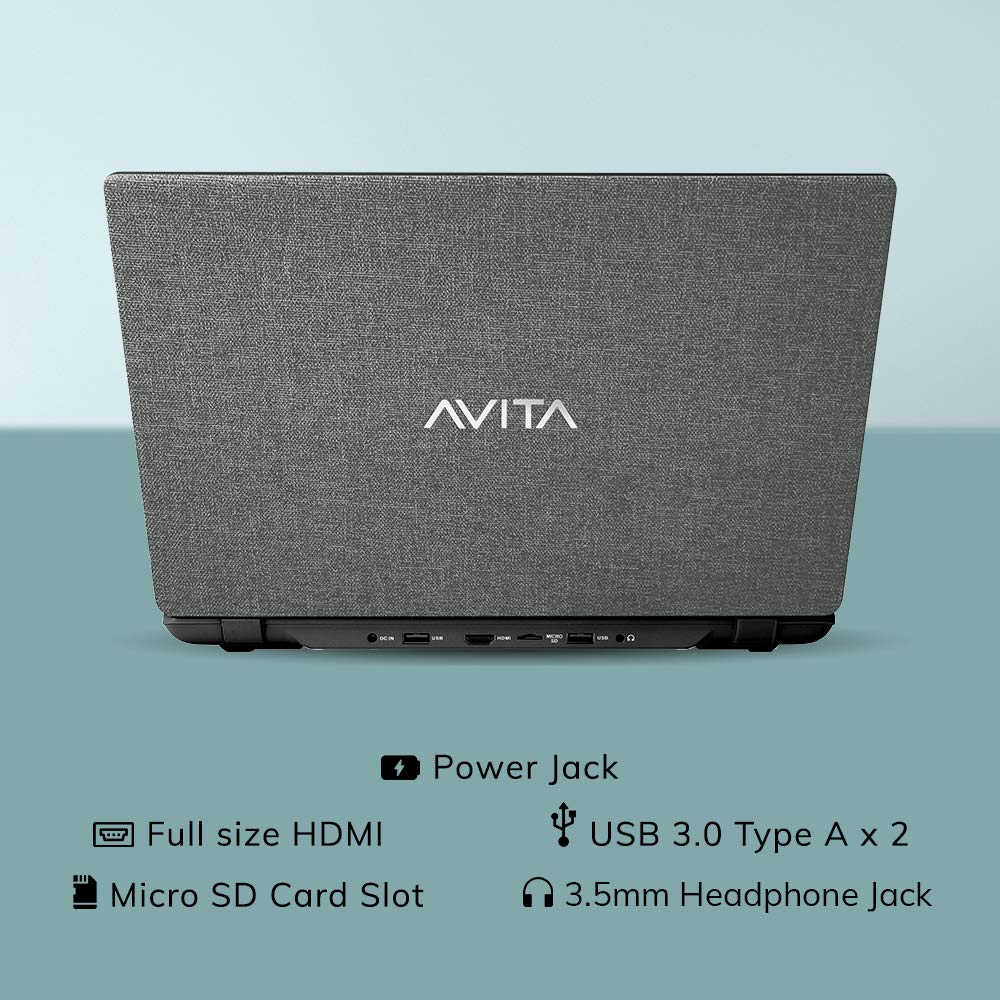
2.3 pav.: galinis view of the laptop detailing the available ports for external devices and power.
2.3 Klaviatūra ir Webkumštelis
The laptop features a full-size island-style keyboard for comfortable typing and an integrated webkamera vaizdo konferencijoms.

2.4 pav.: Iš viršaus į apačią view of the laptop's island-style keyboard and integrated webkumštelis.
2.4 Dizainas
The AVITA Essential boasts a unique cloth design, contributing to its aesthetic appeal.

Figure 2.5: The laptop in a closed position, highlighting its distinctive cloth design.
3. Sąranka
- Išpakavimas: Carefully remove the laptop and all accessories from the packaging. Ensure all items listed in the "What's in the Box" section are present.
- Pradinis mokestis: Connect the AC adapter to the laptop's power jack and then to a power outlet. Allow the laptop to charge for at least 30 minutes before the first use, or until the battery indicator shows a sufficient charge.
- Maitinimas: Open the laptop lid and press the power button. The laptop will begin the initial boot process.
- Windows 10 Home in S Mode Setup: Follow the on-screen instructions to complete the Windows 10 Home in S Mode setup. This includes selecting your region, language, connecting to a Wi-Fi network, and creating a user account.
- Programinės įrangos atnaujinimai: After initial setup, connect to the internet and allow Windows to download and install any available updates. This ensures optimal performance and security.
4. Naudojimo instrukcijos
4.1 Windows 10 Home in S Mode
Your AVITA Essential laptop comes with Windows 10 Home in S Mode, which is designed for security and performance. In S Mode, you can only install apps from the Microsoft Store and must use Microsoft Edge for safe browsing. You can switch out of S Mode to regular Windows 10 Home at any time, but you cannot switch back.
The laptop is eligible for a free upgrade to Windows 11 when available. The upgrade rollout plan is scheduled to begin late in 2021 and continue into 2022, with specific timing varying by device.
4.2 Našumas ir saugykla
Powered by an Intel Celeron N4000 processor and 4GB DDR4 RAM, combined with a 128GB SSD, the laptop offers responsive performance for daily tasks. The Solid State Drive (SSD) ensures faster boot times and quicker application loading compared to traditional hard disk drives.
Video 4.1: This video highlights key features of the AVITA Essential laptop, including its FHD IPS display, narrow bezels, island-style keyboard, integrated webcam, and fast SSD storage. It demonstrates the laptop's sleek design and quick performance for everyday computing tasks.
Video 4.2: This video illustrates the benefits of a modern PC with Windows 10 and an SSD, emphasizing thin and light design, faster startups, improved efficiency, longer battery life, and enhanced durability and security due to fewer moving parts.
5. Priežiūra
- Valymas: Ekraną ir išorę valykite minkšta, nepūkuota šluoste. Įsisenėjusias dėmes šiek tiek nuvalykite.ampNuvalykite šluostę vandeniu arba ekranui saugiu valikliu. Venkite stiprių cheminių medžiagų.
- Akumuliatoriaus priežiūra: To maximize battery life, avoid fully discharging the battery frequently. It is recommended to keep the battery charged between 20% and 80%. Store the laptop in a cool, dry place when not in use for extended periods.
- Programinės įrangos atnaujinimai: Reguliariai tikrinkite, ar yra operacinės sistemos ir tvarkyklių naujinimų, ir juos įdiekite, kad užtikrintumėte optimalų našumą ir saugumą.
- Saugyklos valdymas: Periodiškai review ir ištrinkite nereikalingus files to free up storage space on the 128GB SSD. Consider using external storage or cloud services for large files.
- Vėdinimas: Įsitikinkite, kad nešiojamojo kompiuterio ventiliacijos angos nėra uždengtos, kad jis neperkaistų. Naudokite nešiojamąjį kompiuterį ant kieto, lygaus paviršiaus, o ne ant minkštų baldų.
6. Problemų sprendimas
6.1 Bendrosios problemos ir sprendimai
- Nešiojamasis kompiuteris neįsijungia:
- Įsitikinkite, kad kintamosios srovės adapteris yra tvirtai prijungtas tiek prie nešiojamojo kompiuterio, tiek prie veikiančio maitinimo lizdo.
- Patikrinkite, ar maitinimo lizdas veikia, prijungdami prie jo kitą įrenginį.
- Jei akumuliatorius visiškai išsikrovęs, prieš bandydami įjungti, leiskite jam kurį laiką įsikrauti.
- Lėtas našumas:
- Uždarykite nereikalingas programas, veikiančias fone.
- Patikrinkite, ar yra laukiančių „Windows“ naujinimų, ir įdiekite juos.
- Įsitikinkite, kad SSD diske yra pakankamai laisvos vietos.
- Paleiskite sistemos nuskaitymą, ar nėra kenkėjiškų programų ar virusų.
- „Wi-Fi“ ryšio problemos:
- Iš naujo paleiskite „Wi-Fi“ maršrutizatorių ir nešiojamąjį kompiuterį.
- Patikrinkite, ar „Windows“ nustatymuose įjungtas „Wi-Fi“.
- Update Wi-Fi drivers from the AVITA support websvetainę.
- Windows 10 S Mode App Restrictions:
- Remember that in S Mode, only apps from the Microsoft Store can be installed.
- If you need to install apps from other sources, you must switch out of S Mode. This is a one-way process.
7. Specifikacijos
| Funkcija | Detalė |
|---|---|
| Prekės ženklas | GYVENIMAS |
| Modelio pavadinimas | Esminiai |
| Modelio numeris | NE14A2INC433-MB |
| Ekrano dydis | 14 colių (35 cm) |
| Ekrano raiška | 1920 x 1080 (Full HD) |
| Ekrano tipas | FHD Anti-Glare IPS LED |
| Procesorius | Intel Celeron N4000 (1.10 GHz base, 2.60 GHz Max) |
| RAM atmintis | 4 GB DDR4 |
| Sandėliavimas | 128 GB SSD |
| Operacinė sistema | „Windows 10 Home“ veikia S režimu |
| Grafika | „Intel Integrated UHD Graphics 600“. |
| Baterijos veikimo laikas | Up to 6 Hours (as per MobileMark) |
| Svoris | 1.37 kg |
| Uostai | 2x USB 3.0 Type A, 1x Full Size HDMI, Micro SD Card Reader |
| Belaidis ryšys | 802.11 b/g/n/ac Wi-Fi, Bluetooth 4.0 |
| Webkumštelis | Integrated Front Camera |
8. Garantija ir palaikymas
8.1 Informacija apie garantiją
Your AVITA Essential laptop comes with an 18+6 months onsite domestic warranty from AVITA. This warranty covers manufacturing defects and does not cover physical damage. For detailed terms and conditions, please refer to the warranty section provided with your product or visit the official AVITA support websvetainę.
8.2 Kas yra dėžutėje
Išpakuodami turėtumėte rasti šiuos elementus:
- AVITA Essential Laptop
- Kintamosios srovės adapteris
- Vartotojo vadovas
- Vadovai