
PowerPac PPFS212B 2-in-1 Dual-Usage Stand Fan Instruction Manual
Model: PPFS212B
1. Svarbi saugos informacija
Prieš naudodami šį prietaisą, atidžiai perskaitykite visas instrukcijas ir išsaugokite jas ateičiai. Nesilaikant šių instrukcijų, gali kilti elektros smūgis, gaisras arba sunkūs sužalojimai.
- Įsitikinkite, kad ttagAnt vardinės etiketės nurodyta įtampa atitinka jūsų elektros tinklo įtampątage.
- Nemerkite ventiliatoriaus, kištuko ar laido į vandenį ar kitus skysčius.
- Unplug the fan from the power outlet before cleaning, assembling, or disassembling parts.
- Kai ventiliatorius veikia, laikykite pirštus, pieštukus ar kitus daiktus atokiau nuo grotelių.
- Nenaudokite ventiliatoriaus su pažeistu laidu ar kištuku. Dėl remonto kreipkitės į kvalifikuotus techninės priežiūros darbuotojus.
- This appliance is equipped with thermal fuse protection against overheating. If the fan stops working unexpectedly, unplug it and allow it to cool before attempting to restart.
- Šis prietaisas nėra skirtas naudoti asmenims (įskaitant vaikus), kurių fizinės, jutimo ar psichinės galimybės yra ribotos arba kurie neturi patirties ir žinių, nebent už jų saugumą atsakingas asmuo juos prižiūrėtų arba instruktuotų, kaip naudoti prietaisą. .
2. Produktas baigtasview
The PowerPac PPFS212B is a versatile 2-in-1 dual-usage stand fan designed for efficient cooling in indoor environments. It features 7 blades for maximum airflow, 3-speed settings, and an oscillation function for wider air distribution. The fan is equipped with thermal fuse protection for enhanced safety.
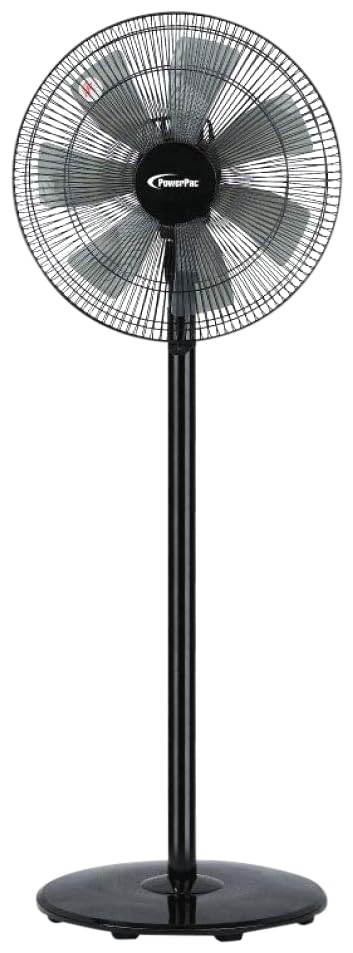
Image: PowerPac PPFS212B 2-in-1 Dual-Usage Stand Fan, showcasing its black finish and stand configuration.
3. Pakuotės turinys
Please check the package contents upon opening to ensure all parts are present and undamaged:
- 1 x PowerPac PPFS212B Stand Fan (includes fan head, stand pole, and base)
4. Surinkimo instrukcijos
Follow these steps to assemble your PowerPac PPFS212B fan:
- Atsargiai išpakuokite visus komponentus iš pakuotės.
- Attach the stand pole to the fan base. Ensure it is securely fastened according to the markings or locking mechanism.
- Mount the fan head assembly onto the top of the stand pole. Align the connection points and secure it firmly.
- Ensure all screws and fasteners are tightened to prevent wobbling during operation.
- Place the assembled fan on a stable, flat surface.
Image: Illustrative diagram of the PowerPac PPFS212B fan assembly, showing the base, stand, and fan head components.
5. Naudojimo instrukcijos
To operate your PowerPac PPFS212B fan:
- Įkiškite maitinimo laidą į tinkamą elektros lizdą.
- Maitinimo įjungimas/išjungimas: Press the 'ON/OFF' button (or corresponding button) on the control panel to turn the fan on or off.
- Greičio reguliavimas: Press the 'SPEED' button repeatedly to cycle through the 3 available speed settings (Low, Medium, High).
- Virpesių funkcija: Press the 'OSC' button (or corresponding button) to activate or deactivate the oscillation feature, which allows the fan head to sweep from side to side.
- When finished, press the 'ON/OFF' button to turn off the fan and unplug it from the power outlet.
6. Priežiūra ir valymas
Regular cleaning and maintenance will help ensure optimal performance and longevity of your fan:
- Prieš valydami visada atjunkite ventiliatorių nuo maitinimo šaltinio.
- Naudokite minkštą, damp cloth to wipe the exterior surfaces of the fan. Do not use abrasive cleaners, solvents, or harsh chemicals.
- To clean the fan blades, carefully remove the front grille (if detachable) according to the product design. Wipe the blades with a soft cloth. Ensure all parts are dry before reassembling.
- Neleiskite vandeniui lašėti į variklio korpusą.
- Ilgesnį laiką nenaudojamą ventiliatorių laikykite vėsioje, sausoje vietoje.
7. Problemų sprendimas
If you encounter issues with your fan, refer to the following table for common problems and solutions:
| Problema | Galima priežastis | Sprendimas |
|---|---|---|
| Ventiliatorius neįsijungia. | Nėra maitinimo. Thermal fuse activated. | Patikrinkite, ar kištukas patikimai įkištas į lizdą. Įsitikinkite, kad maitinimo lizdas veikia. Unplug and allow the fan to cool down for 30 minutes before restarting. |
| Silpnas arba jo visai nėra oro srauto. | Ventiliatoriaus greitis nustatytas per mažas. Ventiliatoriaus mentės nešvarios. | Padidinkite ventiliatoriaus greičio nustatymą. Unplug the fan and clean the blades as per maintenance instructions. |
| Ventiliatorius nesvyruoja. | Osciliacijos funkcija išjungta. | Press the 'OSC' button to activate oscillation. |
| Neįprastas triukšmas veikimo metu. | Laisvos dalys. Kliūtis. | Unplug the fan and check for any loose components or obstructions around the blades or motor. Tighten any loose parts. |
Jei problema išlieka ir išbandžius šiuos sprendimus, susisiekite su klientų aptarnavimo tarnyba.
8. Specifikacijos
| Funkcija | Specifikacija |
|---|---|
| Prekės ženklas | PowerPac |
| Modelio numeris | PPFS212B |
| Tipas | 2-in-1 Dual-Usage Stand Fan |
| Ašmenų skaičius | 7 |
| Greičių skaičius | 3 |
| Maitinimo šaltinis | Su laidu elektra |
| Vattage | 50 vatų |
| Kontrolės metodas | Mygtukas |
| Ypatingos savybės | Oscillating, Thermal Fuse Protection |
| Medžiaga | Plastikiniai |
| Naudojimas viduje / lauke | Vidinis |
| Spalva | Juoda |
9. Garantija ir palaikymas
This PowerPac PPFS212B fan comes with a 2 metų garantija nuo įsigijimo datos. Ši garantija taikoma gamybos defektams įprastomis naudojimo sąlygomis.
For warranty claims, technical support, or any inquiries regarding your product, please contact PowerPac customer service. Keep your proof of purchase for warranty validation.