
Įvadas
This manual provides instructions for the proper use and maintenance of your Wireless Gear True Wireless Bluetooth 5.0 Mini Earbuds. Please read this manual thoroughly before using the product to ensure optimal performance and longevity.
Kas yra dėžutėje:
- True Wireless Mini Earbuds (Left and Right)
- USB įkrovimo bazė
Saugos informacija
- Do not expose the earbuds or charging base to extreme temperatures, moisture, or corrosive materials.
- Stenkitės, kad prietaisas nenumestų ar nepatirtų stipraus smūgio.
- Nebandykite ardyti ar modifikuoti gaminio. Tai panaikins garantiją ir gali sukelti gedimų.
- Laikyti vaikams nepasiekiamoje vietoje.
- Use only the provided charging base.
- Ilgalaikis klausymasis dideliu garsumu gali pažeisti klausą. Sureguliuokite garsumą iki saugaus lygio.
Produktas baigtasview
Familiarize yourself with the components of your True Wireless Mini Earbuds.

Vaizdas: Stambus planas view of a single Wireless Gear earbud, highlighting the touch control button on its outer surface.
- Earbuds: Left and Right earbuds with built-in microphones and touch controls.
- USB įkrovimo bazė: Compact base for charging the earbuds, featuring an integrated USB plug.
Sąranka
1. Ausinių įkrovimas
Before first use, fully charge the earbuds. The charging base provides additional hours of playback.
- Insert both earbuds into the charging base. Ensure they are seated correctly.
- Plug the integrated USB connector of the charging base into any standard USB power source (e.g., computer USB port, USB wall adapter).
- The indicator lights on the earbuds will show charging status (refer to product packaging for specific light behavior if available).
- A full charge provides approximately 1.5 hours of playtime from the earbuds, with the charging base offering an additional 8 hours.
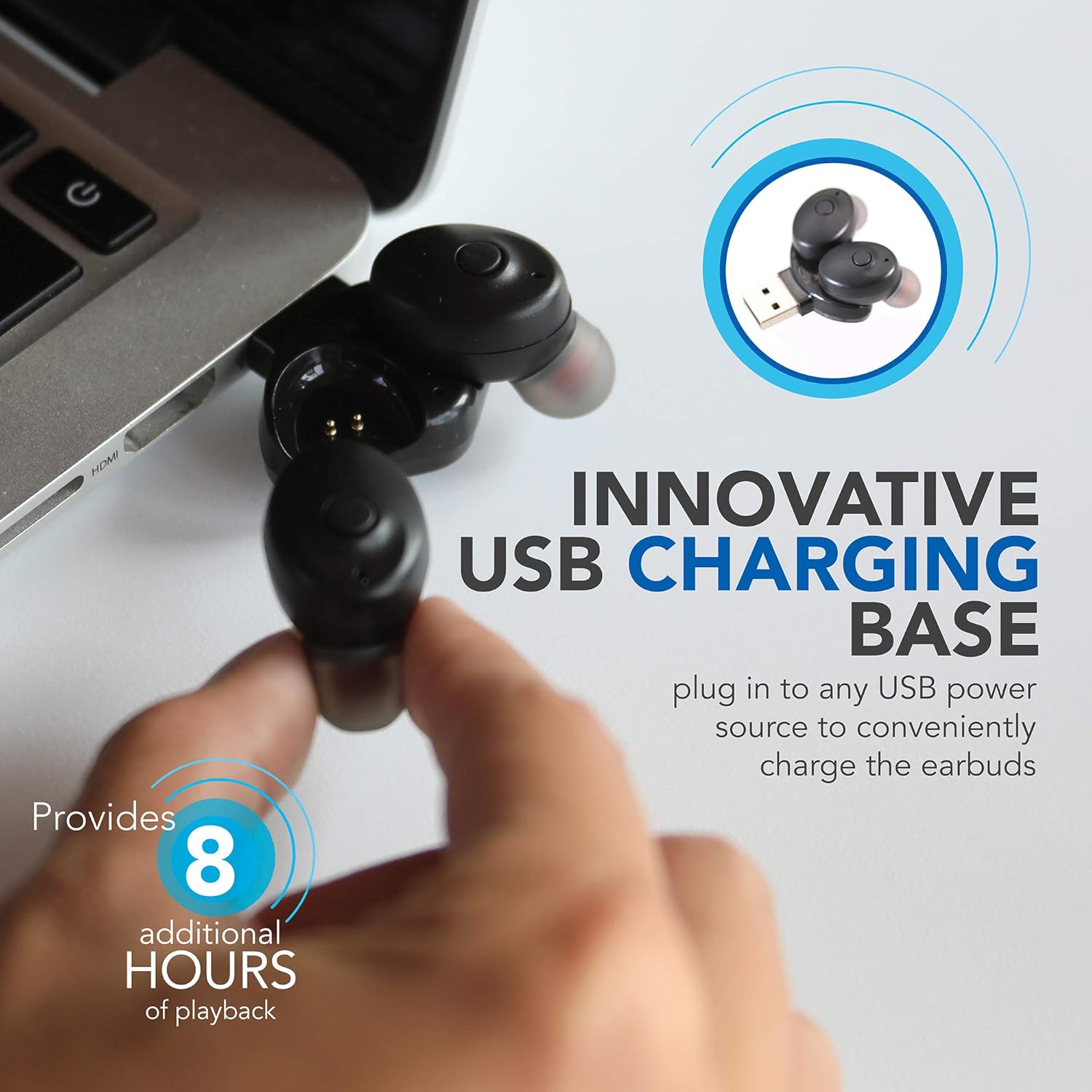
Image: Wireless Gear earbuds placed in their USB charging base, which is plugged into a laptop's USB port.
2. Susiejimas su įrenginiu
The earbuds feature auto-pair and auto-power on functionality for seamless connection.
- Įsitikinkite, kad ausinės yra įkrautos.
- Remove both earbuds from the charging base. They will automatically power on and enter pairing mode.
- On your smartphone, MP3 player, tablet, or laptop, navigate to the Bluetooth settings.
- Ieškokite available devices and select "Wireless Gear Earbuds" (or similar name) from the list.
- Once connected, you will hear an audible confirmation, and the indicator lights on the earbuds will change (refer to product packaging for specific light behavior if available).
- The earbuds will automatically reconnect to the last paired device when removed from the charging base, if Bluetooth is enabled on the device.

Image: Wireless Gear earbuds positioned next to a smartphone, illustrating the pairing process.
Naudojimo instrukcijos
Maitinimo įjungimas/išjungimas
- Maitinimas: Remove the earbuds from the charging base. They will automatically power on.
- Išjungti: Place the earbuds back into the charging base. They will automatically power off and begin charging.
Palieskite valdiklius
Each earbud features a touch-sensitive area for controlling various functions. The specific functions may vary slightly between left and right earbuds or depend on the operating system of your connected device.
- Leisti / pristabdyti muziką: Vieną kartą bakstelėkite bet kurią ausinę.
- Kita daina: Double tap on the right earbud (or specific earbud as per device).
- Ankstesnė daina: Double tap on the left earbud (or specific earbud as per device).
- Atsiliepti / Baigti skambutį: Vieną kartą bakstelėkite bet kurią ausinę įeinančio arba aktyvaus skambučio metu.
- Atmesti skambutį: Įeinančio skambučio metu paspauskite ir palaikykite nuspaudę bet kurią ausinę.
- Activate Voice Assistant (Siri for iOS): Tris kartus palieskite bet kurią ausinę.

Image: A woman smiling while wearing a Wireless Gear earbud, demonstrating comfortable fit and discreet design.
Skambinimas ir skambučių priėmimas
The built-in microphone allows for hands-free calling. Intelligent noise reduction ensures clear communication.
- Kai skambinate, vieną kartą palieskite bet kurią ausinę, kad atsilieptumėte.
- Norėdami baigti skambutį, vieną kartą palieskite bet kurią ausinę.
- To reject an incoming call, press and hold either earbud.
Priežiūra
Valymas
Reguliarus valymas padeda palaikyti garso kokybę ir higieną.
- Gently wipe the earbuds and charging base with a soft, dry, lint-free cloth.
- Nenaudokite abrazyvinių valiklių, alkoholio ar cheminių tirpiklių.
- Periodically check the speaker mesh for debris. Use a soft brush or cotton swab to carefully remove any buildup.

Vaizdas: Stambus planas view of the speaker mesh on a Wireless Gear earbud, showing fine details.
Sandėliavimas
- When not in use, store the earbuds in their charging base to protect them and keep them charged.
- Laikyti vėsioje, sausoje vietoje, apsaugotoje nuo tiesioginių saulės spindulių ir ekstremalių temperatūrų.
Trikčių šalinimas
Jei kyla problemų dėl ausinių, žr. šiuos dažniausiai pasitaikančius sprendimus:
| Problema | Galimas sprendimas |
|---|---|
| Ausinės neįsijungia. | Ensure earbuds are charged. Place them in the charging base and connect to a USB power source for at least 30 minutes. |
| Ausinės nesusijungia su įrenginiu. |
|
| Veikia tik viena ausinė. |
|
| Prasta garso kokybė arba nutrūkstamas ryšys. |
|
Specifikacijos
| Funkcija | Detalė |
|---|---|
| Ryšio technologija | Bluetooth 5.0 |
| Belaidžio ryšio technologija | Bluetooth |
| Įtraukti komponentai | Ausines, pakrovejas |
| Specifinis produkto naudojimas | Namai, sportas ir mankšta, kelionės |
| Suderinami įrenginiai | Phones, MP3 players, Tablets, Laptops |
| Valdymo tipas | Palieskite valdymą |
| Kabelio funkcija | Be Kabelio |
| Baterijos veikimo laikas (ausinės) | Iki 1.5 valandų |
| Additional Battery Life (Charging Base) | 8 valandos |
| Bendras akumuliatoriaus veikimo laikas | 9.5 Hours (Earbuds + Charging Base) |
| Bluetooth diapazonas | 10 metro (33 pėdos) |
| Ausinės forma | Suapvalintas antgalis |
| Prekės svoris | 1.44 uncijos |
| Gamintojas | ESI Wireless Accessories |
| ASIN | B08FF73J9X |
| GTIN / UPC | 680988106811 |
Informacija apie garantiją
No specific warranty information is provided in the product details. Please refer to the product packaging or contact the retailer/manufacturer directly for warranty terms and conditions.
Palaikymas
For further assistance or technical support, please contact Wireless Gear customer service. Contact details are typically found on the product packaging or the manufacturer's official websvetainę.