
EARISE M15
EARISE M15 karaoke aparato naudotojo vadovas
Modelis: M15
Įvadas
Ačiū, kad pirkoteasing the EARISE M15 Karaoke Machine. This portable PA loudspeaker system is designed to provide high-quality audio for various entertainment and public address needs. Featuring powerful sound output, versatile connectivity options, and vibrant LED lights, the M15 is perfect for parties, gatherings, and karaoke sessions. Please read this manual thoroughly before operating the device to ensure proper use and to maximize its lifespan.
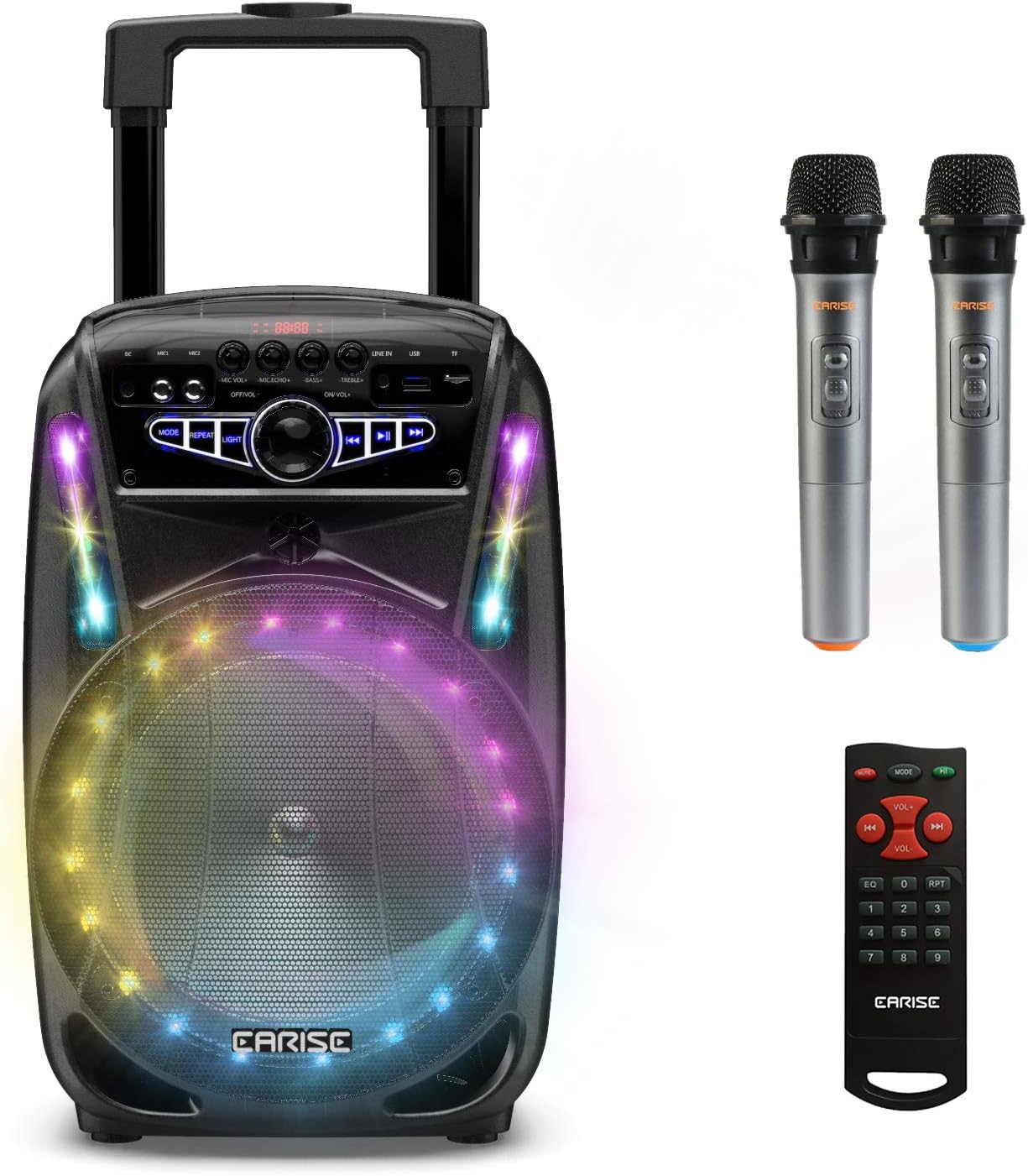
Image: The EARISE M15 Karaoke Machine, a black portable speaker with colorful LED lights on the front, shown with two wireless microphones and a remote control.
Kas yra dėžutėje
Patikrinkite siuntos turinį, kad įsitikintumėte, jog visi daiktai yra pakuotoje ir geros būklės.
- 1 x M15 vežimėlio PA sistema
- 2 x belaidžiai mikrofonai (baterijos neįeina)
- 1x nuotolinio valdymo pultas
- 1 x maitinimo laidas
- 1 x AUX kabelis
- 1 x Naudotojo vadovas (šis dokumentas)

Image: A visual representation of the package contents, showing the M15 speaker, two wireless microphones, a remote control, an AUX cable, and a charging cable.
Sąrankos vadovas
1. Įrenginio įkrovimas
Before first use, fully charge the M15 Karaoke Machine. The built-in 3600mAh 7.4V Lithium rechargeable battery provides portability. A full recharge takes approximately 3 hours.
- Connect the included power cord to the DC Charging Port (6) on the back of the unit.
- Plug the other end of the power cord into a standard AC 100-240V power outlet.
- The charging indicator light will illuminate. Once fully charged, the light may change color or turn off depending on the unit's design.
2. Mikrofono baterijų įdėjimas
The wireless microphones require batteries (not included). Open the battery compartment of each microphone and insert the required batteries, ensuring correct polarity.
3. Pradinis įjungimas
Locate the Power On/Off switch (15) on the control panel. Turn the switch to the "ON" position to power on the unit.
Naudojimo instrukcijos
Valdymo skydas baigtasview
Norėdami optimaliai valdyti, susipažinkite su valdymo skydeliu.

Image: Close-up of the M15's control panel, highlighting various buttons and ports with corresponding numbers for easy identification.
- Ekranas: Rodo dabartinį režimą, takelio numerį ir kitą informaciją.
- Mikrofono garsumas: Reguliuoja prijungtų mikrofonų garsumą.
- Mikrofono aidas: Valdo mikrofonų aidėjimo efektą.
- Bosas: Reguliuoja garso išvesties bosų lygį.
- Aukštas dažnis: Reguliuoja garso išvesties aukštų dažnių lygį.
- Nuolatinės srovės įkrovimo prievadas: For connecting the power adapter to charge the unit.
- Mic 1 Port: Įvestis laidiniam mikrofonui.
- Mic 2 Port: Input for a second wired microphone.
- Line In Port (AUX): Skirta išoriniams garso įrenginiams prijungti per AUX laidą.
- USB atmintinės lizdas: Garso įrašams leisti files iš USB atmintinės.
- TF/SD kortelės lizdas: Garso įrašams leisti files from a TF or SD card.
- Režimas: Switches between Bluetooth, USB, TF, AUX, and FM Radio modes.
- Pakartokite: Kartoja dabartinį takelį arba grojaraštį.
- Šviesa: Toggles or changes the LED light patterns.
- Power On/Off, Master Volume: Turns the unit on/off and adjusts the overall volume.
- Ankstesnis takelis: Pereina į ankstesnį takelį.
- Leisti / pristabdyti: Paleidžia arba pristabdo dabartinį takelį.
- Kitas takelis: Pereina prie kito takelio.
1. „Bluetooth“ poravimas
Connect your smartphone, tablet, or other Bluetooth-enabled device to the M15 for wireless audio streaming.
- Power on the M15 unit.
- Paspauskite Režimas button (12) until "Bluetooth" or "BT" appears on the Display Screen (1).
- Enable Bluetooth on your device and search for "EARISE M15" in the list of available devices.
- Select "EARISE M15" to pair. A confirmation sound will indicate successful pairing.
- You can now play audio from your device through the M15.

Image: A person sitting outdoors, connecting their smartphone to the EARISE M15 speaker via Bluetooth, indicated by the Bluetooth logo.
2. USB/TF kortelių atkūrimas
Leisti garsą files directly from a USB flash drive or TF/SD card.
- Insert a USB flash drive into the USB Flash Drive Slot (10) or a TF/SD card into the TF/SD Card Slot (11).
- The unit should automatically switch to USB or TF mode and begin playing compatible audio files. Jei ne, paspauskite Režimas mygtuką (12), kad pasirinktumėte tinkamą režimą.
- Naudokite Ankstesnis takelis (16), Leisti / pristabdyti (17) ir Kitas takelis (18) buttons to control playback.
3. AUX įvestis
Connect external audio devices that do not have Bluetooth capability using the AUX cable.
- Connect one end of the included AUX cable to the Line In Port (9) on the M15.
- Kitą AUX kabelio galą prijunkite prie išorinio įrenginio (pvz., MP3 grotuvo, nešiojamojo kompiuterio) garso išvesties lizdo.
- Paspauskite Režimas button (12) until "AUX" or "LINE" appears on the Display Screen (1).
- Valdykite atkūrimą iš išorinio įrenginio.
4. Mikrofono naudojimas
The M15 supports up to two wireless microphones and two wired microphones simultaneously for karaoke fun.
- Belaidžiai mikrofonai: Turn on the wireless microphones. They should automatically connect to the M15.
- Laidiniai mikrofonai: Plug wired microphones into Mic 1 Port (7) or Mic 2 Port (8).
- Adjust the Microphone Volume (2) and Microphone Echo (3) knobs to achieve desired sound effects.

Image: A group of people enjoying karaoke, with the EARISE M15 speaker providing sound and multiple microphones in use, demonstrating its multi-user capability.
5. LED lemputės
Enhance your party atmosphere with the M15's colorful LED disco lights.
- Paspauskite Šviesa button (14) to toggle the LED lights on/off or to cycle through different light patterns.

Image: The EARISE M15 speaker with its front-facing LED lights glowing in multiple colors, creating a vibrant visual effect.
6. Nuotolinio valdymo pulto naudojimas
Pridedamas nuotolinio valdymo pultas užtikrina patogų valdymą per atstumą.
- Įsitikinkite, kad nuotolinio valdymo pulte yra veikiančios baterijos.
- Point the remote control towards the front of the M15 unit.
- Use the buttons on the remote to control volume, mode, track selection, EQ, and other functions.
Priežiūra
Proper maintenance will ensure the longevity and optimal performance of your EARISE M15 Karaoke Machine.
- Valymas: Use a soft, dry cloth to wipe the exterior of the unit. Do not use abrasive cleaners, waxes, or solvents as they may damage the finish.
- Akumuliatoriaus priežiūra: To prolong battery life, avoid fully discharging the battery frequently. If storing the unit for an extended period, charge it to about 50% every few months.
- Saugykla: Įrenginį laikykite vėsioje, sausoje vietoje, toliau nuo tiesioginių saulės spindulių, ekstremalių temperatūrų ir didelės drėgmės.
- Tvarkymas: While the unit is portable with wheels and a handle, avoid dropping or subjecting it to strong impacts.

Image: A person demonstrating the portability of the EARISE M15 by pulling it with its retractable handle and built-in wheels.
Trikčių šalinimas
If you encounter issues with your M15, please refer to the following common problems and solutions.
| Problema | Galima priežastis | Sprendimas |
|---|---|---|
| Nėra maitinimo / Įrenginys neįsijungia. | Baterija išsikrovusi. Maitinimo laidas netinkamai prijungtas. | Pilnai įkraukite įrenginį. Ensure power cord is securely connected to both the unit and the power outlet. |
| Iš garsiakalbio nėra garso. | Garsas per mažas. Pasirinktas neteisingas režimas. External device volume is low. | Increase the Master Volume (15). Paspauskite Režimas button (12) to select the correct input source (Bluetooth, USB, AUX). Increase volume on the connected external device. |
| Mikrofonas neveikia. | Microphone batteries are dead or incorrectly inserted. Microphone volume is too low. Wireless microphone not paired. | Replace microphone batteries, ensuring correct polarity. Increase Microphone Volume (2). Ensure wireless microphones are turned on and within range. |
| „Bluetooth“ susiejimas nepavyko. | M15 is not in Bluetooth mode. Device is too far from M15. Įrenginyje „Bluetooth“ išjungtas. | Paspauskite Režimas button (12) to select Bluetooth mode. Perkelkite įrenginį arčiau M15. Įjunkite „Bluetooth“ savo įrenginyje. |
| USB/TF kortelė neveikia. | Neteisinga file formatu. Card/drive not inserted correctly. Unit not in USB/TF mode. | Užtikrinkite garsą fileyra suderinamo formato (pvz., MP3). Re-insert the USB drive or TF card firmly. Paspauskite Režimas button (12) to select USB or TF mode. |
Specifikacijos
Detailed technical specifications for the EARISE M15 Karaoke Machine.
| Funkcija | Specifikacija |
|---|---|
| Modelis | M15 |
| Maitinimo išvestis | 400 W maks. |
| R.Frequency | 90Hz-20KHz |
| Ličio jonų baterija | 3.7V / 2600mAh (Built-in) |
| Pavaros blokas | 8" 4Ω*1 + 1" tweeter*1 |
| S/N santykis | ≥60dB |
| Maitinimo šaltinis | AC 100-240V |
| Gaminio matmenys (I x P x A) | 27.94 x 25.4 x 40.64 cm (11 x 10.4 x 16.3 colio) |
| Prekės svoris | 4.08 kg |
| Ryšio technologija | Bluetooth, USB, AUX |
| Suderinami įrenginiai | Nešiojamasis kompiuteris, išmanusis telefonas |

Image: A diagram illustrating the physical dimensions of the EARISE M15 speaker, showing its height, width, and depth.
Garantija ir palaikymas
For warranty information or technical support, please refer to the contact details provided with your purchase documentation or visit the official EARISE websvetainėje. Išsaugokite pirkimo kvitą kaip pirkimo įrodymą bet kokiems garantiniams prašymams.
Ask a question about this manual
Ask about setup, troubleshooting, compatibility, parts, safety, or missing instructions. Manuals+ will review the question and use this page’s manual context to help answer it.