
Įvadas
This manual provides comprehensive instructions for the Lexmark MS431dw Monochrome Laser Printer. It covers setup, operation, maintenance, and troubleshooting to ensure optimal performance and longevity of your device. The Lexmark MS431dw is designed for efficient monochrome printing, offering speeds up to 40 pages per minute and automatic duplex printing.

Vaizdas: Priekinis dešinysis view of the Lexmark MS431dw Monochrome Laser Printer.
Sąranka
1. Išpakuokite spausdintuvą
Carefully remove the printer from its packaging. Ensure all packing materials, tapes, and protective films are removed from the exterior and interior of the printer. Retain the packaging for future transport if needed.
2. Installing the Toner Cartridge
- Atidarykite priekinį spausdintuvo dangtį.
- Remove the new toner cartridge from its packaging and gently shake it to distribute the toner.
- Insert the toner cartridge into the designated slot until it clicks into place.
- Uždarykite priekinį dangtelį.
3. Popieriaus įdėjimas
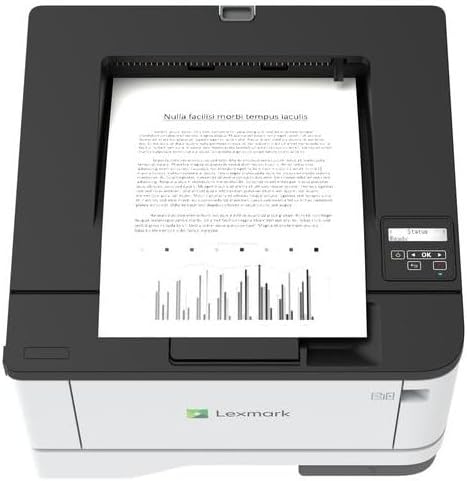
Vaizdas: Viršus view of the Lexmark MS431dw with paper loaded in the input tray.
Open the paper tray and adjust the paper guides to fit the size of your paper. Load the paper stack into the tray, ensuring it is flat and below the maximum fill line. Close the paper tray. The printer supports various media types, including card stock.
4. Maitinimo prijungimas
Prijunkite maitinimo laidą prie spausdintuvo maitinimo įvesties, o tada – prie įžeminto elektros lizdo.
5. Connecting to a Network/Computer
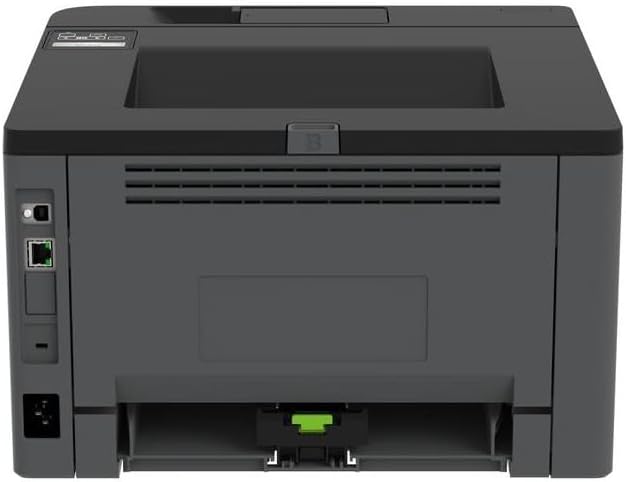
Vaizdas: Galinis view of the Lexmark MS431dw, highlighting the Ethernet and power connection ports.
The Lexmark MS431dw supports Ethernet connectivity. Connect an Ethernet cable from your network router or switch to the Ethernet port on the back of the printer. For direct connection to a computer, use a USB cable (not included) if available, or configure network printing.
6. Tvarkyklės diegimas
Turn on the printer. Insert the driver CD (if provided) into your computer, or download the latest drivers from the official Lexmark support websvebsaitą. Vykdykite ekrane pateikiamus nurodymus, kad užbaigtumėte tvarkyklės diegimą.
Naudojimo instrukcijos
1. Valdymo skydelis baigtasview

Vaizdas: Viršus view of the Lexmark MS431dw, showing the printer's control panel with display and buttons.
The control panel features a display screen and navigation buttons (Up, Down, OK, Back) to access printer settings, status, and functions. Refer to the on-screen menus for specific options.
2. Pagrindinis spausdinimas
- Įsitikinkite, kad spausdintuvas įjungtas ir prijungtas prie kompiuterio arba tinklo.
- Atidarykite dokumentą, kurį norite spausdinti, savo kompiuteryje.
- Pasirinkite Spausdinti iš programos meniu (pvz., File > Spausdinti).
- Choose the Lexmark MS431dw from the list of available printers.
- Adjust print settings as desired (e.g., number of copies, paper size).
- Spustelėkite Spausdinti.
3. Automatic Duplex Printing
The MS431dw supports automatic two-sided (duplex) printing. To enable this feature:
- In the print dialog box on your computer, navigate to the printer properties or preferences.
- Look for an option related to "Two-sided printing" or "Duplex printing."
- Pasirinkite norimą dvipusio spausdinimo parinktį (pvz., įrišimas ilguoju kraštu, įrišimas trumpuoju kraštu).
- Confirm your selection and proceed with printing.
Priežiūra
1. Replacing the Toner Cartridge
When the toner level is low, the printer's display will indicate a warning. To replace the cartridge:
- Įsitikinkite, kad spausdintuvas įjungtas.
- Atidarykite priekinį dangtelį.
- Ištraukite seną tonerio kasetę.
- Unpack a new Lexmark-compatible toner cartridge and gently shake it.
- Įkiškite naują kasetę, kol ji užsifiksuos vietoje.
- Uždarykite priekinį dangtelį.
2. Spausdintuvo valymas
Reguliarus valymas padeda išlaikyti spausdinimo kokybę ir prailgina spausdintuvo tarnavimo laiką.
- Išorė: Išorinius paviršius nuvalykite minkšta, damp, nepūkuota šluoste. Nenaudokite abrazyvinių valiklių ar tirpiklių.
- Interjeras: Periodically open the front cover and gently remove any dust or paper debris from accessible areas using a dry, lint-free cloth. Avoid touching the fuser unit.
Trikčių šalinimas
This section addresses common issues you might encounter. For more detailed troubleshooting, refer to the Lexmark support websvetainę.
1. Popieriaus strigtys
- If a paper jam occurs, the printer display will show an error message indicating the location of the jam.
- Atsargiai atidarykite nurodytus dangčius arba dėklus.
- Švelniai patraukite įstrigusį popierių popieriaus kelio kryptimi. Venkite popieriaus plėšimo.
- Close all covers and trays. The printer should resume printing.
2. Prasta spausdinimo kokybė
- Išblukę atspaudai: The toner cartridge may be low. Replace it if necessary.
- Dryžiai arba dėmės: Clean the printer's interior as described in the Maintenance section. Ensure the toner cartridge is properly seated.
- Tušti puslapiai: Verify the toner cartridge is installed correctly and has toner. Check printer drivers and print settings.
3. Ryšio problemos
- Spausdintuvas nerastas: Ensure the Ethernet cable is securely connected to both the printer and the network. Verify network settings on the printer and computer.
- Būsena neprisijungus: Check the printer's power and network connection. Restart both the printer and your computer.
Specifikacijos
| Funkcija | Detalė |
|---|---|
| Modelio numeris | 29S0110 |
| Spausdinimo technologija | Lazeris |
| Spausdintuvo išvestis | Vienspalvis |
| Maksimalus spausdinimo greitis (vienspalvis) | Iki 40 psl./min. (puslapių per minutę) |
| Ryšio technologija | Ethernet |
| Ypatinga funkcija | Auto-Duplex (Automatic Two-sided Printing) |
| Maksimali įvesties lapo talpa | 900 XNUMX lapų |
| Print Media Support | Card stock, Plain paper |
| Prekės svoris | 9300 gramų (apie 20.5 svaro) |
| Vattage | 570 vatų |
| UPC | 734646695558 |
Pastaba: Specifikacijos gali būti keičiamos be išankstinio įspėjimo.
Garantija ir palaikymas
Informacija apie garantiją
Your Lexmark MS431dw printer is covered by a standard manufacturer's warranty. For specific terms, conditions, and duration of your warranty, please refer to the documentation included with your product or visit the official Lexmark websvetainėje. Išsaugokite pirkimo įrodymą garantiniams reikalavimams.
Pagalba klientams
For technical assistance, driver downloads, or further support, please visit the official Lexmark support portal.
Visit the Lexmark Store for Support