
Sygonix SY-4532434
Sygonix RSL Wireless Socket Set Instruction Manual
Modelis: SY-4532434
1. Įvadas
Thank you for choosing the Sygonix RSL Wireless Socket Set. This set includes three remote-controlled sockets and one remote control, designed to provide convenient wireless control over your electrical appliances. This manual provides essential information for safe and efficient use, including setup, operation, maintenance, and troubleshooting.
Pakuotės turinys
- 3 x Sygonix RSL Wireless Sockets
- 1x nuotolinio valdymo pultas
- 1 x CR2032 Battery (for remote control)
- 1 x naudojimo instrukcija (šis dokumentas)
Pagrindinės savybės
- Wireless control of up to 3 devices.
- Compatible with other Sygonix RSL 433MHz transmitters (e.g., models 1761736, 1761748, 1761740, 1761732, 1761735, 1761752, 1761744).
- Maximum output power of 1000 W per socket.
- LED indicators for operational and pairing status.
- Enhanced touch protection.
- Apsauga nuo perkrovos ir perkaitimo.
- Darbinis dažnis: 433.92 MHz.
- Remote control with up to 12 channels and LED transmission indicator.
- Operating range of up to 30 meters in open field conditions.

Image 1.1: The Sygonix RSL Wireless Socket Set, showing three sockets and the remote control.
2. Saugos instrukcijos
Please read these safety instructions carefully before using the device. Failure to follow these instructions may result in electric shock, fire, or serious injury.
- Naudoti tik patalpose: This product is designed for indoor use in dry environments. Do not expose to moisture, rain, or extreme temperatures.
- Elektros apkrova: Do not exceed the maximum output power of 1000 W per socket. Overloading can cause overheating and fire hazards.
- ttage: Ensure the connected devices operate within the specified voltage range of 230 V/AC.
- Vaikai: Keep the device and remote control out of reach of children. The product features enhanced touch protection, but supervision is always recommended.
- Žala: Do not operate the device if it is damaged. Disconnect it from the power supply immediately and contact qualified personnel for repair.
- Išardymas: Do not attempt to disassemble or modify the device. This will void the warranty and may pose safety risks.
- Baterijos sauga: The remote control uses a CR2032 button cell battery. Keep batteries away from children. If swallowed, seek immediate medical attention. Dispose of used batteries responsibly.
3. Sąranka
3.1 Nuotolinio valdymo pulto baterijų įdėjimas
- Nuotolinio valdymo pulto gale raskite baterijų skyrių.
- Atidarykite skyriaus dangtelį.
- Įdėkite CR2032 bateriją teigiama (+) puse į viršų.
- Saugiai uždarykite akumuliatoriaus skyriaus dangtelį.
3.2 Pairing Sockets with the Remote Control
Each socket needs to be paired with the remote control to function. The remote control supports up to 12 channels.
- Plug the wireless socket into a wall outlet. The LED indicator on the socket will flash slowly.
- Within 5 seconds of plugging in the socket, press the desired "ON" button (e.g., 1 ON, 2 ON, 3 ON) on the remote control.
- The LED indicator on the socket will flash rapidly and then turn solid, indicating successful pairing.
- Repeat this process for each wireless socket you wish to pair.
- To unpair a socket, plug it into a wall outlet, and within 5 seconds, press the corresponding "OFF" button on the remote control. The LED will flash rapidly and then turn off.
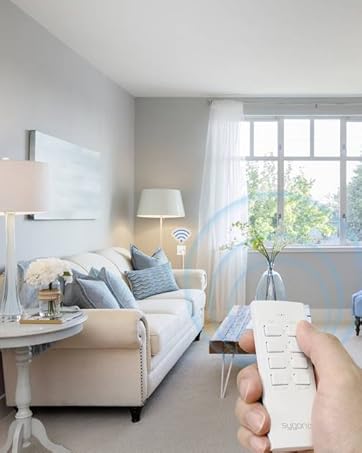
Image 3.1: A hand operating the remote control, demonstrating wireless functionality with a socket.
4. Operating the Wireless Sockets
Once paired, you can control your connected devices using the remote control.
4.1 Individual Control
- To turn on a device connected to a specific socket, press the corresponding "ON" button (e.g., 1 ON) on the remote control. The LED on the socket will illuminate.
- To turn off a device connected to a specific socket, press the corresponding "OFF" button (e.g., 1 OFF) on the remote control. The LED on the socket will turn off.
4.2 Grupės valdymas
- To turn on all paired devices simultaneously, slide the switch on the remote control to "ALL ON".
- To turn off all paired devices simultaneously, slide the switch on the remote control to "ALL OFF".
The remote control has an LED transmission indicator that lights up when a button is pressed, confirming signal transmission.
The maximum operating range is 30 meters in an open field. Obstacles such as walls, furniture, and other electronic devices may reduce this range.
5. Priežiūra
5.1 Valymas
- Before cleaning, ensure the sockets are unplugged from the wall outlets and no devices are connected.
- Wipe the devices with a soft, dry, lint-free cloth.
- Nenaudokite abrazyvinių valiklių, tirpiklių ar stiprių cheminių medžiagų, nes jos gali pažeisti paviršių.
- Nemerkite prietaisų į vandenį ar kitą skystį.
5.2 Akumuliatoriaus keitimas
If the remote control's range decreases or the LED transmission indicator does not light up, the CR2032 battery may need replacement. Follow the steps in Section 3.1 to replace the battery.
6. Problemų sprendimas
| Problema | Galima priežastis | Sprendimas |
|---|---|---|
| Socket does not respond to remote control. |
|
|
| Connected device does not turn on/off. |
|
|
| Sumažintas veikimo diapazonas. |
|
|
7. Specifikacijos
| Funkcija | Specifikacija |
|---|---|
| Modelio numeris | SY-4532434 |
| ASIN | B08HT3T2SC |
| Prekės ženklas | Sygonix |
| Lizdų skaičius | 3 |
| Max. Output Power per Socket | 1000 W |
| Veikimo dažnis | 433.92 MHz |
| Max. Range (open field) | 30 m |
| Maitinimo šaltinis | 230 V/AC |
| Kanalų skaičius (nuotolinis) | 12 |
| Nuotolinio valdymo pulto baterija | CR2032 (įtraukta) |
| Vieta | Vidinis |
| Montavimo tipas | Kištukinis lizdas |
| Spalva | Baltas |
| Pakuotės matmenys | 49 x 41.2 x 15.1 cm |
| Pakuotės svoris | 26 kg |


7.1 paveikslas: Priekis ir galas views of a single Sygonix RSL wireless socket.
8. Garantija ir palaikymas
8.1 Informacija apie garantiją
This product comes with a minimum 2-year warranty from the date of purchase. Please retain your proof of purchase for warranty claims. The warranty covers manufacturing defects and malfunctions under normal use. It does not cover damage caused by misuse, accidents, unauthorized modifications, or failure to follow the instructions in this manual.
8.2 Pagalba klientams
For technical assistance, troubleshooting beyond the scope of this manual, or warranty inquiries, please refer to the contact information provided with your purchase or visit the official Sygonix website. Please have your model number (SY-4532434) and proof of purchase ready when contacting support.
Susiję dokumentai - SY-4532434
 |
Sygonix RSL Remote-Controlled Socket Switch Operating Instructions Comprehensive operating instructions for Sygonix RSL remote-controlled socket switches (Item No. 2365007, 2365009). Includes setup, pairing, safety, and technical specifications. |
 |
Manuel d'utilisation du thermostat d'ambiance sans fil Sygonix SY02B05RF Manuel d'utilisation complet pour le thermostat d'ambiance sans fil Sygonix SY02B05RF, couvrant l'installation, le fonctionnement, les réglages et les consignes de sécurité. Inclut les spécifications techniques et la déclaration de conformité. |
 |
Sygonix SY522: Instrukcja obsługi bezprzewodowego sterownika ogrzewania podłogowego Szczegółowa instrukcja obsługi dla bezprzewodowego sterownika ogrzewania podłogowego Sygonix SY522. Dowiedz się o instalacji, konfiguracji i funkcjach systemu 12-strefowego. |
 |
Sygonix SY522 12-Zonen-433-MHz-Drahtlos-Fußbodenheizungssteuerung Bedienungsanleitung „Sygonix SY522 12-zonų-433-MHz-Drahtlos-Fußbodenheizungssteuerung“ sistemos valdymo sistema. Enthält detaillierte Installations-, Betriebs- und Sicherheitshinweise für eine effiziente und zuverlässige Heizungsregelung. |
 |
„Sygonix SY-RS-200“ išmanusis „Wi-Fi“ lizdas: naudojimo instrukcijos ir saugos informacija Išsamios „Sygonix SY-RS-200“ išmaniojo „Wi-Fi“ lizdo naudojimo instrukcijos ir saugos gairės, kuriose išsamiai aprašomas sąranka, naudojimas ir techninės specifikacijos. |
 |
Sygonix RSL Wireless Remote Control, 3-Channel Operating Instructions Operating instructions for the Sygonix RSL 3-channel wireless remote control (Item No. 2365008). Includes setup, pairing, safety, and technical specifications. |
Ask a question about this manual
Ask about setup, troubleshooting, compatibility, parts, safety, or missing instructions. Manuals+ will review the question and use this page’s manual context to help answer it.