
1. Svarbios saugos instrukcijos
Prieš naudodami šį projektorių, atidžiai perskaitykite visas instrukcijas ir išsaugokite jas ateičiai. Netinkamas naudojimas gali sukelti elektros smūgį, gaisrą ar kitus pavojus.
- Maitinimas: Ensure the projector is connected to a power source that matches the voltage nurodyta prietaise.
- Vėdinimas: Neužblokuokite ventiliacijos angų. Užtikrinkite pakankamai vietos aplink projektorių tinkamam oro cirkuliavimui ir neperkaitimui.
- Valymas: Prieš valydami atjunkite projektorių nuo elektros tinklo. Naudokite minkštą, sausą šluostę. Nenaudokite skystų ar aerozolinių valiklių.
- Vanduo ir drėgmė: Do not expose the projector to rain, moisture, or any liquids.
- Vieta: Projektorių pastatykite ant stabilaus, lygaus paviršiaus. Venkite jo tiesioginiuose saulės spinduliuose arba šalia šilumos šaltinių.
- Aptarnavimas: Nebandykite patys taisyti šio gaminio. Visus techninės priežiūros darbus patikėkite kvalifikuotiems techninės priežiūros darbuotojams.
2. Pakuotės turinys
Patikrinkite, ar pakuotėje yra visi toliau išvardyti daiktai. Jei kurių nors daiktų trūksta arba jie pažeisti, susisiekite su klientų aptarnavimo tarnyba.
- „VIVIMAGE C580“ projektorius
- HDMI kabelis
- AV kabelis
- Vartotojo vadovas
- RCA Male to 2 Female Splitter
- Power Cable (2 meters)
- Nuotolinio valdymo pultas
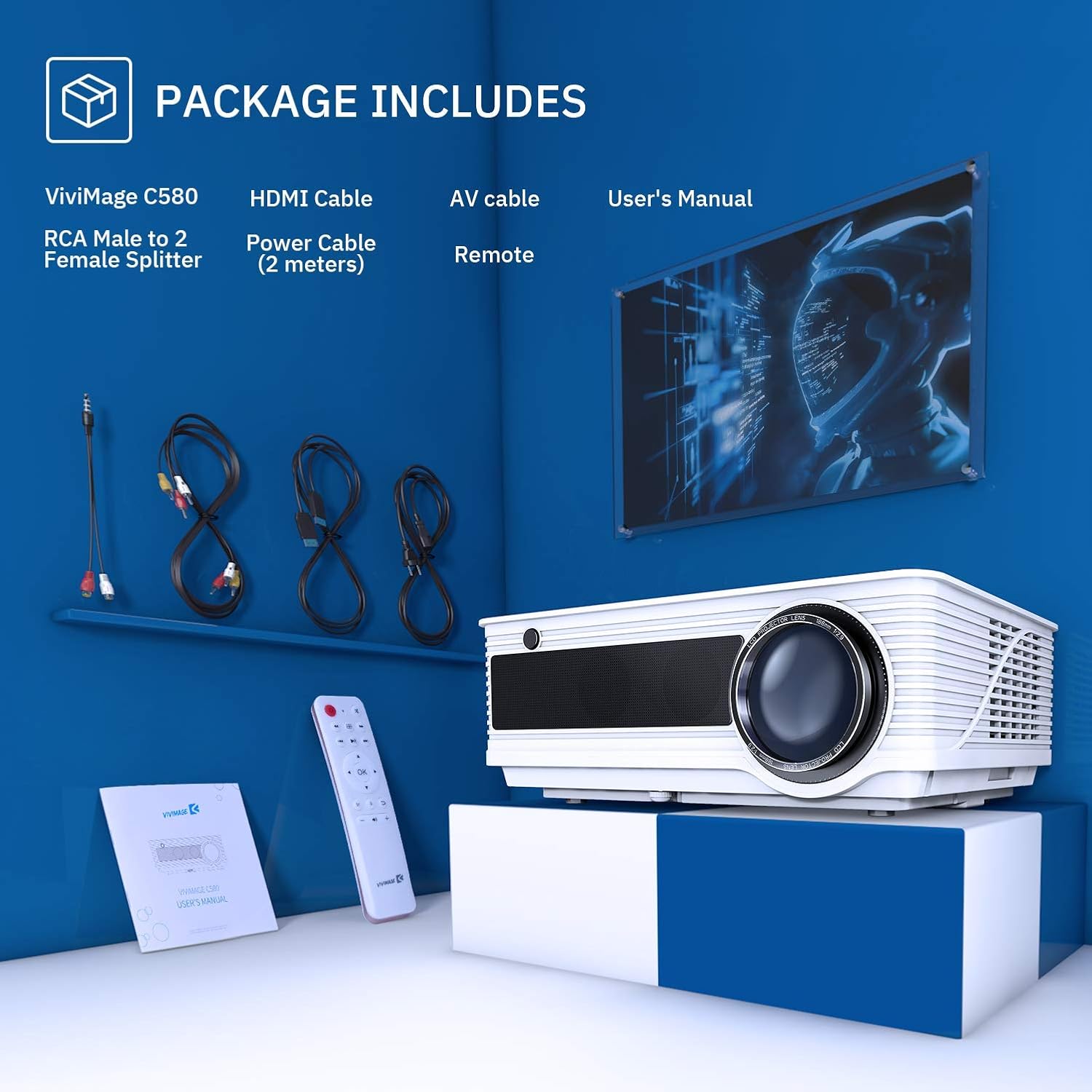
Image: The VIVIMAGE C580 projector and its included accessories, such as the HDMI cable, AV cable, power cable, remote control, and user manual.
3. Produktas baigtasview
The VIVIMAGE C580 is a home theater projector designed to deliver a clear visual experience. It features a native resolution of 1280 x 800 and a contrast ratio of 4000:1. The projector is equipped with various input ports for broad compatibility with multimedia devices.
Įvesties/išvesties prievadai
- Maitinimo įvestis: Maitinimo kabelio prijungimui.
- USB prievadas: Skirta USB diskų prijungimui.
- VGA prievadas: For connecting to computers.
- TV Port: For TV signal input.
- HDMI prievadas: For connecting to various HDMI-enabled devices.
- Garso prievadas: Išorinei garso išvesčiai.

Image: The rear panel of the VIVIMAGE C580 projector showing its various input ports (USB, VGA, TV, HDMI, Audio) connected to devices like a laptop, Fire TV Stick, and game console.
4. Sąranka
4.1 Įdėjimas
Position the projector on a stable surface or mount it to the ceiling using the dedicated mount hole on the bottom. The projection distance can range from 1.5 meters to 5.6 meters, yielding a display size from 44 inches to 200 inches.

Image: A VIVIMAGE C580 projector mounted on a ceiling, projecting a large image onto a screen, illustrating the immersive experience and projection distance/size capabilities.
4.2 Maitinimo jungtis
Connect the provided power cable to the projector's power input port and then plug the other end into a wall outlet.
4.3 Įrenginių prijungimas
The VIVIMAGE C580 projector is compatible with a wide range of multimedia devices. Use the appropriate cable (e.g., HDMI, AV, USB) to connect your device to the projector.
- HDMI: Connect to laptops, Amazon Fire TV Stick, PS4, Xbox, Blu-ray/DVD players.
- USB: Prijunkite USB atmintines, kad galėtumėte atkurti medijos failus.
- VGA: Connect to desktop computers.
- APIE: Connect to older devices using the RCA Male to 2 Female Splitter.
5. Projektoriaus valdymas
5.1 Maitinimo įjungimas/išjungimas
Norėdami įjungti arba išjungti įrenginį, paspauskite projektoriaus arba nuotolinio valdymo pulto maitinimo mygtuką.
5.2 Fokuso reguliavimas
To achieve a clear image, manually rotate the focus ring located on the projector lens until the image appears sharp.
5.3 Keystone koregavimas
If the projected image appears trapezoidal, adjust the ±15° keystone correction ring manually to square the image.

Vaizdas: Stambus planas views of the projector's manual focus ring and keystone correction mechanism, demonstrating how to adjust them for a clear and properly shaped image.
5.4 Šaltinio pasirinkimas
Use the 'Source' button on the remote control or projector to select the desired input source (e.g., HDMI1, HDMI2, USB, VGA, AV).
5.5 Garso išvestis
The projector features dual stereo speakers for integrated audio. For external audio, connect speakers or a sound system to the audio output port.

Image: A VIVIMAGE C580 projector highlighting its built-in speakers, indicating its capability to produce sound directly.
6. Priežiūra
6.1 Objektyvo valymas
Use a soft, lint-free cloth specifically designed for optical lenses to gently wipe the projector lens. Avoid touching the lens with bare hands.
6.2 Aušinimo sistema
The VIVIMAGE C580 features an upgraded cooling system designed to optimize heat dispersion. Regularly check and clean the air filter to ensure efficient cooling and prevent dust buildup.

Paveikslėlis: sprogęs view diagram of the VIVIMAGE C580 projector's internal cooling system, showing the fan and heat sinks, with a close-up of the removable air filter.
6.3 Lamp Gyvenimas
Projektorius lamp has an extended lifespan of up to 60,000 hours under normal operating conditions. Proper ventilation and maintenance contribute to maximizing lamp ilgaamžiškumas.

Image: A VIVIMAGE C580 projector lens with an overlay indicating an extended lamp tarnavimo laikas 60,000 XNUMX valandų.
7. Problemų sprendimas
If you encounter issues with your VIVIMAGE C580 projector, refer to the following common problems and solutions:
- Nėra galios: Įsitikinkite, kad maitinimo laidas yra tvirtai prijungtas prie projektoriaus ir maitinimo lizdo. Išbandykite kitą lizdą.
- Nėra paveiksliuko: Check the input source selection. Ensure the connected device is powered on and outputting a signal. Verify all cables are securely connected.
- Neryškus vaizdas: Adjust the focus ring until the image is sharp. Ensure the projection distance is within the recommended range.
- Trapecijos formos vaizdas: Adjust the keystone correction ring to square the image.
- Nėra garso: Check the projector's volume settings and the connected device's volume. Ensure external speakers are properly connected if used.
- Nuotolinio valdymo pultas neveikia: Pakeiskite nuotolinio valdymo pulto baterijas. Įsitikinkite, kad tarp nuotolinio valdymo pulto ir projektoriaus IR imtuvo nėra jokių kliūčių.
8. Specifikacijos
Key technical specifications for the VIVIMAGE C580 Projector:
| Funkcija | Specifikacija |
|---|---|
| Prekės ženklas | „VIVIMAGE“ |
| Modelio pavadinimas | C580 |
| Ekrano raiška | 1280 x 800 |
| Gimtoji raiška | 1280 x 800 |
| Ekrano tipas | LCD |
| Vaizdo kontrasto santykis | 4000:1 |
| Lamp Gyvenimas | Iki 60,000 valandų |
| Projekcijos atstumas | Nuo 1.5 m iki 5.6 m |
| Projekcijos dydis | 44–200 colio |

Image: A visual comparison demonstrating the brightness and contrast capabilities of the VIVIMAGE C580 projector, indicating 4000 Lux and a 4000:1 contrast ratio.
9. Garantija ir palaikymas
Šis produktas siūlomas kaip „Amazon Renewed“ prekė. „Amazon Renewed“ produktai yra profesionaliai patikrinti ir išbandyti, ar veikia ir atrodo kaip nauji. Jei nesate patenkinti pirkiniu, juos galima pakeisti arba grąžinti pinigus pagal „Amazon Renewed“ garantiją.
For further assistance, troubleshooting, or warranty claims, please refer to the Amazon Renewed Guarantee details or contact Amazon customer support directly.