
Įvadas
The Strymon NightSky is a powerful and innovative time-warped reverberator pedal designed to transform your sound. It offers a unique blend of traditional reverb and advanced sound design capabilities, allowing musicians to explore new sonic dimensions. This manual provides essential information for setting up, operating, and maintaining your NightSky pedal.
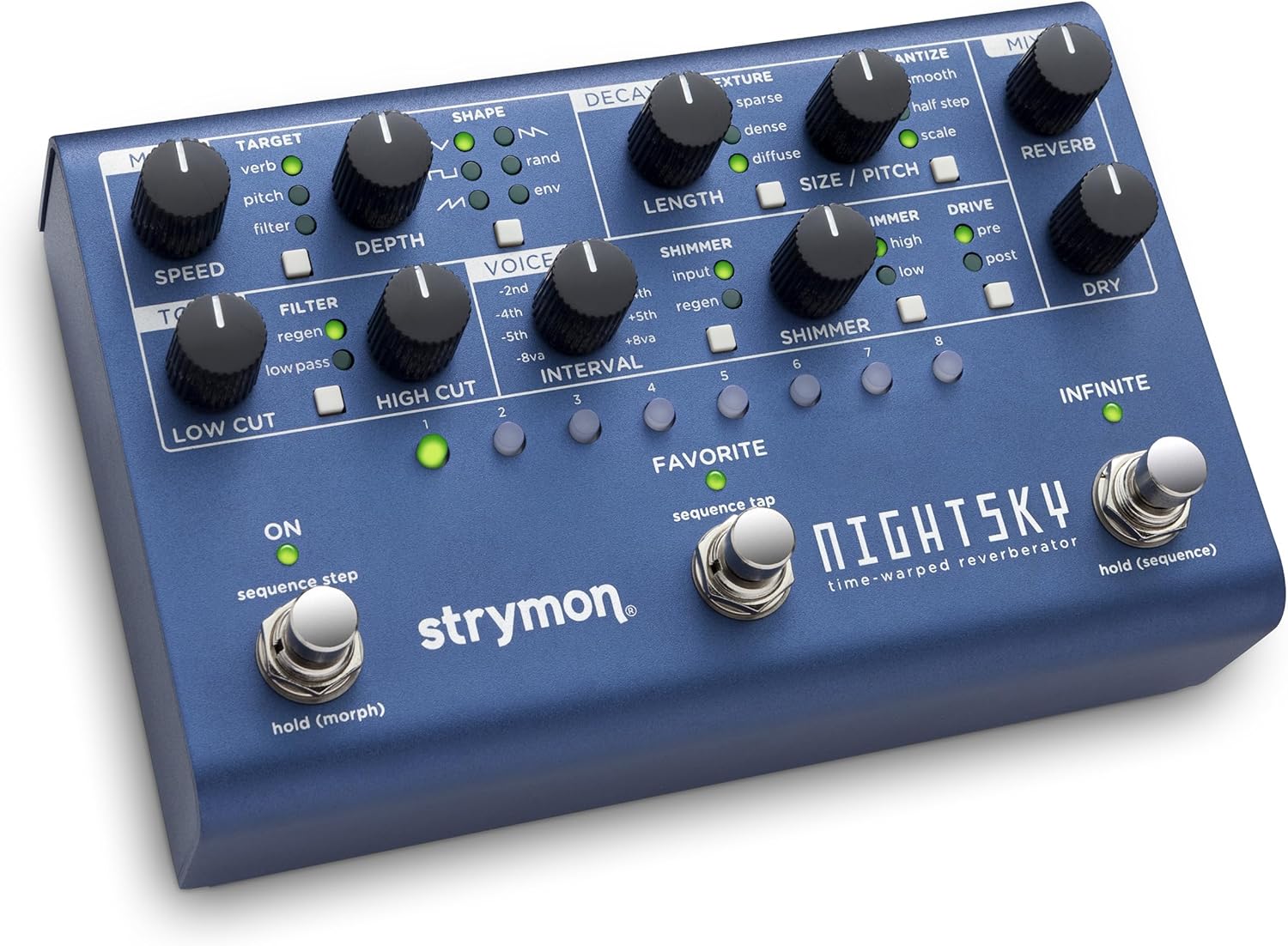
Vaizdas: Viršus view of the Strymon NightSky pedal, showcasing its blue metallic finish, numerous control knobs, and three footswitches. The labels for each control section are clearly visible.
Pagrindinės savybės
- Time-Warped Reverberation: Experience a groundbreaking effects pedal that transcends traditional reverb, transforming your instrument into vast soundscapes with surreal pitch and harmonic manipulation and synth-like filter sweeps.
- Powerful Sound Design Platform: Real-time control over reverb pitch, processing rate, core size, harmonics, and resonant filter, plus a versatile step sequencer with variable glide.
- Experimental Sonic Dimensions: Instant response knob-tweaking allows deep and powerful sound manipulation without menu diving, unlocking unparalleled creative potential.
- Versatile Reverb Core: Adjust reverb size and pitch simultaneously with the Variable Process Rate of NightSky's Warp Core, offering smooth or quantized pitch changes and sequencing capabilities.
- Enhanced Harmonic Manipulation: Shift harmonic structure with Shimmer, dynamically enrich with Glimmer, and generate saturated overdriven harmonics with Drive. Sculpt your signal further using the variable-resonance low-pass filter.
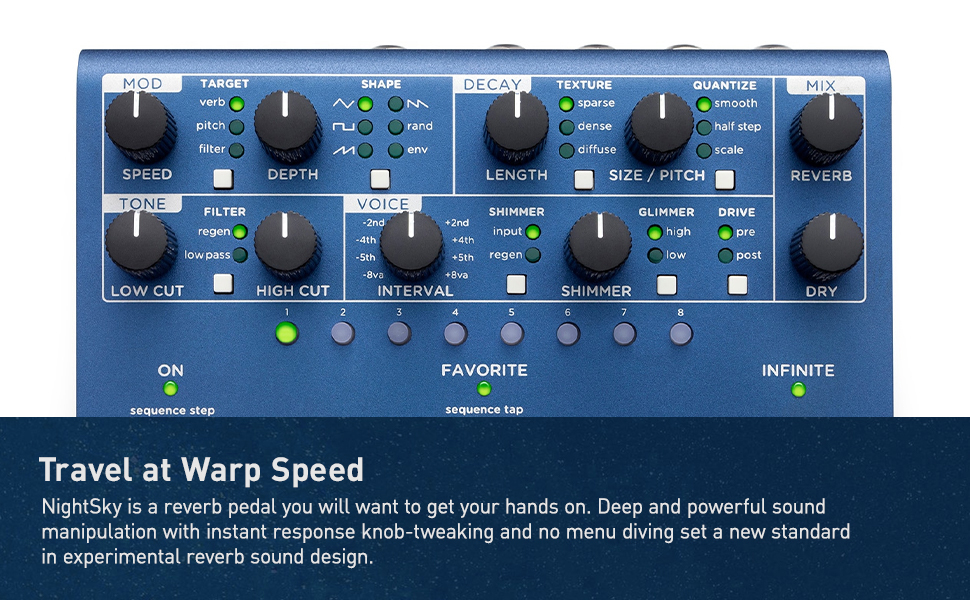
Image: The Strymon NightSky pedal is shown against a starry background with an astronaut, emphasizing its advanced sound design capabilities and the vast sonic landscapes it can create.
Valdikliai ir funkcijos
The NightSky pedal features a comprehensive set of controls for precise sound shaping.
MOD Section
- GREITIS: Valdo moduliacijos greitį.
- TIKSLAS: Selects the parameter to which modulation is applied (Verb, Pitch, Filter).
- SHAPE: Chooses the modulating waveform (Sine, Triangle, Random, Envelope).
- GYLIS: Adjusts the intensity of the modulation effect.
TONE Section
- LOW CUT: Filters out low frequencies from the reverb signal.
- FILTRAS: Controls a variable-resonance low-pass filter for shaping the reverb tone.
- HIGH CUT: Filters out high frequencies from the reverb signal.
VOICE Section
- INTERVALAS: Selects the harmonic interval for pitch shifting (e.g., -2nd, -4th, -5th, -8va, +2nd, +4th, +5th, +8va).
DECAY Section
- ILGIS: Adjusts the decay time of the reverb.
- TEKSTŪRA: Selects the reverb core type: Sparse (distinct reflections), Dense (smooth sound field), or Diffuse (slow-building atmospheric wash).
SIZE / PITCH Section
- KVANKUOTI: Selects the response and range of the SIZE/PITCH knob (Smooth, Half Step, Scale).
- Blizgesys: Adds an octave-up or octave-down effect to the reverb tail.
- GLIMMER: Dynamically enhances high or low frequency harmonics for synth-like textures.
- PAVARAS: Adds saturated overdriven harmonics to the reverb (Pre or Post).
MIX Section
- REVERB: Sets the output level of the reverberated signal.
- DŽIOVAS: Sets the output level of the unprocessed signal.
Foot Switches & Buttons
- ON (Left Footswitch): Toggles the effect on/off. Hold to morph between settings.
- FAVORITE (Middle Footswitch): Taps tempo for the sequencer.
- INFINITE (Right Footswitch): Freezes the audio input and plays it back endlessly.
- PRESET BUTTONS (1-8): Select and enable 16 presets directly from the front panel.
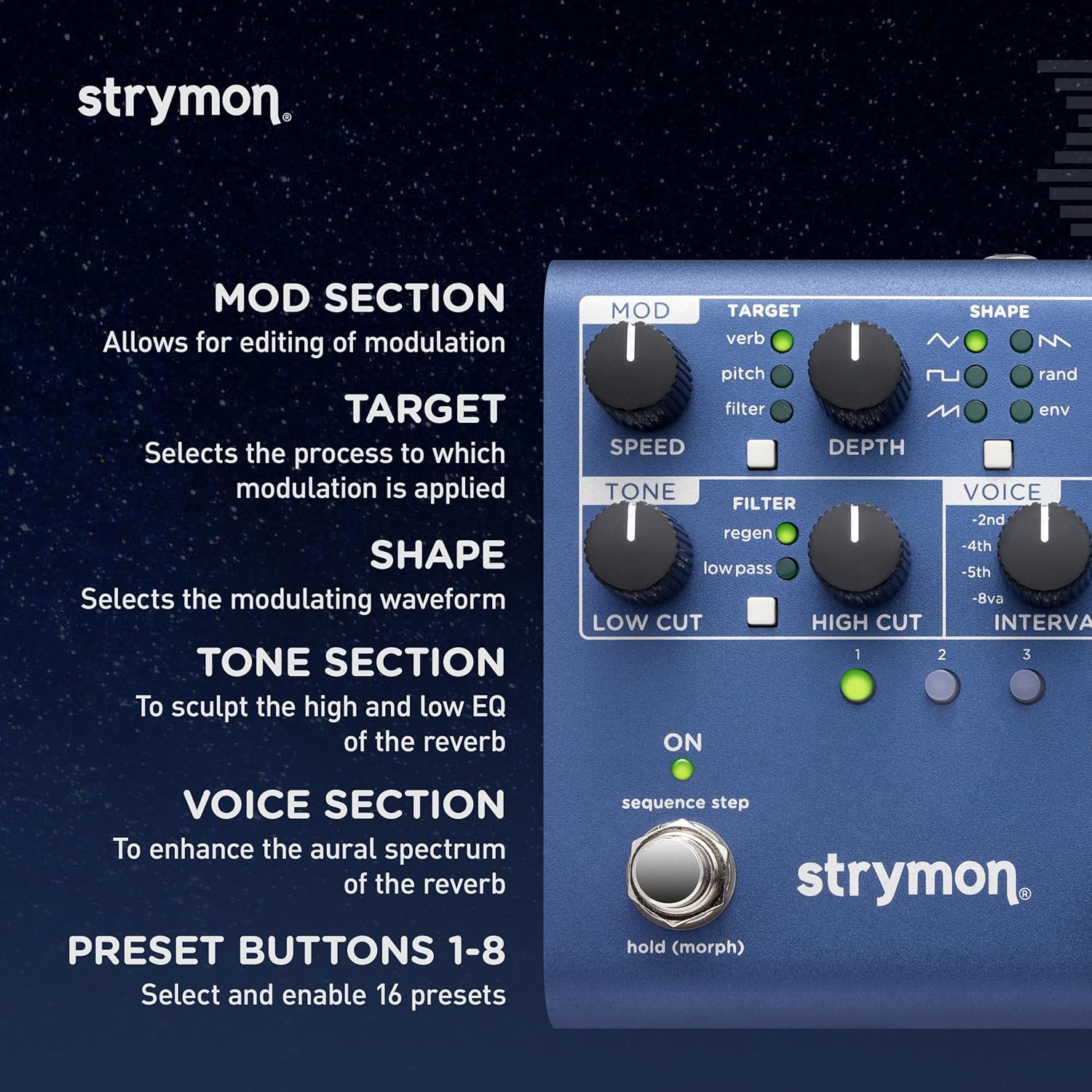
Paveikslėlis: detalus view of the left side of the NightSky pedal, highlighting the Mod, Tone, and Voice sections, along with the preset buttons and their corresponding LEDs.
Jungtys
The NightSky offers versatile connectivity options for various setups.
- Input (Left/Right): Standard 1/4-inch mono/stereo audio inputs.
- Output (Left/Right): Standard 1/4-inch mono/stereo audio outputs.
- EXP: Expression pedal input for real-time control of parameters.
- USB: USB port for firmware updates and MIDI control.
- MIDI ĮĖJIMAS/IŠĖJIMAS: Standard MIDI connections for advanced control and integration with other MIDI devices.

Image: The rear panel of the NightSky pedal, displaying the various input and output jacks, including dedicated instrument/line input level switch, USB, and MIDI ports.
Veikimo režimai
Morph režimas
Hold the left footswitch (ON) to seamlessly morph between two different settings of the pedal. The morph speed can be adjusted for smooth transitions.
Sekos režimas
The NightSky features an eight-step sequencer that allows you to create pitched or free-tuned sequences. These sequences can be saved per preset, offering extensive creative possibilities.
Oficialūs produktų vaizdo įrašai
Explore the capabilities of the Strymon NightSky with these official product videos from the manufacturer.
Strymon NightSky Time-Warped Reverberator Reverb Guitar Overview
Vaizdo įrašas: išsamus aprašymasview of the Strymon NightSky pedal, demonstrating its various features and sound possibilities for guitar, synths, vocals, and keyboards. (Duration: 13:47)
Strymon NightSky Reverberator Pedal Features
Video: A focused demonstration of the key features and functionalities of the Strymon NightSky Reverberator Pedal. (Duration: 1:50)
Specifikacijos
| Prekės svoris | 2.1 svaro |
| Gaminio matmenys | 4.5 x 6.98 x 1.75 colio |
| Prekės modelio numeris | NIGHTSKY |
| Spalva | Mėlyna |
| Techninės įrangos sąsaja | 1/4 colio garsas |
| Signalo formatas | Analoginis |
| Maitinimo šaltinis | Su laidu elektra |
| ttage | 9 voltų |
Priežiūra ir priežiūra
To ensure the longevity and optimal performance of your Strymon NightSky pedal, follow these guidelines:
- Valymas: Pedalo išorę valykite minkšta, sausa šluoste. Venkite abrazyvinių valiklių ar tirpiklių.
- Saugykla: Pedalą laikykite vėsioje, sausoje vietoje, toliau nuo tiesioginių saulės spindulių ir ekstremalių temperatūrų.
- Maitinimas: Always use the recommended 9V DC power supply with the correct polarity. Using an incorrect power supply can damage the unit and void the warranty.
- Jungtys: Ensure all cables are securely connected to prevent signal loss or damage. Disconnect cables when not in use or during transport.
Trikčių šalinimas
If you encounter issues with your NightSky pedal, try the following steps:
- Nėra galios:
- Verify the power supply is correctly connected and is the specified 9V DC.
- Patikrinkite, ar maitinimo lizdas veikia.
- Nėra garso:
- Ensure all audio cables are properly connected to the input and output jacks.
- Check the input source (instrument, synth) and output destination (amplifier, mixer) for proper operation.
- Verify the pedal is engaged (ON footswitch LED is lit).
- Check the MIX knobs (REVERB and DRY) to ensure they are not set to minimum.
- Netikėtas garsas / triukšmas:
- Check for ground loops or interference from other electronic devices.
- Įsitikinkite, kad visi kabeliai yra geros būklės ir tinkamai ekranuoti.
- Adjust the DRIVE knob if saturated harmonics are not desired.
For further assistance, please refer to the official Strymon support resources or contact customer service.
Garantija ir palaikymas
Strymon products are built with high-quality components and undergo rigorous testing. For detailed warranty information and support resources, please visit the official Strymon website or contact their customer service team. Keep your purchase receipt as proof of purchase for warranty claims.


