
1. Įvadas
The JHS Pedals 3 Series Chorus is a versatile guitar effect pedal designed to deliver classic chorus and vibrato modulation sounds. Its straightforward controls allow for a wide range of tonal possibilities, suitable for various musical styles. This manual provides essential information for setting up, operating, maintaining, and troubleshooting your 3 Series Chorus pedal.
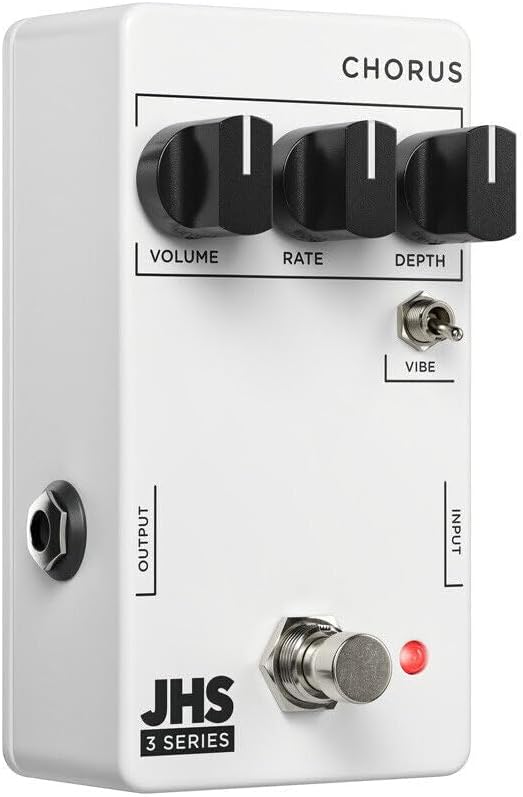
1 vaizdas: priekis view of the JHS 3 Series Chorus pedal.
2. Sąranka
Follow these steps to properly set up your JHS 3 Series Chorus pedal:
- Maitinimo jungtis: Connect a standard 9V DC negative center power supply to the power input jack. The pedal requires 70mA of current. Ensure your power supply meets these specifications to prevent damage.
- Įvesties jungtis: Connect your guitar or other instrument to the INPUT jack on the right side of the pedal using a standard 1/4-inch instrument cable.
- Išvesties jungtis: Prijunkite OUTPUT lizdą kairėje pedalo pusėje prie savo amp„lifier“ arba kitą pedalą signalo grandinėje naudodami standartinį 6,35 mm instrumentinį kabelį.
- Aktyvinimas: Press the footswitch to engage or bypass the effect. The red LED indicator will illuminate when the effect is active.

2 pav.: Viršus view of the JHS 3 Series Chorus pedal, showing input and output jacks.
Sąranka baigtaview Vaizdo įrašas
1 vaizdo įrašas: metimas per sekundęview of the JHS 3 Series Pedals, including setup and general features. This video provides a visual guide to connecting and understanding the basic operation of the 3 Series line.
3. Veikimo valdikliai
The JHS 3 Series Chorus features three primary knobs and one toggle switch for shaping your sound:
- Apimtis: This knob controls the overall output level of the pedal. Adjust it to match the volume of your bypassed signal or to boost your sound when the effect is engaged.

Image 3: Detail of the Volume control knob.
- Įvertinkite: The Rate knob adjusts the speed of the chorus or vibrato modulation. Turning it clockwise increases the speed, creating faster, more intense wobbles. Counter-clockwise movement slows the modulation for a more subtle, swirling effect.

Image 4: Detail of the Rate control knob.
- Gylis: This knob controls the intensity or depth of the modulation. A lower setting (counter-clockwise) provides a gentle, less pronounced chorus. Increasing the depth (clockwise) results in a more pronounced, seasick-like modulation.

Image 5: Detail of the Depth control knob.
- Vibe Toggle: This two-position toggle switch alters the character of the effect. When engaged (up position), the Vibe toggle removes the dry signal, transforming the chorus into a true pitch vibrato sound. In the down position, the pedal operates as a standard chorus effect, blending the modulated signal with your dry signal.

Image 6: Detail of the Vibe toggle switch.
4. Specifikacijos
| Prekės ženklas | JHS pedalai |
| Modelio pavadinimas | 3 Series Chorus |
| Modelio numeris | 3SCHORUS |
| Stilius | Choras |
| Spalva | Baltas |
| Prekės svoris | 0.3 kilogramo |
| ttage | 9 voltų DC |
| Amppakilimas | 70 milijonųamps |
| Maitinimo šaltinis | Corded Electric (9V DC Negative Center) |
| Garso išvesties efektai | Chorus, Vibrato |
| Valdymo tipas | Knob (Volume, Rate, Depth), Toggle (Vibe) |
| Signalo formatas | Analoginis |
| Sound Profile | Warm, Musical, Chorus/Vibrato |
| Prekės matmenys | 4 x 3 x 2 colio |
| UPC | 650415212354 |
5. Priežiūra
To ensure the longevity and optimal performance of your JHS 3 Series Chorus pedal, follow these maintenance guidelines:
- Valymas: Use a soft, dry cloth to clean the pedal's exterior. Avoid using abrasive cleaners or solvents, as these can damage the finish and internal components.
- Saugykla: Pedalą laikykite vėsioje, sausoje vietoje, toliau nuo tiesioginių saulės spindulių ir ekstremalių temperatūrų. Jei ilgesnį laiką nenaudojate, atjunkite maitinimo šaltinį.
- Jungtys: Periodiškai tikrinkite visas kabelių jungtis, ar jos nėra susidėvėjusios. Įsitikinkite, kad lizdai nėra dulkių ir šiukšlių.
- Maitinimas: Always use a regulated 9V DC negative center power supply that meets the 70mA current requirement. Incorrect power can damage the pedal and void the warranty.
6. Problemų sprendimas
If you encounter issues with your JHS 3 Series Chorus pedal, refer to the following troubleshooting tips:
- Nėra garso:
- Patikrinkite visas kabelių jungtis (gitaros įvestį, išvesties į amp).
- Ensure the power supply is correctly connected and providing the specified 9V DC negative center power.
- Patikrinkite, ar jūsų prietaisas ir amplifier are working correctly by bypassing the pedal.
- Confirm the pedal is engaged (red LED illuminated).
- Silpnas arba iškraipytas garsas:
- Check the Volume knob setting on the pedal.
- Ensure your power supply is providing stable power. Low battery or an inadequate power supply can cause performance issues.
- Išbandykite su skirtingais kabeliais, kad išvengtumėte netinkamų jungčių.
- Effect Not Working as Expected:
- Adjust the Rate and Depth knobs to explore the full range of the effect.
- Experiment with the Vibe toggle switch to understand its impact on the sound (chorus vs. vibrato).
- If the sound is too subtle, increase the Depth. If it's too fast or slow, adjust the Rate.
7. Garantija ir palaikymas
The JHS Pedals 3 Series Chorus comes with a 4-year non-transferable warranty within the USA. Product registration is required to activate the warranty.
For warranty claims, technical support, or further assistance, please visit the official JHS Pedals website or contact their customer service department. Always refer to the official JHS Pedals resources for the most accurate and up-to-date support information.
Oficialus Websvetainė: www.jhspedals.com