
1. Įvadas
Ačiū, kad pirkoteasing the JVC XS-N2239TC Wireless Stereo Speaker System. This manual provides essential information for the safe and efficient use of your new speaker system. Please read these instructions thoroughly before operating the device and retain them for future reference.
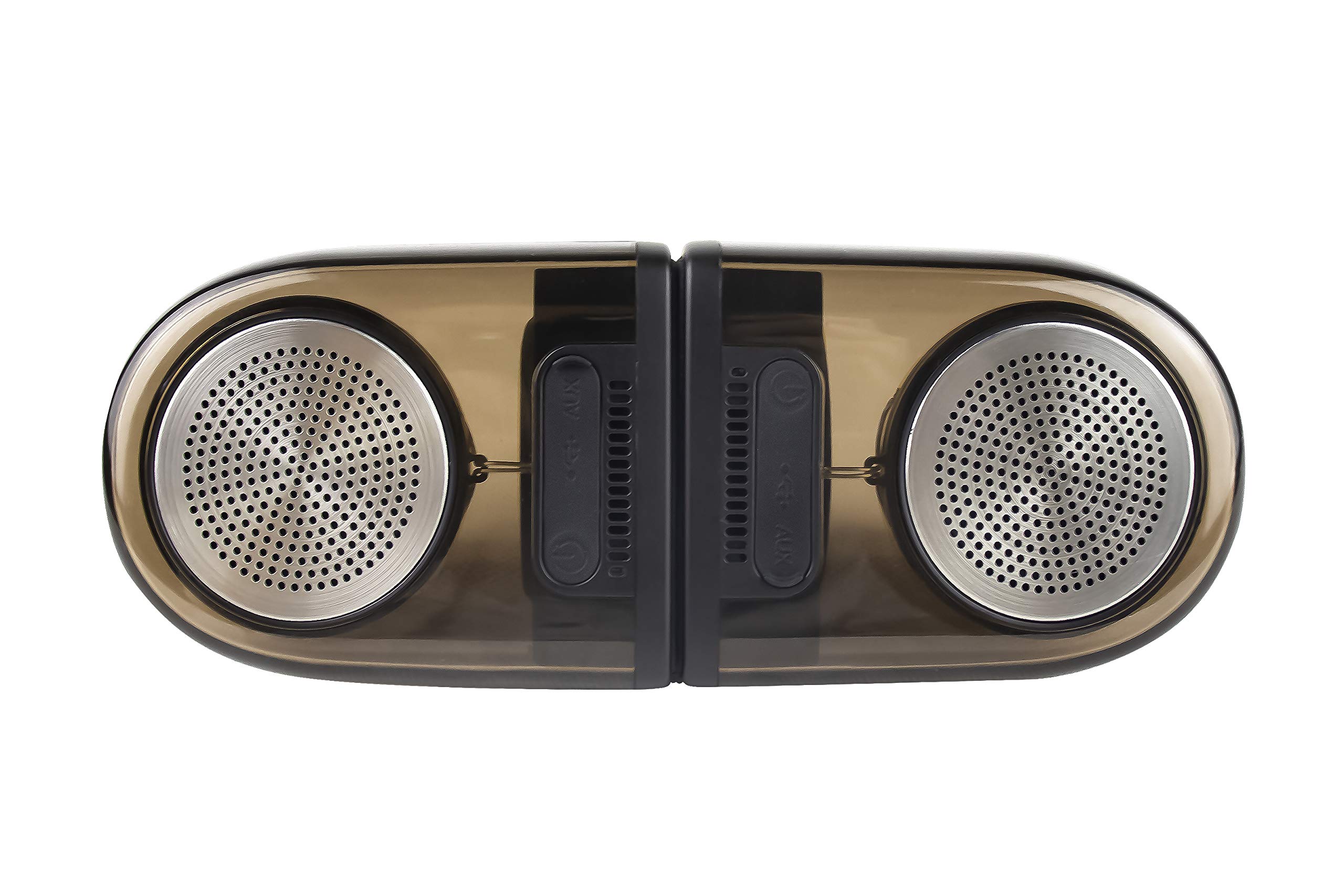
Image of the JVC XS-N2239TC speaker system, showcasing jo dizainą ir komponentus.
2. Dėžutės turinys
Patikrinkite, ar jūsų pakuotėje yra visi šie daiktai:
- 1 x JVC XS-N2239TC Speaker Unit
- 1 x AUX kabelis
- 1 x Naudotojo vadovas (šis dokumentas)
- 1x įkrovimo laidas
- 1x garantinis talonas
3. Sąranka
3.1 Įdėjimas
The JVC XS-N2239TC speakers are designed for versatile placement, suitable as Bookshelf or Floor Standing units. Ensure the speakers are placed on a stable, flat surface or floor, away from direct sunlight, heat sources, and moisture. For optimal stereo sound, position the two speakers appropriately within your listening area.
3.2 Maitinimo jungtis
- Connect the charging cable to the speaker's power input port.
- Kitą įkrovimo laido galą prijunkite prie tinkamo maitinimo lizdo.
- Ensure the speaker is fully charged before initial use for optimal battery life.
4. Naudojimo instrukcijos
4.1 Įjungimas / išjungimas
Locate the power button on the speaker unit. Press and hold the button for a few seconds to power the speaker on or off. An indicator light will typically confirm the power status.
4.2 Ryšys
4.2.1 Belaidis ryšys
The speaker supports wireless streaming. To connect wirelessly:
- Ensure the speaker is powered on and in pairing mode (refer to the speaker's indicator lights for status).
- On your device (e.g., smartphone, tablet, television), enable wireless functionality.
- Ieškokite available devices and select "JVC XS-N2239TC" from the list.
- Once connected, you can stream audio wirelessly to the speaker system.
4.2.2 USB jungtis
The speaker features a plug-and-play USB card reader. Insert a USB storage device containing audio files into the designated USB port on the speaker. The speaker will automatically detect and begin playing compatible audio files.
4.2.3 AUX jungtis
Use the provided AUX cable to connect the speaker to devices with a 3.5mm audio output jack, such as televisions or other audio sources. Plug one end of the AUX cable into the speaker's AUX input and the other end into your audio source's output.
4.3 Valdikliai
4.3.1 Multifunctional Panel Keys
The speaker unit is equipped with multifunctional panel keys. These keys allow you to:
- Adjust volume (increase/decrease).
- Play/Pause audio playback.
- Navigate tracks (forward/backward) when playing from USB or wireless sources.
4.3.2 Nuotolinis valdymas
The included remote control provides convenient access to various functions from a distance. Use the remote to:
- Power on/off the speaker.
- Sureguliuokite garsumą.
- Control playback (play, pause, skip tracks).
- Switch input modes (e.g., Wireless, USB, AUX).
5. Priežiūra
5.1 Valymas
To clean the speaker, use a soft, dry cloth. Do not use abrasive cleaners, waxes, or solvents as they may damage the finish. Ensure the speaker is powered off and unplugged before cleaning.
5.2 Atsparumas vandeniui
The JVC XS-N2239TC speaker is designed with water resistance. While it can withstand splashes, it is not intended for submersion. Avoid exposing the speaker to excessive moisture or direct water jets to prevent damage.
6. Problemų sprendimas
If you encounter issues with your speaker system, please refer to the following common solutions:
- Nėra galios: Ensure the charging cable is securely connected to both the speaker and a working power outlet. Check if the power button has been pressed correctly.
- Nėra garso: Verify the volume level on both the speaker and your connected device. Ensure the correct input mode (Wireless, USB, AUX) is selected. Check all cable connections.
- Belaidžio ryšio problemos: Make sure the speaker is within range of your device. Try unpairing and re-pairing the speaker with your device. Ensure no other devices are interfering with the wireless signal.
- USB atkūrimo problemos: Confirm the USB device is formatted correctly and contains compatible audio files. Išbandykite kitą USB įrenginį.
- Nuotolinio valdymo pultas neveikia: Check the remote control's batteries and replace them if necessary. Ensure there are no obstructions between the remote and the speaker's sensor.
Jei problema išlieka, susisiekite su klientų aptarnavimo tarnyba.
7. Specifikacijos
| Funkcija | Detalė |
|---|---|
| Prekės ženklas | JVC |
| Modelio pavadinimas | JVC XS-N2239TC |
| Ryšio technologija | USB, belaidis |
| Belaidės technologijos tipas | Bevielis |
| Ryšio protokolas | USB |
| Garso išvesties režimas | Stereo |
| Garsiakalbio tipas | Knygų lentyna |
| Montavimo tipas | Grindų stovėjimas |
| Produkto savybės | Nuotolinio valdymo pultas |
| Kontrolės metodas | Nuotolinis |
| Suderinami įrenginiai | Televizija |
| Garso kanalų skaičius | 2.1 |
| Garsiakalbio dydis | 7.5 centimetro |
| Subwoofer Speaker Diameter | 5 colių |
| Tweeter Driver Diameter | 1 colių |
| Garso tvarkyklės tipas | Dinaminis vairuotojas |
| Spalva | Juoda |
| Yra atsparus vandeniui | TIESA |
| Atsparumo vandeniui lygis | Atsparus vandeniui |
| Specifinis produkto naudojimas | Namų pramogų sistemos |
| Vidutinis akumuliatoriaus veikimo laikas | 6 valandų |
| Prekės svoris | 0.56 kilogramo |
8. Garantija ir palaikymas
8.1 Informacija apie garantiją
Šis produktas tiekiamas su a 1 metų garantija gamintojo pateikta nuo pirkimo datos. Prašome išsaugoti pirkimo kvitą ir garantijos kortelę bet kokiems garantiniams reikalavimams.
8.2 Pagalba klientams
For any complaints, technical assistance, or support regarding your JVC XS-N2239TC speaker system, please contact JVC customer care:
- Klientų aptarnavimo numeris: +91-9910332380
Please have your product model number and purchase details ready when contacting support.