
Įvadas
This manual provides comprehensive instructions for the Rimous Universal Remote Control, designed for seamless compatibility with various LG Smart TV models, including LCD, LED, OLED, UHD, 3D, and 4K televisions. This remote control is a direct replacement and requires no complex programming for most LG TVs. Please read this manual carefully to ensure proper use and longevity of your remote control.
Sąranka
1. Akumuliatoriaus įdėjimas
The Rimous Universal Remote Control operates on two (2) AAA batteries (not included). Follow these steps to install the batteries:
- Nuotolinio valdymo pulto gale raskite baterijų skyrių.
- Paspauskite fiksatorių žemyn ir pastumkite akumuliatoriaus dangtelį žemyn, kad jį atidarytumėte.
- Įdėkite dvi AAA tipo baterijas, užtikrindami, kad teigiamas (+) ir neigiamas (-) poliai teisingai sutaptų su žymėjimais baterijų skyriuje.
- Stumkite akumuliatoriaus dangtelį atgal į vietą, kol jis patikimai užsifiksuos.
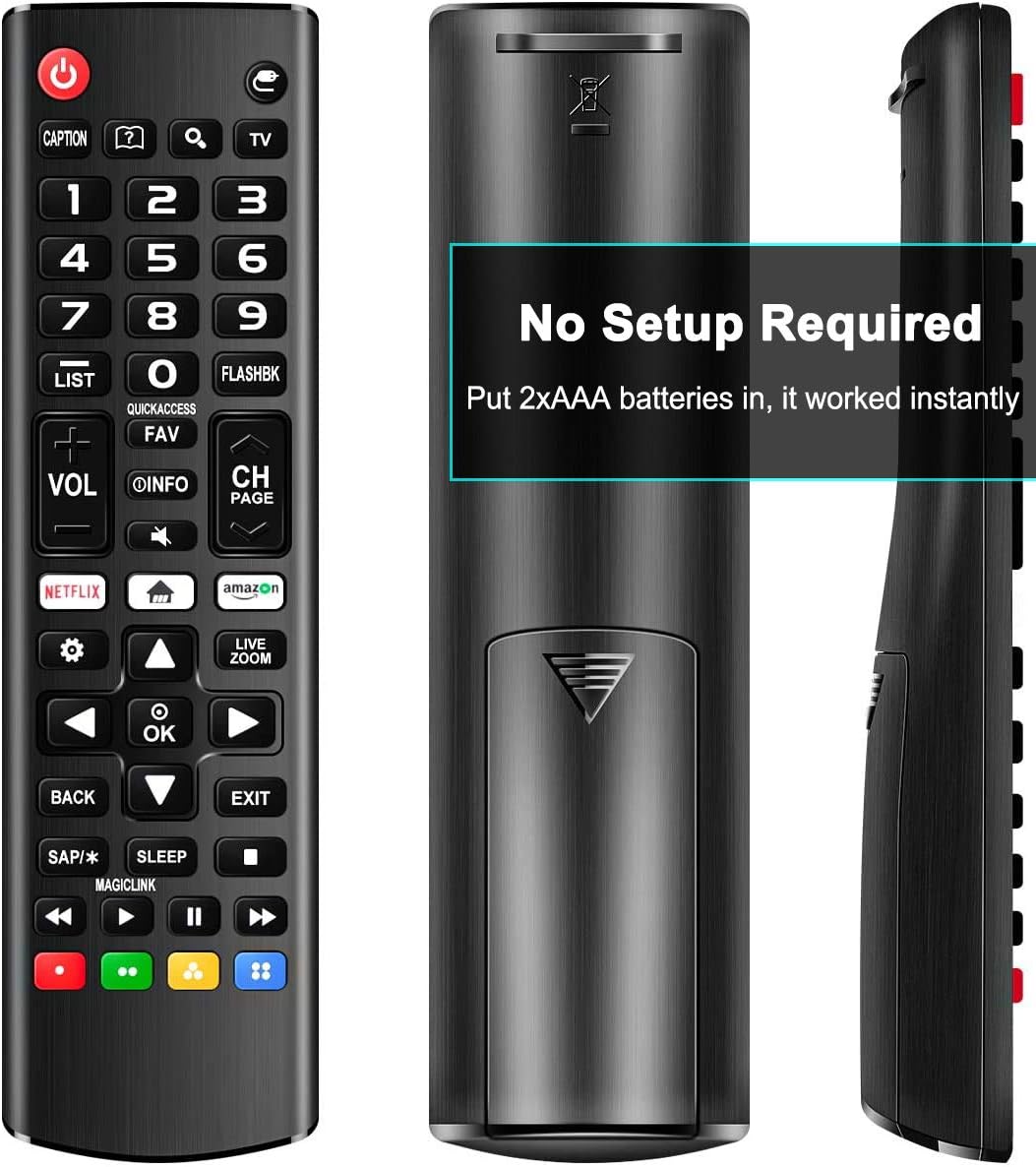
Image: Back of the remote control with the battery compartment open, illustrating the correct orientation for AAA battery insertion.
2. Pradinis naudojimas
This remote control is designed for immediate use with most LG Smart TVs. No programming or pairing is required. Once batteries are installed, point the remote towards your LG TV and begin operation.

Vaizdas: priekis view of the remote control, indicating compatibility with various LG Smart TV types.
Naudojimo instrukcijos
The Rimous Universal Remote Control features an ergonomic design for comfortable grip and intuitive button placement. Below is a guide to the primary functions of the remote's buttons.

Image: Detailed layout of the remote control buttons with their functions labeled.
- Įjungimo mygtukas (⑆): Turns the TV on and off.
- Skaičių mygtukai (0–9): Tiesiogiai pasirinkite kanalus.
- SĄRAŠAS: atidaro išsaugotų kanalų sąrašą.
- FLASHBK: Grįžta į ankstesnį viewed kanalas.
- VOL +/-: reguliuoja garsumo lygį.
- CH +/-: Perjungia kanalus aukštyn arba žemyn.
- INFORMACIJA: Displays information about the current program.
- FAV: Atidaro mėgstamiausių kanalų sąrašą.
- Nutildyti: Cuts off the sound temporarily.
- „Netflix“ mygtukas: Tiesioginė prieiga prie „Netflix“ programėlės.
- Amazon Button: Direct access to the Amazon application.
- Navigacijos skydelis (aukštyn, žemyn, kairėn, dešinėn, gerai): Naršo meniu ir patvirtina pasirinkimus.
- ATGAL: Returns to the previous step or menu.
- EXIT: Išeina iš dabartinio meniu arba programos.
- MIEGAS: Įjungia miego laikmačio funkciją.
- Spalvoti mygtukai (raudona, žalia, geltona, mėlyna): Provide shortcuts for interactive functions within certain applications or TV menus.
- Medijos valdymo mygtukai (leisti, pristabdyti, sustabdyti, atsukti atgal, persukti pirmyn): valdyti medijos atkūrimą.

Image: The remote control held in a hand, illustrating its comfortable and ergonomic design.
Priežiūra
Valymas
To maintain the remote control's appearance and functionality, wipe it regularly with a soft, dry cloth. For stubborn dirt, slightly dampen the cloth with water. Avoid using harsh chemicals, abrasive cleaners, or solvents, as these can damage the remote's surface and internal components.
Baterijos keitimas
Replace batteries when the remote's responsiveness decreases or it stops functioning. Always replace both AAA batteries at the same time with new ones. Do not mix old and new batteries, or different types of batteries, as this can lead to leakage or malfunction. Dispose of used batteries according to local regulations.
Trikčių šalinimas
- Nuotolinio valdymo pultas nereaguoja:
- Įsitikinkite, kad baterijos įdėtos teisingai, laikantis teisingo poliškumo (+/-).
- Pakeiskite senas baterijas naujomis AAA baterijomis.
- Patikrinkite, ar nėra kliūčių tarp nuotolinio valdymo pulto ir televizoriaus infraraudonųjų spindulių jutiklio.
- Ensure you are within the effective operating range and pointing the remote directly at the TV.
- Buttons require multiple presses:
- Tai dažnai rodo, kad baterijos išsikrovė. Pakeiskite baterijas.
- Clean the remote's surface, especially around the buttons, to ensure no debris is interfering with button presses.
- Nuotolinis darbas su pertrūkiais:
- Check battery connections for looseness.
- Ensure there are no strong light sources (like direct sunlight or certain types of lighting) interfering with the infrared signal.
Specifikacijos
| Prekės ženklas | Rimousas |
| Suderinami įrenginiai | LG LED LCD HDTV 3D 4K Smart TV (all models) |
| Ryšio technologija | Infraraudonųjų spindulių |
| Maitinimo šaltinis | 2 x AAA baterijos (į komplektą neįeina) |
| Ypatinga funkcija | Ergonomic, Universal, No Setup Required |
| Matmenys | 6.77 x 1.85 x 0.91 colio |
| Prekės svoris | 1.76 uncijos |
Garantija ir palaikymas
This Rimous Universal Remote Control is designed for reliability and performance. For any questions, technical assistance, or warranty inquiries, please contact the manufacturer or your retailer. Please refer to your purchase documentation for specific warranty terms and contact information.