
1. Įvadas
This manual provides essential instructions for the safe and effective operation, setup, maintenance, and troubleshooting of your AWELCO ARC 250 MMA Inverter Welder and accompanying Red 13 LCD Welding Helmet. Please read this manual thoroughly before using the equipment to ensure proper function and user safety.

Figure 1: AWELCO ARC 250 MMA Inverter Welder and Red 13 LCD Welding Helmet.
2. Saugos instrukcijos
Welding operations involve significant risks. Always adhere to the following safety guidelines to prevent injury or damage:
- Akių ir veido apsauga: Always wear the provided Red 13 LCD welding helmet or a suitable alternative with appropriate shade protection (9-13) to shield your eyes and face from arc rays and sparks.
- Kūno apsauga: Wear flame-resistant clothing, heavy-duty gloves, and protective footwear. Avoid synthetic materials.
- Vėdinimas: Ensure adequate ventilation in the work area to disperse welding fumes. Welding fumes can be hazardous to health.
- Priešgaisrinė prevencija: Keep a fire extinguisher nearby. Remove all flammable materials from the welding area. Sparks and hot slag can travel.
- Elektros sauga: Ensure the welder is properly grounded. Do not operate in wet conditions. Inspect cables for damage before each use.
- Darbo sritis: Darbo vieta turi būti švari ir tvarkinga. Užtikrinkite stabilų stovėjimą.
- Vaikai ir pašaliniai asmenys: Laikykite vaikus ir neįgaliotus asmenis atokiau nuo suvirinimo zonos.
3. Komponentai baigtiview
Your AWELCO ARC 250 pack includes the following items:
- AWELCO ARC 250 Inverter Welder
- Red 13 LCD Automatic Welding Helmet
- Manual Protective Mask
- Gruntas Clamp su Kabeliu
- Elektrodų laikiklis su kabeliu
- Vielinis šepetys / plaktukas

Figure 2: Included welding accessories: ground clamp, electrode holder, and wire brush.
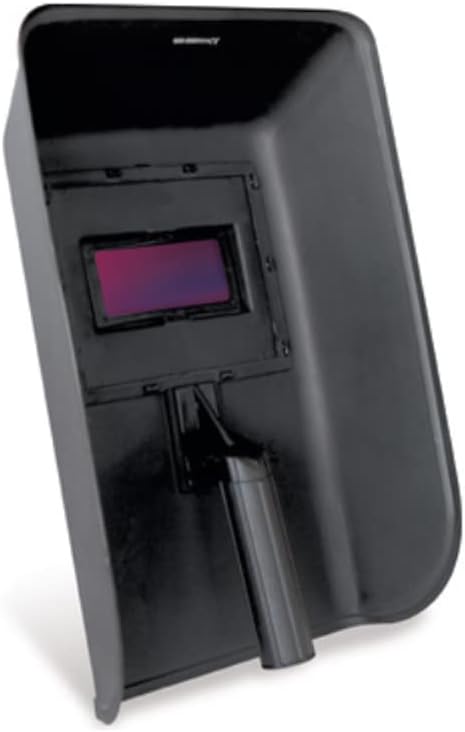
Figure 3: Manual protective welding mask.
4. Sąranka
4.1 Welder Connection
- Išpakuoti: Atsargiai išimkite visus komponentus iš pakuotės.
- Prijunkite įžeminimo jungtįamp: Pritvirtinkite žemę clamp cable to the negative (-) terminal on the front panel of the welder. Ensure a secure connection.
- Prijunkite elektrodo laikiklį: Attach the electrode holder cable to the positive (+) terminal on the front panel of the welder. Ensure a secure connection.
- Maitinimo jungtis: Connect the welder's power cord to a suitable 230V, 50/60Hz single-phase power outlet protected by a 16A fuse or circuit breaker. The welder is also compatible with generators.

Figure 4: Front panel of the AWELCO ARC 250 Inverter Welder with control knob and digital display.
4.2 Welding Helmet Setup (Red 13 LCD)
- Patikrinti: Check the helmet for any damage before use.
- Sureguliuokite galvos diržą: Adjust the head strap for a comfortable and secure fit. The helmet should sit firmly on your head without being too tight.
- Funkcijų testas: Before welding, perform a quick test to ensure the auto-darkening function is working correctly. Briefly expose the sensor to a bright light source (not the welding arc) to see if it darkens.

Figure 5: Red 13 LCD Automatic Welding Helmet.
5. Naudojimo instrukcijos
5.1 Powering On and Current Adjustment
- Maitinimas: Flip the main power switch located on the welder to the 'ON' position. The digital display will illuminate.
- Pasirinkite elektrodą: Choose an electrode suitable for your material and welding thickness (diameter 1.6 to 5 mm).
- Adjust Welding Current: Use the control knob on the front panel to set the desired welding current. The digital display will show the current in Amperes (15-200A). Refer to electrode manufacturer guidelines for recommended current settings.
5.2 MMA suvirinimo procesas
- Saugus ruošinys: Prijunkite įžeminimą klamp securely to the workpiece or a metal workbench that is in direct contact with the workpiece.
- Įdėkite elektrodą: Insert the chosen electrode into the electrode holder.
- Padėtis: Position yourself comfortably and safely. Lower your welding helmet.
- Smūgio lankas: Briefly touch the electrode to the workpiece and quickly lift it slightly to establish an arc. The ARC 250 features HOT FORCE for optimal ignition and ANTI-STICK technology to prevent the electrode from sticking.
- Suvirinimas: Maintain a consistent arc length and travel speed. The ARC 250 is designed for continuous welding (high duty cycle).
- Baigti: Once the weld is complete, lift the electrode from the workpiece. The helmet will return to its light state.
- Išvalyti: Use the wire brush/hammer to remove slag from the weld.
5.3 Generator Compatibility
The AWELCO ARC 250 welder can be connected to a suitable power generator. Ensure the generator provides stable power within the welder's specifications (230V, 50/60Hz, sufficient KVA output, minimum 8.5 KVA recommended) to prevent damage to the welder or inconsistent welding performance.
6. Priežiūra
Regular maintenance ensures the longevity and safe operation of your welding equipment.
- Valymas: Regularly clean the welder's ventilation openings to prevent dust and debris buildup, which can cause overheating. Use compressed air if available.
- Kabelio apžiūra: Periodically inspect all cables (power, ground, electrode) for cuts, fraying, or damaged insulation. Replace damaged cables immediately.
- Terminalo patikrinimas: Ensure all cable connections to the welder are tight and free of corrosion.
- Helmet Care: Clean the helmet's outer and inner lenses with a soft cloth and mild cleaner. Do not use abrasive materials.
- Saugykla: Store the welder and accessories in a dry, clean environment, away from moisture and extreme temperatures.
7. Problemų sprendimas
Jei kyla problemų, žr. toliau pateiktas dažniausiai pasitaikančias problemas ir sprendimus:
| Problema | Galima priežastis | Sprendimas |
|---|---|---|
| Suvirinimo aparatas neįsijungia | No power supply, faulty power cord, tripped circuit breaker. | Check power outlet, inspect power cord, reset circuit breaker. |
| Nėra suvirinimo lanko | Poor ground connection, incorrect current setting, wet electrode, faulty cable. | Užtikrinkite, kad įžeminimas būtų švarusamp is on bare metal, adjust current, use dry electrodes, check cables. |
| Arc is unstable or difficult to strike | Low current setting, improper electrode angle, workpiece contamination. | Increase current, adjust electrode angle, clean workpiece surface. |
| Welder overheats (thermal protection activates) | Viršytas darbo ciklas, užblokuota ventiliacija, aukšta aplinkos temperatūra. | Allow welder to cool down, clear ventilation openings, work in a cooler environment. |
| Welding helmet does not darken | Sensors blocked, low battery (if applicable), incorrect sensitivity setting. | Ensure sensors are clean, check/replace batteries, adjust sensitivity. |
8. Specifikacijos
| Funkcija | Specifikacija |
|---|---|
| Prekės ženklas | Awelco |
| Modelis | ARC 250 (PK5524) |
| Suvirinimo tipas | MMA (rankinis metalinis lankas) |
| Įvesties tomastage | 230V, Single-Phase, 50/60Hz |
| Suvirinimo srovės diapazonas | 15–200 A |
| Open Circuit Voltage (U0) | 65 V |
| Power Source Protection | 16 A (Fuse/Circuit Breaker) |
| Absorbuota jėga | 8.5 KVA |
| Elektrodo skersmuo | 1.6–5 mm |
| Suvirinimo storis | 1.5–10 mm |
| Duty Cycle (Normal Use) | 200A at 60% |
| Apsaugos klasė | IP 21S |
| Welder Dimensions (L x W x H) | 37 x 16 x 30 cm |
| Welder Weight | 4.8 kg |
| Helmet Protection Shade | 9-13 (Automatic) |
| Šalmo svoris | 0.9 kg (900 gr) |
| Standards / Classifications | EN 60974-1, EN 60974-10 |
9. Garantija
The AWELCO ARC 250 MMA Inverter Welder Pack comes with a 3 metų garantija. Please retain your proof of purchase for any warranty claims. The warranty covers manufacturing defects under normal use conditions. It does not cover damage resulting from misuse, neglect, unauthorized modifications, or normal wear and tear.
10. Parama
For technical assistance, spare parts, or warranty inquiries, please contact your retailer or the official AWELCO customer support. When contacting support, please have your product model (ARC 250 PK5524) and proof of purchase readily available.
Gamintojas: AWELCO