
1. Saugos informacija
Read all safety instructions carefully before installing and operating the PNI SP2000W Voltage Inverter. Failure to follow these instructions may result in electric shock, fire, or serious injury.
- Elektros sauga: Šis prietaisas veikia esant didelei įtampaitage. Do not open the inverter casing. Visus techninės priežiūros darbus turi atlikti kvalifikuoti darbuotojai.
- Vėdinimas: Ensure adequate ventilation around the inverter. Do not block the cooling fans or place the inverter in an enclosed space. Overheating can cause damage or fire.
- Aplinka: Do not expose the inverter to water, rain, snow, spray, or dust. Operate in a dry, cool, and well-ventilated area.
- Baterijos prijungimas: Connect the inverter directly to a 12V car battery. Do not connect to other voltage sources or attempt to use with solar panels, as special inverters are required for solar systems.
- Suderinamumas su apkrova: This inverter is designed for resistive loads such as TVs, lighting lamps, radios, fans, and mini-refrigerators. Avoid connecting inductive loads with high starting currents unless within the inverter's surge capacity.
- Apsauga nuo perkrovos: The inverter includes overload protection. Do not exceed the continuous output power of 2000W.
2. Produktas baigtasview
The PNI SP2000W is a pure sinusoid voltage inverter designed to convert 12V DC power from a car battery into 230V AC power, suitable for powering various electrical appliances. It features a continuous output of 2000W and active cooling for efficient operation.
2.1. Pagrindinės savybės
- Išėjimo galia: 2000 W nuolatinė galia, 4000 W maksimali galia.
- Įvesties tomastage: 12V DC.
- Išėjimas ttage: 220V / 230V AC.
- Išvesties bangos forma: Pure Sinusoid.
- Dažnis: 50 Hz.
- Aušinimas: Active cooling with two built-in fans and aluminum housing.
- Apsauga: Overload, thermal, short circuit.
2.2. Pakuotės turinys
- PNI SP2000W Voltage Inverteris
- Power connection cables (red for positive, black for negative)
- Wrench for terminal connections
- Vartotojo vadovas
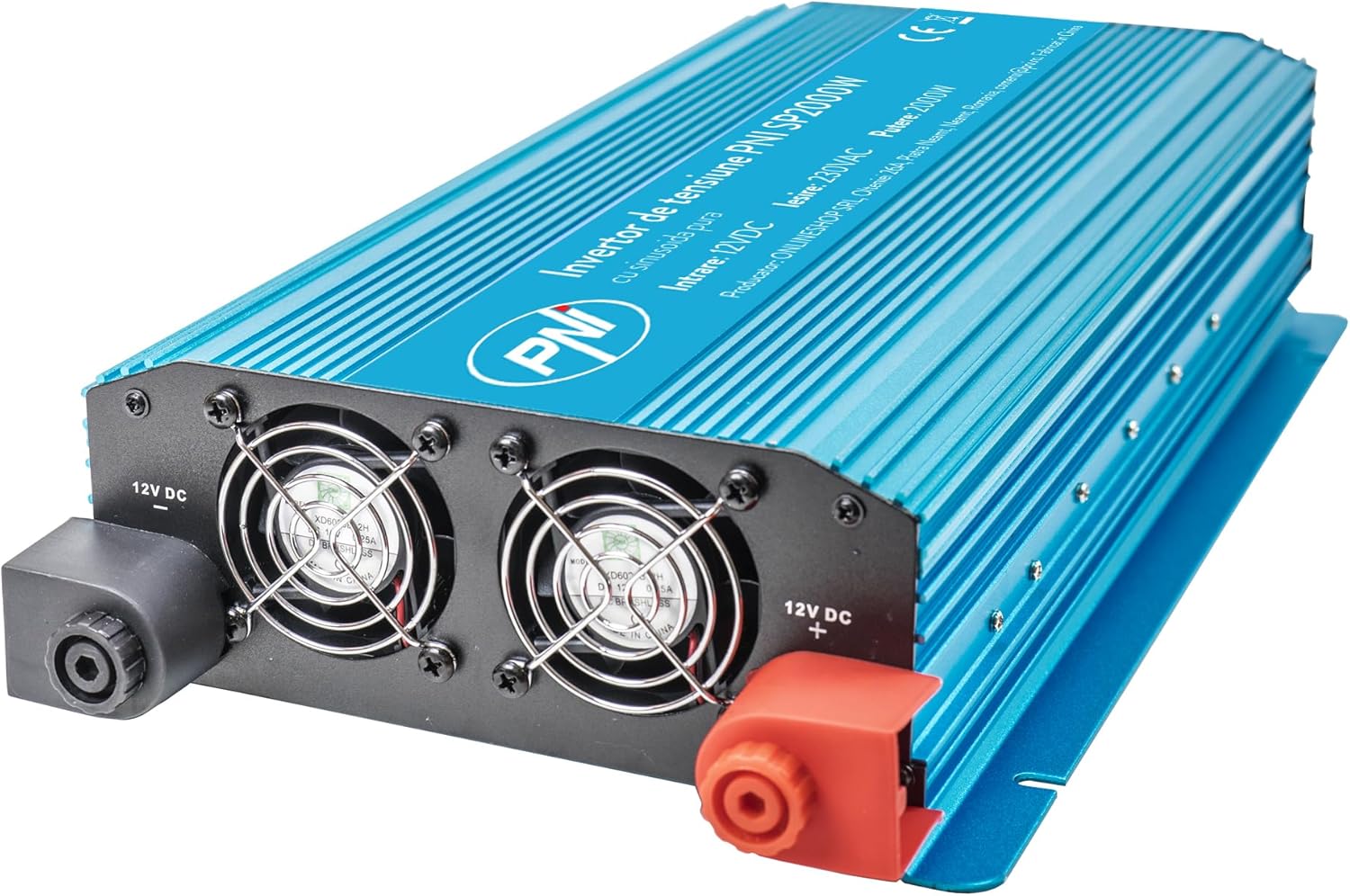
1 pav.: priekis view of the PNI SP2000W Voltage Inverter, showing the blue casing and the PNI logo.

2 paveikslas: viršuje view of the PNI SP2000W Voltage Inverter, displaying the product label with model information and specifications.

Figure 3: The PNI SP2000W Voltage Inverter shown with its included accessories: power connection cables (red and black) and a wrench for securing terminals.
3. Sąranka
Tinkamas nustatymas yra labai svarbus saugiam ir efektyviam keitiklio veikimui.
3.1. Įdėjimas
- Pastatykite keitiklį ant lygaus, stabilaus paviršiaus.
- Ensure there is at least 15 cm (6 inches) of clear space around the inverter for proper ventilation.
- Venkite tiesioginių saulės spindulių, šilumos šaltinių ir vietų, kuriose yra daug dulkių ar daug drėgmės.
3.2. Connecting to a 12V Battery
The inverter must be connected directly to a 12V DC battery. Use the provided cables for connection.
- Įsitikinkite, kad keitiklio maitinimo jungiklis yra padėtyje „OFF“ (išjungta).
- Connect the red cable to the positive (+) terminal of the inverter and then to the positive (+) terminal of the 12V battery.
- Connect the black cable to the negative (-) terminal of the inverter and then to the negative (-) terminal of the 12V battery.
- Tighten all connections securely using the provided wrench to prevent loose connections, which can cause overheating and damage.
- Verify that all connections are correct and secure before proceeding.

Figure 4: Input side of the inverter, showing the 12V DC positive (+) and negative (-) terminals for battery connection, along with the cooling fans.

Figure 5: Output side of the inverter, featuring two 230V AC sockets, the main power switch, and indicator lights for power and fault status.
4. Naudojimo instrukcijos
Follow these steps to operate your PNI SP2000W Voltage Inverter safely.
- Maitinimas: After ensuring all connections are secure and correct, switch the inverter's power button to the "ON" position. The green "POWER" indicator light should illuminate.
- Prijunkite prietaisus: Plug your 230V AC appliances into the inverter's output sockets. Ensure the total wattage of all connected appliances does not exceed 2000W.
- Monitorius: Observe the inverter's indicator lights. If the red "FAULT" light illuminates, refer to the Troubleshooting section.
- Išjungti: When you are finished using the inverter, first turn off and unplug all connected appliances. Then, switch the inverter's power button to the "OFF" position.
5. Priežiūra
Reguliarus techninis aptarnavimas užtikrina keitiklio ilgaamžiškumą ir patikimą veikimą.
- Valymas: Periodically clean the exterior of the inverter with a soft, dry cloth. Do not use liquid cleaners or solvents. Ensure the cooling vents are free from dust and debris.
- Vėdinimas: Regularly check that the cooling fans are not obstructed and are operating correctly. Good airflow is essential to prevent overheating.
- Kabelių jungtys: Periodically inspect the battery connection cables for any signs of wear, damage, or corrosion. Ensure connections remain tight.
- Saugykla: If storing the inverter for an extended period, disconnect it from the battery and store it in a cool, dry place away from direct sunlight.
6. Problemų sprendimas
If you encounter issues with your PNI SP2000W Inverter, refer to the following common problems and solutions.
| Problema | Galima priežastis | Sprendimas |
|---|---|---|
| Nėra išėjimo galios / Inverteris neįsijungia | Atsilaisvinusios akumuliatoriaus jungtys Žemas akumuliatoriaus tūristage Inverterio jungiklis išjungtas | Patikrinkite ir priveržkite akumuliatoriaus laidus Įkraukite arba pakeiskite bateriją Įsitikinkite, kad keitiklio jungiklis yra ĮJUNGTAS |
| Red "FAULT" light is on | Perkrova Perkaitimas Trumpasis jungimas Žemas/didelis įvesties tūristage | Sumažinkite prijungtą apkrovą Allow inverter to cool, ensure ventilation Check for short circuits in connected appliances/cables Patikrinkite akumuliatoriaus tūrįtage |
| Appliances not working correctly | Appliance wattage per aukšta Appliance type incompatible (e.g., high inductive load) | Ensure total load is within 2000W continuous Consult appliance manual for compatibility with pure sine wave inverters |
| Ventiliatoriai nuolat garsiai dirba | Aukšta vidaus temperatūra dėl didelio krovinio arba prastos ventiliacijos | Reduce load or improve ventilation around the inverter |
Jei problema išlieka ir išbandžius šiuos sprendimus, susisiekite su klientų aptarnavimo tarnyba.
7. Specifikacijos
| Funkcija | Specifikacija |
|---|---|
| Modelis | PNI-SP2000W |
| Nuolatinė išėjimo galia | 2000 W |
| Maximum Output Power (Peak) | 4000 W |
| Įvesties tomastage | 12 V DC |
| Išėjimas ttage | 220 V / 230 V kintamoji srovė |
| Darbo dažnis | 50 Hz |
| Išvesties bangos forma | Pure Sinusoid |
| Efektyvumas | > 88 proc. |
| Consumption in Stand-by | 10-15 W |
| Aktyvus aušinimas | Su ventiliatoriumi |
| Matmenys (I x P x A) | 440 x 220 x 100 mm |
| Svoris | 4.27 kg |
| Kabelio ilgis | 44 cm |
| Darbinė temperatūra | -10 °C ~ +40 °C |
| Laikymo temperatūra | -20 °C ~ +55 °C |
| Drėgmė | 90 % (nekondensuojantis) |
| Perkrovos pajėgumas | > 120 proc. |
| Apsaugos | Overload, Thermal, Short Circuit, Over-voltage, pagal ttage |
| Išvesties lizdai | 2 x 230 V AC sockets |
8. Garantija ir palaikymas
PNI products are manufactured to high-quality standards. This product is covered by a manufacturer's warranty against defects in materials and workmanship. Please retain your proof of purchase for warranty claims.
For technical support or warranty inquiries, please refer to the contact information provided with your purchase documentation or visit the official PNI websvetainę.