
1. Įvadas
This manual provides detailed instructions for the installation, operation, and maintenance of your Overmax Camspot 3.7 Full HD Wireless Indoor Camera. Please read this manual thoroughly before using the product to ensure proper function and safety. Keep this manual for future reference.
2. Pakuotės turinys
Patikrinkite, ar pakuotėje yra visi komponentai:
- Overmax Camspot 3.7 Wireless Indoor Camera
- Maitinimo laidas su adapteriu
- Tvirtinimo komplektas (varžtai, sieniniai kaiščiai, laikiklis)
- Vartotojo vadovas (šis dokumentas)
3. Produktas baigtasview
Susipažinkite su fotoaparato komponentais ir sąsajomis.
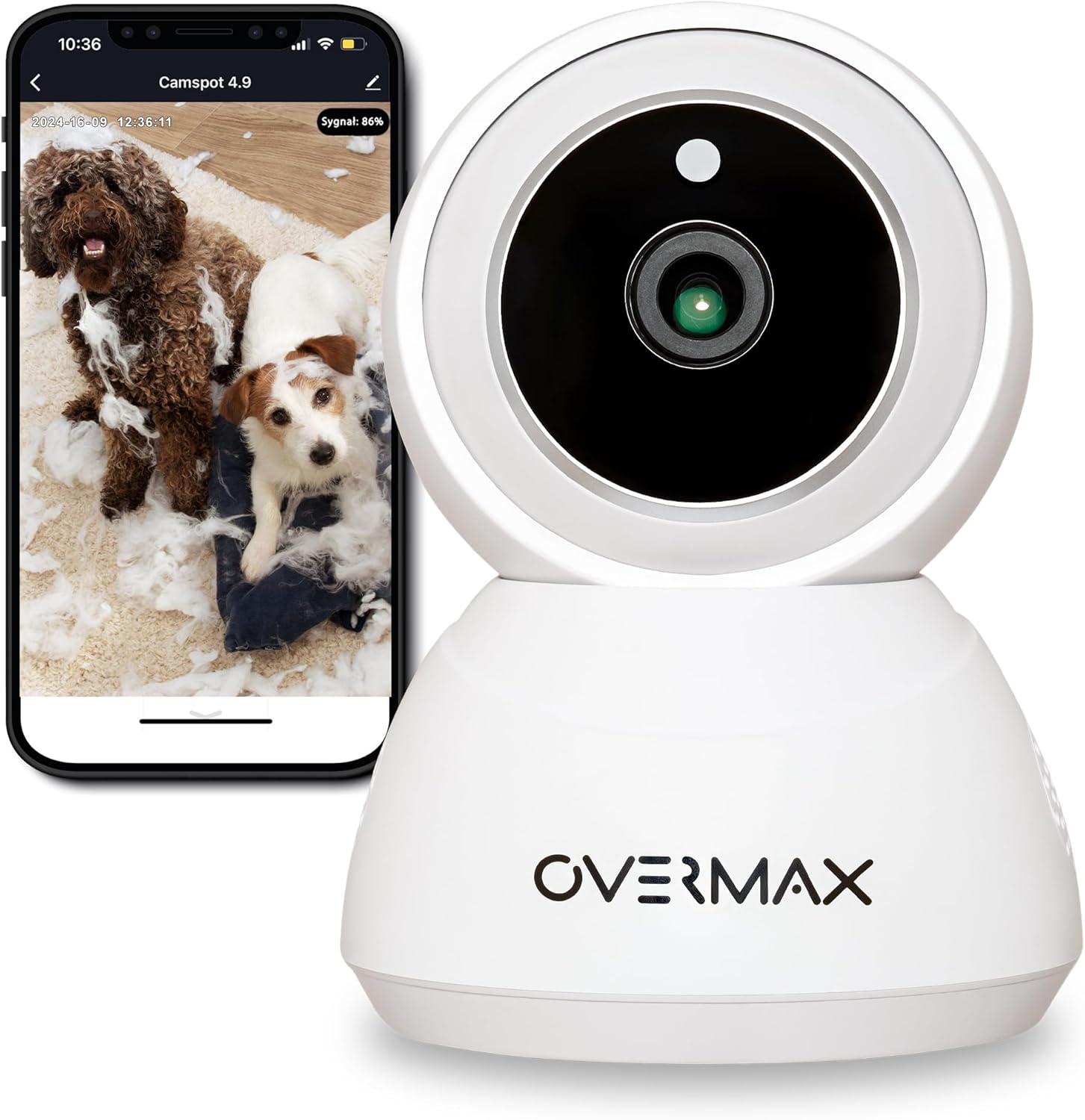
3.1 pav.: priekis view of the Overmax Camspot 3.7 camera with a smartphone showing the live video feed.

3.2 pav.: šonas view of the Overmax Camspot 3.7 camera, showing its dome shape and speaker grille.

3.3 pav.: galinis view of the camera, highlighting the LAN port, Reset button, and DC 5V power input.

3.4 paveikslas: View of the camera with the microSD card slot visible, located beneath the lens assembly.
4. Sąranka
4.1 Fizinis įrengimas
The Camspot 3.7 can be placed on a flat surface or mounted to a wall or ceiling.
- Pasirinkite vietą: Pasirinkite vietą, kurioje būtų pageidaujama viewing angle and is within range of your Wi-Fi network or an Ethernet connection.
- Montavimas (pasirinktinai):
- Attach the mounting bracket to the desired surface using the provided screws and wall plugs.
- Secure the camera to the mounting bracket. Ensure it is firmly attached.

Figure 4.1: The Overmax Camspot 3.7 camera shown mounted on a wall bracket, illustrating a typical installation.
4.2 Programėlės diegimas ir paskyros sukūrimas
The Overmax Control app is required to operate the camera.
- Atsisiųskite programą: Ieškokite "Overmax Control" in your smartphone's app store (iOS or Android) and download it.
- Sukurti paskyrą: Atidarykite programėlę ir vykdykite ekrane pateikiamus nurodymus, kad sukurtumėte naują vartotojo paskyrą.

Figure 4.2: The Overmax Camspot 3.7 camera alongside a smartphone displaying the 'CONTROL' app logo, indicating the required application for setup and operation.
4.3 Power On and Network Connection
- Maitinimas: Connect the power cable to the camera's DC 5V port and plug the adapter into a power outlet. The camera will power on and initiate its startup sequence.
- Tinklo prisijungimas:
- „Wi-Fi“: Vykdykite programėlėje pateiktas instrukcijas, kad prijungtumėte kamerą prie 2.4 GHz „Wi-Fi“ tinklo.
- Eternetas (neprivaloma): Connect an Ethernet cable from your router to the camera's LAN port for a wired connection.
4.4 Fotoaparato susiejimas
Once the camera is powered on and the app is installed, proceed with pairing:
- Pridėti įrenginį: In the Overmax Control app, tap the "Add Device" or "+" icon.
- Pasirinkite kameros tipą: Choose the appropriate camera model (Camspot 3.7).
- Nuskaityti QR kodą: The app will prompt you to scan a QR code. Position your smartphone's screen with the QR code approximately 15-20 cm in front of the camera lens. The camera will emit a sound upon successful scanning.
- Užbaigti sąranką: Follow any remaining on-screen prompts in the app to finalize the pairing process.

Figure 4.3: The Overmax Camspot 3.7 camera positioned to scan a QR code displayed on a smartphone, a common method for device pairing.
5. Naudojimo instrukcijos
5.1 Tiesiogiai View
Access the live video feed from your camera through the Overmax Control app. This allows real-time monitoring of the camera's surroundings.
5.2 Pakreipimo / pasukimo valdymas
The Camspot 3.7 features motorized pan and tilt capabilities.
- Horizontalus sukimasis: 355 laipsnių
- Vertikalus sukimas: 120 laipsnių
Use the directional controls within the Overmax Control app to adjust the camera's viewkampu nuotoliniu būdu.

Figure 5.1: Diagram illustrating the camera's extensive pan (355°) and tilt (120°) rotation range.
5.3 Dvipusis garsas
The camera is equipped with a microphone and speaker, enabling two-way communication. You can listen to the camera's environment and speak through the camera using the app.
5.4 Judesio aptikimas ir automatinis sekimas
The camera can detect moving objects and automatically track their movement within its field of view. Configure motion detection sensitivity and alerts in the app settings.
5.5 Naktinis matymas
The Camspot 3.7 features infrared technology for clear viewing in low-light or complete darkness, with a night vision range of up to 10 meters. The camera automatically switches to night mode when ambient light is insufficient.
5.6 Įrašymas ir saugojimas
The camera supports two primary storage methods for video recordings:
- „MicroSD“ kortelė: Insert a microSD card (up to 128GB, not included) into the designated slot for local storage. This allows for continuous recording for up to 3 weeks.
- Saugykla debesyje: The camera supports real-time cloud storage for recordings. Refer to the app for subscription details and options.
5.7 Išmaniųjų namų integracija
The Camspot 3.7 is compatible with Google Home and Amazon Alexa. Follow the instructions within the respective smart home apps to integrate your camera for voice control and automation.
5.8 Baby Monitor Function
Utilize the camera's features, including two-way audio and night vision, to monitor an infant. The app provides a comprehensive interface for this purpose.

Figure 5.2: The Overmax Camspot 3.7 camera shown with a smartphone displaying the app's control interface, including options for screenshot, speaking, recording, cloud storage, and direction control.
6. Priežiūra
- Valymas: Kameros objektyvą ir korpusą valykite minkštu, sausu audiniu. Nenaudokite stiprių cheminių medžiagų ar abrazyvinių valiklių.
- Firmware atnaujinimai: Regularly check the Overmax Control app for available firmware updates to ensure optimal performance and security.
- Saugyklos valdymas: Periodiškai review and manage recordings on your microSD card or cloud storage to free up space if needed.
7. Problemų sprendimas
- Fotoaparatas neprisijungia prie „Wi-Fi“:
- Įsitikinkite, kad jūsų „Wi-Fi“ tinklas yra 2.4 GHz dažnio. Kamera nepalaiko 5 GHz tinklų.
- Patikrinkite „Wi-Fi“ slaptažodžio teisingumą.
- Perkelkite kamerą arčiau maršrutizatoriaus.
- Iš naujo paleiskite kamerą ir maršrutizatorių.
- Nėra gyvų View:
- Verify internet connection on your smartphone and the camera.
- Check if the camera is powered on and connected to the network.
- Iš naujo paleiskite programą.
- Judesio aptikimas neveikia:
- Įsitikinkite, kad programėlės nustatymuose įjungtas judesio aptikimas.
- Sureguliuokite jautrumo nustatymus.
- Patikrinkite, ar kameros lauke nėra kliūčių view.
- „MicroSD“ kortelė neįrašo:
- Įsitikinkite, kad „microSD“ kortelė įdėta teisingai.
- Format the microSD card through the app.
- Check if the card is full or corrupted.
- Kamera nereaguoja:
- Press and hold the Reset button (located at the back) for approximately 5-10 seconds to factory reset the camera. You will need to re-pair it after a reset.
8. Specifikacijos
| Funkcija | Specifikacija |
|---|---|
| Modelio pavadinimas | Overmax Camspot 3.7 |
| Vaizdo raiška | „Full HD“ (1080p) raiška |
| Objektyvas | 3.6 mm |
| Kadrai per sekundę (FPS) | 25-30 |
| Vaizdo įrašų suspaudimas | H.264 |
| Horizontalus sukimasis | 355° |
| Vertikalus sukimas | 120° |
| Naktinio matymo diapazonas | Iki 10 metrų (infraraudonųjų spindulių) |
| „MicroSD“ kortelių palaikymas | Iki 128 GB |
| Ryšys | Wi-Fi (2.4GHz), Ethernet |
| Palaikomos sistemos | Windows XP/7/8/10, Android, iOS, Mac |
| Dvipusis garsas | Yes (Microphone, 1W Speaker) |
| Judesio aptikimas | Yes (Automatic Detector) |
| Maitinimo šaltinis | 12 Volts, 1 Watt |
| Matmenys (I x P x A) | 8.5 x 8.2 x 10.5 cm |
| Svoris | 180 gramų |
| Medžiaga | Metalas |
| Spalva | Baltas |
9. Garantija ir palaikymas
Overmax products are covered by a manufacturer's warranty. For specific warranty terms and conditions, please refer to the warranty card included in your package or visit the official Overmax websvetainę.
For technical support, troubleshooting assistance, or any product-related inquiries, please contact Overmax customer service through the contact information provided on the official website or within the Overmax Control application.