
Įvadas
This manual provides detailed instructions for the safe and efficient operation of your Phomemo D30 Bluetooth Thermal Label Maker. Please read this manual thoroughly before use and retain it for future reference.

Image: The Phomemo D30 Label Maker in white, accompanied by three rolls of adhesive labels and its product packaging.
Sąranka
1. Išpakavimas ir pradinis įkrovimas
Carefully remove all components from the packaging. The package includes: 1 Phomemo D30 Label Maker, 1 USB Charging Cable, 1 User Guide, and 3 Rolls of Label Paper.
Before first use, fully charge the device using the provided USB cable. The indicator light will show charging status.
2. Installing Label Roll
- Open the label compartment by gently pressing the side release button or lifting the top cover, depending on the model design.
- Insert the label roll with the printing surface facing upwards, ensuring it is properly seated in the designated slot.
- Pull a small portion of the label tape out, extending it past the cutting edge.
- Saugiai uždarykite etiketės skyrių.

Vaizdas: Stambus planas view of the Phomemo D30 Label Maker with its top cover open, illustrating the correct placement of a label roll for thermal printing.
Naudojimo instrukcijos
1. Programėlės diegimas ir prijungimas
Download the "Print Master" app from your device's app store (compatible with iOS and Android smartphones and tablets).
Turn on the Phomemo D30 Label Maker by pressing the power button. The indicator light will illuminate.
Open the "Print Master" app on your mobile device. Ensure Bluetooth is enabled on your device. The app will automatically detect and connect to the label maker.
2. Etikečių kūrimas ir spausdinimas
Within the "Print Master" app, you can choose from various modes and templates:
- Supaprastintas režimas: For simple and quick label design.
- Kūrimo režimas: Offers extensive functions and materials for customized labels.
- One-Click Print: Pre-designed common words and phrases for instant printing.
To create a custom label:
- Select "Creation Mode" or "New Label" in the app.
- Choose your desired label size and type (e.g., white, continuous, cut label). The app supports label widths of 12-15mm.
- Utilize the app's features to add text, icons (over 1000 available), borders (over 60 available), images, barcodes, QR codes, and more. You can also import data from Excel or use OCR functionality.
- Adjust font styles, sizes, alignment, and character pitch as needed.
- Preview jūsų etiketės dizainas.
- Tap "Print Label" or "Print Now" to send the design to the label maker.
- Once printed, gently tear off the label along the cutting edge.
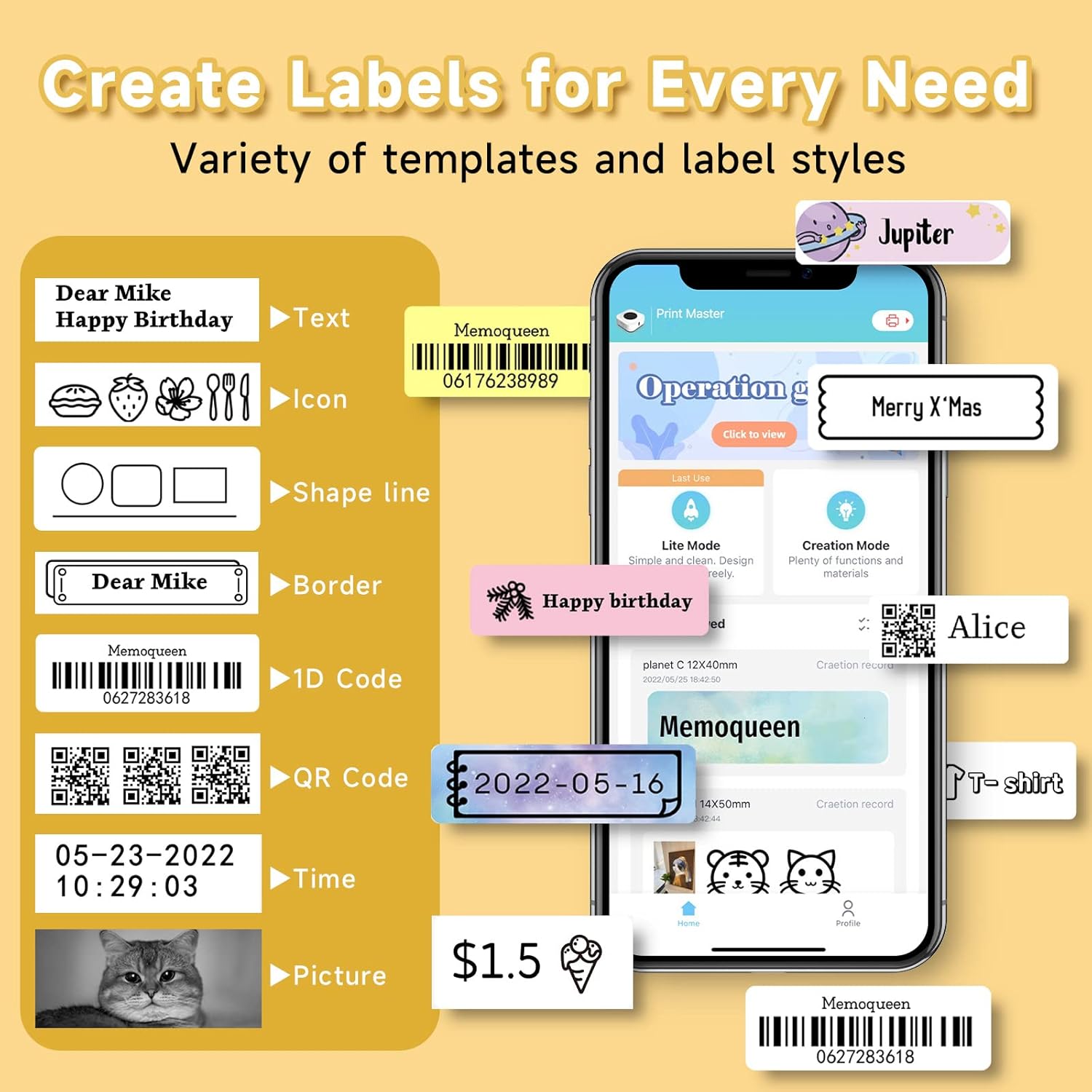
Image: Screenshot of the "Print Master" app, displaying diverse label creation tools and templates for text, icons, barcodes, and QR codes.

Image: The Phomemo D30 Label Maker shown alongside a smartphone running the "Print Master" app, highlighting Bluetooth connectivity and customization options like fonts and templates.
Vaizdo demonstracijos
Video: A quick look at the Phomemo D30 Label Maker, demonstrating its compact size and ease of use with the companion app.
Video: A thorough review demonstrating the Phomemo D30 app's features and the quality of the printed labels.
Priežiūra
To ensure optimal performance and longevity of your Phomemo D30 Label Maker, follow these maintenance guidelines:
- Valymas: Regularly clean the print head with a soft, lint-free cloth. Do not use harsh chemicals or abrasive materials.
- Saugykla: Etikečių spausdintuvą laikykite vėsioje, sausoje vietoje, toliau nuo tiesioginių saulės spindulių ir ekstremalių temperatūrų.
- Akumuliatoriaus priežiūra: Charge the device regularly, even if not in frequent use, to maintain battery health. Avoid fully discharging the battery for extended periods.
- Etikečių rulonai: Use only genuine Phomemo D30 thermal label rolls to prevent damage to the print head and ensure print quality.

Image: A visual comparison emphasizing the compact and portable design of the Phomemo D30 Label Maker.
Trikčių šalinimas
| Problema | Galima priežastis | Sprendimas |
|---|---|---|
| Įrenginys neįsijungia | Išsikrovęs akumuliatorius; netinkamai paspaustas maitinimo mygtukas | Charge the device fully; Press and hold the power button for a few seconds. |
| Nepavyko prisijungti per Bluetooth | Bluetooth off on device; App not detecting printer; Printer too far from device | Ensure Bluetooth is enabled; Restart app and printer; Move devices closer (within 10m). |
| Poor print quality / Faint print | Print head dirty; Incorrect label roll insertion; Low battery | Clean the print head; Re-insert label roll correctly; Charge the device. |
| Etiketės netinkamai tiekiamos | Label roll jammed or improperly installed | Open compartment, clear any jams, and re-install label roll. |
Specifikacijos
| Funkcija | Detalė |
|---|---|
| Modelio pavadinimas | D30 |
| Spausdinimo technologija | Terminis (be rašalo) |
| Ryšys | Bluetooth |
| Spausdinimo raiška | 203 x 203 XNUMX DPI |
| Maksimalus spausdinimo greitis (vienspalvis) | 1 ppm (60 mm/s) |
| Suderinamas etiketės plotis | 12–15 mm (0.47–0.59 coliai) |
| Suderinami įrenginiai | Išmanieji telefonai, planšetiniai kompiuteriai („iOS“ ir „Android“) |
| Baterijos talpa | 1000 mAh |
| Gaminio matmenys | Matmenys: apie 2.9 x 7.5 x 13.1 cm (1.14 colio gylis x 2.95 colio plotis x 5.17 colių aukštis) |
| Prekės svoris | 5.5 uncijos (apie 156 gramų) |
| Įtraukti komponentai | Label Maker, USB Cable, User Guide, 3 Roll Paper |
Garantija ir palaikymas
The Phomemo D30 Label Maker comes with a limited warranty. For specific warranty terms and conditions, please refer to the warranty card included in your product packaging or visit the official Phomemo websvetainę.
For technical support, troubleshooting assistance, or to purchase additional label rolls, please contact Phomemo customer service through their official channels.