
1. Įvadas
The ProForm Carbon T7 Smart Treadmill is designed to provide an effective and engaging cardiovascular workout experience in your home. Featuring a 7-inch HD touchscreen and integration with iFIT, this treadmill offers a variety of interactive training options. This manual provides essential information for the safe assembly, operation, maintenance, and troubleshooting of your Carbon T7 treadmill.

This image shows the ProForm Carbon T7 Smart Treadmill from a front-side angle, highlighting its console with a 7-inch HD touchscreen, the running deck, and the sturdy frame.
2. Svarbi saugos informacija
Before operating the ProForm Carbon T7 Smart Treadmill, please read all instructions carefully. Keep this manual for future reference. Failure to follow these instructions could result in injury or damage to the product.
- Prieš pradėdami bet kokią mankštos programą, visada pasitarkite su gydytoju.
- Bėgimo takelį pastatykite ant lygaus paviršiaus, palikdami bent 2 metrus (6.5 pėdas) laisvos vietos už jo ir po 0.5 metro (1.6 pėdas) iš kiekvienos pusės.
- Darbo metu laikykite vaikus ir naminius gyvūnus toliau nuo bėgimo takelio.
- Nenaudokite bėgimo takelio, jei pažeistas jo maitinimo laidas ar kištukas arba jei jis neveikia tinkamai.
- Dėvėkite tinkamus sportinius drabužius ir sportinę avalynę. Venkite laisvų drabužių, kurie gali įstrigti judančiose dalyse.
- Always use the safety key. Attach the clip to your clothing before starting the treadmill.
- Nelipkite ant bėgimo takelio ir nenulipkite nuo jo, kai juosta juda.
- Do not attempt to adjust or repair the treadmill yourself. Contact qualified service personnel.
3. Surinkimas
The ProForm Carbon T7 Treadmill requires assembly. For detailed, step-by-step 3D instructions, download the free Bilt app on your smartphone or tablet. Ensure all parts are present before beginning assembly. It is recommended to have two people for assembly due to the weight and size of the components.
- Išpakuokite visus komponentus ir padėkite juos ant lygaus, skaidraus paviršiaus.
- Follow the instructions provided in the Bilt app or the included assembly guide.
- Ensure all bolts, nuts, and screws are securely tightened before use.

The ProForm Carbon T7 Smart Treadmill is shown in its upright, folded configuration, illustrating its SpaceSaver design for compact storage when not in use.
4. Operacija
4.1 Darbo pradžia
- Maitinimo jungtis: Įjunkite maitinimo laidą į įžemintą lizdą.
- Saugos raktas: Attach the safety key clip to your clothing and insert the safety key into the console. The treadmill will not operate without the safety key in place.
- Standing on the Treadmill: Stand on the foot rails, not the running belt, before starting your workout.
- Pradedant treniruotę: Press the 'Start' button on the console. The belt will begin to move at a low speed.
4.2 Using the Console and 7" HD Touchscreen
The Carbon T7 features a 7-inch HD interactive touchscreen display that allows you to stream iFIT workouts directly. The console also includes physical buttons for quick adjustments.
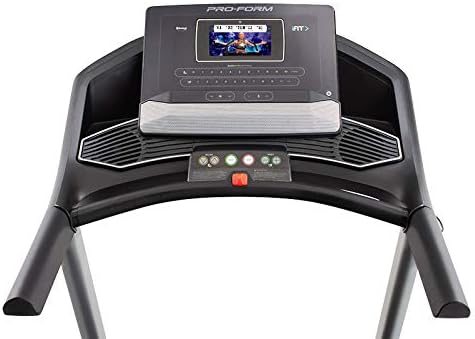
Išsamią view of the treadmill's console, featuring the 7-inch HD touchscreen display, control buttons for speed and incline, and integrated speakers.
- Jutiklinio ekrano navigacija: Use the touchscreen to browse iFIT workouts, adjust settings, and view workout metrics.
- QuickSpeed Controls: Use the 'Speed' buttons or quick-select buttons on the console to adjust the running belt speed from 0 to 10 MPH.
- Quick Incline Controls: Use the 'Incline' buttons or quick-select buttons to adjust the incline from 0% to 10%.
- Treniruotės sustabdymas: Press the 'Stop' button to pause or end your workout. Remove the safety key to fully power off the treadmill.
4.3 iFIT Integration
Your ProForm Carbon T7 Treadmill includes a 30-Day iFIT Family Membership. iFIT provides access to live workouts, studio classes, and global workouts led by expert personal trainers. With iFIT, your trainer can auto-adjust your treadmill's speed and incline for an optimized and immersive exercise experience.
- Activating iFIT: Follow the on-screen prompts on the 7-inch HD touchscreen to activate your iFIT membership.
- Treniruočių pasirinkimas: Browse the iFIT library for a wide range of workouts, including running, walking, and cross-training.
- Trainer Control: During iFIT workouts, the treadmill's speed and incline may automatically adjust according to the trainer's program. You can override these adjustments manually if needed.

A woman is shown actively running on the ProForm Carbon T7 Smart Treadmill, demonstrating its use in a typical home environment. The treadmill's running deck and console are visible.
5. Priežiūra
Regular maintenance ensures the longevity and optimal performance of your ProForm Carbon T7 Treadmill.
- Valymas: Regularly wipe down the treadmill surfaces with a damp audinys. Nenaudokite abrazyvinių valiklių ar tirpiklių.
- Belt Cleaning: Periodically clean the running belt and the area beneath it to prevent debris buildup.
- Diržo tepimas: The running belt is pre-lubricated. Refer to the full product manual for specific lubrication instructions and frequency, typically required after a certain number of hours of use.
- Diržo lygiavimas ir įtempimas: Check the running belt for proper alignment and tension. Adjust as needed according to the detailed instructions in the full product manual.
- Maitinimo laido apžiūra: Patikrinkite, ar maitinimo laidas nepažeistas. Jei pažeistas, nebenaudokite ir susisiekite su klientų aptarnavimo tarnyba.
6. Problemų sprendimas
If you encounter issues with your ProForm Carbon T7 Treadmill, refer to the table below for common problems and solutions.
| Problema | Galima priežastis | Sprendimas |
|---|---|---|
| Bėgimo takelis neįsijungia. | Neįjungtas maitinimo laidas; suveikė grandinės pertraukiklis; neįdėtas saugos raktas. | Įsitikinkite, kad maitinimo laidas yra tvirtai prijungtas. Patikrinkite buitinį automatinį jungiklį. Įkiškite saugos raktą į valdymo pultą iki galo. |
| Bėgimo juosta nejuda. | Safety key not inserted; 'Start' button not pressed; motor overload. | Insert safety key. Press 'Start'. If motor overload, reduce load and try again. |
| Diržas slysta arba dvejoja. | Diržo įtempimas per laisvas; diržą reikia sutepti. | Adjust belt tension according to the full manual. Lubricate the belt if necessary. |
| Konsolės ekranas tuščias arba nereaguoja. | Maitinimo problema; programinės įrangos triktis. | Ensure power is connected. Try unplugging the treadmill for 60 seconds and plugging it back in. If issue persists, contact customer support. |
7. Specifikacijos
Key technical specifications for the ProForm Carbon T7 Smart Treadmill:
| Funkcija | Detalė |
|---|---|
| Modelio numeris | PFTL87720 |
| Gaminio matmenys (I x P x A) | 186.69 cm x 89.41 cm x 146.05 cm (73.5" x 35.2" x 57.5") |
| Prekės svoris | 97.98 kg (216 svaro) |
| Variklio arklio galia | 2.6 CHP (nuolatinė arklio galia) |
| Greičio diapazonas | 0–10 mylių per valandą (0–16 km/val.) |
| Nuolydžio diapazonas | 0-10% Digital Quick Incline |
| Tread Belt Size | 20 colio x 55 colio (51 cm x 140 cm) |
| Ekranas | 7" HD Interactive Touchscreen |
| Svorio talpa | 300 svarai (136 kg) |
| Rėmo medžiaga | Legiruotasis plienas |
| Maitinimo šaltinis | Su laidu elektra |
| Ypatingos savybės | SpaceSaver Design, ISO Flex Deck Cushioning |
8. Garantija ir klientų aptarnavimas
Your ProForm Carbon T7 Smart Treadmill is backed by a comprehensive warranty to ensure your peace of mind.
- Rėmo garantija: 10 metai
- Dalims ir darbui suteikiama garantija: 1 metai
For warranty claims, technical assistance, or to order replacement parts, please contact ProForm customer support. Refer to the contact information provided in your product packaging or on the official ProForm websvetainę.