
1. Įvadas
The Vgate VR800 OBD2 Scanner is a powerful and user-friendly diagnostic tool designed for automotive enthusiasts and professional mechanics alike. It provides comprehensive diagnostic functions for OBD-II/EOBD compliant vehicles, enabling users to quickly identify and resolve issues related to the Check Engine Light (CEL). This manual provides detailed instructions on how to set up, operate, and maintain your VR800 scanner to ensure optimal performance and accurate vehicle diagnostics.
2. Produktas baigtasview
The Vgate VR800 is a handheld diagnostic device featuring a color LCD display, intuitive button layout, and a durable OBD-II connector cable. Its compact design allows for easy portability and use in various automotive environments.
2.1 Pagrindiniai komponentai
- LCD spalvotas ekranas: Provides clear and detailed diagnostic information.
- Naršymo mygtukai: Rodyklės aukštyn, žemyn, kairėn, dešinėn meniu naršymui.
- Gerai mygtukas: Patvirtina pasirinkimus.
- I/M mygtukas: Shortcut for I/M Readiness status.
- Question Mark (?) Button: Provides help and DTC lookup information.
- Grįžimo mygtukas: Grįžta į ankstesnį ekraną.
- OBD-II jungtis: Connects the scanner to the vehicle's diagnostic port.
- USB prievadas: Programinės įrangos atnaujinimams ir duomenų spausdinimui.

3. Savybės
The Vgate VR800 OBD2 Scanner offers a comprehensive set of features for vehicle diagnostics:
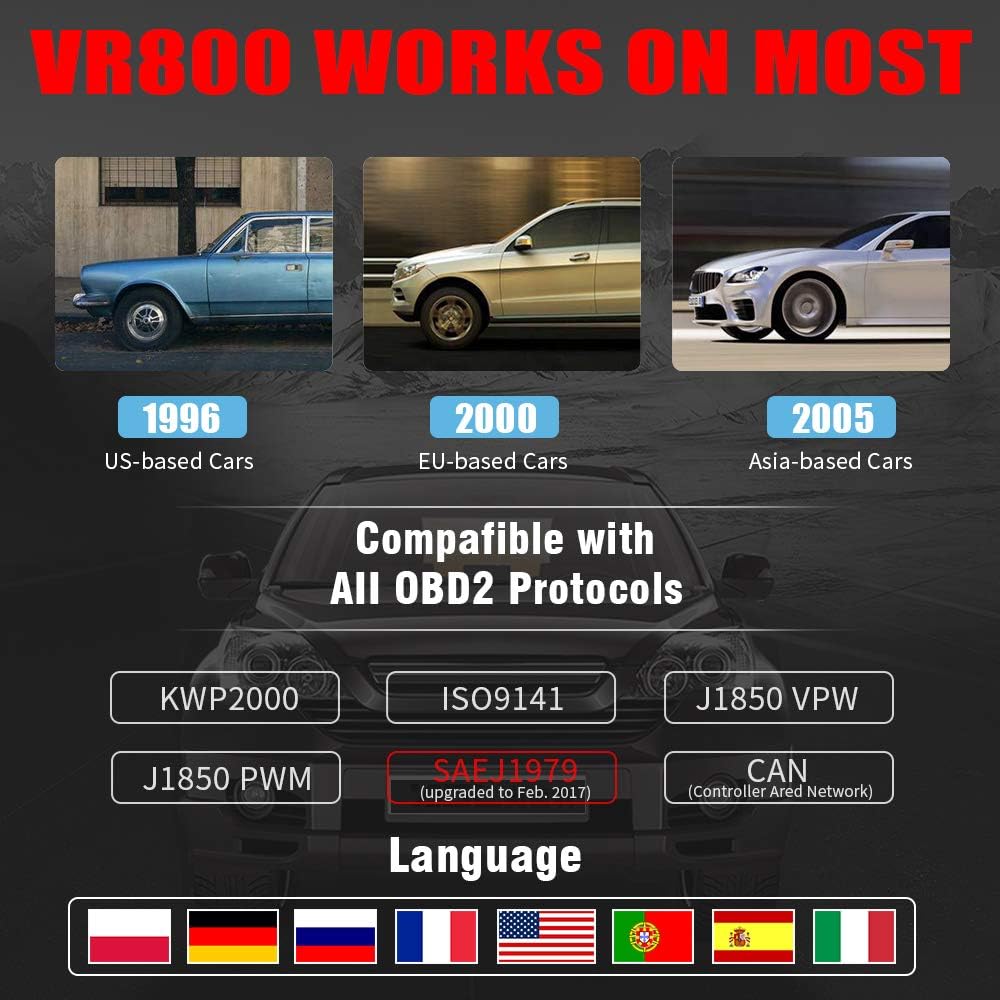
- All OBD2 Protocols Support: Compatible with ISO9141, KWP2000, J1850 PWM, J1850 VPW, and CAN protocols. Compliance with SAEJ1979 has been upgraded to the latest standards (February 2017).
- Platus transporto priemonių suderinamumas: Works with most American vehicles manufactured after 1996, European vehicles after 2000, and Asian vehicles after 2005. Applicable to OBD-II/CAN/EOBD-compliant vehicles, including light-duty trucks (6.5T or less), SUVs, and minivans.
- Smog Check Helper (I/M Readiness): Features Red-Yellow-Green LEDs and a built-in speaker to indicate readiness status for emissions testing. Dedicated I/M and '?' shortcut keys provide quick access to readiness checks.
- Full OBD Service Modes: Quickly reads and checks Diagnostic Trouble Codes (DTCs), views freeze frame data, reads live PCM data stream, performs On-Board Monitor tests, and displays live O2 sensor test data.
- Built-in DTC Lookup Library: Allows accurate determination of the causes of the Check Engine Light.
- Accurate Battery Status Check: Reads real-time battery and voltage informacija.
- Kelių kalbų palaikymas: Available in English, French, German, Italian, Spanish, Russian, Polish, and Portuguese.
- Data Logging and Printing: Supports data logging and connection to a PC for printing diagnostic data files.



4. Sąranka
Follow these steps to set up your Vgate VR800 OBD2 Scanner:
- Raskite OBD-II prievadą: OBD-II prievadas paprastai yra po prietaisų skydeliu, vairuotojo pusėje. Jei jo nerandate, žr. savo transporto priemonės naudotojo vadovą.
- Prijunkite skaitytuvą: Plug the VR800's OBD-II connector cable firmly into the vehicle's OBD-II port.
- Maitinimas: The scanner will automatically power on once connected to the vehicle's OBD-II port. No external power source or batteries are required as it draws power directly from the vehicle.
- Initial Setup (if prompted): If this is your first time using the scanner or after a factory reset, you may be prompted to select a language. Use the navigation buttons to select your preferred language and press OK.

5. Naudojimo instrukcijos
Once the scanner is connected and powered on, you can begin diagnosing your vehicle.
5.1 Meniu naršymas
Naudokite UP ir ŽEMYN Norėdami peržiūrėti meniu parinktis, paspauskite rodyklių mygtukus. OK button to select an option. Press the Grįžti mygtuką, norėdami grįžti į ankstesnį ekraną.
5.2 Diagnostinių gedimų kodų (DTC) skaitymas
- Pagrindiniame meniu pasirinkite Skaityti DTC.
- The scanner will display any active or pending DTCs. Each code will have a brief description.
5.3 Clearing DTCs
Warning: Clearing DTCs will erase all diagnostic trouble codes from the vehicle's computer and may reset readiness monitors. Ensure you have addressed the underlying issue before clearing codes.
- Pagrindiniame meniu pasirinkite Išvalyti DTC.
- Confirm your selection when prompted. The scanner will attempt to clear the codes.
5.4 I/M Readiness Function
The I/M Readiness function checks if the various emissions-related systems on the vehicle are operating correctly and if they have completed their self-tests.
- Paspauskite skirtą AŠ button on the scanner.
- The display will show the status of various monitors (e.g., O2 Sensor, EVAP, Catalyst). A green light indicates ready, yellow indicates pending, and red indicates not ready or a fault.
5.5 Viewtiesioginius duomenis
Live Data allows you to view real-time sensor data from the vehicle's engine control unit (ECU).
- Pagrindiniame meniu pasirinkite Tiesioginiai duomenys.
- Choose the specific data parameters you wish to view (e.g., engine RPM, vehicle speed, O2 sensor voltagir).
5.6 DTC peržiūra
If you have a DTC and need more information, use the built-in DTC lookup library.
- Pagrindiniame meniu pasirinkite DTC paieška arba paspauskite ? button when a DTC is displayed.
- Enter the DTC code (if not already displayed) to get a detailed description and possible causes.
5.7 Akumuliatoriaus būsenos patikrinimas
To check your vehicle's battery voltage and status:
- Pagrindiniame meniu pasirinkite Baterija.
- Skaitytuvas rodys dabartinį akumuliatoriaus įkrovos lygįtage and an estimated charge percentage.
6. Priežiūra
Proper maintenance ensures the longevity and accuracy of your Vgate VR800 scanner.
- Valymas: Skaitytuvo išorę valykite minkštu, sausu skudurėliu. Nenaudokite abrazyvinių valiklių ar tirpiklių.
- Saugykla: Skaitytuvą laikykite švarioje, sausoje vietoje, toliau nuo ekstremalių temperatūrų ir tiesioginių saulės spindulių.
- Programinės įrangos atnaujinimai: Regularly check for software updates to ensure compatibility with the latest vehicle models and diagnostic protocols. Updates can typically be performed by connecting the scanner to a PC via the USB port and using the provided update software.
7. Problemų sprendimas
If you encounter issues while using your Vgate VR800 scanner, refer to the following common problems and solutions:
- Skaitytuvas neįsijungia:
- Įsitikinkite, kad OBD-II jungtis yra tvirtai prijungta prie transporto priemonės prievado.
- Verify the vehicle's ignition is in the ON position (engine can be off).
- Patikrinkite transporto priemonės OBD-II prievado saugiklį (žr. savo transporto priemonės vadovą).
-
Ask a question about this manual
Ask about setup, troubleshooting, compatibility, parts, safety, or missing instructions. Manuals+ will review the question and use this page’s manual context to help answer it.