
Įvadas
The Clean Remote CR3HOME is a universal TV remote control designed for simplicity and ease of use. It features a nonporous, sealed membrane surface for easy cleaning and enhanced hygiene. This remote is compatible with nearly all TV brands and cable boxes, offering a streamlined control experience without unnecessary buttons.
This manual provides instructions for setting up, operating, maintaining, and troubleshooting your CR3HOME remote control.
Produktas baigtasview
The Clean Remote CR3HOME features a basic key layout, focusing on essential functions for TV and cable box control. It is designed to be user-friendly for all ages.

Vaizdas: priekis view of the Clean Remote CR3HOME, highlighting its simple key layout and absence of input, menu, or guide buttons.
Pagrindinės funkcijos:
- Universal compatibility with most TV brands and cable boxes.
- Nonporous, sealed membrane surface for easy cleaning.
- Simplified button layout: No Input, Menu, or Guide buttons.
- Large, easy-to-press buttons.
Sąrankos instrukcijos
1. Akumuliatoriaus įdėjimas
- Nuotolinio valdymo pulto gale raskite baterijų skyrių.
- Norėdami atidaryti, pastumkite akumuliatoriaus dangtelį žemyn.
- Įdėkite dvi (2) AAA baterijas, užtikrindami teisingą poliškumą (+ ir -), kaip nurodyta skyriaus viduje.
- Replace the battery cover by sliding it back into place until it clicks.
2. TV Pairing
The CR3HOME remote is designed for quick setup with most televisions.
- For Samsung and LG TVs: The remote instantly replaces and works with these brands without any setup required. Simply point and use.
- For All Other TV Brands (One-Touch Setup):
- Įsitikinkite, kad jūsų televizorius įjungtas.
- Point the CR3HOME remote at your TV.
- Paspauskite ir palaikykite NUSTATYMAS button until the red indicator light on the remote turns on and stays lit.
- Laikydami NUSTATYMAS mygtuką, paspauskite TV MAITINIMAS button once. The red light will blink.
- Release both buttons. The remote will now attempt to find the correct code for your TV. Test the remote by pressing the TV MAITINIMAS button. If the TV turns off, the setup is complete.
- If the TV does not turn off, repeat steps 3-5. The remote cycles through codes quickly, so you may need to try a few times.
3. Cable Box Setup
The CR3HOME remote offers simple setup for cable boxes.
- Ensure your cable box is turned ON.
- Point the CR3HOME remote at your cable box.
- Paspauskite ir palaikykite NUSTATYMAS button until the red indicator light on the remote turns on and stays lit.
- Laikydami NUSTATYMAS mygtuką, paspauskite CBL button once. The red light will blink.
- Release both buttons. The remote will now attempt to find the correct code for your cable box. Test the remote by pressing the CH+ or CH- buttons. If the channel changes, the setup is complete.
- If the channel does not change, repeat steps 3-5.
Naudojimo instrukcijos
The Clean Remote CR3HOME is designed for straightforward operation with its essential buttons.
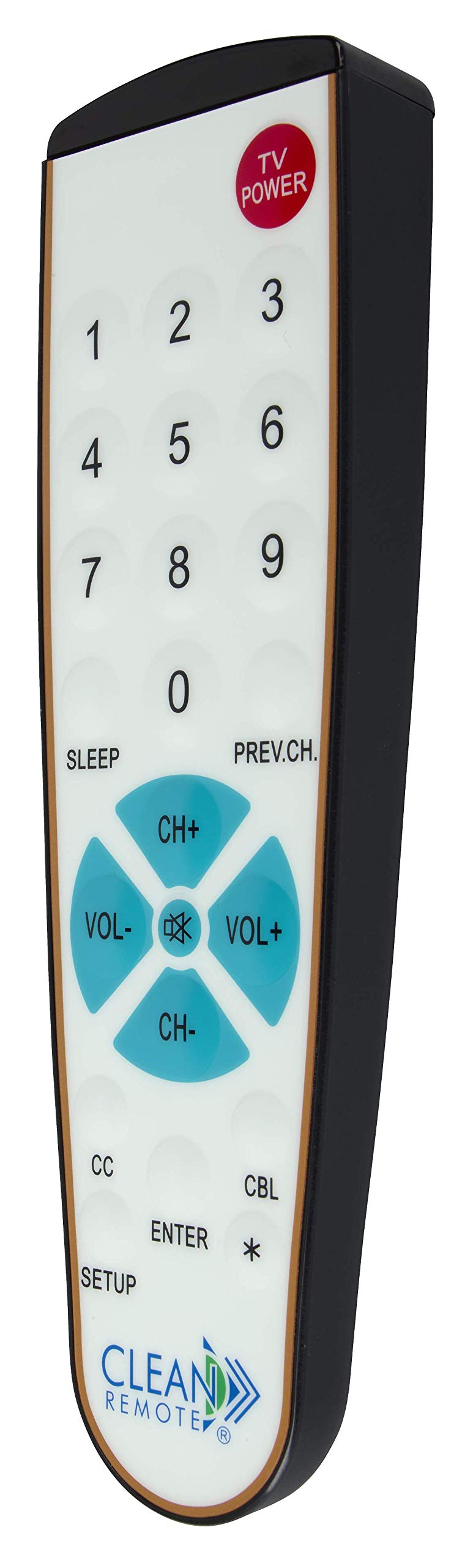
Vaizdas: Išsamus view of the Clean Remote CR3HOME, illustrating the layout of its power, number, volume, and channel buttons.
- Televizoriaus galia: Įjungia arba išjungia jūsų televizorių.
- Skaičių mygtukai (0–9): Used to directly enter channel numbers.
- VOL+ / VOL-: Padidina arba sumažina garsumą.
- CH+ / CH-: Keičia kanalą aukštyn arba žemyn.
- PREV.CH: Grįžta prie ankstesnio viewed kanalas.
- MIEGAS: Activates the TV's sleep timer function (if supported by your TV).
- Uždarieji subtitrai (CC): Toggles closed captioning on or off (if supported by your TV).
- Įveskite: Confirms selections or channel entries.
- *: May function as a dash or special character depending on the TV/cable box.
Pastaba: This remote intentionally omits Input, Menu, and Guide buttons to prevent accidental changes to TV settings, making it ideal for environments where simplicity is key.
Priežiūra
The Clean Remote CR3HOME is designed for easy maintenance due to its spill-proof and sealed construction.
- Valymas: To clean the remote, simply wipe its nonporous, sealed membrane surface with a damp cloth or a mild disinfectant wipe. Avoid using abrasive cleaners or submerging the remote in liquid.
- Baterijos keitimas: Replace batteries when the remote's indicator light becomes dim or the remote becomes unresponsive. Always use fresh AAA batteries.
- Saugykla: Store the remote in a dry place away from extreme temperatures.
Trikčių šalinimas
- Nuotolinis nereaguoja:
- Patikrinkite, ar baterijos įdėtos teisingai ir nėra išsikrovusios. Jei reikia, pakeiskite.
- Ensure there is a clear line of sight between the remote and the TV/cable box. Remove any obstructions.
- Make sure you are within the effective range of the remote (typically up to 20 feet).
- Remote not controlling TV/Cable Box after setup:
- Repeat the TV Pairing or Cable Box Setup steps carefully. The remote cycles through codes, and sometimes it may require multiple attempts to find the correct one.
- Ensure the TV/cable box is powered on during the setup process.
- Kai kurie mygtukai neveikia:
- Verify that the button functionality is supported by your specific TV or cable box model.
- Remember that the CR3HOME intentionally does not have Input, Menu, or Guide buttons.
Specifikacijos
| Prekės ženklas | VALYMAS NUOTOLINIO PULTAS |
| Modelio numeris | CR3HOME |
| Ypatinga funkcija | Spillproof, Universal |
| Suderinami įrenginiai | Television, Cable Box |
| Ryšio technologija | Infraraudonųjų spindulių |
| Valdiklio tipas | Mygtukų valdymas |
| Maitinimo šaltinis | 2 x AAA baterijos (į komplektą neįeina) |
| UPC | 816466021271 |
Informacija apie garantiją
Clean Remote products are typically covered by a limited manufacturer's warranty. Please refer to the packaging or the official Clean Remote webKonkrečias garantijos sąlygas, įskaitant galiojimo laiką ir aprėpties informaciją, rasite svetainėje. Išsaugokite pirkimo įrodymą, jei prireiktų pateikti garantijos pretenzijas.
Pagalba klientams
For further assistance, technical support, or inquiries regarding your Clean Remote CR3HOME, please visit the official Clean Remote websvetainėje arba susisiekite su jų klientų aptarnavimo skyriumi. Kontaktinę informaciją paprastai galite rasti ant produkto pakuotės arba gamintojo websvetainę.