
1. Įvadas
Welcome to the Xtrfy M42 RGB Ultra-Light Gaming Mouse user manual. The Xtrfy M42 is engineered for high performance and comfort, featuring an ultra-light design, state-of-the-art components, and an adjustable symmetrical shape. This manual will guide you through the setup, operation, customization, and maintenance of your new gaming mouse.

Figure 1.1: Xtrfy M42 RGB Ultra-Light Gaming Mouse (Miami Blue edition)
2. Pakuotės turinys
Patikrinkite, ar jūsų prekės pakuotėje yra visi šie daiktai:
- Xtrfy M42 RGB Ultra-Light Gaming Mouse
- Two sizes of interchangeable mouse shells
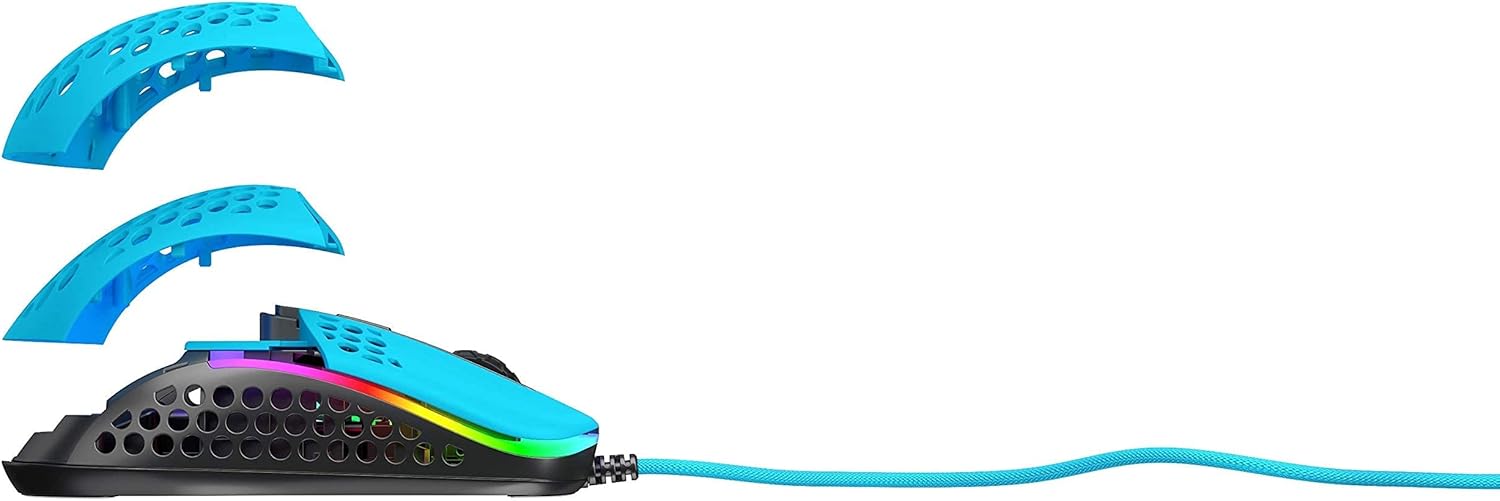
Figure 2.1: Xtrfy M42 with interchangeable top shells
3. Sąranka
Follow these steps to set up your Xtrfy M42 gaming mouse:
- Prijunkite pelę: Plug the USB connector of the Xtrfy M42 mouse into an available USB port on your computer.
- Tvarkyklės diegimas: The mouse is plug-and-play and typically does not require additional driver software. Your operating system will automatically detect and install the necessary drivers.
- Pradinis bandymas: Judinkite pelę ir spustelėkite mygtukus, kad įsitikintumėte, jog jie veikia tinkamai.

Figure 3.1: Xtrfy M42 connected via USB cable
4. Naudojimo instrukcijos
The Xtrfy M42 offers various functions for an optimized gaming experience.
4.1 Pagrindinės funkcijos
- Kairysis spustelėjimas: Pagrindinis veiksmo mygtukas.
- Dešiniuoju pelės mygtuku spustelėkite: Antrinio veiksmo mygtukas.
- Slinkties ratukas: Slenka turinį aukštyn arba žemyn. Taip pat galima spustelėti, kad būtų atlikta vidurinio pelės mygtuko paspaudimo funkcija.
- Šoniniai mygtukai: Typically used for forward/backward navigation or custom in-game commands.
4.2 DPI reguliavimas
The Xtrfy M42 features a Pixart 3389 sensor, allowing for precise DPI (Dots Per Inch) adjustments. The DPI button, usually located behind the scroll wheel, cycles through preset DPI levels. Refer to the Xtrfy website for specific DPI steps and corresponding LED indicators.
4.3 RGB apšvietimas
The mouse features customizable RGB lighting. All settings for LED effects, brightness, and color selection are controlled directly on the mouse, without the need for software. Consult the Xtrfy website or product packaging for specific button combinations to adjust RGB settings.
4.4 Apklausų dažnis
The polling rate, which determines how often the mouse reports its position to the computer, can typically be adjusted on gaming mice. Information on adjusting the polling rate for the M42 can be found on the official Xtrfy support page.
5. Pritaikymas
The Xtrfy M42 is designed with an adjustable symmetrical shape to accommodate various grip styles (palm, claw, fingertip) and hand sizes. This is achieved through interchangeable parts.
5.1 Changing Mouse Shells
The mouse comes with two different sized top shells. To change the shell:
- Gently detach the currently installed top shell from the mouse body.
- Align the desired new top shell with the mouse body and press it firmly until it clicks into place.
This allows you to modify the mouse's hump height and overall feel for optimal comfort and control.
Figure 5.1: Illustration of interchangeable mouse shells
6. Priežiūra
Proper maintenance ensures the longevity and performance of your Xtrfy M42 gaming mouse.
6.1 Pelės valymas
- Prieš valydami atjunkite pelę nuo kompiuterio.
- Pelės paviršių nuvalykite minkštu, sausu, nepūkuotu skudurėliu.
- Įsisenėjusiam purvui šiek tiek pamirkykiteampNuvalykite šluostę vandeniu arba švelniu valymo tirpalu. Venkite stiprių cheminių medžiagų.
- Use compressed air to clear dust from the holes in the shell and around buttons.
6.2 Caring for PTFE Skates
The M42 features 100% PTFE skates for smooth glide. Keep the mouse pad and the underside of the mouse clean to prevent debris from accumulating on the skates, which can affect glide performance. Avoid scratching or damaging the skates.

Figure 6.1: Underside of the Xtrfy M42 mouse, highlighting the PTFE skates
7. Problemų sprendimas
If you encounter issues with your Xtrfy M42 mouse, try the following solutions:
- Pelė nereaguoja:
- Įsitikinkite, kad USB laidas tvirtai prijungtas prie kompiuterio.
- Pabandykite prijungti pelę prie kito USB prievado.
- Iš naujo paleiskite kompiuterį.
- Tracking Issues (Jittery or No Movement):
- Nuvalykite optinį jutiklį pelės apačioje minkštu, sausu skudurėliu.
- Įsitikinkite, kad pelę naudojate ant tinkamo paviršiaus (pvz., pelės kilimėlio). Venkite labai atspindinčių ar skaidrių paviršių.
- RGB Illumination Not Working:
- Check if the RGB lighting has been turned off via the on-mouse controls.
- Įsitikinkite, kad pelė tinkamai prijungta ir gauna maitinimą.
For further assistance, refer to the Xtrfy official support resources.
8. Specifikacijos
| Funkcija | Detalė |
|---|---|
| Modelio numeris | M42 |
| Jutiklis | Pixart 3389 Optical |
| Jungikliai | Pro player-optimized, rated for 20 million clicks |
| Svoris | Maždaug 2.08 uncijos (59 gramai) |
| Matmenys (I x P x A) | 4.65 x 2.48 x 1.5 colio (11.8 x 6.3 x 3.8 cm) |
| Ryšys | USB |
| Pačiūžos | 100% PTFE with rounded edges |
| Apšvietimas | Pritaikomas RGB |
| Forma | Adjustable Symmetrical (with interchangeable parts) |
9. Garantija ir palaikymas
The Xtrfy M42 RGB Ultra-Light Gaming Mouse is covered by a manufacturer's warranty. For detailed warranty information, including terms and conditions, please refer to the warranty card included with your product or visit the official Xtrfy websvetainę.
For technical support, frequently asked questions, or to download the latest firmware (if applicable), please visit the Xtrfy support page: