
1. Įvadas
Thank you for choosing the Avari EG Air Purifier. This advanced air purification system is designed to provide cleaner, healthier air in your home or office. Featuring a 4-stage filtration process, smart air quality sensing, and UV LED sterilization, the Avari EG is engineered for optimal performance and ease of use. Please read this manual thoroughly before operating your new air purifier to ensure safe and efficient use.
2. Produkto ypatybės
- AHAM & ECARF, ETL, CARB Tested and Certified for reliable performance.
- Embossed HEPA filter technology removes particles as small as 0.1 microns.
- Smart Automatic Air Quality Sensor adjusts purification based on real-time air conditions.
- Integrated UV LED Sterilizer for enhanced air hygiene.
- User-friendly controls and quiet operation.
4-Stage Filtravimo sistema
The Avari EG Air Purifier employs a comprehensive 4-stage filtration system to capture a wide range of airborne pollutants:
- Išankstinis filtras: Sulaiko didesnes daleles, pvz., dulkes, pūkus ir naminių gyvūnėlių plaukus.
- Patented Embossed HEPA Filtration: Effectively removes fine particles including pollen, bacteria, viruses, allergens, and pet dander down to 0.1 microns.
- Carbon Deodorizer: Sugeria kvapus, dūmus ir lakiuosius organinius junginius (LOJ).
- LED Sterilizer: Provides an additional layer of purification by sterilizing captured microorganisms.

Figure 1: Illustration of the 4-Stage Filtravimo sistema
Smart Air Quality Monitoring
The integrated air quality sensor continuously monitors the surrounding air and displays its quality using a color-coded LED indicator. The purifier can automatically adjust its fan speed based on detected pollution levels.

Figure 2: Air Quality Sensor Display
Effective Purification
The Avari EG Air Purifier is highly effective in removing common indoor air pollutants, contributing to a healthier living environment.

Figure 3: Pollutants Removed by Avari EG

Figure 4: Avari EG Air Purifier in a home setting, demonstrating its compact size and effectiveness against pet dander.
Produkto vaizdo įrašasview
Video 1: Official video demonstrating the Avari EG Air Purifier's efficiency and effectiveness in cleaning indoor air.
3. Sąrankos vadovas
Išpakavimas
- Atsargiai išimkite oro valytuvą iš pakuotės.
- Nuimkite visus plastikinius maišelius ir apsaugines medžiagas.
- Ensure all components are present: main unit, filter (pre-installed or separate), and power cord.
Filtro montavimas
The filter may come pre-installed or require installation. If separate, follow these steps:
- Apverskite įrenginį aukštyn kojom.
- Pasukite pagrindinį dangtelį prieš laikrodžio rodyklę, kad jį atlaisvintumėte ir nuimtumėte.
- Išimkite filtrą iš apsauginio plastikinio maišelio.
- Insert the filter into the unit, ensuring it sits securely.
- Uždėkite pagrindinį dangtelį ir pasukite pagal laikrodžio rodyklę, kad jį užfiksuotumėte.
Įdėjimas
Place the air purifier on a firm, level surface. For optimal performance, ensure there is at least 6 inches (15 cm) of space around all sides of the unit for proper air circulation. Avoid placing it directly against walls or furniture.
4. Naudojimo instrukcijos
Valdymo skydas baigtasview
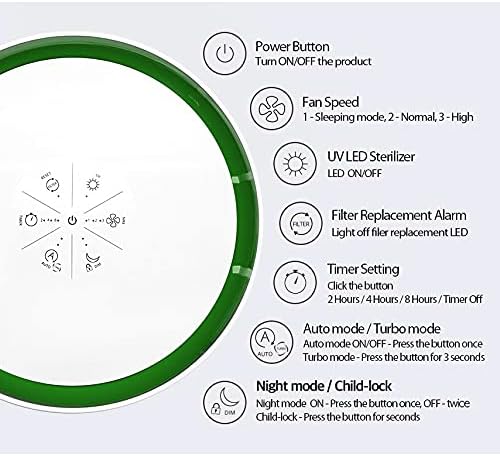
Figure 5: Avari EG Control Panel
- Maitinimo mygtukas: Paspauskite, kad įjungtumėte arba išjungtumėte įrenginį.
- Ventiliatoriaus greitis: Cycle through 3 fan speeds (1-Sleeping mode, 2-Normal, 3-High).
- UV LED Sterilizer: Press to turn the UV LED ON or OFF.
- Filter Replacement Alarm: A light will indicate when it's time to replace the filter.
- Laikmačio nustatymas: Press to set the operating timer for 2, 4, or 8 hours, or to turn the timer off.
- Auto / Turbo Mode: Press once for Auto mode (adjusts fan speed automatically based on air quality). Press and hold for 3 seconds for Turbo mode (maximum fan speed).
- Night Mode / Child-lock: Press once for Night mode (dims lights and reduces fan speed for quiet operation). Press twice for Child-lock (disables control panel buttons). Press and hold for 3 seconds to activate/deactivate Child-lock.
5. Priežiūra
Filtro keitimas
The Avari EG Air Purifier is equipped with a filter replacement indicator. When the 'FILTER' light illuminates, it's time to replace the filter to maintain optimal performance. Filters typically last 6-8 months depending on usage and air quality.
- Ištraukite oro valytuvą iš maitinimo lizdo.
- Apverskite įrenginį aukštyn kojom.
- Pasukite pagrindinį dangtelį prieš laikrodžio rodyklę, kad jį atlaisvintumėte ir nuimtumėte.
- Išimkite seną filtrą ir tinkamai jį išmeskite.
- Insert a new Avari EG replacement filter (Model AV-EG-HEPA-FILTER) into the unit.
- Uždėkite pagrindinį dangtelį ir pasukite pagal laikrodžio rodyklę, kad jį užfiksuotumėte.
- Plug the unit back in. The filter replacement light should reset automatically. If not, consult the troubleshooting section.
Įrenginio valymas
- Prieš valydami, visada išjunkite įrenginį.
- Oro valytuvo išorę nuvalykite minkštu, sausu skudurėliu.
- Nenaudokite abrazyvinių valiklių, vaško ar tirpiklių.
- The pre-filter layer of the main filter can be gently vacuumed to extend its life, but the entire filter should be replaced as indicated. Do not wash the HEPA or carbon filter layers.
6. Problemų sprendimas
| problema | Galima priežastis | Sprendimas |
|---|---|---|
| Įrenginys neįsijungia | No power; Power cord not properly connected | Patikrinkite maitinimo lizdą ir įsitikinkite, kad laidas yra tvirtai prijungtas. |
| Oro srautas silpnas | Filter is dirty or clogged | Pakeiskite filtrą. |
| Neįprastas triukšmas | Ventiliatoriaus kliūtis; įrenginys nepastatytas ant stabilaus paviršiaus | Unplug and check for obstructions. Place on a flat, stable surface. |
| Filter replacement light remains on after changing filter | Sensor not reset | Press and hold the 'RESET' button (if available, or power button for 5 seconds) to reset the filter indicator. Refer to the control panel diagram for specific reset instructions. |
| Prastas kvapo pašalinimas | Anglies filtras prisotintas | Pakeiskite filtrą. |
7. Techninės specifikacijos
| Specifikacija | Detalė |
|---|---|
| Modelio numeris | AV-EG-HEPA |
| Gaminio matmenys | 11 colio gylis x 11 colio plotis x 13 colio aukštis (27.94 cm gylis x 27.94 cm plotis x 33.02 cm aukštis) |
| Prekės svoris | 8 svarų (3.63 kg) |
| Maitinimo šaltinis | Su laidu elektra |
| Spalva | Baltas |
| Gamintojas | AVARI |
| Filtravimo tipas | 4-Stage (Pre-filter, Embossed HEPA, Carbon Deodorizer, UV LED) |
| Dalelių pašalinimas | Down to 0.1 microns |

6 pav.: Gaminio matmenys
8. Garantija ir klientų aptarnavimas
Gamintojo garantija
The Avari EG Air Purifier comes with a manufacturer's warranty. While some users have reported a 5-year warranty, please refer to your product packaging or the official AVARI website for the most accurate and up-to-date warranty information and terms.
Pagalba klientams
For any questions, technical assistance, or warranty claims, please contact AVARI customer support through their official website or the contact information provided with your product packaging. Your satisfaction is 100% guaranteed.