
1. Įvadas
The Tycon TPSC2440NMPPT is an advanced Maximum Power Point Tracking (MPPT) solar charge controller designed for efficient battery charging from solar panels. It automatically adjusts to 12V or 24V battery systems and supports various battery types including Flooded, AGM, GEL, and Lithium, with a customizable USER setting. This controller features an integral LCD display for monitoring key system parameters.
2. Saugos instrukcijos
Prieš montuodami ir naudodami, perskaitykite ir supraskite visas instrukcijas. Nesilaikant šių instrukcijų, gali kilti elektros smūgis, gaisras arba sunkūs sužalojimai.
- Įsitikinkite, kad visi laidai yra tinkamai poliarizuoti ir tvirtai prijungti.
- Do not disassemble or attempt to repair the controller. Refer to qualified service personnel.
- Valdiklį montuokite gerai vėdinamoje vietoje, atokiau nuo degių medžiagų ir korozinių dujų.
- Always disconnect the battery and solar panel before installing or moving the controller.
- Montavimo metu dėvėkite tinkamas asmenines apsaugos priemones (AAP).
- The controller is designed for indoor use or protected outdoor environments (IP32 rating). Avoid direct exposure to water.
3. Produktas baigtasview
The TPSC2440NMPPT controller is equipped with several features to optimize solar charging and battery management:
- MPPT technologija: Maksimaliai padidina energijos gamybą iš saulės baterijų.
- Auto-Ranging Voltage: Compatible with 12V or 24V battery arrays.
- Multimode Load Operation: Offers 5 selectable modes for load control.
- Soft Start Load Output: Powers high capacitive loads safely.
- Automatic Battery Equalization: Performs 30-day equalization for optimal battery health.
- Conformal Coated Electronics: Provides environmental protection.
- TVS Lightning Protection: Enhances durability against electrical surges.
- Integral LCD Display: Rodo baterijos tūrįtage, Capacity, Charging Capacity, Temperature, Load Current, and Solar Current.
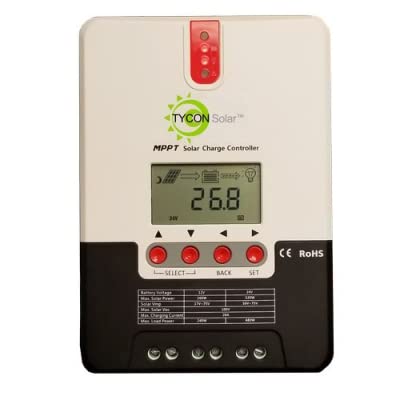
1 pav.: priekis view of the Tycon TPSC2440NMPPT Solar MPPT Battery Charging Controller, showing the LCD display and connection terminals.
4. Sąranka ir diegimas
Norėdami tinkamai įdiegti, atlikite šiuos veiksmus:
- Montavimas: Choose a suitable location for mounting the controller. Ensure good ventilation and protection from direct sunlight and moisture.
- Baterijos prijungimas: Pirmiausia prijunkite bateriją prie valdiklio baterijos gnybtų. Įsitikinkite, kad poliškumas yra teisingas (+ prie + ir - prie -). Valdiklis automatiškai aptiks baterijos įtampą.tage (12V arba 24V).
- Saulės skydo jungtis: Connect the solar panel array to the controller's solar input terminals. Observe correct polarity. Ensure the open-circuit voltage of the solar array does not exceed the controller's maximum input voltage (110V at 25°C).
- Apkrovos jungtis (neprivaloma): If using the load output, connect your DC loads to the controller's load terminals. Do not exceed the rated load current (20A Max).
- Temperatūros jutiklis: Connect the included battery temperature probe cable to the designated port on the controller. Place the sensor near the battery for accurate temperature compensation.
- Maitinimas: Kai visos jungtys bus tvirtai pritvirtintos, valdiklis įsijungs ir pradės veikti.
5. Naudojimo instrukcijos
The integral LCD display provides real-time information about your solar charging system. Use the buttons (if present, assuming standard UP/DOWN/SET) to navigate through the display menus and adjust settings.
5.1 Informacija LCD ekrane
- Baterijos tūristage: Dabartinis ttage prijungto akumuliatoriaus.
- Baterijos talpa: Estimated state of charge.
- Įkrovimo talpa: Current power being delivered to the battery.
- Baterijos temperatūra: Temperature measured by the external probe.
- Apkrovos srovė: Current being drawn by connected DC loads.
- Solar Current: Current being generated by the solar panels.
5.2 Baterijos tipo nustatymai
The controller supports Flooded, AGM, GEL, and Lithium battery types. A USER setting allows for custom charge parameters. Refer to the on-screen menu for selecting and configuring the battery type.
5.3 Load Operation Modes
The controller offers 5 selectable load operation modes. Consult the device's menu for details on each mode and how to select them, typically involving timed operation or dusk-to-dawn control.
6. Priežiūra
Reguliarus saulės įkrovimo valdiklio veikimas ir ilgaamžiškumas užtikrinamas reguliariu jo aptarnavimu.
- Patikrinkite jungtis: Periodiškai patikrinkite visų laidų jungčių sandarumą ir koroziją.
- Švarus valdiklis: Keep the controller clean and free of dust. Use a dry cloth for cleaning. Do not use liquids.
- Baterijos būklė: Monitoriaus akumuliatoriaus talpatage and capacity on the LCD. Ensure batteries are properly maintained according to their manufacturer's guidelines.
- Vėdinimas: Užtikrinkite, kad montavimo vieta būtų gerai vėdinama, kad neperkaistų.
7. Problemų sprendimas
| Problema | Galima priežastis | Sprendimas |
|---|---|---|
| Nėra ekrano / Nėra maitinimo | Loose battery connection; Battery voltage too low; Blown fuse (external, if applicable). | Check battery connections and polarity. Charge battery if voltage is below operating threshold. Check and replace any external fuses. |
| Nėra saulės įkrovimo | Solar panel not connected; Incorrect polarity; Insufficient sunlight; Damaged solar panel/wiring. | Verify solar panel connections and polarity. Ensure panels are receiving adequate sunlight. Inspect panels and wiring for damage. |
| Įkrova neveikia | Load disconnected; Overload; Short circuit; Battery voltage per žema. | Check load connections. Reduce load if exceeding 20A. Check for short circuits. Ensure battery is sufficiently charged. |
| Netikslūs rodmenys | Loose connections; Faulty sensor. | Check all wiring connections. Ensure temperature sensor is properly connected and placed. |
8. Specifikacijos
- Modelis: TPSC2440NMPPT
- Auto Voltage: 12V/24V (System)
- Ampčia: 40A
- Nominali apkrovos srovė: 20A maks
- Didžiausia talpinė apkrova: 10,000 uF
- Maksimalus saulės energijos įvesties tūristage: 110V (25°C), 90V (25°C)
- Max Power Point Range: 2VDC to 75VDC (Battery Volts)
- Konversijos efektyvumas: 96% tip.
- MPPT sekimo efektyvumas: 99 %
- Savarankiškas vartojimas: 1W
- Temperatūros kompensavimas: -3.0mV/°C/ląstelė
- Maksimalus laido dydis: 8 AWG
- ttage and Current Accuracy: +/-2 %
- Įžeminimas: Neigiamas pagrindas
- Aplinkos apsauga: IP32
- Gaminio matmenys: 12 x 9 x 6 colio
- Prekės svoris: 5.16 svaro
- Ekrano tipas: LCD
