
1. Produktas baigtasview
The KAIDI KD-763 is a wired gaming headset designed for use with the PlayStation 4 (PS4) console and other compatible devices with a 3.5mm audio jack. It features over-ear cups for immersive sound, a rotary microphone for clear communication, and an inline volume control for convenient audio adjustments. The headset also includes an LED lighting effect, typically powered via a USB connection.
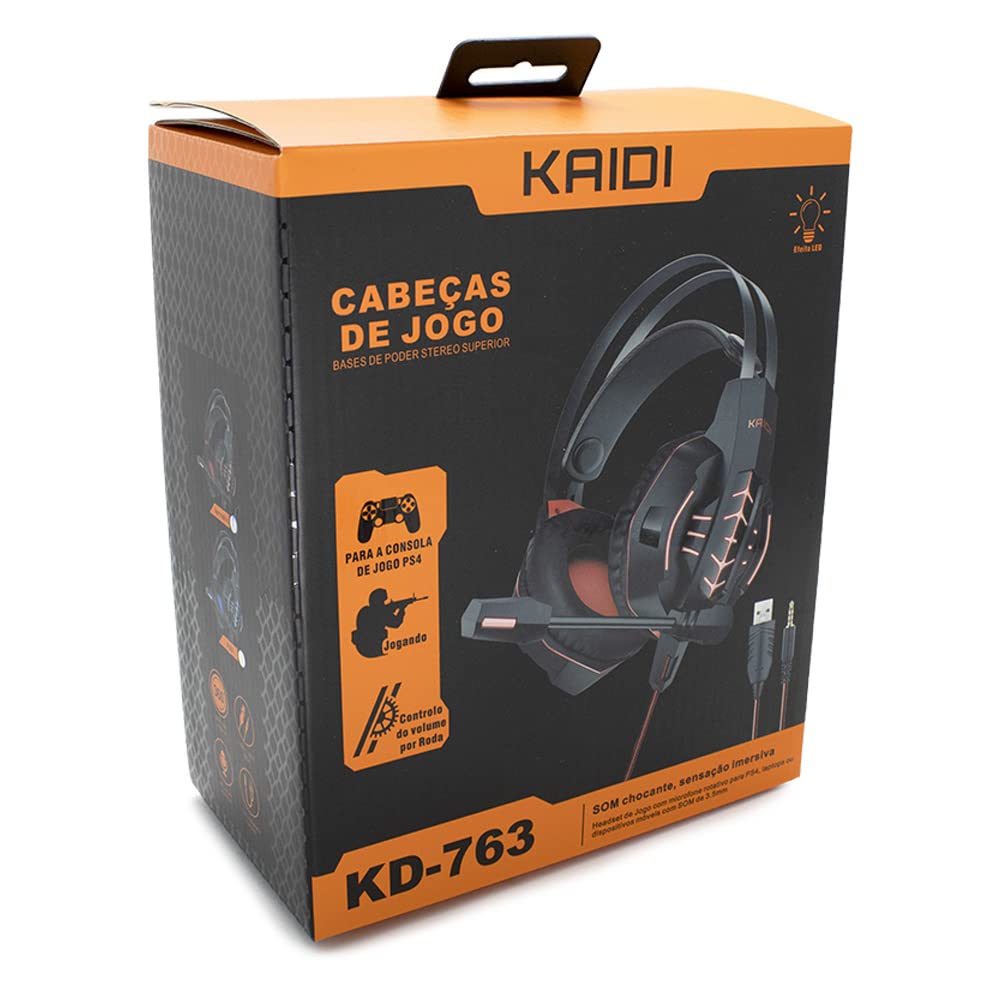
1.1 paveikslas: The KAIDI KD-763 PS4 Gaming Headset packaging, showing the headset, its features, and compatibility with PS4.
2. Saugos informacija
- Venkite ilgai klausytis dideliu garsumu, kad nepažeistumėte klausos.
- Nelaikykite ausinių ekstremaliose temperatūrose, drėgmėje ar tiesioginiuose saulės spinduliuose.
- Laikykite laisvų rankų įrangą nuo vandens ir kitų skysčių.
- Nebandykite ardyti ar modifikuoti ausinių. Tai gali panaikinti garantiją ir sukelti gedimų.
- Clean the headset with a soft, dry cloth only.
- Laikyti vaikams nepasiekiamoje vietoje.
3. Pakuotės turinys
Atidarę pakuotę, patikrinkite jos turinį. Jei trūksta kokių nors daiktų arba jie pažeisti, susisiekite su pardavėju.
- KAIDI KD-763 Gaming Headset
- Vartotojo vadovas (šis dokumentas)
4. Sąrankos vadovas
- Connect to PS4 Controller: Locate the 3.5mm audio jack on your PS4 controller. Insert the 3.5mm connector from the KD-763 headset firmly into this port.
- Powering LED Lights (Optional): If your headset features LED lighting, connect the USB connector from the headset to an available USB port on your PS4 console or a compatible USB power adapter. The LED lights will illuminate once connected.
- Ausinių pritaikymas: Extend or retract the headband to ensure the earcups sit comfortably and securely over your ears. The over-ear design should fully enclose your ears for optimal sound isolation.
- Mikrofono padėtis: Adjust the flexible rotary microphone boom to a position near your mouth for clear voice pickup. Ensure it is not obstructing your vision.
- Configure PS4 Audio Settings:
- Eikite į Nustatymai > Prietaisai > Garso įrenginiai on your PS4.
- Nustatyti Įvesties įrenginys to "Headset (Controller)".
- Nustatyti Išvesties įrenginys to "Headset (Controller)".
- Nustatyti Išvestis į ausines to "All Audio" for full game and chat sound.
- Sureguliuoti Garsumo valdymas (ausinės) iki patogaus lygio.
5. Naudojimo instrukcijos
5.1. Garsumo valdymas
The KD-763 headset features an inline volume control wheel located on the cable. Rotate the wheel upwards to increase the volume and downwards to decrease it. Adjust to a comfortable listening level.
5.2. Mikrofono naudojimas
The microphone is designed to capture your voice clearly. Ensure it is positioned correctly near your mouth. If your PS4 audio settings are configured correctly, your voice will be transmitted to other players in online games or chat parties.
To mute the microphone, check if there is a physical mute switch on the inline control. If not, you can mute the microphone through your PS4's quick menu (hold the PS button on your controller).
6. Priežiūra
- Valymas: Use a soft, dry, lint-free cloth to wipe the earcups and headband. Do not use liquid cleaners or abrasive materials.
- Saugykla: Kai nenaudojate, laikykite ausines švarioje, sausoje vietoje, toliau nuo tiesioginių saulės spindulių ir ekstremalių temperatūrų. Venkite susipainioti laido.
- Kabelio priežiūra: Do not pull on the cable to disconnect the headset. Always grasp the plug. Avoid bending or twisting the cable excessively.
7. Problemų sprendimas
- Nėra garso arba garsas per mažas:
- Įsitikinkite, kad 3.5 mm lizdas yra visiškai įkištas į PS4 valdiklį.
- Check the inline volume control wheel on the headset cable and turn it up.
- Verify PS4 audio settings (Nustatymai > Prietaisai > Garso įrenginiai) are correctly configured for the headset.
- Test the headset with another device (e.g., smartphone) to rule out a headset issue.
- Mikrofonas neveikia:
- Įsitikinkite, kad mikrofono strėlė yra tinkamai pastatyta.
- Check PS4 audio settings (Nustatymai > Prietaisai > Garso įrenginiai) to ensure Įvesties įrenginys is set to "Headset (Controller)".
- Confirm the microphone is not muted via an inline switch or the PS4 quick menu.
- Jei įmanoma, išbandykite mikrofoną su kita programa ar įrenginiu.
- Neveikia LED lemputės:
- Ensure the USB connector is firmly plugged into a powered USB port.
- Išbandykite kitą USB prievadą.
8. Specifikacijos
| Prekinis ženklas: | KAIDI |
| Modelis: | KD-763 |
| Ausinių tipas: | Over-ear (Circumaurais) |
| Varža: | 32 omai |
| Jautrumas: | 110 dB |
| Ryšys: | Wired (3.5mm audio jack + USB for LED) |
| Suderinami įrenginiai: | Gaming Consoles (e.g., PS4), devices with 3.5mm audio jack |
| Konkretus naudojimas: | Žaidimas |
| Valdymo tipas: | Inline Volume Control Wheel |
| Mikrofonas: | Rotary/Swivel |
| LED efektas: | Yes (USB powered) |
9. Garantija ir palaikymas
KAIDI products are designed and manufactured to the highest quality standards. For information regarding warranty coverage, terms, and conditions, please refer to the warranty card included with your purchase or visit the official KAIDI websvetainę.
For technical support, troubleshooting assistance, or to inquire about replacement parts, please contact KAIDI customer service through their official channels. Contact information can typically be found on the product packaging or the official KAIDI websvetainę.