
Goshyda KX-T6001CID
Goshyda KX-T6001CID Big Button Corded Telephone User Manual
Model: KX-T6001CID | Brand: Goshyda
Įvadas
Thank you for choosing the Goshyda KX-T6001CID Big Button Corded Telephone. This manual provides detailed instructions to help you set up, operate, and maintain your new telephone. Please read this manual thoroughly before use to ensure proper functionality and to take full advantage iš jo savybių.
Saugos informacija
- Saugokite telefoną nuo vandens ar drėgmės.
- Avoid placing the telephone in direct sunlight or near heat sources.
- Use only the provided telephone line cord.
- Do not attempt to open or repair the telephone yourself. Refer all servicing to qualified personnel.
- Laikyti vaikams nepasiekiamoje vietoje.
Pakuotės turinys
Patikrinkite, ar pakuotėje yra visi reikalingi daiktai:
- 1x ragelis
- 1 x Telephone Base Unit
- 1 x Handset Cord
- 1 x telefono linijos laidas
- 1 x Vartotojo vadovas

Image: The Goshyda KX-T6001CID telephone, showing the base unit, handset, and coiled cord.
Produktas baigtasview
Familiarize yourself with the main components and controls of your telephone.

Vaizdas: priekis view of the telephone, highlighting the LCD display, large numeric keypad, and function buttons.
Keypad and Display:
- Skaitinė klaviatūra (0–9, *, #): For dialing phone numbers.
- LCD ekranas: Rodo skambinančiojo ID, laiką, datą ir meniu parinktis.
- M1/M2 mygtukai: One-touch memory dialing keys.
- SET/STORE Button: Used for entering settings menu and saving entries.
- AUKŠTYN/ŽEMYN mygtukai: Navigate through menu options or adjust volume.
- RING Button: Adjust ringer volume.
- VOL mygtukas: Adjust earpiece/speaker volume.
- FL/BRT (Flash/Brightness) Button: Flash function for call waiting, also adjusts LCD brightness.
- REDIAL Button: Perrenka paskutinį rinktą numerį.
- H.F (Hands-Free) Button: Įjungia garsiakalbio režimą.

Vaizdas: Stambus planas view of the large, easy-to-read buttons on the telephone's keypad.
Sąranka
1. Connecting the Telephone:
- Connect one end of the coiled handset cord to the handset and the other end to the handset jack on the left side of the telephone base unit.
- Connect one end of the telephone line cord to the LINE jack on the back of the telephone base unit.
- Prijunkite kitą telefono linijos laido galą prie sieninio telefono lizdo.
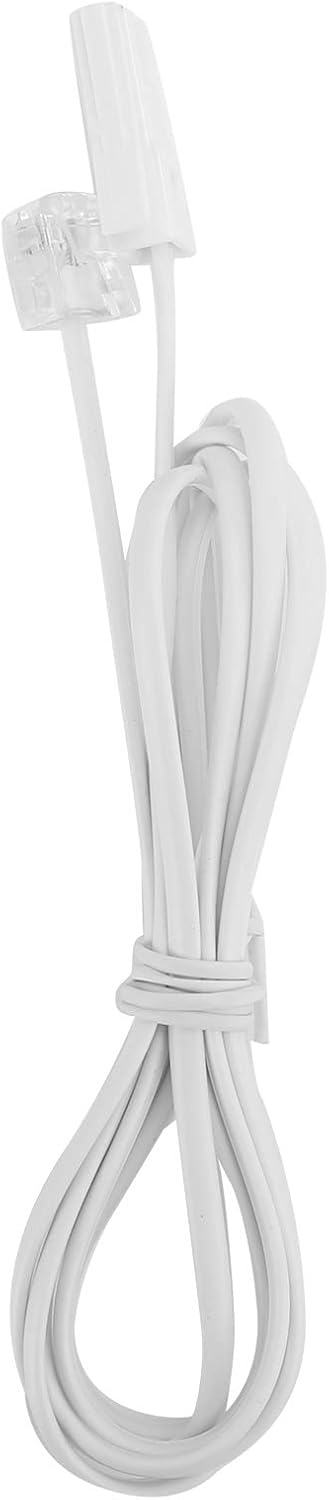
Image: The telephone line cord, used to connect the phone to the wall jack.
2. Pradiniai nustatymai:
Upon initial connection, the LCD display may prompt you to set the date and time. Follow the on-screen instructions using the UP ir ŽEMYN buttons to adjust values and the NUSTATYTI/PARDUOTI mygtuką, kad patvirtintumėte.
Naudojimo instrukcijos
Skambinimas:
- Pakelkite ragelį arba paspauskite HF garsiakalbio mygtukas.
- Surinkite norimą telefono numerį naudodami skaitmeninę klaviatūrą.
- Palaukite, kol skambutis prisijungs.
- Norėdami baigti skambutį, padėkite ragelį arba paspauskite HF mygtuką dar kartą.
Atsiliepimas į skambutį:
Kai suskamba telefonas, pakelkite ragelį arba paspauskite HF mygtuką atsakyti.
Perrinkimas:
Pakelkite ragelį arba paspauskite HF, tada paspauskite PERSKAMBINTI mygtuką, kad paskambintumėte paskutiniu rinktu numeriu.
Using Memory Keys (M1/M2):
Skaičiaus saugojimas:
- Pakelkite ragelį arba paspauskite HF.
- Paspauskite NUSTATYTI/PARDUOTI.
- Surinkite telefono numerį, kurį norite išsaugoti.
- Paspauskite NUSTATYTI/PARDUOTI vėl.
- Paspauskite bet kurį M1 or M2 to save the number to that memory key.
Dialing from Memory:
Pakelkite ragelį arba paspauskite HF, then press either M1 or M2 to dial the stored number.
Savybės
- DTMF/FSK Dual System Caller ID: Supports both DTMF and FSK caller ID systems for displaying incoming call information.

Image: The telephone's display, showing its capability for DTMF/FSK dual system caller ID function.
- FLASH Time Adjustment: Adjustable FLASH time (90/95/100/120/180/300/600/1000ms) for compatibility with various PBX systems or call waiting services.
- 16 Ringtone Options: Choose from 16 different ringtones.

Image: The telephone with graphic elements suggesting a choice of 16 ringtones.
- Adjustable LCD Brightness: Five levels of LCD screen brightness adjustment for optimal viewing.
- 3 Alarm Clock Functions: Set up to 3 different alarm clocks, each with unique alarm sounds.
- 10 Groups of Dual Key Memory: Store up to 10 frequently called numbers using dual-key memory functions.
- 1-99 Hours Do Not Disturb Function: Set a "Do Not Disturb" period from 1 to 99 hours.
Priežiūra
- Clean the telephone with a soft, damp audinys. Nenaudokite abrazyvinių valiklių ar tirpiklių.
- Keep the telephone away from dust and extreme temperatures.
- Įsitikinkite, kad laidai nėra susipynę ar suspausti, kad nepažeistumėte.
Trikčių šalinimas
| Problema | Galima priežastis | Sprendimas |
|---|---|---|
| Nėra rinkimo tono | Telefono linijos laidas atjungtas arba sugedęs. | Check all cable connections. Try a different telephone line cord. Test the wall jack with another phone. |
| Negalima skambinti arba priimti skambučių | Line issue, or phone is in "Do Not Disturb" mode. | Verify phone line service. Check if "Do Not Disturb" is active and disable it. |
| Skambinančiojo ID nerodomas | Caller ID service not subscribed or incompatible system. | Norėdami įsitikinti, kad skambintojo ID paslauga įjungta, susisiekite su savo telefono paslaugų teikėju. |
| Ekranas blankus arba tuščias | LCD brightness setting is too low. | Adjust the LCD brightness using the FL/BRT button or menu settings. |
Specifikacijos
| Funkcija | Detalė |
|---|---|
| Modelis | KX-T6001CID |
| Prekės ženklas | Goshyda |
| Medžiaga | Akrilnitrilo butadieno stirenas (ABS) |
| Spalva | Baltas |
| Tipas | Laidinis telefonas |
| Rinkiklio tipas | Viena klaviatūra |
| Skambintojo ID | Yes (DTMF/FSK Dual System) |
| Blykstės laikas | 90/95/100/120/180/300/600/1000ms |
| Skambėjimo melodijos | 16 variantų |
| LCD ryškumas | Reguliuojama 5 lygių |
| Signalizacijos funkcijos | 3 grupės |
| Atminties funkcija | 10 groups of dual key memory |
| Netrukdyti | 1-99 valandas |
| Prekės svoris | 481 gramų |
| Matmenys (I x P x A) | 10 x 10 x 10 millimeters (approximate) |
| Maitinimo šaltinis | Battery Powered (likely referring to LCD/memory backup, as corded phones are line-powered for basic functions) |
Garantija ir palaikymas
This Goshyda product is covered by a standard manufacturer's warranty. For specific warranty details, please refer to the documentation included with your purchase or contact Goshyda customer support.
For technical assistance or further inquiries, please contact Goshyda customer service through their official websvetainėje arba kontaktinėje informacijoje, pateiktoje kartu su jūsų produktu.
Ask a question about this manual
Ask about setup, troubleshooting, compatibility, parts, safety, or missing instructions. Manuals+ will review the question and use this page’s manual context to help answer it.