
Teslong TD450D85L1 Articulating Borescope User Manual
Model: TD450D85L1
1. Įvadas
The Teslong TD450D85L1 Articulating Borescope is a professional inspection tool designed for visual examination of hard-to-reach areas. It features a two-way 180-degree articulating probe, an integrated 4.5-inch IPS LCD monitor, and high-definition imaging capabilities. This manual provides essential information for the safe and effective use of your borescope.
2. Saugos informacija
- Non-Waterproof Probe: The inspection probe of this borescope is NĖRA ATSPIRUS VANDENIUI. Do not submerge the probe or any part of the device in water or other liquids. Doing so will cause damage and void the warranty.
- Avoid using the device in environments with extreme temperatures or high humidity.
- Saugokite įrenginį nuo stiprių magnetinių laukų.
- Nebandykite ardyti ar modifikuoti įrenginio. Remontą turėtų atlikti tik įgalioti specialistai.
- Ensure the device is fully charged before use to prevent unexpected power loss during inspections.

3. Pakuotės turinys
Patikrinkite, ar pakuotėje yra visi toliau išvardyti daiktai:
- TD450D85L1 Articulating Borescope Unit (with integrated 4.5-inch IPS monitor)
- C tipo USB įkrovimo laidas
- 8 GB „MicroSD“ kortelė (iš anksto įdiegta)
- Dėklas nešiojimui
- Vartotojo vadovas

4. Produktas baigtasview ir Savybės
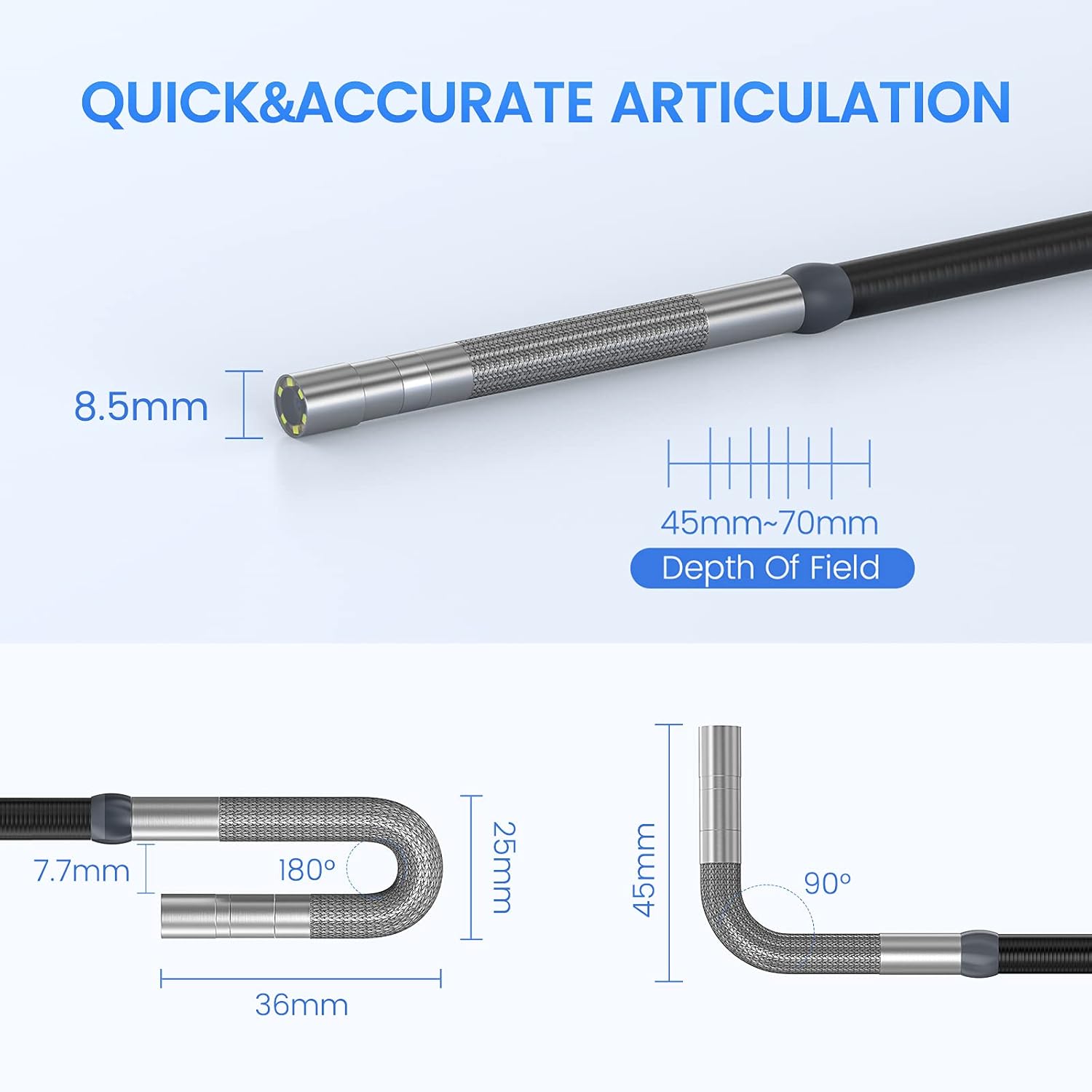
The Teslong TD450D85L1 is an advanced inspection camera designed for detailed visual inspections. It features a flexible gooseneck probe with an 8.5mm diameter and a 2.0MP CMOS sensor, providing 1080P HD image and video capture. The integrated 4.5-inch IPS LCD monitor offers a clear view without the need for external devices or Wi-Fi connections.
Pagrindinės funkcijos:
- Two-Way 180° Articulation: Allows precise control of the probe tip for navigating complex spaces and maintaining optimal viewkampų.
- Integrated 4.5-inch IPS LCD Monitor: Provides a clear, real-time display of the inspection area. No smartphone, Wi-Fi, or app required.
- Didelės raiškos vaizdavimas: 1080P HD resolution with a 2.0MP CMOS sensor for capturing detailed images and videos.
- Adjustable LED Illumination: Built-in highlighting LEDs ensure clear visibility in dark conditions.
- Nuotraukų ir vaizdo įrašymas: Supports JPG image and AVI video recording directly to the included 8GB MicroSD card. Includes a microphone and speaker for audio recording.
- Ilgas baterijos veikimo laikas: Equipped with a built-in 5000mAh rechargeable battery for extended operation.


5. Sąranka
5.1 Pradinis įkrovimas
- Connect the USB Type-C charging cable to the borescope's charging port.
- Kitą USB laido galą prijunkite prie standartinio USB maitinimo adapterio (nepridedamas) arba kompiuterio USB prievado.
- Allow the device to charge fully before first use. The charging indicator light will change when charging is complete.
5.2 „MicroSD“ kortelės įdėjimas
The 8GB MicroSD card is typically pre-installed. If it needs to be inserted or replaced:
- Locate the MicroSD card slot on the side of the monitor unit.
- Švelniai įkiškite „MicroSD“ kortelę auksiniais kontaktais žemyn, kol ji spragtelės į vietą.
- Norėdami išimti, šiek tiek paspauskite kortelę, kol ji iššoks.

6. Naudojimo instrukcijos
6.1 Įjungimas / išjungimas
- Norėdami įjungti, paspauskite ir palaikykite maitinimo mygtuką, kol ekranas įsijungs.
- Norėdami išjungti, paspauskite ir palaikykite maitinimo mygtuką, kol ekranas išsijungs.
6.2 Controlling Articulation
The borescope probe features two-way 180-degree articulation. Use the control knob on the handle to adjust the direction of the probe tip:
- Rotate the knob clockwise or counter-clockwise to bend the probe tip left or right.
- The articulation can be locked in position for stable viewing.

6.3 LED apšvietimo reguliavimas
The probe tip is equipped with adjustable LED lights to illuminate the inspection area. Use the dedicated button on the monitor unit to cycle through different brightness levels or turn the lights off.
6.4 Fotografavimas ir vaizdo įrašų įrašymas
- Norėdami nufotografuoti: Kol vyksta gyvai view, press the Photo button (usually indicated by a camera icon) to capture a still image.
- Norėdami įrašyti vaizdo įrašą: Press the Video button (usually indicated by a video camera icon) to start recording. Press it again to stop recording. The device will record audio through its built-in microphone.
- All captured media is saved to the installed MicroSD card.
6.5 Reviewžiniasklaidą
Access the playback mode from the main menu to view captured photos and videos. Use the navigation buttons to browse through your media files.
7. Priežiūra
- Valymas: Gently wipe the monitor screen and the probe with a soft, dry cloth. For stubborn dirt on the probe, use a slightly damp cloth and ensure it is completely dry before storage. Do not use abrasive cleaners or solvents.
- Saugykla: Store the borescope in its carrying case in a cool, dry place, away from direct sunlight and extreme temperatures.
- Akumuliatoriaus priežiūra: For optimal battery life, charge the device regularly and avoid fully discharging it for extended periods. If storing for a long time, charge it to about 50% every few months.
- Programinės įrangos atnaujinimai: Patikrinkite gamintojo websvetainėje, ar nėra galimų programinės įrangos atnaujinimų.
8. Problemų sprendimas
| Problema | Galima priežastis | Sprendimas |
|---|---|---|
| Įrenginys neįsijungia. | Senka baterija. | Visiškai įkraukite įrenginį. |
| Ekrane nėra vaizdo. | Probe cable not securely connected. | Ensure the probe cable is firmly connected to the monitor unit. |
| Vaizdas neryškus arba tamsus. | Insufficient lighting; dirty camera lens; incorrect focus. | Adjust LED brightness. Clean the camera lens. Ensure the object is within the 45-70mm depth of field. |
| Nepavyksta įrašyti nuotraukų / vaizdo įrašų. | MicroSD card full or not inserted correctly; card error. | Check MicroSD card insertion. Delete unnecessary files or replace the card. Format the card if necessary (this will erase all data). |
| Articulation is stiff or unresponsive. | Mechanical obstruction; debris in articulation mechanism. | Carefully inspect the probe tip for any obstructions. Do not force articulation. Contact customer support if the issue persists. |
9. Specifikacijos
| Funkcija | Specifikacija |
|---|---|
| Modelio pavadinimas | Articulating Endoscope Inspection Camera (TD450D85L1) |
| Ekrano dydis | 4.5 colių IPS LCD ekranas |
| Veiksminga nejudančioji raiška | 2 MP |
| Vaizdo įrašymo raiška | 1080p |
| Zondo skersmuo | 8.5 mm |
| Artikuliacija | Two-Way 180 Degrees |
| Macro Focus Range (Depth of Field) | 45-70 mm |
| Tikrasis kampas View | 60 laipsnių |
| Jutiklio tipas | CMOS |
| Medijos tipas | „Micro SD“ kortelė (pridedama 8 GB) |
| File Formatas | JPG (vaizdai), AVI (vaizdo įrašai) |
| Garso įrašymas | Yes (with internal microphone) |
| Ryšio technologija | USB |
| Baterijos talpa | 5000 mAh (įkraunamas) |
| Atsparumo vandeniui lygis | Not Waterproof (probe) |
10. Garantija ir palaikymas
Your Teslong TD450D85L1 Articulating Borescope comes with a 12 mėnesių garantija from the date of purchase. This warranty covers manufacturing defects and ensures reliable performance under normal use.
For technical assistance, troubleshooting, or warranty claims, please contact Teslong customer service. Refer to the contact information provided on the official Teslong website or in your product packaging for the most up-to-date support channels.
Please have your model number (TD450D85L1) and purchase details ready when contacting support.