
Varmilo VBS108
Varmilo VBS108 Lure Bot Mechanical Keyboard
Instrukcijų vadovas
Įvadas
Thank you for choosing the Varmilo VBS108 Lure Bot Mechanical Keyboard. This keyboard is designed for versatility and durability, featuring triple mode connectivity (Bluetooth 5.0, 2.4GHz Wireless, and USB-C), high-quality PBT dye-sub keycaps, and Cherry MX Brown switches for a tactile typing experience. This manual provides detailed instructions for setup, operation, maintenance, and troubleshooting to ensure optimal performance and longevity of your keyboard.
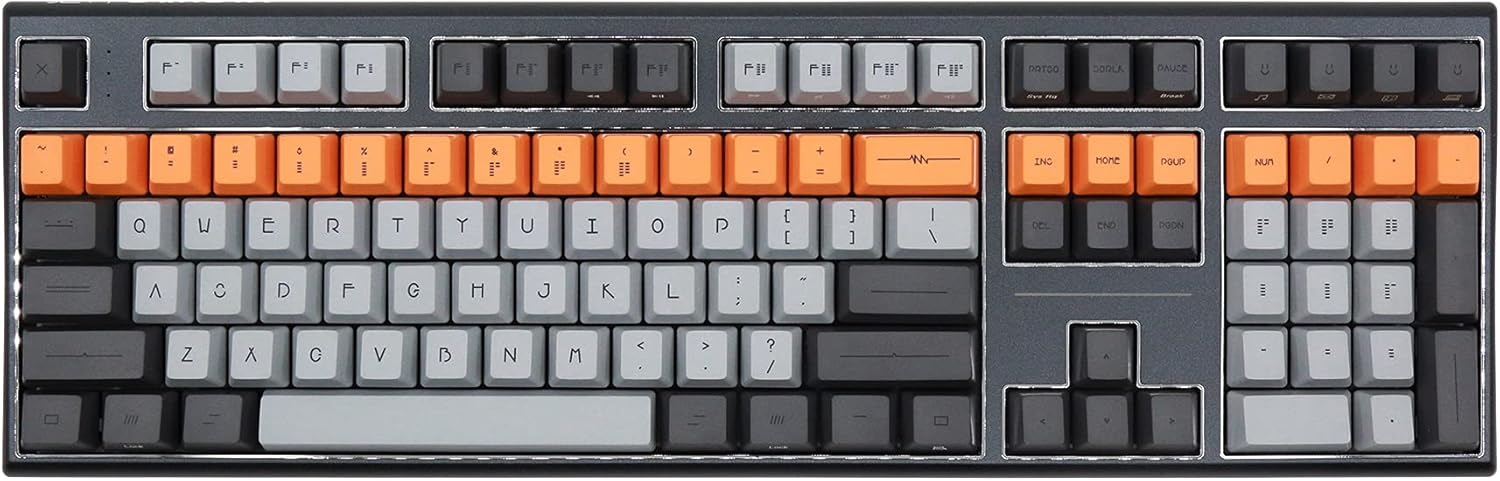
Figure 1: Varmilo VBS108 Lure Bot Mechanical Keyboard
Pakuotės turinys
Prašome įsitikinti, kad pakuotėje yra visi daiktai:
- Varmilo VBS108 Lure Bot Mechanical Keyboard
- USB-C į USB-A laidas
- 2.4GHz Wireless Dongle (typically stored in the keyboard's battery compartment or a dedicated slot)
- Klaviatūros dangtelio nuėmėjas (gali būti įtrauktas)
- Vartotojo vadovas (šis dokumentas)
Sąranka
The Varmilo VBS108 offers three connectivity modes: USB-C wired, 2.4GHz wireless, and Bluetooth 5.0.
1. Laidinis USB-C ryšys
- Locate the USB-C port on the keyboard (usually on the top edge).
- Prijunkite vieną pateikto USB-C laido galą prie klaviatūros.
- Kitą galą (USB-A) prijunkite prie laisvo kompiuterio USB prievado.
- Klaviatūra bus automatiškai atpažinta ir paruošta naudoti.
2. 2.4 GHz belaidis ryšys
- Locate the 2.4GHz wireless dongle.
- Prijunkite raktą prie laisvo kompiuterio USB prievado.
- Ensure the keyboard is in 2.4GHz mode (refer to the keyboard's function key combinations or a physical switch if available).
- Klaviatūra turėtų prisijungti automatiškai.
3. „Bluetooth 5.0“ ryšys
- Ensure the keyboard is in Bluetooth pairing mode. This typically involves holding down a specific Fn key combination (e.g., Fn + 1, Fn + 2, or Fn + 3 for different profiles) until an indicator light flashes. Consult your keyboard's specific key legend for Bluetooth pairing.
- Kompiuteryje arba įrenginyje atidarykite „Bluetooth“ nustatymus.
- Ieškokite new devices and select "Varmilo VBS108" or a similar name from the list.
- Vykdykite visus ekrane pateikiamus nurodymus, kad užbaigtumėte susiejimo procesą.
Veikiantis
The Varmilo VBS108 keyboard includes various function key combinations for enhanced control.
Function Key Combinations (Fn + Key)
- Fn + F1–F12: Multimedia controls (play/pause, volume up/down, mute, etc.). Refer to the keycap legends for specific functions.
- Fn + Win: „Windows“ klavišo užrakinimas / atrakinimas.
- Fn + Left Alt: Switch between macOS and Windows layouts (if supported).
- Fn + Q/W/E: Perjungti „Bluetooth Pro“files (jei taikoma).
- Fn + R: Perjunkite į 2.4 GHz belaidį režimą.
- Fn + T: Switch to USB-C wired mode.
- Fn + Backlight Keys: Adjust backlight brightness or effects (if applicable).
Adjustable Flip-out Feet
Klaviatūra turi 3 sekundestage adjustable flip-out feet on the underside, allowing you to customize the typing angle for ergonomic comfort.

Figure 2: Adjustable Flip-out Feet
Priežiūra
Proper maintenance ensures the longevity and performance of your Varmilo keyboard.
Klaviatūros valymas
- Klaviatūros dangteliai: Use a keycap puller to carefully remove keycaps. Clean them with a mild soap solution and a soft cloth, then rinse thoroughly and air dry completely before reattaching.
- Atvejis: Wipe the keyboard case with a soft, slightly damp, nepūkuotą šluostę. Venkite naudoti stiprias chemines medžiagas ar abrazyvines medžiagas.
- Tarp raktų: Use compressed air to remove dust and debris from between the key switches. A small brush can also be used for stubborn particles.

Figure 3: PBT Dye-Sub Keycaps
Trikčių šalinimas
If you encounter issues with your Varmilo VBS108 keyboard, try the following solutions:
- Klaviatūra nereaguoja (laidinė): Įsitikinkite, kad USB-C laidas yra tvirtai prijungtas prie klaviatūros ir kompiuterio. Išbandykite kitą USB prievadą arba laidą.
- Keyboard not responding (Wireless/Bluetooth):
- Patikrinkite akumuliatoriaus lygį.
- Ensure the keyboard is in the correct mode (2.4GHz or Bluetooth).
- For 2.4GHz, ensure the dongle is properly inserted and try a different USB port.
- For Bluetooth, unpair and re-pair the keyboard with your device. Ensure your device's Bluetooth is enabled.
- Raktai neregistruojami: Remove the keycap and check for any obstructions around the switch. Clean the area with compressed air.
- Pertraukiamas ryšys: Ensure there are no major sources of interference (e.g., other wireless devices) near the keyboard or dongle.
- Programinės aparatinės įrangos atnaujinimas: Check the official Varmilo website for any available firmware updates for your model, which can resolve known issues.
Specifikacijos
| Funkcija | Detalė |
|---|---|
| Prekės ženklas | Varmilo |
| Modelis | VBS108 Lure Bot |
| Ryšio technologija | Bluetooth 5.0, 2.4GHz Wireless, USB-C |
| Jungiklio tipas | Vyšnių MX ruda |
| Keycap medžiaga | PBT Dye-Sub |
| Raktų skaičius | 104 |
| Suderinami įrenginiai | PC |
| Spalva | Cherry MX Brown (keyboard color scheme) |
| Ypatinga funkcija | 3-Stage Adjustable Flip-out Feet |
Garantija ir palaikymas
Varmilo products are designed for quality and reliability. For information regarding warranty coverage, technical support, or service, please refer to the warranty card included with your product or visit the official Varmilo websvetainę. Taip pat galite kreiptis pagalbos į pardavėją, iš kurio įsigijote produktą.
Ask a question about this manual
Ask about setup, troubleshooting, compatibility, parts, safety, or missing instructions. Manuals+ will review the question and use this page’s manual context to help answer it.