
Ctronics CTIPC-285C-Z4B
„Ctronics“ 5 kartų optinio priartinimo „WiFi“ lauko apsaugos kameros naudotojo vadovas
Model: CTIPC-285C-Z4B
1. Įvadas
Thank you for choosing the Ctronics 5X Optical Zoom WiFi Outdoor Security Camera. This manual provides detailed instructions for the installation, operation, and maintenance of your camera. Please read this manual thoroughly before use to ensure proper functionality and safety. This camera is designed for outdoor surveillance, offering advanced features such as 5X optical zoom, human detection, auto-tracking, color night vision, and two-way audio.

1.1 paveikslas: Ctronics 5X Optical Zoom WiFi Outdoor Security Camera. This image shows the main unit of the camera with its dual antennas and lens array.
2. Saugos informacija
Kad nesugadintumėte gaminio ir nesužalotumėte savęs bei kitų, laikykitės šių saugos priemonių:
- Ensure the power supply is stable and matches the camera's voltage reikalavimai (12 voltų).
- Do not expose the camera to extreme temperatures or humidity beyond its operating range.
- Venkite tiesioginio objektyvo poveikio stipriai šviesai, nes tai gali pažeisti jutiklį.
- Nebandykite ardyti ar modifikuoti fotoaparato. Visus techninės priežiūros darbus patikėkite kvalifikuotiems specialistams.
- Laikykite fotoaparatą ir jo priedus vaikams nepasiekiamoje vietoje.
- Ensure proper mounting to prevent the camera from falling.
3. Pakuotės turinys
Please check the package contents upon opening. If any items are missing or damaged, contact your retailer or Ctronics support.
- Ctronics 5X Optical Zoom WiFi Outdoor Security Camera
- Maitinimo adapteris
- Tvirtinimo varžtai ir sieniniai kaiščiai
- Waterproof Kit for Network Cable (if applicable)
- Greitos pradžios vadovas
4. Sąranka
4.1 Fizinis įrengimas
- Pasirinkite vietą: Select a suitable outdoor location with a clear view of the area you wish to monitor. Ensure the location has access to a power outlet.
- Montavimas: Use the provided mounting template (if included) to mark drill holes on the wall or ceiling. Drill the holes, insert wall plugs, and secure the camera bracket using the screws.
- Maitinimo jungtis: Connect the power adapter to the camera's power input and plug it into a power outlet.
4.2 Tinklo jungtis
The camera supports 2.4GHz Wi-Fi networks.
- Atsisiųskite programą: Download the "Ctronics" app from your smartphone's app store (iOS/Android). For PC users, download the HiP2P software for MAC/Windows.
- Pradiniai nustatymai: Norėdami pridėti kamerą, vadovaukitės programėlėje pateiktomis instrukcijomis. Paprastai tai reiškia, kad reikia nuskaityti QR kodą kameroje arba rankiniu būdu įvesti jos ID.
- „Wi-Fi“ konfigūracija: Prijunkite kamerą prie 2.4 GHz „Wi-Fi“ tinklo per programėlę.

4.1 paveikslas: Broad Compatibility. This image illustrates the camera's compatibility with various devices and operating systems, including iOS, Android, Windows, and Mac OS, through the Ctronics Pro app and HiP2P Client software.
4.3 „Micro SD“ kortelės įdėjimas (neprivaloma)
The camera supports a micro SD card up to 64GB for local storage of recordings.
- Locate the SD card slot on the camera (refer to the camera diagram in the quick start guide).
- Carefully insert the micro SD card into the slot until it clicks into place.
- Format the SD card via the camera's settings in the Ctronics app for optimal performance.
5. Fotoaparato valdymas
5.1 Pasukimas, pakreipimas ir priartinimas (PTZ)
The camera features motorized pan (355° horizontally) and tilt (90° vertically) functions, along with 5X optical zoom.
- Valdymas: Use the Ctronics app to remotely control the camera's pan and tilt movements by swiping on the live view ekranas.
- Optinis priartinimas: Žnybtelėjimas, norint priartinti tiesioginį vaizdą view to activate the 5X optical zoom. The camera will auto-focus for clear detailed images.
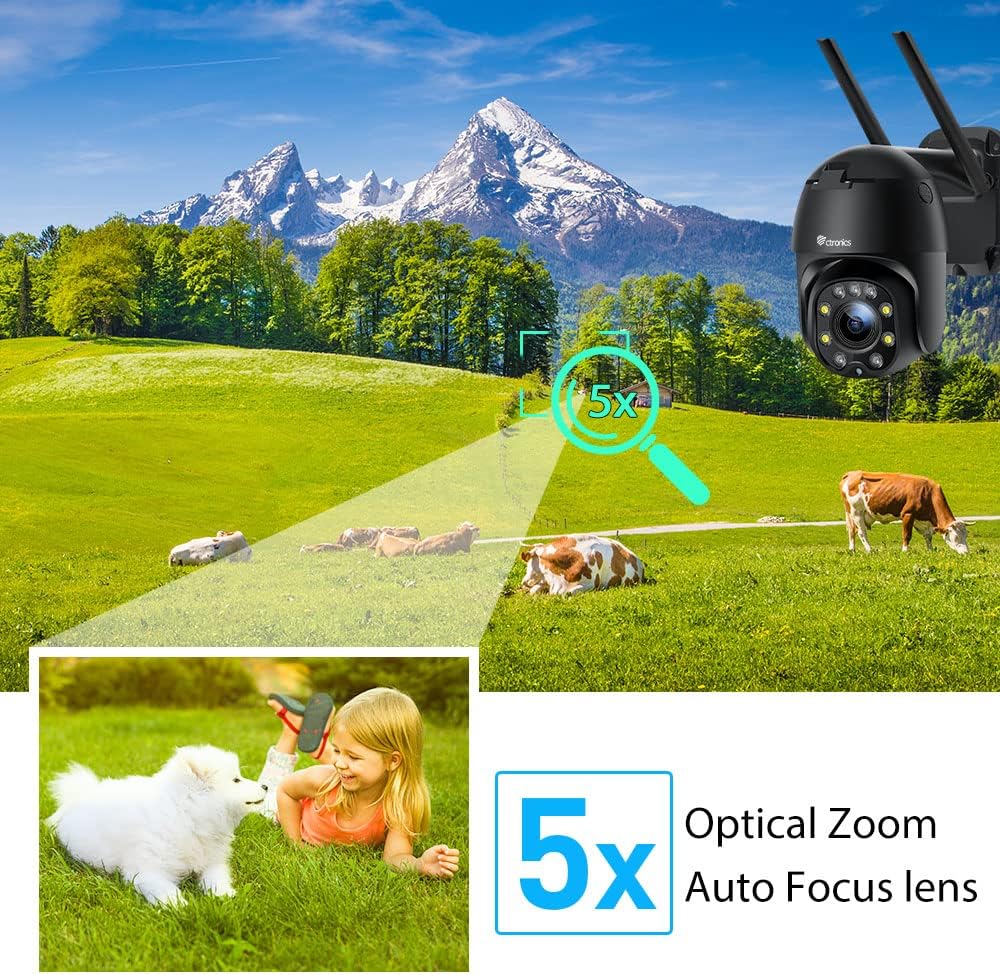
5.1 paveikslas: 5X Optical Zoom. This image demonstrates the camera's 5X optical zoom capability, allowing for detailed viewing of distant objects with auto-focus functionality.
5.2 Human Detection and Auto-Tracking
The camera utilizes AI algorithms to distinguish human movement from other triggers, reducing false alarms by up to 95%.
- Aptikimas: Kai kamera aptinka žmogų, ji automatiškai seka jo judėjimą savo stebėjimo lauke. view.
- Įspėjimai: You will receive instant notifications via the app, FTP, or email.
- Įrašas: Detected events are recorded to the installed SD card.

5.2 paveikslas: Human Detection. This image illustrates how the camera's human detection feature accurately identifies people while ignoring non-human movements like pets, significantly reducing false alarms.

5.3 paveikslas: Auto Tracking. This image demonstrates the camera's auto-tracking capability, showing how it follows a detected subject's movement within its 355° horizontal and 90° vertical range.
5.3 HD 1080P & Night Vision
The camera provides 1920x1080P resolution for clear images and offers two night vision modes.
- Spalvotas naktinis matymas: With 4 spotlights and 5 infrared lights, the camera can display vivid color images in total darkness up to 25 meters.
- Infraraudonųjų spindulių nakties vizija: Standard black and white infrared vision is also available.

5.4 paveikslas: Color Night Vision. This image illustrates the camera's ability to provide full-color video surveillance even in low-light or nighttime conditions.
5.4 Dvipusis garsas
Bendraukite su lankytojais arba atbaidykite įsibrovėlius naudodami įmontuotą mikrofoną ir garsiakalbį.
- Real-time Conversation: Use the Ctronics app to engage in real-time conversations.
- Triukšmo mažinimas: The camera features ambient noise reduction technology for clearer sound quality.

5.5 paveikslas: Two-Way Audio. This image depicts the camera's two-way audio functionality, allowing users to communicate with individuals near the camera via their smartphone.
5.5 Nuotolinė prieiga
View gyvas kvailystage and recordings from anywhere at any time using the Ctronics app or HiP2P software.
- Ensure your camera is connected to the internet.
- Log in to your Ctronics app or HiP2P software account to access your camera feed.
6. Priežiūra
Reguliarus fotoaparato aptarnavimas užtikrina jo ilgaamžiškumą ir optimalų veikimą.
- Valymas: Švelniai nuvalykite fotoaparato objektyvą ir korpusą minkšta,amp audinys. Nenaudokite stiprių cheminių medžiagų ar abrazyvinių valiklių.
- Firmware atnaujinimai: Check the Ctronics app periodically for available firmware updates. Keeping the firmware updated ensures you have the latest features and security enhancements.
- Maitinimo ciklas: If the camera experiences minor issues, try power cycling it by unplugging and replugging the power adapter.
7. Problemų sprendimas
Šiame skyriuje aptariamos dažniausiai pasitaikančios problemos, su kuriomis galite susidurti.
| Problema | Galima priežastis | Sprendimas |
|---|---|---|
| Fotoaparatas neprisijungęs | Nėra maitinimo; atjungtas „Wi-Fi“; maršrutizatoriaus problema | Check power connection; Reconnect Wi-Fi in app; Restart router |
| Prasta vaizdo kokybė | Dirty lens; Network bandwidth; Low light | Clean lens; Check internet speed; Ensure sufficient lighting or use night vision |
| Klaidingi pavojaus signalai | Sensitivity too high; Non-human movement | Adjust detection sensitivity in app; Ensure human detection is enabled |
| SD kortelė neįrašo | SD card full/corrupted; Not formatted; Incorrect settings | Format SD card in app; Check recording settings; Replace SD card if faulty |
8. Specifikacijos
Detailed technical specifications for the Ctronics CTIPC-285C-Z4B camera:
| Funkcija | Specifikacija |
|---|---|
| Modelio numeris | CTIPC-285C-Z4B |
| Matmenys (I x P x A) | 11 x 17 x 30 cm |
| Svoris | 940 gramų |
| Medžiaga | Akrilnitrilo butadieno stirenas (ABS) |
| Galios tipas | Elektros kabelis |
| ttage | 12 voltų |
| Energijos suvartojimas | 6 vatų |
| Rezoliucija | 1920x1080p |
| Optinis priartinimas | 5X |
| "Pan" diapazonas | 355° |
| Pakreipimo diapazonas | 90° |
| Naktinio matymo atstumas | Apytiksl. 25 metrai |
| Atsparumo vandeniui įvertinimas | IP66 |
| Atminties kortelės tipas | Micro SD |
| Maksimali atminties talpa | 64 GB |
| Suderinami įrenginiai | Smartphone (iOS/Android), PC (MAC/Windows) |
9. Garantija ir palaikymas
Ctronics products come with a standard warranty. For specific warranty terms and conditions, please refer to the warranty card included with your product or visit the official Ctronics website. If you encounter any issues not covered in this manual or require further assistance, please contact Ctronics customer support:
- Websvetainė: www.ctronics.com
- El. paštas: Žiūrėkite savo produkto pakuotę arba webpalaikymo el. pašto svetainė.
- Telefonas: Žiūrėkite savo produkto pakuotę arba webpalaikymo telefono numerio svetainė.
Please have your model number (CTIPC-285C-Z4B) and purchase information ready when contacting support.
Ask a question about this manual
Ask about setup, troubleshooting, compatibility, parts, safety, or missing instructions. Manuals+ will review the question and use this page’s manual context to help answer it.