
DUODUOGO J6+
DUODUOGO J6+ Smartphone User Manual
Model: J6+
Produktas baigtasview
The DUODUOGO J6+ is a 4G-enabled smartphone featuring a 6.0-inch HD+ display and running on Android 9.0. It is designed for everyday use, offering a balance of performance and features.
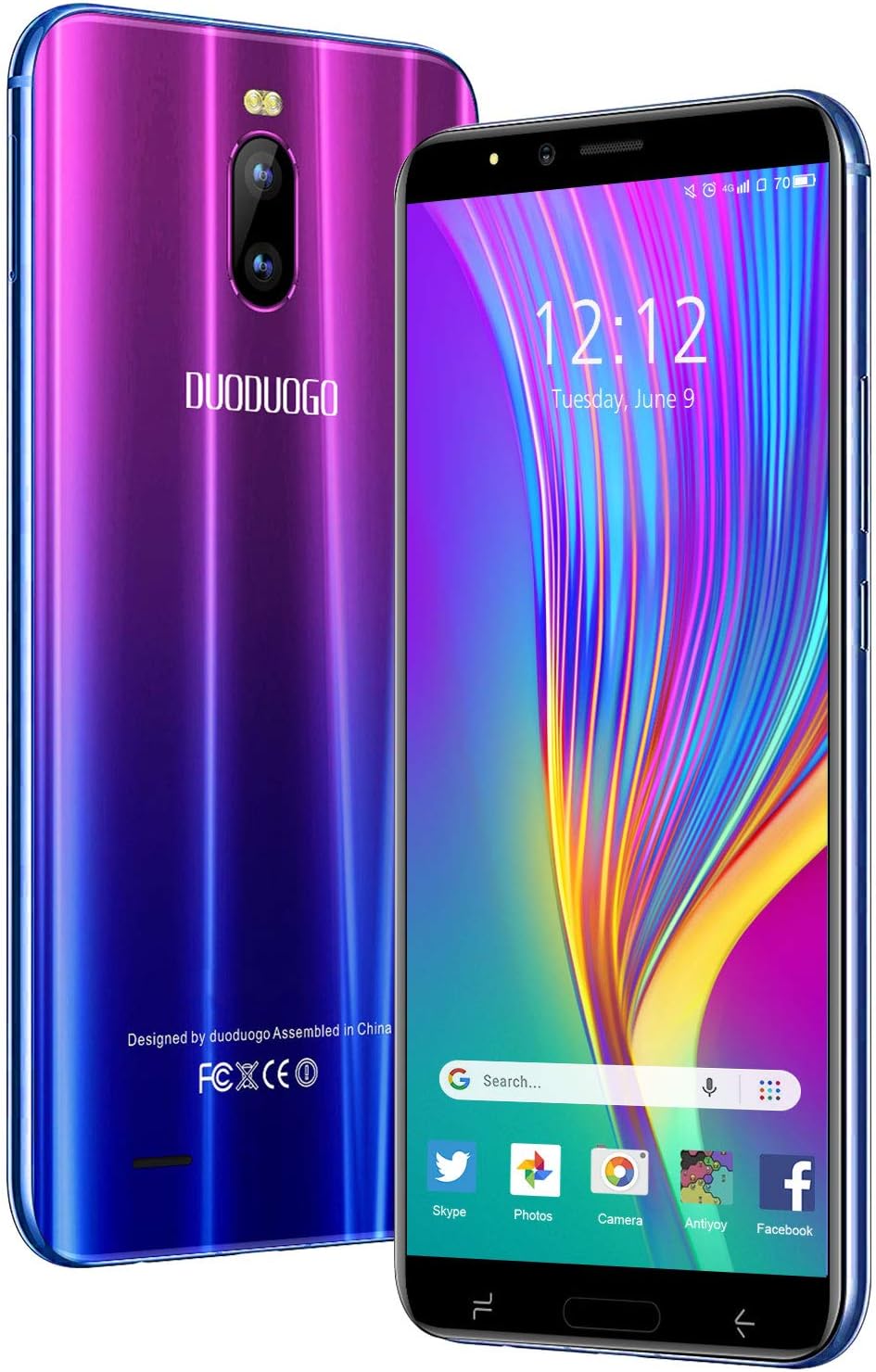
Vaizdas: Priekinė ir galinė dalys view of the DUODUOGO J6+ smartphone, showcasing its vibrant purple-to-blue gradient finish and the display.
Pagrindinės funkcijos:
- Ekranas: 6.0 colio HD+ ekranas.
- Operacinė sistema: Android 9.0.
- Našumas: 3GB RAM and 16GB internal storage, expandable up to 128GB via microSD.
- Baterija: 4800 mAh large capacity battery for extended use.
- Kameros: 8 MP galinė kamera ir 5 MP priekinė kamera.
- Saugumas: Face ID unlock feature.
- Ryšys: Dual SIM (2 Micro-SIM + 1 MicroSD) with 2G/3G/4G network support, Wi-Fi, Bluetooth 4.2, and GPS.
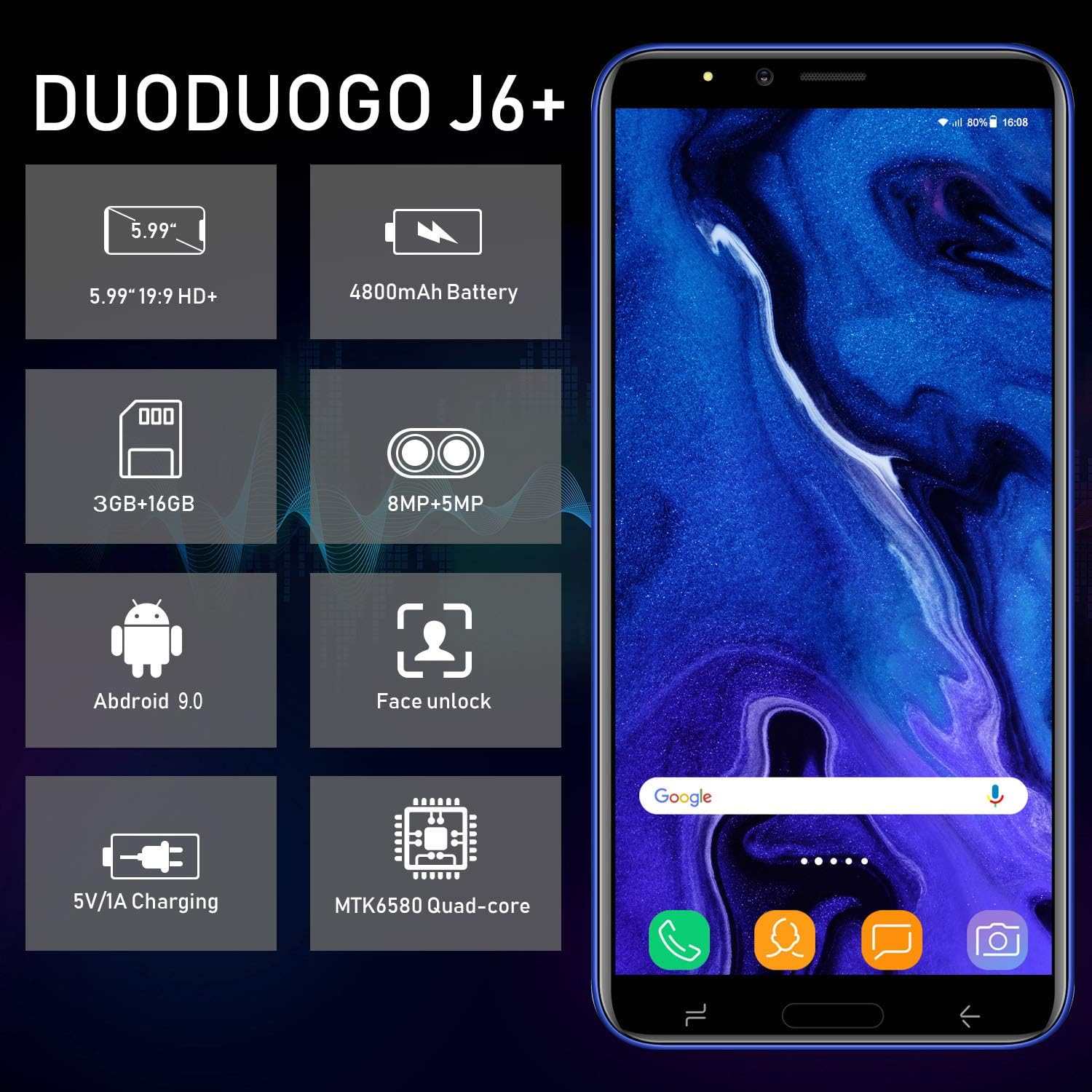
Image: Infographic highlighting key specifications of the DUODUOGO J6+, including screen size, battery capacity, memory, camera resolution, Android version, Face Unlock, charging, and processor type.
Pakuotės turinys
Atidarius pakuotę, įsitikinkite, kad yra visi šie daiktai:
- DUODUOGO J6+ Smartphone
- Įkroviklis
- USB duomenų kabelis
- Ausinės
- Apsauginis dėklas
- Screen Protector (Anti-burst membrane)
- Vartotojo vadovas

Image: All items included in the DUODUOGO J6+ smartphone package, neatly laid out, including the phone, charger, USB cable, headphones, protective case, and user manual.
Sąranka
1. Baterijos įdėjimas ir pradinis įkrovimas
The DUODUOGO J6+ comes with a removable battery. Before first use, remove the insulating film from the battery terminals. Insert the battery into the designated compartment on the back of the phone. Close the back cover securely.
Connect the charger to the phone's USB port and plug it into a power outlet. Charge the phone completely before initial use. A full charge ensures optimal battery calibration.
2. SIM kortelės ir „MicroSD“ kortelės įdėjimas
The phone supports two Micro-SIM cards and one MicroSD card for expandable storage.
- Locate the SIM/MicroSD card slot(s), typically under the battery or on the side of the device.
- Carefully insert your Micro-SIM cards into the SIM slots with the gold contacts facing down.
- If desired, insert a MicroSD card (up to 128GB) into the dedicated MicroSD slot.
- Ensure the cards are seated correctly.
3. Įjungimas ir pradinė sąranka
Press and hold the Power button (usually on the right side) until the screen lights up. Follow the on-screen prompts to complete the initial setup, which includes selecting your language, connecting to Wi-Fi, setting up your Google account, and configuring security features like Face ID.
Naudojimo instrukcijos
Pagrindinė navigacija
- Maitinimo įjungimas/išjungimas: Press and hold the Power button. Select "Power off" or "Restart" from the options.
- Ekrano užraktas / atrakinimas: Trumpai paspauskite maitinimo mygtuką, kad užrakintumėte arba atrakintumėte ekraną.
- Pagrindinis ekranas: Braukite kairėn arba dešinėn, kad naršytumėte tarp pagrindinių ekranų.
- Pranešimai: Braukite žemyn nuo ekrano viršaus, kad pasiektumėte pranešimų skydelį ir greituosius nustatymus.
- Naujausios programos: Palieskite kvadratinį naršymo mygtuką (arba braukite aukštyn ir palaikykite iš apačios, jei naudojate gestus), kad view neseniai naudotos programos.
Skambinimas ir žinučių siuntimas
- Skambučiai: Atidarykite programėlę „Telefonas“, įveskite numerį ir palieskite skambinimo piktogramą.
- Žinutės: Open the "Messages" app, tap the new message icon, enter the recipient's number or select from contacts, and type your message.
Kameros naudojimas
The DUODUOGO J6+ features an 8MP rear camera and a 5MP front camera.
- Atidarykite programėlę „Kamera“.
- Norėdami nufotografuoti, palieskite užrakto mygtuką.
- Tap the video icon to switch to video recording mode.
- Norėdami perjungti priekinę ir galinę kameras, naudokite kameros perjungimo piktogramą.

Image: The DUODUOGO J6+ smartphone displayed with icons indicating its 8MP rear camera and 5MP front camera capabilities.
Veido ID atrakinimas
Norėdami nustatyti „Face ID“, eikite į Settings > Security & Location > Face Unlock. Follow the on-screen instructions to register your face. Once set up, simply look at the front camera to unlock your device quickly and securely.
Priežiūra
Bendroji priežiūra
- Laikykite prietaisą sausai. Drėgmė gali pažeisti elektronines grandines.
- Venkite ekstremalių temperatūrų. Aukšta temperatūra gali sutrumpinti elektroninių prietaisų tarnavimo laiką ir sugadinti baterijas.
- Neišmeskite, netrankykite ir nepurtykite prietaiso. Šiurkštus valdymas gali sugadinti vidines grandines.
- Naudokite tik patvirtintus įkroviklius ir priedus.
- Clean the screen and body with a soft, dry cloth. Avoid using harsh chemicals.
Akumuliatoriaus priežiūra
- Norėdami pailginti akumuliatoriaus veikimo laiką, venkite dažnai visiškai jį iškrauti.
- Nepalikite telefono krautis per ilgai po to, kai jis visiškai įkrautas.
- Jei telefonas bus nenaudojamas ilgesnį laiką, prieš padėdami jį įkrauti, įkraukite jį iki maždaug 50 %.

Image: A visual representation emphasizing the 4800mAh large capacity battery of the DUODUOGO J6+ smartphone.
Trikčių šalinimas
| Problema | Galima priežastis / sprendimas |
|---|---|
| Telefonas neįsijungia. | Battery might be completely drained. Charge the phone for at least 30 minutes before attempting to power on. Ensure the insulating film is removed from the battery. |
| Nepavyksta prisijungti prie „Wi-Fi“. | Ensure Wi-Fi is enabled in settings. Check if the Wi-Fi password is correct. Restart your router and the phone. |
| SIM kortelė neaptikta. | Ensure the SIM card is correctly inserted in the slot. Restart the phone. Check if the SIM card is active with your network provider. |
| Face ID not working. | Ensure your face is well-lit and not obstructed. Re-register your face in settings if the issue persists. |
| Lėtas veikimas. | Close unused apps. Clear cache from apps. Free up storage space by deleting unnecessary files or moving them to the SD card. Restart the phone. |
Specifikacijos
| Funkcija | Detalė |
|---|---|
| Modelio pavadinimas | J6+ |
| Prekės ženklas | DUODUOGO |
| Operacinė sistema | Android 9.0 |
| Ekrano dydis | 6.0 inches (15.3 cm) HD+ |
| RAM | 3 GB |
| Vidinė saugykla | 16 GB |
| Išplečiama saugykla | Iki 128 GB („MicroSD“) |
| Galinė kamera | 8 MP |
| Priekinė kamera | 5 MP |
| Baterijos talpa | 4800 mAh |
| SIM kortelių lizdai | Dual-SIM (2 Micro-SIM) |
| Tinklo technologija | 2G, 3G, 4G |
| Ryšys | Bluetooth 4.2, USB, WLAN (Wi-Fi), GPS |
| Apsaugos funkcijos | Veido ID |
| Gaminio matmenys | 16.1 x 7.7 x 0.8 cm |
| Produkto svoris | 170 gramų |
| Spalva | Violetinė |

Image: Detailed dimensions of the DUODUOGO J6+ smartphone, showing its length, width, and thickness.
Garantija ir palaikymas
The DUODUOGO J6+ smartphone comes with a 1 metų garantija from the date of purchase. This warranty covers manufacturing defects and malfunctions under normal use. Please note that the warranty does not cover damages caused by human factors (e.g., accidental drops, liquid damage, unauthorized repairs).
For any questions, technical support, or warranty claims, please contact DUODUOGO customer service. Refer to the contact information provided in your product packaging or on the official DUODUOGO websvetainę.
Ask a question about this manual
Ask about setup, troubleshooting, compatibility, parts, safety, or missing instructions. Manuals+ will review the question and use this page’s manual context to help answer it.