
1. Įvadas
The Quick 857DW+ is a high-performance SMD rework station featuring a hot air gun, designed for precise desoldering and soldering of various electronic components. It incorporates a microcomputer for temperature control, an LED digital display, and a brushless fan for soft, adjustable airflow. This manual provides essential information for the safe and effective operation, setup, maintenance, and troubleshooting of your device.
2. Svarbios saugos instrukcijos
Prieš naudodami šį gaminį, perskaitykite visas instrukcijas. Nesilaikant šių instrukcijų, gali kilti elektros smūgis, gaisras arba sunkūs sužalojimai.
- Always operate the hot air gun in a well-ventilated area to avoid inhaling fumes.
- The nozzle and heated air can reach very high temperatures (up to 500°C). Avoid direct contact with skin or flammable materials.
- Do not point the hot air gun at people, animals, or heat-sensitive objects.
- Įsitikinkite, kad maitinimo laidas nėra pažeistas ir yra tinkamai įžemintas.
- Unplug the unit from the power outlet when not in use or before performing any maintenance.
- Prieš padėdami į vietą, leiskite įrenginiui visiškai atvėsti.
- Laikykite darbo vietą švarią ir be netvarkos.
- Do not use the device near liquids or in damp sąlygas.
- Šis prietaisas nėra skirtas naudoti asmenims (įskaitant vaikus), kurių fizinės, jutimo ar psichikos negalios arba neturintys patirties ir žinių, nebent už jų saugumą atsakingas asmuo juos prižiūrėtų arba instruktuotų, kaip naudoti prietaisą.
3. Pakuotės turinys
Carefully unpack the box and ensure all items are present and undamaged. If any items are missing or damaged, contact your supplier immediately.
- Quick 857DW+ Main Rework Station Unit
- Hot Air Gun Handle
- Hot Air Gun Stand
- Assorted Nozzles (typically 3-4 different sizes)
- Heating Element (replacement)
- Maitinimo laidas
4. Produktas baigtasview
The Quick 857DW+ rework station consists of a main control unit and a hot air gun handle. The main unit features controls for temperature and airflow, along with a digital display for precise monitoring.
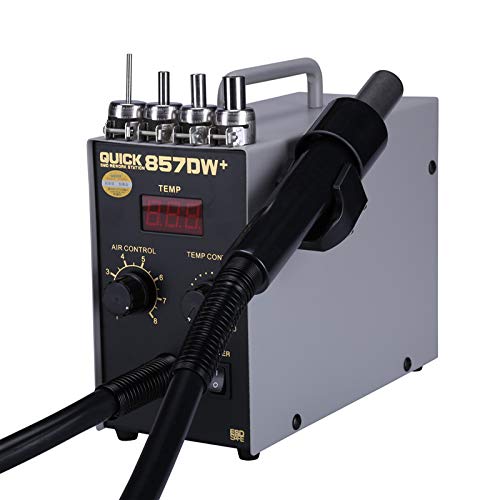
Quick 857DW+ SMD Rework Station main unit with digital LED temperature display, air control knob, temperature control knob, power switch, and the connected hot air gun handle.
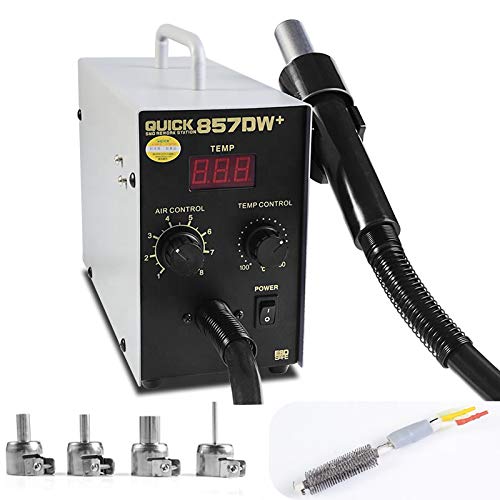
Assortment of hot air nozzles and a replacement heating element for the Quick 857DW+ SMD Rework Station.
Pagrindinės įrenginio savybės:
- LED skaitmeninis ekranas: Shows real-time temperature with 1°C resolution.
- Air Control Knob: Adjusts the airflow rate (up to 120 liters/minute).
- Temperatūros valdymo rankenėlė: Sets the desired temperature (100°C - 500°C).
- Maitinimo jungiklis: Įjungia arba išjungia įrenginį.
Hot Air Gun Handle:
- Induction Switch: Automatically activates the working mode when picked up and enters standby when placed in the holder.
- Brushless Fan: Provides soft, consistent airflow with low noise and long lifespan.
- High-Quality Heating Element: Užtikrina greitą įkaitimą ir stabilią temperatūrą.
5. Specifikacijos
| Parametras | Vertė |
|---|---|
| Modelis | Quick 857DW+ |
| Energijos suvartojimas | 700 vatų |
| ttage | 220V/50HZ (also supports 110V-240V) |
| Oro srauto tipas | Brushless fan soft wind |
| Dujų srauto greitis | 120 litrai per minutę |
| Temperatūros valdymo diapazonas | 100–500 °C |
| Rodymo forma | LED Digital (resolution 1°C) |
| Handle Component Length | 120 cm |
| Triukšmas | Mažiau nei 45 dB |
| Ekrano tipas | LED skaitmeninis |
| Temperatūros stabilumas | 100 degrees_celsius (range) |
| Kanalų skaičius | 1 |
6. Sąranka
Follow these steps to set up your Quick 857DW+ rework station:
- Išpakuoti: Atsargiai išimkite visus komponentus iš pakuotės.
- Vieta: Place the main rework station unit on a stable, heat-resistant, and level surface in a well-ventilated area.
- Prijunkite karšto oro pistoletą: Securely connect the hot air gun handle cable to the designated port on the main unit.
- Įdiekite antgalį: Select the appropriate nozzle for your application and attach it firmly to the hot air gun handle.
- Position Holder: Place the hot air gun handle in its designated holder on the side of the unit.
- Prijunkite maitinimą: Plug the power cord into the main unit and then into a suitable grounded electrical outlet.
7. Naudojimo instrukcijos
The Quick 857DW+ is designed for user-friendly operation. Familiarize yourself with the controls before beginning work.
- Maitinimas: Flip the POWER switch to the 'ON' position. The LED display will illuminate, showing the current temperature.
- Reguliuoti temperatūrą: Use the 'TEMP CONTROL' knob to set the desired temperature. The digital display will show the set temperature, and then gradually rise to meet it.
- Sureguliuokite oro srautą: Use the 'AIR CONTROL' knob to adjust the airflow rate. Start with a lower setting and increase as needed for your application.
- Pradėti operaciją: Pick up the hot air gun handle from its holder. The induction switch will detect this, and the unit will quickly enter working mode, heating to the set temperature and starting airflow.
- Working Applications: This station is suitable for desoldering various components such as SOIC, CHIP, QFP, PLCC, and BGA (especially for mobile phone lines). It can also be used for heat shrinking, drying, paint removal, glue removal, thawing, preheating, and welding tasks.
- Budėjimo režimas: When you place the hot air gun handle back into its holder, the induction switch will activate standby mode. The system will automatically cool down the heating element with air before turning off the fan, prolonging the life of the heating element.
- Išjungti: After use, ensure the hot air gun is in its holder and has cooled down. Then, flip the POWER switch to the 'OFF' position and unplug the unit from the power outlet.
8. Priežiūra
Reguliarus techninis aptarnavimas užtikrina jūsų perdirbimo stoties ilgaamžiškumą ir optimalų veikimą.
- Švarūs purkštukai: Periodically clean the nozzles to prevent blockages from flux residue or solder. Use a soft brush or non-abrasive tool.
- Inspect Heating Element: Check the heating element for any signs of damage or wear. Replace if necessary (refer to the replacement heating element included in the package).
- Laikykite oro angas laisvas: Ensure the air intake and exhaust vents on the main unit are free from dust and debris to maintain proper airflow and cooling.
- Švarus įrenginys: Wipe the exterior of the unit with a soft, dry cloth. Do not use harsh chemicals or solvents.
- Saugykla: Store the rework station in a dry, dust-free environment when not in use.
9. Problemų sprendimas
If you encounter issues with your Quick 857DW+ rework station, refer to the following common problems and solutions:
| Problema | Galima priežastis | Sprendimas |
|---|---|---|
| Įrenginys neįsijungia | No power supply; Power cord loose; Power switch off | Check power outlet; Ensure power cord is securely plugged in; Turn power switch to 'ON' |
| No heat from hot air gun | Heating element failure; Temperature set too low; Handle not picked up (in standby) | Replace heating element; Increase temperature setting; Pick up handle from holder |
| Insufficient or no airflow | Air control knob set too low; Fan blockage; Nozzle blockage | Increase air control setting; Clear air vents; Clean or replace nozzle |
| Temperatūra nestabili | Sensor issue; Drafts in work area; Heating element wear | Ensure stable environment; Inspect sensor connection; Consider replacing heating element |
10. Garantija ir palaikymas
This product comes with a standard manufacturer's warranty. For specific warranty terms, duration, and conditions, please refer to the documentation provided at the time of purchase or contact your retailer. For technical support, spare parts, or service inquiries, please contact the vendor or manufacturer directly through their official support channels.