
1. Įvadas
This manual provides detailed instructions for the setup, operation, and maintenance of your USHINING BF-N11 HD Webcam. This device is designed to enhance your video communication experience with features such as high-definition video, an integrated ring light, and a noise-reducing microphone. Please read this manual thoroughly before using the product.
2. Pakuotės turinys
Patikrinkite, ar pakuotėje yra visi toliau išvardyti daiktai:
- USHINING BF-N11 HD Webkumštelis
- Privatumo viršelis
- USB laidas (integruotas)
- Vartotojo vadovas (šis dokumentas)
3. Produkto ypatybės
The USHINING BF-N11 HD Webcam offers a range of features for optimal performance:
- „Full HD 1080p“ vaizdo įrašas: Delivers clear and sharp video quality.
- Integrated Ring Light: Provides adjustable illumination with three brightness levels (Low, Medium, High) to improve video quality in various lighting conditions.
- Privatumo apsauga: A physical cover to ensure privacy when the webkamera nenaudojama.
- Built-in Dual Noise-Reducing Microphone: Captures clear audio by minimizing background noise.
- „Plug & Play“ USB jungtis: Easy setup without the need for additional drivers.
- Platus suderinamumas: Supports Windows XP, Mac OS 10.6, Android 5.0, and various video conferencing software like Zoom, Skype, Facetime, and Teams.
- 90 laipsnių plataus kampo objektyvas: Užfiksuoja platų lauką view, suitable for group calls.
- Lankstus montavimas: Features a clip that allows for secure placement on monitors, laptops, or flat surfaces, with 360-degree rotation and 15-degree tilt adjustment.
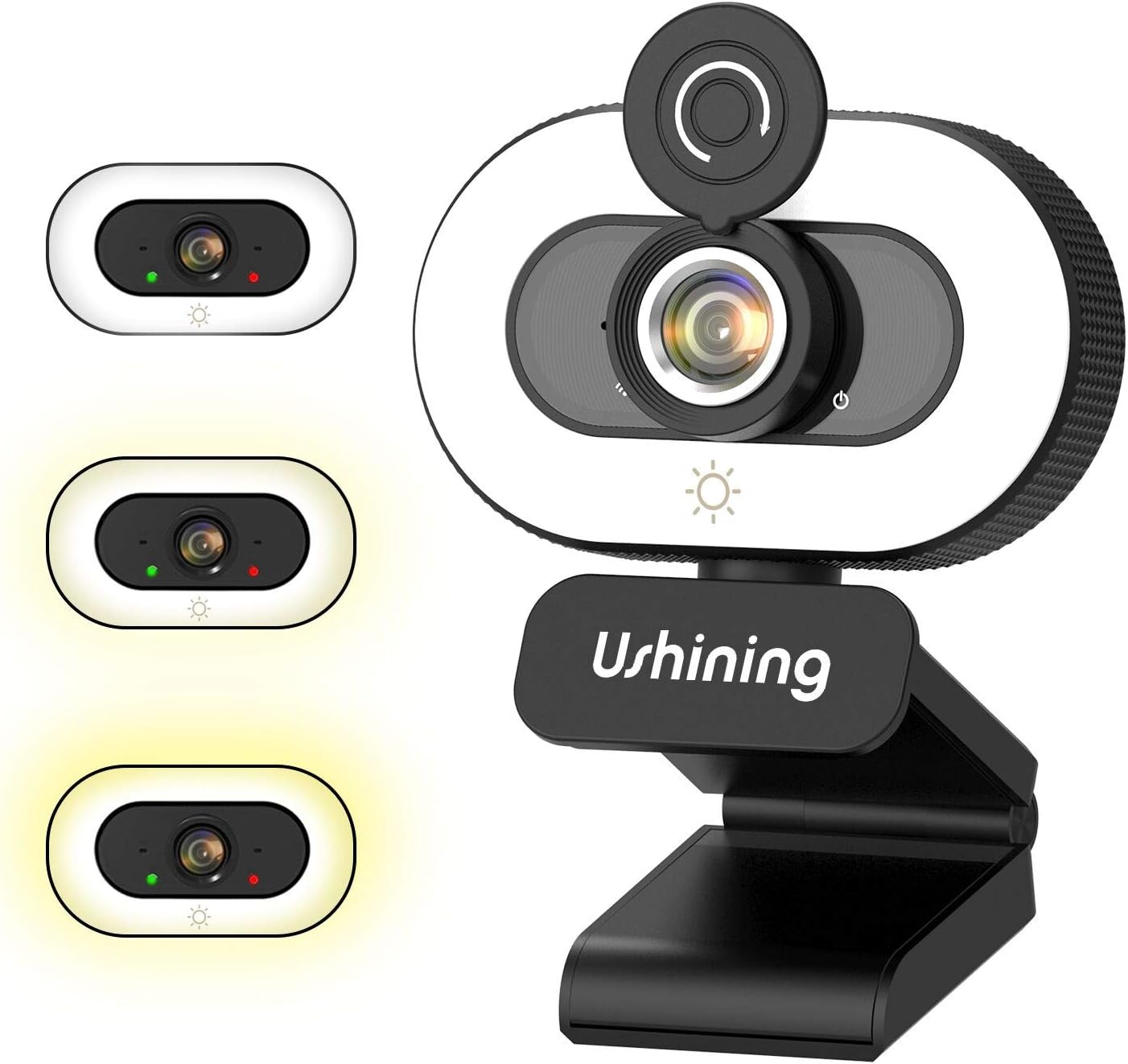
Image 1: USHINING BF-N11 HD Webcam with its integrated ring light and privacy cover.

2 vaizdas: Baigtaview of key features including adjustable ring light, security & privacy, internal noise reduction mic, USB plug & play, human face optimization, wide compatibility, and Full HD 1080P resolution.

Image 3: Demonstrates the three adjustable brightness levels (Low, Medium, High) of the integrated ring light, controlled by a touch sensor.

Image 4: Illustrates the difference between 720P and 1080P video clarity, highlighting the Full HD capability of the webkumštelis.

Image 5: Shows the webcam in use during a video conference, emphasizing the built-in dual noise-reducing microphone for clear audio.

Image 6: Demonstrates the 90-degree wide-angle view and flexible mounting options, including 360-degree rotation and 15-degree tilt.

Image 7: Illustrates the function of the privacy cover, protecting against surveillance and privacy leaks.

Image 8: Displays the wide compatibility of the webcam with various software and operating systems, including Windows XP, Mac OS 10.6, and Android 5.0.
4. Sąrankos instrukcijos
Follow these steps to set up your USHINING BF-N11 HD Webkumštelis:
- Montavimas Webkumštelis:
- Open the flexible clip base.
- Padėkite webkamerą ant kompiuterio monitoriaus arba nešiojamojo kompiuterio ekrano viršaus, užtikrindami, kad priekinė dalis būtų webcam faces you.
- Adjust the clip to securely rest on the back of your monitor or laptop. The webcam can also be placed on a flat surface.
- Sureguliuokite kampą webcam as needed. It supports 360-degree horizontal rotation and 15-degree vertical tilt.
- Prijungimas prie kompiuterio:
- Prijunkite integruotą USB laidą prie laisvo kompiuterio USB prievado.
- The webcam is plug-and-play, meaning your operating system (Windows, macOS, Android) should automatically detect and install the necessary drivers. This may take a few moments.
- Įdiegus, webcam will be ready for use with your preferred video conferencing or recording software.
5. Naudojimo instrukcijos
Using your USHINING BF-N11 HD Webcam is straightforward:
- Using the Ring Light:
- The webcam features an integrated ring light. To turn it on or adjust its brightness, gently touch the light icon sensor located on the front of the webcam, below the lens.
- Each touch will cycle through the three brightness levels: Low, Medium, High, and Off.
- Using the Privacy Cover:
- To ensure privacy, slide the physical privacy cover over the webkameros objektyvas, kai nenaudojamas.
- Slide it back to expose the lens when you need to use the camera.
- Pasirinkus Webkamera ir mikrofonas:
- In your video conferencing software (e.g., Zoom, Skype, Microsoft Teams, Facetime), navigate to the audio and video settings.
- Select "USHINING BF-N11 Web„cam“ kaip vaizdo įvesties įrenginį.
- Select "USHINING BF-N11 Microphone" (or similar name) as your audio input device.
6. Priežiūra
Tinkama priežiūra užtikrina jūsų įrenginio ilgaamžiškumą ir optimalų veikimą webkumštelis:
- Objektyvo valymas: Švelniai nuvalykite minkštu, nepūkuotu audiniu, specialiai skirtu optiniams lęšiams webkameros lęšis. Venkite abrazyvinių medžiagų ar stiprių cheminių medžiagų.
- Kūno valymas: Nuvalykite korpusą webcam with a soft, dry cloth. If necessary, a slightly damp Galima naudoti šluostę, tačiau įsitikinkite, kad į įrenginį nepatenka drėgmės.
- Saugojimas: Kai ilgesnį laiką nenaudojate, laikykite webcam in a clean, dry place. Use the privacy cover to protect the lens from dust and scratches.
- Venkite ekstremalių sąlygų: Neatskleiskite webkamerą veikiamą ekstremalių temperatūrų, drėgmės ar tiesioginių saulės spindulių.
7. Problemų sprendimas
If you encounter issues with your USHINING BF-N11 HD Webkamera, žr. šias dažniausiai pasitaikančias problemas ir sprendimus:
| Problema | Galimas sprendimas |
|---|---|
| WebKompiuteris neaptiko kameros. |
|
| No video output or black screen. |
|
| Mikrofonas neveikia arba garso kokybė prasta. |
|
| Ring light not turning on or adjusting. |
|
8. Specifikacijos
| Funkcija | Detalė |
|---|---|
| Prekės ženklas | USHINING |
| Modelio numeris | BF-N11 |
| Vaizdo įrašymo raiška | 1080p |
| Ryšio technologija | USB |
| Mikrofonas | Built-in Dual Noise-Reducing Microphone |
| Žiedo šviesa | Integrated, 3 Adjustable Brightness Levels |
| Objektyvo tipas | Padidinti |
| Laukas View | 90 laipsnių platus kampas |
| Rotacija | 360 Degrees Horizontal |
| Pakreipti | 15 Degrees Vertical |
| Spalva | Juoda, Balta |
| Prekės svoris | 5.7 uncijos |
| Pakuotės matmenys | 4.53 x 3.35 x 2.36 colio |
| Formos faktorius | Nešiojamasis kompiuteris |
| Įtraukti komponentai | Privacy Cover, USB Cable |
9. Garantija ir palaikymas
For warranty information and technical support, please refer to the official USHINING website or contact their customer service directly. Details regarding warranty periods and support channels are typically provided with your purchase documentation or on the manufacturer's product page.
For further assistance, you may visit the USHINING support page or contact their customer service team.