
1. Įvadas
Ačiū, kad pirkoteasing the Trevi CMP 588 DAB Portable Stereo System. This manual provides essential information for the safe and correct operation of your device. Please read it thoroughly before use and retain it for future reference.
The Trevi CMP 588 DAB is a versatile portable stereo system featuring DAB/DAB+ and FM radio with RDS, a CD/MP3 player, USB input, AUX-in, Bluetooth connectivity, and a headphone jack, all designed for an enhanced audio experience.
2. Saugos informacija
- Maitinimo šaltinis: Naudokite tik nurodytą maitinimo adapterį arba baterijas. Įsitikinkite, kad įtampatage atitinka įrenginio reikalavimus.
- Vanduo ir drėgmė: Do not expose the unit to rain, moisture, or immerse it in water. Avoid placing objects filled with liquids, such as vases, on the unit.
- Vėdinimas: Užtikrinkite tinkamą vėdinimą. Neužblokuokite ventiliacijos angų.
- Šiluma: Laikykite įrenginį atokiau nuo šilumos šaltinių, tokių kaip radiatoriai, šildytuvai, viryklės ar kiti prietaisai (įskaitant ampkeltuvai), kurie gamina šilumą.
- Valymas: Prieš valydami atjunkite įrenginį nuo elektros lizdo. Naudokite minkštą, sausą šluostę. Nenaudokite skystų ar aerozolinių valiklių.
- Aptarnavimas: Nemėginkite patys aptarnauti šio gaminio. Visą techninę priežiūrą patikėkite kvalifikuotam aptarnavimo personalui.
- CD grotuvas: Niekada nežiūrėkite tiesiai į lazerio spindulį.
3. Pakuotės turinys
Patikrinkite, ar visi daiktai yra ir yra geros būklės:
- Trevi CMP 588 DAB Portable Stereo System
- Kintamosios srovės laidas
- Nuotolinio valdymo pultas
- Vartotojo vadovas (šis dokumentas)
4. Produkto ypatybės
- DAB/DAB+ and FM Radio with RDS
- High Readability Dot Matrix Display
- CD Player (supports CD-DA, MP3)
- USB Input for MP3 Playback
- AUX-in for external audio devices
- Bluetooth ryšys
- Ausinių lizdas
- Nešiojamas dizainas su rankena
- Pridedamas nuotolinio valdymo pultas
5. Valdikliai ir jungtys

1 pav.: priekis view of the Trevi CMP 588 DAB, showing speakers, display, and main controls.
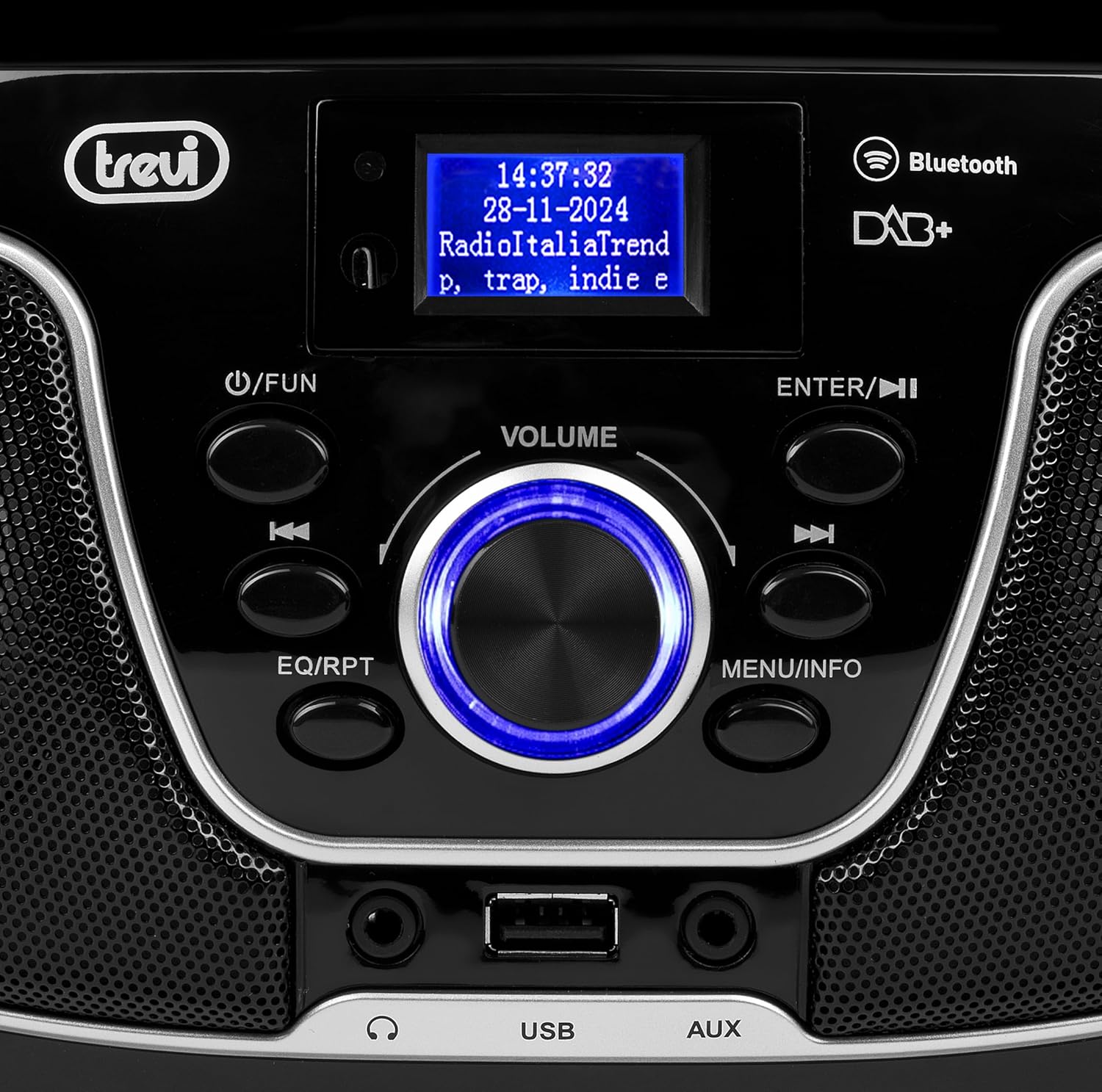
2 pav. Išsamus view of the control panel, including power, function, volume knob, and navigation buttons.
Priekinio skydelio valdikliai:
- POWER / FUN button: Press to turn on/off, press to switch functions (CD/USB/DAB/FM/Bluetooth/AUX).
- VOLUME rankenėlė: Rotate to adjust volume. Press to confirm selections.
- ENTER / ►►I button: Confirm selection / Skip to next track/station.
- I▼▼ / EQ/RPT button: Skip to previous track/station / Equalizer settings / Repeat mode.
- MENU / INFO button: Access menu / Display information.
- USB prievadas: Connect USB storage devices for MP3 playback.
- AUX įvesties lizdas: Prijunkite išorinius garso įrenginius.
- Ausinių lizdas: Prijunkite ausines privačiam klausymuisi.

3 pav.: galinis view of the Trevi CMP 588 DAB, showing the power input and telescopic antenna.
Galinio skydelio jungtys:
- Kintamosios srovės įvestis: Prijunkite pateiktą kintamosios srovės maitinimo kabelį.
- Teleskopinė antena: Ištieskite, kad radijo ryšys būtų optimalus.

Figure 4: Remote control for the Trevi CMP 588 DAB, showing various function buttons.
Nuotolinio valdymo pulto funkcijos:
- PASIRENGIMAS: Maitinimo įjungimas/išjungimas.
- FUNC.: Switch between modes (CD, USB, DAB, FM, Bluetooth, AUX).
- Nutildyti: Nutildyti / įjungti garsą.
- RPT: Pakartotinis atkūrimo režimas.
- SKAN.: Auto scan for radio stations.
- F+/CH+, F-/CH-: Navigate folders/channels.
- EQ: Ekvalaizerio nustatymai.
- PLAY/PAUSE (►II): Leisti / pristabdyti atkūrimą.
- PREV/TUN- (▼▼): Previous track/tune down.
- NEXT/TUN+ (►►): Next track/tune up.
- STOP (■): Sustabdyti atkūrimą.
- MENIU: Prieigos meniu.
- INFORMACIJA: Rodyti informaciją.
- PROGRAMA: Program tracks/stations.
- VOL+ / VOL-: Sureguliuokite garsumą.
6. Sąranka
6.1 Maitinimo jungtis
- Kintamosios srovės maitinimas: Connect the supplied AC power cable to the AC power input on the rear of the unit, then plug the other end into a wall outlet.
- Baterijos veikimas (neprivaloma): For portable use, insert 6 x C-size batteries (not included) into the battery compartment on the bottom of the unit. Ensure correct polarity.
6.2 Pradinis įjungimas
Paspauskite POWER / FUN įrenginio mygtuką arba LAIKYMAS button on the remote control to turn on the system. The display will light up.
6.3 Setting Up the Antenna
For optimal radio reception, fully extend the telescopic antenna located at the rear of the unit. Adjust its position for the best signal.
7. Naudojimo instrukcijos
7.1 DAB/DAB+ radijo valdymas
- Paspauskite POWER / FUN button repeatedly until "DAB" mode is selected.
- The unit will automatically scan for available DAB/DAB+ stations on first use. To perform a manual scan, press the MENIU button, navigate to "Full Scan" and press ENTER.
- Kai nuskaitymas bus baigtas, naudokite ▼▼ or ►► buttons to browse through the available stations. Press ENTER norėdami pasirinkti stotį.
- Paspauskite INFORMACIJA button to cycle through different information displays (e.g., program type, signal strength, time).
7.2 FM radijo veikimas
- Paspauskite POWER / FUN button repeatedly until "FM" mode is selected.
- To auto-scan and store stations, press the NUSKAITYTI button on the remote. The unit will scan and save strong signals.
- To manually tune, press and hold the ▼▼ or ►► buttons to search for the next available station. Press briefly to fine-tune the frequency.
- The RDS function will display station information (if available).
7.3 CD/MP3 atkūrimas

5 paveikslas: viršuje view of the Trevi CMP 588 DAB with the CD compartment open, ready for disc insertion.
- Atidarykite CD skyriaus dangtelį.
- Place a CD (CD-DA or MP3 CD) onto the spindle with the label side facing up.
- Uždarykite CD skyriaus dangtelį.
- Paspauskite POWER / FUN button repeatedly until "CD" mode is selected.
- The unit will read the disc. Press PLAY/PAUSE (►II) norėdami pradėti atkūrimą.
- Naudokite ▼▼ or ►► to skip tracks. Press and hold to fast forward/rewind.
- Paspauskite STOP (■) norėdami sustabdyti atkūrimą.
7.4 USB atkūrimas
- Įdėkite USB atmintinę su MP3 files į USB prievadą.
- Paspauskite POWER / FUN mygtuką kelis kartus, kol bus pasirinktas „USB“ režimas.
- Įrenginys automatiškai aptiks ir pradės groti MP3 files.
- Naudokite ▼▼ or ►► praleisti takelius.
7.5 „Bluetooth“ susiejimas ir atkūrimas
- Paspauskite POWER / FUN button repeatedly until "Bluetooth" mode is selected. The display will show "BT" or "PAIRING".
- Įjunkite „Bluetooth“ savo mobiliajame įrenginyje (išmaniajame telefone, planšetiniame kompiuteryje ir kt.).
- Ieškokite available devices and select "TREVI CMP 588 DAB" from the list.
- Once paired, you can play audio from your device through the stereo system.
- Use the controls on your mobile device or the stereo system to manage playback.
7.6 AUX-in Operation
- Connect an external audio device (e.g., MP3 player, smartphone) to the AUX-in jack using a 3.5mm audio cable (not included).
- Paspauskite POWER / FUN mygtuką kelis kartus, kol bus pasirinktas „AUX“ režimas.
- Play audio from your connected device. The volume can be controlled via both the stereo system and the external device.
8. Priežiūra
8.1 Įrenginio valymas
Wipe the exterior of the unit with a soft, dry cloth. Do not use abrasive cleaners, waxes, or solvents as they may damage the finish. Ensure the unit is unplugged before cleaning.
8.2 CD objektyvo priežiūra
If the CD player experiences reading errors, the lens may be dirty. Use a commercially available CD lens cleaner to clean the lens. Do not touch the lens with your fingers.
8.3 Saugykla
If the unit will not be used for an extended period, remove the batteries (if applicable) and unplug the power cable. Store the unit in a cool, dry place away from direct sunlight and extreme temperatures.
9. Problemų sprendimas
| Problema | Galima priežastis | Sprendimas |
|---|---|---|
| Nėra galios | Neprijungtas maitinimo laidas; Baterijos išsikrovusios arba neteisingai įdėtos. | Check power cable connection; Replace batteries or ensure correct polarity. |
| Nėra garso | Per mažas garsumas; Įjungta nutildymo funkcija; Pasirinktas neteisingas šaltinis. | Increase volume; Deactivate mute; Select correct function (CD, USB, DAB, FM, BT, AUX). |
| Prastas radijo priėmimas | Antena neištiesta arba netinkamai pastatyta; silpno signalo zona. | Visiškai ištieskite ir sureguliuokite teleskopinę anteną; Pabandykite perkelti įrenginį į kitą vietą. |
| CD / USB negroja | Disc dirty/scratched; Incorrect file format on USB; USB drive not properly inserted. | Clean or replace disc; Ensure MP3 format for USB; Reinsert USB drive. |
| „Bluetooth“ susiejimas nepavyko | Device too far; Bluetooth not enabled on source device; Unit not in pairing mode. | Move devices closer; Enable Bluetooth on source device; Ensure unit is in Bluetooth mode and searching. |
10. Specifikacijos
- Modelis: CM 588 DAB
- Maitinimo šaltinis: AC 230V ~ 50Hz or 6 x C-size batteries (not included)
- Energijos suvartojimas: 15 vatų
- Garsiakalbio tipas: Stereo (2 speakers)
- Ryšys: Bluetooth, USB, AUX-in
- Palaikomi garso formatai: CD audio (CD-DA), MP3
- Radijo dažniai: DAB/DAB+, FM with RDS
- Matmenys (P x P x A): 50 x 50 x 28 cm (apytiksliai)
- Svoris: 1.5 kilogramo (apytiksliai)
- Spalva: Juoda
11. Garantija ir palaikymas
Šiam produktui taikoma standartinė gamintojo garantija. Dėl konkrečių sąlygų, įskaitant garantijos laikotarpį ir aprėpties informaciją, žr. garantijos kortelę, pridėtą prie pakuotės.
For technical support, service, or warranty claims, please contact your retailer or the official Trevi customer service. Contact information can typically be found on the Trevi websvetainėje arba produkto pakuotėje.
Please retain your proof of purchase (receipt) for any warranty-related inquiries.