
Įvadas
This instruction manual provides comprehensive guidance for the SOAR NFL True Wireless Earbuds V.4. These earbuds feature Bluetooth 5.0 technology, a built-in microphone, and touch controls, offering 3-4 hours of playtime per charge. The included charging case ensures portability and extended use. Please read this manual thoroughly before using your earbuds to ensure proper operation and longevity.
Kas yra dėžutėje
Upon opening your SOAR NFL True Wireless Earbuds V.4 package, you should find the following items:
- One (1) Pair of True Wireless Earbuds
- Vienas (1) įkrovimo dėklas
- Vienas (1) „Micro USB“ įkrovimo laidas

The image above displays the SOAR NFL True Wireless Earbuds V.4 in their retail packaging. The package includes the earbuds, the charging case, and a micro-USB charging cable.
Produktas baigtasview
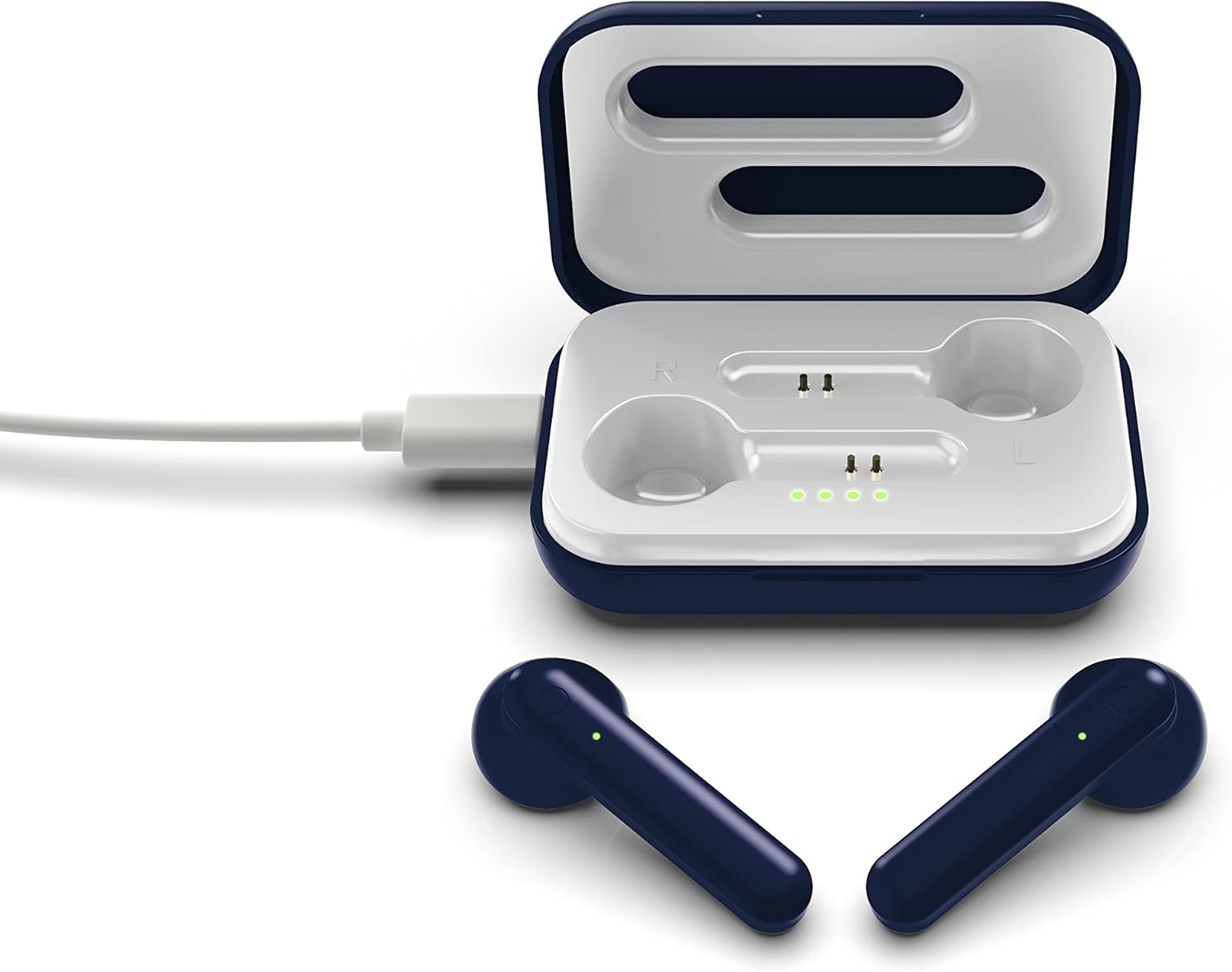
The SOAR NFL True Wireless Earbuds V.4 consist of two individual earbuds and a portable charging case. Each earbud features a touch-sensitive area for controls and an LED indicator. The charging case has a lid, charging ports for the earbuds, and LED indicators to show its battery status.

This image shows the earbuds outside their charging case, which is open and connected to a charging cable. The charging case has designated slots for each earbud (Left and Right) and LED indicators for charging status.
The image above illustrates the earbuds securely placed within their charging case. The illuminated LED lights on the case indicate the charging status of both the case and the earbuds.
Sąranka
1. Ausinių ir dėklo įkrovimas
Prieš pirmą kartą naudodami, visiškai įkraukite ir ausines, ir įkrovimo dėklą.
- Dėklo įkrovimas: Connect the provided Micro-USB cable to the charging port on the case and the other end to a USB power source (e.g., computer, wall adapter). The LED indicators on the case will illuminate to show charging progress.
- Ausinių įkrovimas: Place the earbuds into their respective slots in the charging case. Ensure they are correctly seated. The earbuds will begin charging automatically from the case's internal battery. The LED indicators on the earbuds will show their charging status.
- Pilnai įkrautas akumuliatorius veikia maždaug 3–4 valandas.
2. „Bluetooth“ poravimas
Norėdami prijungti ausines prie įrenginio:
- Įsitikinkite, kad ausinės yra įkrautos.
- Atidarykite įkrovimo dėklą. Ausinės automatiškai įsijungs ir pradės veikti susiejimo režimu. Vienos ausinės LED indikatorius mirksės, rodydamas, kad ausinės paruoštos susiejimui.
- Savo įrenginyje (išmaniajame telefone, planšetiniame kompiuteryje ir kt.) įjunkite „Bluetooth“.
- Ieškokite available Bluetooth devices and select "SOAR TWS4" from the list.
- Once connected, the earbud LED indicator will stop flashing. You will hear an audible confirmation.
- Ausinės automatiškai vėl prisijungs prie paskutinio suporuoto įrenginio, kai bus išimtos iš dėklo, jei įrenginyje įjungtas „Bluetooth“.
Naudojimo instrukcijos
The SOAR NFL True Wireless Earbuds V.4 feature touch controls for easy management of audio and calls.
Maitinimo įjungimas/išjungimas
- Maitinimas: Atidarykite įkrovimo dėklą arba 3 sekundes palaikykite nuspaudę abiejų ausinių jutiklinę sritį.
- Išjungti: Įdėkite ausines atgal į įkrovimo dėklą ir uždarykite dangtelį arba 5 sekundes palaikykite nuspaudę abiejų ausinių jutiklinę sritį.
Muzikos atkūrimas
- Leisti / pristabdyti: Vieną kartą bakstelėkite bet kurią ausinę.
- Kitas takelis: Dukart bakstelėkite dešinę ausinę.
- Ankstesnis takelis: Dukart palieskite kairę ausinę.
Skambučių valdymas
- Atsiliepti / Baigti skambutį: Vieną kartą bakstelėkite bet kurią ausinę įeinančio arba aktyvaus skambučio metu.
- Atmesti skambutį: Long-press on either earbud for 2 seconds during an incoming call.
Balso asistentas
- Suaktyvinti „Voice Assistant“: Tris kartus palieskite bet kurią ausinę.
Priežiūra
Tinkama priežiūra prailgins ausinių tarnavimo laiką.
- Valymas: Ausinėms ir įkrovimo dėklui valyti naudokite minkštą, sausą šluostę. Nenaudokite stiprių cheminių medžiagų ar abrazyvinių medžiagų.
- Saugykla: Kai nenaudojate, laikykite ausines įkrovimo dėkle, kad jos būtų apsaugotos ir įkrautos.
- Atsparumas vandeniui: Šios ausinės yra nėra atsparus vandeniui. Avoid exposure to liquids, moisture, and extreme temperatures.
- Įkrovimas: Use only the provided Micro-USB cable or a certified equivalent for charging.
Trikčių šalinimas
Jei kyla problemų dėl ausinių, žr. šiuos dažniausiai pasitaikančius sprendimus:
| Problema | Sprendimas |
|---|---|
| One earbud is not connecting or producing sound. |
|
| Earbuds are not pairing with my device. |
|
| Ausinės neįkraunamos. |
|
Specifikacijos
| Funkcija | Detalė |
|---|---|
| Modelio pavadinimas | Tikros belaidės ausinės V.4 |
| Prekės modelio numeris | NFL-TWS4-SHKS |
| Ryšio technologija | „Bluetooth“, belaidis |
| Belaidžio ryšio technologija | Bluetooth 5.0 |
| Bluetooth diapazonas | Iki 30 pėdų (9.14 metrų) |
| Baterijos veikimo laikas (žaidimo laikas) | 3-4 valandos vienam įkrovimui |
| Valdymo tipas | Lietimas, medijos valdymas |
| Ypatinga funkcija | Komplekte mikrofonas |
| Ausų išdėstymas | Ausyje |
| Atsparumo vandeniui lygis | Neatsparus vandeniui |
| Medžiaga | Plastikiniai |
| Gaminio matmenys | 1.25 x 4.5 x 6.5 colio |
| Prekės svoris | 3.52 uncijos |
| Gamintojas | Prime Brands Group, Inc. |
| UPC | 192129070757 |
Oficialus produkto vaizdo įrašas
Šis vaizdo įrašas pateikia vaizdinę apžvalgąview of the SOAR TWS4 True Wireless Earbuds V.4, highlighting key features such as the wireless charging case, touch controls, and Bluetooth 5.0 technology. It demonstrates the product's design and functionality.
Garantija ir palaikymas
Your SOAR NFL True Wireless Earbuds V.4 are covered by a 1 metų ribota garantija. This warranty covers manufacturing defects and issues arising from normal use. It does not cover damage caused by misuse, accidents, unauthorized modifications, or exposure to liquids.
For warranty claims, technical support, or further assistance, please contact the manufacturer, Prime Brands Group, Inc., or visit their official websvetainėje. Išsaugokite pirkimo įrodymą, kad galėtumėte patvirtinti garantiją.