
1. Įvadas
The Magewell Ultra Encode SDI (Model 53050) is a versatile live stream encoder designed for professional AV applications. It supports high-quality H.264, H.265 (HEVC), and NDI|HX encoding, along with multiple streaming protocols. This manual provides detailed instructions for setting up, operating, maintaining, and troubleshooting your Ultra Encode SDI device.
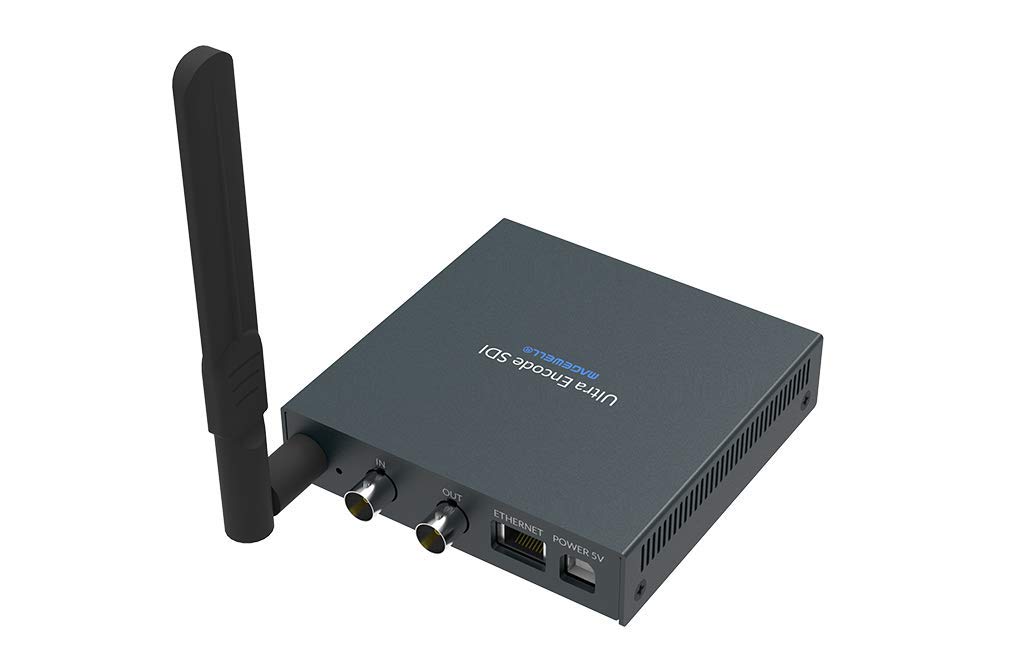
Figure 1.1: Magewell Ultra Encode SDI (Model 53050) device.
2. Pakuotės turinys
Please verify that all items listed below are included in your package. If any items are missing or damaged, contact your vendor or Magewell support.
- Magewell Ultra Encode SDI (Model 53050) Unit
- Power Adapter (with regional plugs)
- USB 2.0 Type B cable
- „Wi-Fi“ antena
- T formos laikiklis
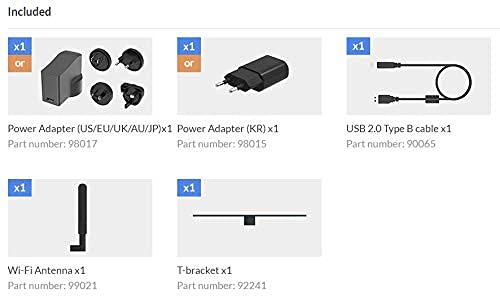
Figure 2.1: Included accessories with the Ultra Encode SDI.
3. Produktas baigtasview
The Ultra Encode SDI features various ports and indicators for connectivity and status monitoring. Familiarize yourself with these components before setup.
3.1 Front/Side Panel

Figure 3.1: Front/Side panel with audio ports, status LEDs, and USB port.
- IŠRIKIUOTI: 3.5 mm garso išvestis.
- EILUTĖ: 3.5 mm garso įvestis.
- PWR šviesos diodas: Maitinimo indikatorius.
- Į LED: Input signal status.
- LIVE LED: Streaming status.
- ETH šviesos diodas: Ethernet connection status.
- „Wi-Fi“ šviesos diodas: „Wi-Fi“ ryšio būsena.
- OPTION: USB port for optional accessories or configuration.
3.2 Galinis skydelis

Figure 3.2: Rear panel with video, network, and power connections.
- IN (SDI): SDI/3G video input.
- OUT (SDI): SDI/3G loop-through output.
- ETHERNETAS: RJ45 prievadas laidiniam tinklo ryšiui.
- POWER 5V: Maitinimo įvesties prievadas.
3.3 Prievado diagrama

Figure 3.3: Comprehensive port and indicator diagram.
4. Sąranka
Follow these steps to set up your Magewell Ultra Encode SDI device.
4.1 Fiziniai ryšiai
- Prijunkite maitinimą: Prijunkite pateiktą maitinimo adapterį prie MAITINIMO 5V port on the rear panel and then into a power outlet. The PWR LED on the front panel should illuminate.
- Connect Video Input: Connect your SDI/3G video source to the IN (SDI) port on the rear panel. If you need to loop the signal through, connect a cable from the OUT (SDI) port to your monitoring device.
- Prijunkite garsą (pasirinktinai): If using analog audio, connect your audio source to the LINE IN port and your audio monitoring device to the IŠRIKIUOTI uostas.
- Prijunkite tinklą:
- Laidinis: Prijunkite Ethernet kabelį prie tinklo maršrutizatoriaus arba perjunkite į ETHERNETAS port on the rear panel. The ETH LED should illuminate.
- Belaidis ryšys: Screw the provided Wi-Fi antenna onto the antenna socket. You will configure the Wi-Fi connection via the web sąsaja. The Wi-Fi LED will indicate connection status.
4.2 Pradinė konfigūracija (Web Sąsaja)
The Ultra Encode SDI is configured via a web-based interface. To access it:
- Ensure your computer is on the same network as the Ultra Encode SDI.
- Use a network scanning tool or check your router's connected devices list to find the IP address of the Ultra Encode SDI. Alternatively, some devices may have a default IP or a discovery tool.
- Atidarykite a web naršyklę ir adreso juostoje įveskite įrenginio IP adresą.
- Log in using the default credentials (refer to the device's quick start guide or Magewell documentation for default username and password).
- Iš web interface, you can configure network settings (including Wi-Fi), video/audio input parameters, encoding settings, and streaming destinations.
5. Naudojimo instrukcijos
The Ultra Encode SDI offers flexible encoding and streaming capabilities.
5.1 Kodavimo nustatymai
- The device supports H.264 and H.265 (HEVC) video encoding. Select the desired codec and adjust parameters such as bitrate (up to 16Mbps), resolution, and frame rate via the web sąsaja.
- Audio encoding options are also available for optimal quality and compatibility.
5.2 Streaming Protocols
The Ultra Encode SDI supports various streaming protocols:
- RTMP/RTMPS: Commonly used for live streaming to platforms like YouTube, Facebook, and Twitch. Configure the server URL and stream key in the web sąsaja.
- HLS: HTTP Live Streaming for adaptive bitrate delivery.
- SRT: Secure Reliable Transport protocol for low-latency, high-quality video transport over unreliable networks.
- NDI|HX: NewTek's NDI|HX encoding for IP production workflows. Enable and configure NDI|HX output in the web sąsaja.
5.3 Configurable Presets
The device includes configurable presets for easy streaming to popular platforms:
- Access the presets section in the web sąsaja.
- Select a platform (e.g., Facebook, Twitch, YouTube) and enter your stream key or login details as prompted.
- Activate the preset to begin streaming.
6. Priežiūra
Proper maintenance ensures the longevity and optimal performance of your Ultra Encode SDI.
- Valymas: Įrenginio išorę valykite minkšta, sausa šluoste. Venkite skystų valiklių ar abrazyvinių medžiagų.
- Vėdinimas: Įsitikinkite, kad prietaisas yra gerai vėdinamoje vietoje, kad jis neperkaistų. Neužblokuokite ventiliacijos angų.
- Firmware atnaujinimai: Periodically check the Magewell official website for firmware updates. Updating the firmware can provide new features, performance improvements, and bug fixes. Follow the instructions provided by Magewell for safe firmware updates.
- Saugykla: Kai ilgesnį laiką nenaudojate prietaiso, laikykite jį vėsioje, sausoje vietoje, apsaugotoje nuo tiesioginių saulės spindulių ir ekstremalių temperatūrų.
7. Problemų sprendimas
Šiame skyriuje aptariamos dažniausiai pasitaikančios problemos, su kuriomis galite susidurti.
- Nėra galios:
- Įsitikinkite, kad maitinimo adapteris yra tvirtai prijungtas prie įrenginio ir veikiančio maitinimo lizdo.
- Verify the power adapter is the correct one supplied with the device.
- No Video Input:
- Check the SDI cable connection between the source and the device's IN (SDI) uostas.
- Confirm the video source is active and outputting a compatible SDI signal.
- Patikrinkite IN LED būsena.
- Nėra tinklo ryšio:
- For wired connection, ensure the Ethernet cable is properly connected and the ETH LED is active.
- For Wi-Fi, ensure the antenna is attached, and Wi-Fi settings are correctly configured in the web interface. Check the Wi-Fi šviesos diodai.
- Verify your network router is functioning correctly.
- Nepavyksta pasiekti Web Sąsaja:
- Ensure your computer is on the same network as the encoder.
- Verify the IP address of the encoder.
- Pabandykite išvalyti naršyklės talpyklą arba naudoti kitą naršyklę.
- Streaming Issues (Buffering, Disconnections):
- Patikrinkite interneto ryšio greitį ir stabilumą.
- Reduce the encoding bitrate in the web interface if your network bandwidth is limited.
- Verify streaming server URL and stream key are correct.
- Patikrinkite GYVAI LED būsena.
For further assistance, refer to the Magewell support websvetainėje arba susisiekite su jų techninės pagalbos komanda.
8. Specifikacijos
| Funkcija | Specifikacija |
|---|---|
| Prekės ženklas | Magewell |
| Modelis | 53050 |
| Gaminio matmenys | 10.5 x 10.6 x 2.5 cm |
| Prekės svoris | 596 g (0.6 kilogramo) |
| Vaizdo įvestis | SDI/3G Input |
| Vaizdo išvestis | SDI/3G Loop |
| Garso įvestis | Line-In (3.5mm) |
| Garso išvestis | Line-Out (3.5mm) |
| Kodavimo formatai | H.264, H.265 (HEVC), NDI|HX |
| Maksimalus bitų dažnis | Iki 16 Mbps |
| Srautinio perdavimo protokolai | RTMP, RTMPS, HLS, SRT |
| Tinklo ryšys | Ethernet (RJ45), Wi-Fi (802.11ac) |
| Maitinimo šaltinis | 12 volto (DC) |
| Suderinami įrenginiai | Nešiojamasis kompiuteris (konfigūracijai) |
| Ypatingos savybės | Wireless connectivity, Configurable presets for streaming platforms |
9. Garantija ir palaikymas
For information regarding product warranty, technical support, and service, please refer to the official Magewell website or contact your authorized Magewell dealer. Keep your purchase receipt as proof of purchase for warranty claims.
Magewell Official Websvetainė: www.magewell.com