
Įvadas
This manual provides detailed instructions for the assembly, operation, and maintenance of your Yaheetech L-Shaped Corner Computer Desk. Please read all instructions carefully before beginning assembly and retain this manual for future reference. Ensure all components are present and undamaged before proceeding.

Image: The Yaheetech L-Shaped Corner Computer Desk, showcasing its design with two monitors and various office accessories.
Sąranka ir surinkimas
Assembly is required for this product. It is recommended to have two people for certain steps to ensure ease and safety. Please follow the steps below carefully.
1. Išpakavimas ir dalių identifikavimas
Carefully unpack all components from the box. Lay them out on a clean, soft surface to prevent scratches. Verify that all parts listed in the included hardware list are present. If any parts are missing or damaged, please contact customer support.

Image: The desk frame components laid out, illustrating the metal structure before the top panels are attached.
2. Surinkimo žingsniai
Refer to the separate assembly diagram provided with your product for detailed step-by-step instructions. Key features of the desk's construction include:
- Thickened Metal Frame: Provides robust support and stability.
- Reguliuojami pėdų paminkštinimai: Allows for leveling the desk on uneven floors, preventing wobbling.
- Monitoriaus stovas: Can be mounted anywhere along the edge of the table for ergonomic placement.

Vaizdas: Išsamus views of the desk's construction, highlighting the sturdy metal frame, the rustic finish of the engineered wood, the monitor stand, and the adjustable footpads for stability.
3. Monitor Stand Installation
The monitor stand is designed for flexible placement. It can be attached to either side of the desk using its vice grips. Ensure the grips are securely tightened to prevent movement.
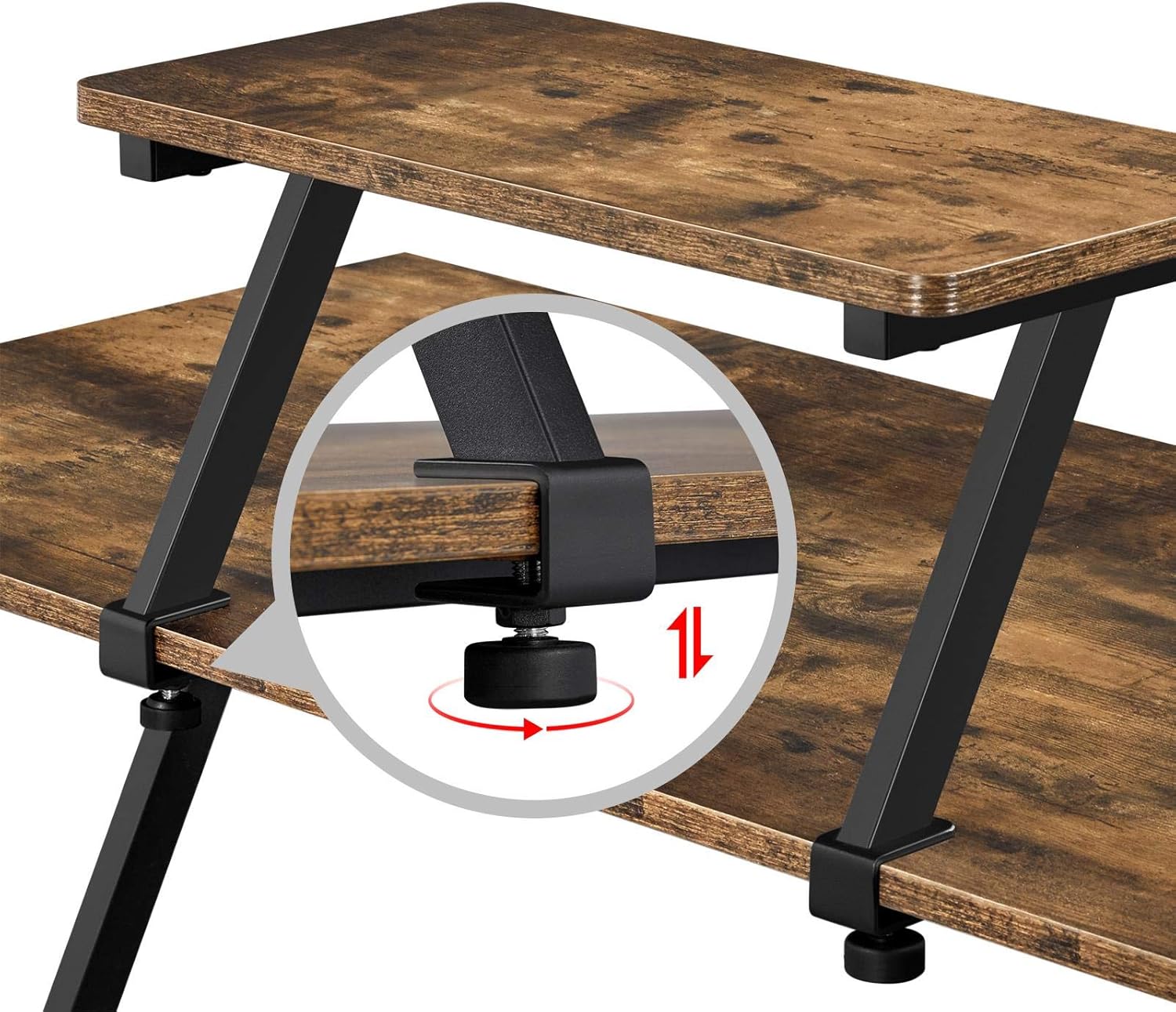
Vaizdas: Stambus planas view of the monitor stand's adjustable clamp, demonstrating how it attaches to the desk surface.
Naudojimo instrukcijos
Your Yaheetech L-Shaped Corner Computer Desk is designed for versatility and ergonomic comfort.
1. Lanksti konfigūracija
The L-shaped design allows for flexible configuration. The two rectangular desk sections can be arranged to suit various corner layouts, adapting to your specific workspace needs. This convertible design enables you to change the position and direction of the table on the left/right sides according to your habits.

Image: A visual representation of the desk's convertible design, demonstrating how the two main sections can be reconfigured to fit different room layouts.
2. Ergonomic Monitor Stand Usage
The included monitor stand helps elevate your screen to a comfortable and ergonomic height, reducing strain on your neck, shoulders, and arms. Position it to achieve optimal viewing angles for your monitor(s).

Image: The L-shaped desk in use, showing a monitor placed on the main surface and a laptop positioned on the elevated monitor stand.
3. Darbo vietos panaudojimas
The desk provides a spacious work area, measuring 130 cm in length and 50 cm in depth on both sides. The additional monitor stand, measuring 48 cm long and 24 cm wide, helps save space on the main desktop for items like keyboards or gaming consoles.

Image: The L-shaped desk integrated into a home office environment, demonstrating its spaciousness and functionality with a computer setup and office chair.
Priežiūra ir priežiūra
To ensure the longevity and appearance of your Yaheetech desk, follow these maintenance guidelines:
- Valymas: Nuvalykite paviršių minkšta, damp šluoste. Venkite abrazyvinių valiklių ar stiprių cheminių medžiagų, kurios gali pažeisti apdailą.
- Išsiliejimai: The desk surface is water-resistant. In case of spills, wipe them immediately to prevent moisture penetration.
- Apsauga: The surface offers protection against slight scratches. However, using coasters for drinks and pads for heavy or sharp objects is recommended to maintain its condition.
- Priveržkite tvirtinimo detales: Periodically check and tighten all screws and bolts to ensure the desk remains stable.

Image: Visual demonstration of the desk's protective surface, highlighting its waterproof quality and resistance to minor scratches.
Trikčių šalinimas
Jei kyla problemų dėl stalo, žr. šias dažniausiai pasitaikančias problemas ir sprendimus:
- Rašomasis stalas svyruoja:
- Įsitikinkite, kad visi surinkimo varžtai yra tvirtai priveržti.
- Adjust the footpads on the bottom of the desk legs to level the desk on uneven surfaces.
- Monitor Stand is Loose:
- Tighten the vice grips that secure the monitor stand to the desk.
- Ensure the stand is correctly positioned on a stable part of the desk edge.
- Surinkimo sunkumai:
- Review the assembly diagram carefully.
- Įsitikinkite, kad kiekvienam žingsniui naudojate tinkamą įrangą.
- If a part seems difficult to fit, double-check its orientation. Do not force components.
For issues not covered here, please contact Yaheetech customer support.
Specifikacijos
| Funkcija | Detalė |
|---|---|
| Prekės ženklas | Yaheetech |
| Modelio numeris | MM-00103548 |
| Spalva | Rustic ruda |
| Matmenys (I x P x A) | 130 x 130 x 96.5 cm |
| Medžiaga | Inžinerinė mediena, geležis |
| Prekės svoris | 19.3 kilogramo |
| Maximum Load Capacity (each rectangular desk) | 35 kg |
| Monitoriaus stovo matmenys (ilgis x plotis) | 48 x 24 cm |
| Reikalingas surinkimas | Taip |

Image: A detailed diagram illustrating the overall dimensions of the L-shaped desk and the monitor stand, including length, width, and height measurements.
Garantija ir palaikymas
For warranty information, spare parts availability, or further assistance, please refer to the documentation included with your purchase or visit the official Yaheetech website. You can also contact Yaheetech customer service directly for support.
Visit the official Yaheetech store: „Yaheetech“ parduotuvė