
1. Įvadas
Thank you for choosing the USHINING 3G Flip Phone, Model SC6531E. This phone is specifically designed for seniors, featuring large buttons, clear displays, and enhanced audio for ease of use. It includes essential functions such as an SOS emergency call button, FM radio, and a flashlight, making it a reliable communication device. This manual provides detailed instructions on how to set up, operate, and maintain your new phone.

Image 1.1: The USHINING 3G Flip Phone shown with its charging dock.
2. Saugos informacija
Please read this section carefully before using your phone to ensure safe and proper operation. Keep this manual for future reference.
- Baterijos sauga: Use only approved batteries and chargers. Do not short-circuit, puncture, or disassemble the battery. Keep away from flammable and explosive materials during charging.
- Klausos apsauga: Avoid prolonged exposure to high volume levels when using headphones or the loudspeaker.
- Vairavimo sauga: Nesinaudokite telefonu vairuodami. Visada teikite pirmenybę eismo saugumui.
- Medicinos prietaisai: Kad išvengtumėte trukdžių, išlaikykite saugų atstumą tarp telefono ir medicinos prietaisų, tokių kaip širdies stimuliatoriai.
- Šalinimas: Telefoną ir bateriją išmeskite pagal vietinius reikalavimus. Nemeskite į buitines atliekas.

Image 2.1: Product packaging showing warning labels, including battery safety information.
3. Pakuotės turinys
Išpakuodami, patikrinkite pakuotės turinį:
- USHINING 3G Flip Phone (Model SC6531E)
- Įkrovimo dokas
- USB įkrovimo laidas
- 1200 mAh ličio jonų baterija
- Vartotojo vadovas (šis dokumentas)
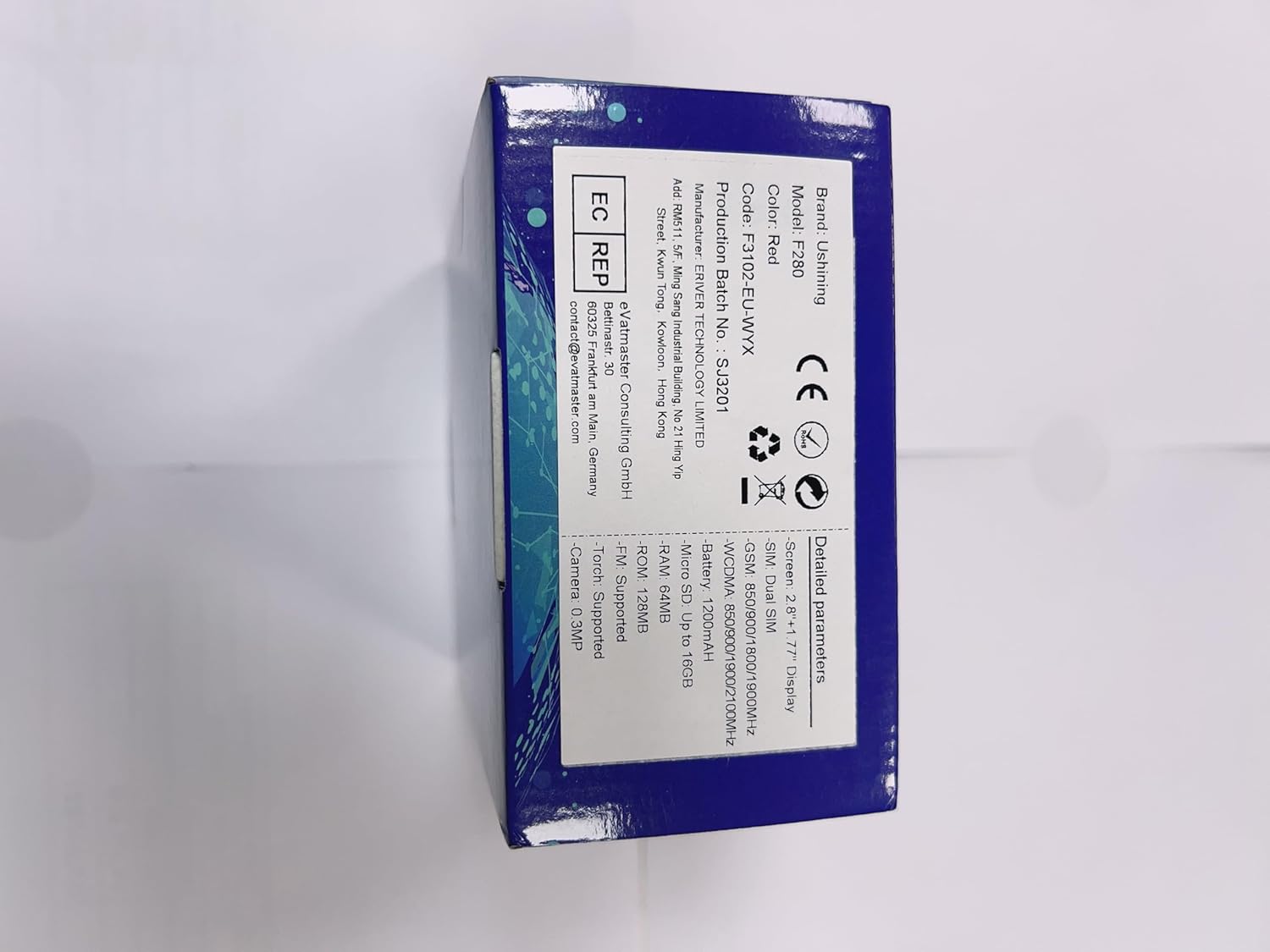

3.1 paveikslas: Priekinė ir šoninė dalys views of the USHINING flip phone, illustrating its design.
4. Sąranka
4.1. SIM kortelės (-ių) ir akumuliatoriaus įdėjimas
- Atidarykite telefono galinį dangtelį, švelniai jį ištraukdami iš įpjovos.
- Jei yra, išimkite bateriją.
- Locate the SIM card slot(s). This phone supports Dual SIM. Insert your SIM card(s) with the gold contacts facing down, ensuring they are correctly seated.
- Insert the 1200 mAh Lithium-ion battery into its compartment, aligning the contacts.
- Uždėkite galinį dangtelį, kol jis spragtelėdamas tvirtai užsifiksuos.
4.2. Telefono įkrovimas
Before first use, fully charge the phone. The phone can be charged using the included charging dock or directly via the USB cable.
- Įkrovimo stotelės naudojimas: Connect the USB cable to the charging dock and then to a power adapter (not included) or a USB port. Place the phone into the charging dock, ensuring it sits firmly. The charging indicator on the phone will light up.
- Tiesioginis įkrovimas: Connect the USB cable directly to the phone's charging port and then to a power adapter or USB port.


Image 4.1: Illustrations of the phone being charged via its convenient charging dock.
4.3. Powering On/Off and Initial Setup
- Maitinimas: Paspauskite ir palaikykite maitinimo / skambučio baigimo mygtuką (raudoną mygtuką), kol ekranas užsidegs.
- Išjungti: Paspauskite ir palaikykite maitinimo / skambučio baigimo mygtuką, kol pasirodys išjungimo parinktys, tada pasirinkite „Išjungti“.
- Kalbos pasirinkimas: Upon first power-on, you may be prompted to select your preferred language. The phone supports Spanish, English, French, Italian, and German.
5. Naudojimo instrukcijos
5.1. Pagrindinės skambučių funkcijos
- Skambinimas: Surinkite numerį naudodami klaviatūrą ir paspauskite skambinimo mygtuką (žalias mygtukas).
- Atsiliepimas į skambutį: Kai suskamba telefonas, paspauskite skambinimo mygtuką (žalias mygtukas).
- Skambučio pabaiga: Press the End Call button (red button).
- Garso reguliavimas: Use the side volume keys during a call or in standby mode to adjust the earpiece or ringtone volume.
5.2. SOS avarinio iškvietimo funkcija
The SOS button is a critical safety feature, allowing you to quickly contact pre-set emergency numbers.
- SOS numerių nustatymas: Navigate to the SOS settings in the phone's menu. You can set up to 5 family numbers or emergency contacts.
- SOS aktyvinimas: In an emergency, press and hold the dedicated SOS button on the back of the phone for a few seconds. The phone will automatically dial the pre-set numbers in sequence until one answers. It will also send an emergency SMS to these contacts.


Image 5.1: Visual representation of the SOS emergency call function and its contact setup.
5.3. Pagrindinės savybės ir funkcijos
The USHINING flip phone includes several useful features:
- Dideli mygtukai ir ekranas: Sukurta lengvam rinkimui ir viewing, with large fonts and menu icons.
- Enhanced Speakers: Provides clear and loud audio for calls and multimedia.
- FM radijas: Listen to your favorite radio stations. Access via the main menu.
- Žibintuvėlis: A built-in LED torch for convenience. Activate it via a dedicated button or menu option.
- Kamera: Capture simple photos. Access the camera from the main menu.
- Greitasis rinkimas: Assign frequently called numbers to specific keys (M1, M2, or number keys 2-9) for quick dialing.
- Calendar & Alarm Clock: Tvarkykite savo tvarkaraštį ir nustatykite priminimus.
- Juodasis sąrašas / Baltasis sąrašas: Manage incoming calls by blocking unwanted numbers or allowing only specific contacts.
- Hearing Aids Compatible: Designed to reduce interference with hearing aids.


5.2 vaizdas: Baigtaview of the phone's various features and the flashlight in action.


Image 5.3: The phone's FM radio function and its enhanced audio quality for clear listening.
6. Priežiūra
- Valymas: Telefono paviršių valykite minkšta, sausa šluoste. Venkite naudoti skystus valiklius ar aerozolius.
- Saugykla: Telefoną laikykite vėsioje, sausoje vietoje, toliau nuo tiesioginių saulės spindulių ir ekstremalių temperatūrų.
- Akumuliatoriaus priežiūra: To prolong battery life, avoid fully discharging the battery frequently. Charge the phone regularly, especially if not used for extended periods.
- Venkite lašų: While durable, avoid dropping the phone to prevent damage to the screen or internal components.
7. Problemų sprendimas
If you encounter issues with your phone, please refer to the following common solutions:
| Problema | Galima priežastis | Sprendimas |
|---|---|---|
| Telefonas neįsijungia. | Baterija išsikrovė arba netinkamai įdėta. | Įkraukite bateriją. Įsitikinkite, kad baterija tinkamai įdėta. |
| Negalima skambinti arba priimti skambučių. | No SIM card, SIM card not active, or out of network coverage. | Įsitikinkite, kad SIM kortelė įdėta ir aktyvi. Patikrinkite tinklo signalo stiprumą. Susisiekite su savo paslaugų teikėju. |
| Prasta skambučių kokybė. | Weak signal, environmental interference. | Move to an area with better signal. Avoid obstacles. |
| Baterija greitai išsikrauna. | Dažnas naudojimas, foninės programos arba sena baterija. | Reduce screen brightness, close unused applications. If battery is old, consider replacement. |
| SOS funkcija neveikia. | SOS numbers not set, or no credit/signal. | Verify SOS numbers are correctly set in settings. Ensure sufficient credit and network signal. |
8. Specifikacijos
| Funkcija | Detalė |
|---|---|
| Prekės ženklas | USHINING |
| Modelio numeris | SC6531E |
| Operacinė sistema | Branduolio OS |
| Ekrano dydis | 2.8 Inches (main), 1.77 Inches (sub-screen) |
| Rezoliucija | 480 x 800 |
| Korinio ryšio technologija | 3G |
| Ryšys | USB |
| Baterijos talpa | 1200 mAh Ličio jonų |
| Pokalbių laikas | Iki 300 minučių |
| Budėjimo laikas | Iki 200 valandų |
| RAM dydis | 32 MB |
| Atminties talpa | 16 GB (išplečiama) |
| SIM palaikymas | Dvi SIM kortelės |
| Palaikomos kalbos | Spanish, English, French, Italian, German |
| Spalva | Oranžinė |
9. Garantija ir palaikymas
USHINING products are designed for reliability and performance. For warranty information, please refer to the warranty card included in your product packaging or contact your point of purchase. For technical support or further assistance, please visit the official USHINING websvetainėje arba susisiekite su jų klientų aptarnavimo tarnyba.
Note: Information regarding software updates and spare parts availability was not provided at the time of this manual's creation.