
1. Įvadas
The Avidsen HomeCam Battery is a 100% wireless outdoor surveillance camera designed for easy installation and robust home protection. Featuring 1080P Full HD resolution, a solar panel for continuous power, night vision, and two-way audio, this camera allows you to monitor your property remotely via a smartphone application without any subscription fees. This manual provides detailed instructions for setting up, operating, and maintaining your camera.
2. Kas yra dėžutėje
Prašome patikrinti, ar pakuotėje yra visi komponentai:
- 1 x Avidsen HomeCam Battery IP WiFi Camera
- 1 x Solar Panel (PV module)
- 2 x 18650 baterijos
- 1 x Camera Sealing Gasket
- Tvirtinimo varžtai ir sieniniai kaiščiai

Image: The Avidsen HomeCam Battery camera and its accompanying solar panel, unmounted, showing the main components included in the box.
3. Sąrankos vadovas
3.1. Akumuliatoriaus įdėjimas
- Suraskite fotoaparato akumuliatoriaus skyrių.
- Insert the two 18650 batteries, ensuring correct polarity (+/-).
- Saugiai uždarykite akumuliatoriaus skyrių.
3.2. Kameros ir saulės baterijos montavimas
The camera and solar panel are designed for outdoor use and can be mounted separately or together. Choose a location that provides optimal sunlight exposure for the solar panel and a clear view dėl kameros.
- Fotoaparato tvirtinimas: The camera features an innovative magnetic mount for precise orientation. Secure the base of the mount to a wall using the provided screws and wall plugs. Attach the camera to the magnetic base and adjust its angle.
- Saulės skydo montavimas: Mount the solar panel in a location that receives direct sunlight for several hours a day. Connect the solar panel cable to the camera's charging port.
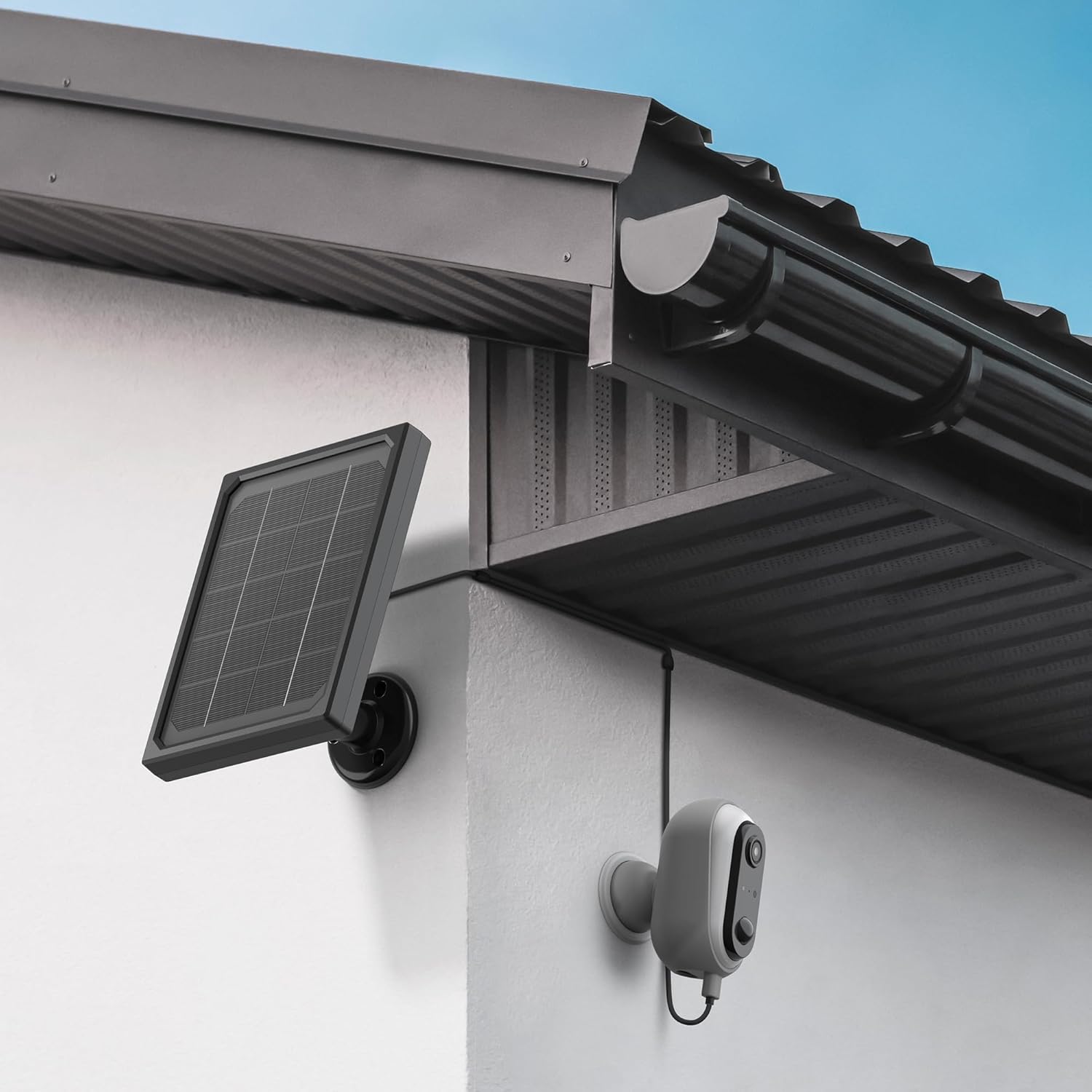
Image: The Avidsen HomeCam Battery camera and its solar panel are shown securely mounted on an exterior wall, positioned to capture sunlight and monitor the area.

Vaizdas: Stambus planas view of the Avidsen HomeCam Battery camera, highlighting its adjustable magnetic mount which allows for flexible positioning and angle adjustments.
3.3. Programėlės atsisiuntimas ir pradinis susiejimas
- Download the "Avidsen Home" application from your smartphone's app store (available on Google Play and Apple App Store).
- Atidarykite programą ir susikurkite paskyrą arba prisijunkite, jei ją jau turite.
- Follow the in-app instructions to add a new device. This typically involves scanning a QR code on the camera or manually selecting the device type.
- Įsitikinkite, kad susiejimo proceso metu jūsų išmanusis telefonas yra prijungtas prie 2.4 GHz „Wi-Fi“ tinklo.
3.4. „Wi-Fi“ ryšys
During the app pairing process, you will be prompted to connect the camera to your home Wi-Fi network.
- Enter your Wi-Fi network name (SSID) and password when requested by the app.
- The camera supports 2.4GHz Wi-Fi networks only. Ensure your router is configured accordingly.
- Prijungus, kameros indikatoriaus lemputė pasikeis, o programėlė patvirtins sėkmingą susiejimą.
4. Fotoaparato valdymas
4.1. Gyvai View ir valdikliai
Once connected, open the Avidsen Home app to access the live feed from your camera.
- Tiesioginis vaizdo įrašas: Palieskite kamerą programėlėje, kad view the real-time video stream.
- Dvipusis garsas: Use the microphone icon in the app to speak through the camera's speaker and the speaker icon to listen to audio from the camera's microphone.
- Įrašas: Manually record video or capture screenshots directly from the live view sąsaja.
- Atkūrimas: Prieiga įrašyta footage stored on the MicroSD card (not included) via the app's playback feature.

Image: A smartphone screen showing the Avidsen Home app, with options for live view, screenshot, two-way talk, recording, playback, and photo album.
4.2. Judesio aptikimas ir pranešimai
The camera features motion detection to alert you to activity.
- Įjungti / išjungti: In the app settings for your camera, you can enable or disable motion detection.
- Jautrumas: Sureguliuokite judesio aptikimo jautrumą, kad sumažintumėte klaidingų aliarmų skaičių.
- Pranešimai: When motion is detected, you will receive a notification on your smartphone.
- Įrašas: Motion-triggered events are automatically recorded to the MicroSD card (if installed).
4.3. Naktinis matymas
The integrated infrared LEDs provide clear visibility up to 8 meters in total darkness.
- Naktinio matymo funkcija įsijungia automatiškai esant prastam apšvietimui.
- The camera provides a clear black and white image in night vision mode.
4.4. Vietinė atmintis („MicroSD“ kortelė)
The camera supports local storage via a MicroSD card (up to 128GB, not included).
- Insert the MicroSD card into the designated slot on the camera.
- Ensure the card is formatted correctly (FAT32 recommended).
- All recordings, including motion-triggered events, will be saved to this card.
4.5. Išmaniųjų namų integracija
The Avidsen HomeCam Battery is compatible with Amazon Alexa and Google Assistant.
- Link your Avidsen Home account with your Alexa or Google Assistant app.
- Naudokite balso komandas, kad view jūsų kameros vaizdo transliaciją suderinamuose išmaniuosiuose ekranuose.
5. Priežiūra
5.1. Valymas
- Reguliariai valykite kameros objektyvą ir saulės baterijos paviršių minkšta, drėgna šluoste.amp skudurėliu, kad būtų užtikrintas optimalus veikimas.
- Avoid using harsh chemicals or abrasive materials that could damage the surfaces.
5.2. Akumuliatoriaus priežiūra
- The solar panel is designed to keep the batteries charged. Ensure the panel is free from obstructions and receives adequate sunlight.
- If the camera's battery level drops significantly, consider repositioning the solar panel or manually charging the batteries if possible (refer to specific battery charging instructions if applicable).
5.3. Connection Check
- Periodically check the physical connection between the solar panel and the camera to ensure it is secure and free from corrosion.
- Verify the camera's Wi-Fi connection status in the Avidsen Home app.
6. Problemų sprendimas
6.1. No Power / Camera Not Turning On
- Ensure the 18650 batteries are correctly inserted with the right polarity.
- Check if the batteries are charged. If not, ensure the solar panel is connected and receiving sunlight, or try charging the batteries externally if possible.
- Verify the power button (if any) is pressed.
6.2. Nepavyksta prisijungti prie „Wi-Fi“
- Įsitikinkite, kad jūsų „Wi-Fi“ tinklas yra 2.4 GHz dažnio. Kamera nepalaiko 5 GHz tinklų.
- Įsitikinkite, kad programėlėje įvestas teisingas „Wi-Fi“ slaptažodis.
- Perkelkite kamerą arčiau „Wi-Fi“ maršrutizatoriaus, kad pagerintumėte signalo stiprumą.
- Iš naujo paleiskite maršrutizatorių ir kamerą.
- If issues persist, try resetting the camera to factory settings (refer to the reset procedure in the app or device manual) and re-pairing.
6.3. Prasta vaizdo kokybė
- Nuvalykite fotoaparato objektyvą, kad pašalintumėte nešvarumus ar dėmes.
- Įsitikinkite, kad priešais objektyvą nėra jokių kliūčių.
- Check your Wi-Fi signal strength; a weak signal can affect video streaming quality.
6.4. Neveikiantis judesio aptikimas arba per daug klaidingų aliarmų
- Verify motion detection is enabled in the Avidsen Home app.
- Adjust the motion detection sensitivity settings in the app. Lower sensitivity for fewer false alarms, higher for more sensitive detection.
- Užtikrinkite kameros matymo lauką view is clear and not obstructed by moving objects like tree branches.
7. Specifikacijos
| Modelio pavadinimas | HOME CAM BATTERY (127070) |
| Rezoliucija | 1080p „Full HD“ |
| Ryšys | Belaidis ryšys (2.4 GHz „Wi-Fi“) |
| Maitinimo šaltinis | Solar Panel (5V 3W), 2x 18650 Batteries |
| Naktinio matymo diapazonas | Iki 8 metrų |
| Laukas View | 130° |
| IP reitingas | IP65 (naudoti lauke) |
| Sandėliavimas | „MicroSD“ kortelė (iki 128 GB, nepridedama) |
| Ypatingos savybės | Motion Detection, Two-Way Audio, Smart Home Compatibility (Alexa, Google Assistant) |
| Matmenys | 31.5 x 21 x 8.5 cm |
| Svoris | 1100 gramų |
8. Garantija ir palaikymas
8.1. Gamintojo garantija
This Avidsen product is covered by a 2 metų gamintojo garantija nuo pirkimo datos. Išsaugokite pirkimo įrodymą garantiniams reikalavimams. Garantija taikoma medžiagų ir gamybos defektams, atsiradusiems įprasto naudojimo sąlygomis.
8.2. Techninė pagalba
For technical assistance, troubleshooting, or further inquiries, please visit the official Avidsen website or contact their customer support. You can find contact information and FAQs on their websvetainė: